 USA
USA UAE
UAESmall Business
Designed for startups and growing businesses

See More





Brand: October
October CMS is a developer-focused and Laravel-based content management system which is known for its flexibility, ease of use, and powerful features. It is trusted by top brands like Toyota and Nestlé and supports 300,000+ websites worldwide. It offers strong customization, high performance, and s...
See MoreHave you used October CMS before?
Share your insights for better experience
Brand: October
Founded Year: 2014
October is a free, open-source, self-hosted CMS platform based on Laravel PHP framework. It allows web developers to have full self-expression and the freedom to build websites however they want.
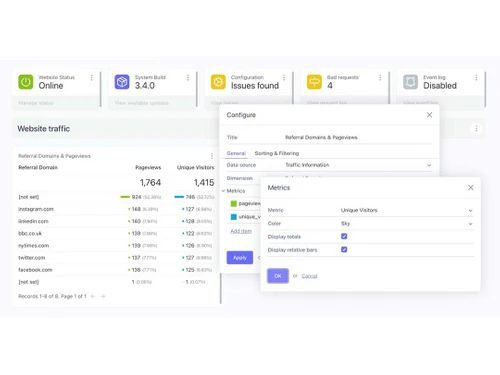
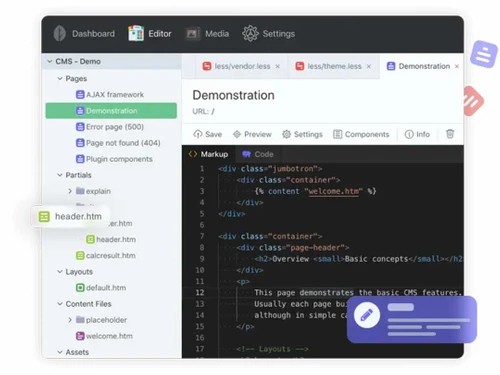
 Workflow Management Plugins and Extensions Custom themes and templates Page Creation and Management Multi-Site Management Multi-Language Content Document Management

Watch the demo video to explore key features, real workflows, and how the software fits your business needs.
 Windows
  Desktop
  Cloud-Based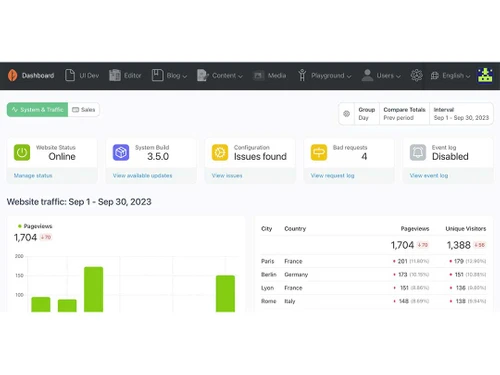
Small Business
Designed for startups and growing businesses
Medium Business
Built for business growth and flexibility
Enterprises
Designed for complex and large-scale business needs
3.9
Out of 5

Overall Rating
Based on
10 Verified Reviews
Rating Breakdown
83% Recommend this Product
Add ReviewOverall, users appreciate October CMS for its simplicity, flexibility, and ease of use, making it a reliable choice for managing diverse content and custom development needs. Many find the integration with Laravel beneficial for adding functionalities, while the clean architecture and straightforward plugin system are frequently highlighted. However, users note limitations such as a smaller community, lack of advanced features like version control, and insufficient documentation for more complex tasks. Despite these drawbacks, many recommend it for small to medium projects.
Pros
"It has been a great tool, which helps with easy backend adjustments. Updates are generally trouble-free compared to other platforms."
"It’s easy to use right out of the box and has powerful plugin features that can be extended. The documentation is good, and the API is easy to understand."
"The CMS is quite simple to use and tailor to fit specific needs. It’s straightforward and does the job well for basic projects."
Cons
"The marketplace for pre-made add-ons is still limited. It would be nice to have more ready-made, high-quality options. "
"It lacks some typical CMS features like version control and blog setups. However, you can build these features yourself if needed. "
"The community for public plugins and themes isn’t very active compared to other CMS platforms. "

Sep 11, 2024
Techjockey Verified
“October CMS gave me the simplicity I needed for my projects”
I moved to October CMS from Drupal because I wanted something more lightweight and simpler to manage. October CMS fit the bill by offering the core functionality I needed without too much overhead.
Pros
October CMS has been great for my projects because of how straightforward it is. I appreciated its simplicity and how it allowed me to build websites without unnecessary features that just get in the way. The integration with Laravel also made it a breeze to add custom functionalities, which I couldn’t do with other CMS options.
Cons
One limitation I found with October CMS was that it isn’t as feature-rich as some other CMS options out there. If you’re looking for something with a lot of built-in features, this may not be for you. There’s also a smaller community, so finding help for specific problems isn’t always easy.
Reason to switch
I needed a lighter, easier-to-manage CMS for smaller-scale projects.
Jul 18, 2024
Techjockey Verified
“A Reliable Choice for Content Management”
October CMS has been a dependable choice for managing diverse content types across various projects.
Pros
It’s straightforward to use, with powerful plugin capabilities and good documentation. The API is user-friendly and effective.
Cons
The community for public plugins and themes isn’t very active, which can limit options.
Reason to switch
We needed a more flexible CMS with fewer restrictions on customization.
Sep 2, 2024
Techjockey Verified
“A Dependable CMS for Various Projects”
We’ve been using October CMS for different projects, including client websites and internal systems.
Pros
It has been a great tool, which helps with easy backend adjustments. Updates are generally trouble-free compared to other platforms.
Cons
It lacks some typical CMS features like version control and blog setups. However, you can build these features yourself if needed.
Reason to switch
I was looking for change.

October CMS
Price On Request
Desktop
Mobile
Web based
On Premises
Windows
Mac OS
Grav
Price On Request
Desktop
Mobile
Web based
On Premises
Windows
Mac OS

OpenText Web CMS
Price On Request
Desktop
Mobile
Web based
On Premises
Windows
Mac OS

Wix
Price On Request
Desktop
Mobile
Web based
On Premises
Windows
Mac OS

Cosmic AI
Price On Request
Desktop
Mobile
Web based
On Premises
Windows
Mac OS

Scrintal
Price On Request
Desktop
Mobile
Web based
On Premises
Windows
Mac OS

Contentful
Price On Request
Desktop
Mobile
Web based
On Premises
Windows
Mac OS

Wordable
Price On Request
Desktop
Mobile
Web based
On Premises
Windows
Mac OS
Bear CMS
Price On Request
Desktop
Mobile
Web based
On Premises
Windows
Mac OS

Genei
Price On Request
Desktop
Mobile
Web based
On Premises
Windows
Mac OS

Scalenut
Price On Request
Desktop
Mobile
Web based
On Premises
Windows
Mac OS
(0) Product(s) selected
Available
Price on Request
Available
Price on Request
Starting Price:
$99 /Month
Starting Price:
$5 /Month

Starting Price:
$149

Starting Price:
€29

Starting Price:
$5

Starting Price:
$99

Starting Price:
$170

Starting Price:
$18 /Month

Available
Price on Request




October CMS is a flexible, developer-friendly platform built on Laravel, offering time-saving tools, high performance, and strong customization options. It’s ideal for creating anything from simple websites to complex applications.
October CMS offers a Free License, which includes one year of updates. Paid options include a Single License at $29 per year and an Unlimited License at $32 per month.
October CMS is self-hosted and built on the open-source Laravel PHP framework, allowing for extensive customization and flexibility.
To install October CMS, download the installation files from the official website, upload them to your server, and follow the setup wizard to configure your site.
To fill extra columns of a pivot table when adding a record in October CMS, you can use the ‘attach()’ or ‘sync()’ methods while specifying the additional pivot data. To do this follow the steps given below:
In your model, define the ‘belongsToMany’ relationship with ‘pivot’ attributes:

Use the ‘attach()’ method to add a record and fill the extra pivot columns:

You can use ‘sync()’ to update multiple records and their pivot data at once:

0 0
To store an October CMS project in Git, follow the steps given below:
Run ‘git init’ in the project root.
Use ‘.gitignore’ to ignore sensitive and unnecessary files, like
/storage/ ,
/vendor/ ,
.env Track important files, like ‘composer.json’, Custom plugins and themes, ‘Config’ files
Stage and commit your files:

Use ‘composer.json’ to manage dependencies.
0 0
To add a default query condition to a model in October CMS, you can use the ‘boot()’ method in your model to apply a global scope. To do this follow the steps given below:
Find the model you want to apply the default query condition to, typically located in
/models .
Add a ‘boot()’ method in the model to apply the condition:

Test the Condition: Query the model to ensure the default condition status = 'active' is applied automatically:

If you need to query without this condition, use ‘withoutGlobalScope’:

0 0
To properly send HTML mail with a plain text alternative from October CMS, follow the steps given below:
Open your October CMS backend
Go to Settings > Mail > Mail templates.
Create a new email template with both HTML and plain text content sections.
Use the ‘Mail::send()’ method to send the email, specifying both HTML and plain text views:

Create two views: one for HTML ‘template_html.htm’ and one for plain text ‘template_text.txt’.
Store them in the appropriate plugin folder
/plugins/author/pluginname/views/mail Ensure the email is sent with both HTML and plain text alternatives by sending it to yourself and checking different email clients.
0 0
To check if a record exists in October CMS, follow the steps given below:
Use the ‘find()’ or ‘where()’ method with the model to check for the record:

Use an if statement to verify if the record is found:

Alternatively, using exists() with a query:

0 0
20,000+ Software Listed
Best Price Guranteed
Free Expert Consultation
2M+ Happy Customers
Terms and Condtions

Users with registered businesses can purchase goods from merchants on the platform to satisfy their business needs. Users are not permitted to utilize any products acquired through the platform for resale, advertising, business, or further distribution.
For each purchase made, users will receive a Tax Invoice (or 'GST invoice') that includes specific details such as:
the GSTIN of the user associated with their registered business, and
the specified Entity Name for their business.
It should be noted that not all products are eligible for GST Invoice. Only the products displayed by participating sellers with the 'GST-based Invoice Available' callout on the product description page would qualify.
Certain goods and services are not eligible to get a GST Invoice, including items with VAS, i.e., Value Added Services (e.g., Total Mobile Protection/Assured Buyback) and those involving an exchange offer at the time of purchase.
Users must ensure the accuracy of the GSTIN, and business entity name provided for the GST Invoice. Requests for corrections into GST Invoice would not be accommodated by Techjockey.com or any Seller, and any issues arising from user-provided information are the sole responsibility of users.
Techjockey.com is not liable for the GST Invoice or any associated input tax credit. To efficiently claim an input tax credit, users should select the registered place of business address as per the GST authority's data and follow the provisions of the GST Act and rules.
To claim an input tax credit, the delivery and billing addresses must match. Furthermore, input tax credits will not be granted if the delivery address and GSTIN on the invoice are from different states. In case of incorrect GST details provided during the order placement, the order will be canceled automatically.



