linkedin
OpenEMR logo
play OpenEMR
openemr-access
openemr-history

OpenEMR

Brand: OpenEMR

  • 4.4

  • 5 Ratings

Streamline medical billing, scheduling, and patient records with OpenEMR, the free, ONC-certified, and globally popular open-source EHR management software.

See More

Have you used OpenEMR before?

Share your insights for better experience

Add a Review

Price Available on Request

Questions about pricing or customization? We’re here to help, just a click away.

100% Genuine
Products
Best Price
Guaranteed
Safe & Secure
Payment
  • Description

  • Pricing

  • Features

  • Specification

  • Review

  • Compare

  • Alternatives

  • FAQ

OpenEMR Software Overview

What is OpenEMR?

OpenEMR is a world-leading open-source software solution designed for medical practices, serving as both an Electronic Health Record (EHR) and a comprehensive practice management system. It is ONC (Office of the National Coordinator for Health Information Technology) Certified, ensuring it meets stringent U.S. government standards for interoperability, security, and functionality. As a community-driven project, OpenEMR is developed and maintained by a global community of passionate volunteers and professional contributors.

The platform provides healthcare facilities with complete ownership and confidentiality of their data. It integrates essential functions including patient scheduling, electronic medical records, a robust medical billing system, and a secure patient portal. Its open-source nature means the core software is perpetually free, offering a powerful and cost-effective alternative to proprietary systems.

Why Choose OpenEMR?

Clinics and medical organizations choose OpenEMR for its unique combination of freedom, power, and community support. Key advantages include:

  • No Cost Software: The core OpenEMR software is completely free to download, use, and modify, eliminating expensive licensing fees and making it accessible to practices of all sizes.
  • ONC Certified: Its official certification provides assurance of its quality, security, and compliance with U.S. healthcare interoperability standards, which is critical for reporting and data exchange.
  • Full Data Ownership: Unlike many cloud-based proprietary systems, OpenEMR gives you 100% ownership and control over your patient data, allowing for secure on-premise or private cloud hosting.
  • Vibrant Community & Professional Support: Users can access a free, active community forum for peer-to-peer assistance. For more dedicated help, a network of professional support vendors is available for installation, customization, and maintenance.
  • Global & Multilingual: With support for over 30 languages, OpenEMR is used by healthcare providers around the world, offering extensive internationalization and localization options.
  • Flexible Deployment: OpenEMR can be installed on local servers running Windows, macOS, or Linux. Additionally, a free, fully hosted version is available for U.S.-based healthcare providers, removing the need for server management.

Advanced Features of OpenEMR

OpenEMR is equipped with a rich feature set designed to streamline clinical workflows and improve patient care. Notable features include:

  1. Advanced Scheduling: Create complex, repeating appointment schedules, configure automated workflows triggered by patient check-in, and send automated patient reminders.
  2. e-Prescribing: Securely enter prescriptions during a patient encounter and transmit them electronically directly to the patient's preferred pharmacy.
  3. Integrated Medical Billing: The system supports HIPAA ASC X12 Version 5010 standards and includes modules for integrating with medical billing clearinghouses for claims submission and eligibility verification.
  4. Lab Integration: Automate the process of sending lab orders to external laboratories and seamlessly integrate the results directly into the patient's chart upon their return.
  5. Clinical Decision Rules (CDR): Implement complex, customizable clinical algorithms to guide providers, ensuring adherence to best practices and improving the quality of patient care.
  6. Patient Portal: Empower patients with secure access to their health records, appointment information, and a direct line of communication with the clinic.
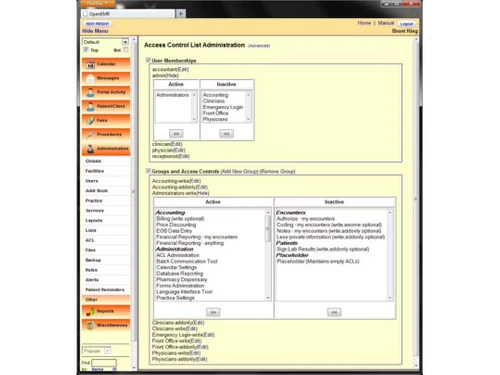
  7. Robust Security: The platform is designed to be HIPAA-friendly, featuring fine-grained access controls and industry-standard encryption to protect sensitive patient data from unauthorized access.

Key Capabilities of OpenEMR

OpenEMR's functionality is organized into several core capabilities that work together to manage a modern medical practice efficiently.

  • Electronic Health Records (EHR): At its core, OpenEMR provides comprehensive charting, management of patient demographics, tracking of medical history, and secure document management.
  • Practice Management: Beyond clinical data, it manages the administrative side of a practice, including patient registration, appointment scheduling, and inventory management.
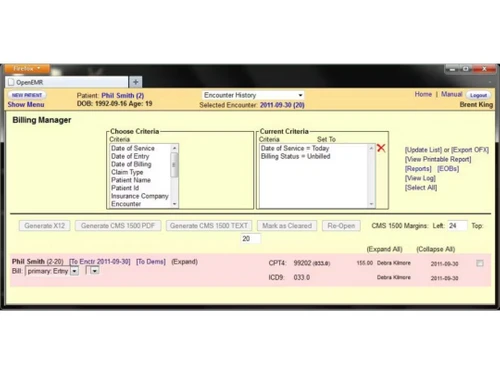
  • Billing and Financials: The platform includes a complete financial module for generating superbills, submitting electronic claims, tracking payments, and generating detailed financial reports.
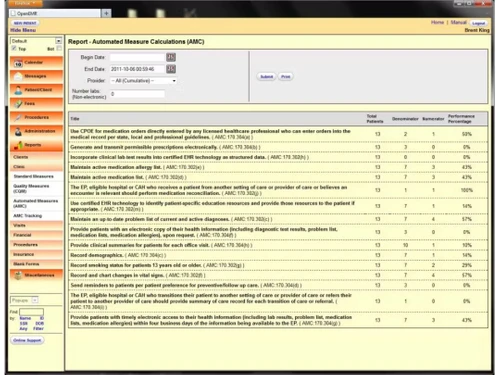
  • Reporting and Analytics: Generate standard CMS reports with a few clicks and leverage the database for custom reporting to gain insights into clinical and operational performance.

Who Can Use OpenEMR?

OpenEMR is a versatile solution suitable for a wide range of healthcare environments. Its primary users include:

  • Small to Medium-Sized Clinics: Private practices, family medicine clinics, and specialty offices benefit from its comprehensive features without the high cost of proprietary software.
  • Solo Practitioners: Individual doctors and therapists can leverage OpenEMR to manage their entire practice efficiently and affordably.
  • Non-Profit & Global Health Organizations: The free, open-source model makes it an ideal choice for organizations with limited budgets operating in diverse global settings.
  • Developers & IT Consultants: The open-source code allows for deep customization and integration, making it a powerful platform for creating tailored healthcare solutions.

How to Use OpenEMR?

Getting started with OpenEMR involves a few straightforward steps:

  1. Choose a Deployment Model: Decide between self-hosting by downloading the software for your server (Windows, macOS, Linux) or opting for the free, professionally hosted solution available to U.S. providers.
  2. Installation and Setup: Follow the detailed installation and upgrade guides available on the official OpenEMR website. For those who need assistance, professional support vendors can manage the entire process.
  3. Configuration: Customize the system to fit your clinic specific workflows, including setting up user accounts, configuring billing rules, and tailoring forms and templates.
  4. Access Support: Engage with the community on the OpenEMR forum for free advice or contract with a professional vendor for dedicated training, support, and maintenance services.

OpenEMR Price

OpenEMR is fundamentally free, open-source software. There are no licensing fees to use the core product. However, costs can be associated with optional professional services. The free, fully hosted version for U.S. providers eliminates server and setup costs entirely. For self-hosted deployments or those requiring specialized support, practices may choose to pay for professional installation, customization, training, and ongoing maintenance from third-party vendors.

Read more

OpenEMR Company Details

Founded Year:  2021

The OpenEMR Foundation supports OpenEMR, an open-source electronic medical records software that is used all around the globe

Director/Founders Sam Bowen
Company Size 1-100 Employees

OpenEMR Pricing & Plans

Looking for The Right Pricing?

Share your requirements and get a plan built around your business.

  • Define your business needs
  • Get customised pricing
  • Choose features that fit your workflow

Price Available on Request

Get personalised OpenEMR pricing that fits your needs. Our team will connect with you.

OpenEMR Features

  • icon_check Electronic Medical Records
    The software provides electronic medical record management of every patient.
  • icon_check OPD Prescriptions
    Doctors can use electronic prescription management for outpatients.
  • icon_check Billing & Invoicing
    The software offers exemplary billing & invoicing features. Users can create tax structure in the system and work
  • icon_check Patient Portal
    Doctors can create patient portals for effective communication and appointment management for great user experience.
  • icon_check Reports
    OpenEMR generates detailed reports about the medical organization.
  • icon_check MULTILANGUAGE
    This electronic health record software supports over 30 languages.
  • icon_check Security
    OpenEMR prioritizes data safety of the organization. It protects data from all attempts of data theft, hacking etc.
  • icon_check Support
    It has a community driven support system; the software offers a forum where users can get access to support.
  • icon_check Payment Processing
    This electronic health record software can integrate with online payment gateways for quick payment processing.
  • icon_check Patient Record Management
    The software saves all the important details of the visiting patients both outdoor and indoor for comprehensive listing.
OpenEMR Demo Video play icon

Get OpenEMR Demo

Watch the demo video to explore key features, real workflows, and how the software fits your business needs.

Understand
Key Features
Personal
Demo Insights
Interactive
Demo Support

OpenEMR Specifications

Supported Platforms
Windows Windows
Devices
Desktop Desktop
Deployment
Cloud-Based Cloud-Based Perpetual Perpetual
Suitable For
Healthcare Pharmaceutical
Business Specific
Hospitals Pharmacy
Business Size
Small Business Startups Medium Business Enterprises
Customer Support
Email
Language
English
Training Resources
Documentation

Explore the Best Alternative Solutions Similar to Your Business Size and Needs

OpenEMR Review

4.4

Out of 5

img

Overall Rating

Based on
5 Verified Ratings

Rating Breakdown

  • Features 4.7
  • Value for Money 4.4
  • Ease of Use 4.2
  • Customer Support 4.3

84% Recommend this Product

Add Review

Techjockey Trusted Reviews from Verified Users

No reviews are currently available for OpenEMR. Discover similar Medical Billing Software reviews

  • AdvancedMD

    4.9

    Whats great - Amazing software. Guided training on how to use the system is included in the implementation. read more

  • Vyapar Billing Software

    4.6

    Whats great - You can do all your business transactions through Vyapar software. There is no need to carry account books everywhere or main... read more

  • eVitalRx

    4.9

    Whats great - The best pharmacy software that I have used so far. Extremely user friendly and a responsive support team. read more

Compare OpenEMR With other Medical Billing Software

Products
Ratings
Pricing
Device Supported
Deployment
Supported Platforms
  • img

    OpenEMR

  • 4.4

  • Price On Request

  • Desktop

    Mobile

  • Web based

    On Premises

  • Windows

    Mac OS

  • img

    AdvancedMD

  • 4.9

  • Price On Request

  • Desktop

    Mobile

  • Web based

    On Premises

  • Windows

    Mac OS

  • img

    Meddoz

  • 4.5

  • ₹ 10000

  • Desktop

    Mobile

  • Web based

    On Premises

  • Windows

    Mac OS

  • img

    Doctor Sahab

  • 4.2

  • Price On Request

  • Desktop

    Mobile

  • Web based

    On Premises

  • Windows

    Mac OS

  • img

    DigiHealth

  • 4.2

  • Price On Request

  • Desktop

    Mobile

  • Web based

    On Premises

  • Windows

    Mac OS

  • img

    Medisoft

  • 4.2

  • Price On Request

  • Desktop

    Mobile

  • Web based

    On Premises

  • Windows

    Mac OS

  • img

    PracticeSuite

  • Price On Request

  • Desktop

    Mobile

  • Web based

    On Premises

  • Windows

    Mac OS

  • img

    Waystar

  • Price On Request

  • Desktop

    Mobile

  • Web based

    On Premises

  • Windows

    Mac OS

  • img

    Flash Code

  • 4.1

  • Price On Request

  • Desktop

    Mobile

  • Web based

    On Premises

  • Windows

    Mac OS

  • img

    Codify

  • Price On Request

  • Desktop

    Mobile

  • Web based

    On Premises

  • Windows

    Mac OS

(0) Product(s) selected

OpenEMR Alternatives

See All OpenEMR Alternatives

Available

Price on Request

Starting Price:

$10 /Month

Starting Price:

$80 /Year

Articles for OpenEMR

See All Related Articles

What is the quickest way for me to evaluate OpenEMR?

OpenEMR offers a demo for interested buyers to get better comprehension of the software before making purchase.

What are the system requirements for OpenEMR to work smoothly?

This electronic health record software is a web application that can be accessed through a web browser. Hence, there are no major system requirements for OpenEMR.

Where does OpenEMR saves my data?

OpenEMR provides flexibility in methods for saving data. It facilitates both on-premise and cloud-based storage solutions.

Will I have to use personal cloud computing services?

OpenEMR offers Amazon Web Services integration by default. You can change it according to your own convenience.

Can I integrate proprietary software with OpenEMR?

OpenEMR can be integrated with any of the ongoing APIs of your organization.

How much does OpenEMR cost?

OpenEMR price is available on request at techjockey.com.

Is OpenEMR HIPAA compliant?

Yes, OpenEMR is designed to be HIPAA-friendly with advanced security controls and integrated billing that supports HIPAA ASC X12 Version 5010 standards.

Does OpenEMR have a billing module?

Yes, OpenEMR includes an integrated medical billing module that supports electronic billing, eligibility verification, and standard transaction sets.

What are the system requirements for OpenEMR?

OpenEMR can be installed on Windows, macOS, or Linux operating systems, with specific installation guides available on the official website.

Who uses OpenEMR?

OpenEMR is used by medical practices and healthcare organizations as a comprehensive electronic health records (EHR) and medical practice management solution.

Is OpenEMR ONC Certified?

Yes, OpenEMR is an ONC Certified solution, and the community regularly funds efforts to maintain its active certification status with new versions.

What kind of support is available for OpenEMR users?

Users can access a volunteer support network and community forums for free assistance or choose from a list of professional support vendors for paid help.

Does OpenEMR support multiple languages?

Yes, OpenEMR offers multilingual support with availability in over 30 languages and can be customized to include additional languages.

Can I send prescriptions electronically with OpenEMR?

Yes, the software includes an e-Prescribing feature that allows you to enter a prescription during an encounter and send it electronically to the patients pharmacy.

20,000+ Software Listed

Best Price Guranteed

Free Expert Consultation

2M+ Happy Customers

Terms and Condtions

close

Users with registered businesses can purchase goods from merchants on the platform to satisfy their business needs. Users are not permitted to utilize any products acquired through the platform for resale, advertising, business, or further distribution.

For each purchase made, users will receive a Tax Invoice (or 'GST invoice') that includes specific details such as:

  • the GSTIN of the user associated with their registered business, and

  • the specified Entity Name for their business.

It should be noted that not all products are eligible for GST Invoice. Only the products displayed by participating sellers with the 'GST-based Invoice Available' callout on the product description page would qualify.

Certain goods and services are not eligible to get a GST Invoice, including items with VAS, i.e., Value Added Services (e.g., Total Mobile Protection/Assured Buyback) and those involving an exchange offer at the time of purchase.

Users must ensure the accuracy of the GSTIN, and business entity name provided for the GST Invoice. Requests for corrections into GST Invoice would not be accommodated by Techjockey.com or any Seller, and any issues arising from user-provided information are the sole responsibility of users.

Techjockey.com is not liable for the GST Invoice or any associated input tax credit. To efficiently claim an input tax credit, users should select the registered place of business address as per the GST authority's data and follow the provisions of the GST Act and rules.

To claim an input tax credit, the delivery and billing addresses must match. Furthermore, input tax credits will not be granted if the delivery address and GSTIN on the invoice are from different states. In case of incorrect GST details provided during the order placement, the order will be canceled automatically.