linkedin
Quickclaim logo
play quickclaim
quickclaim-claims
quickclaim-management

Quickclaim

Brand: Hype Systems

  • 4.2

  • 6 Ratings

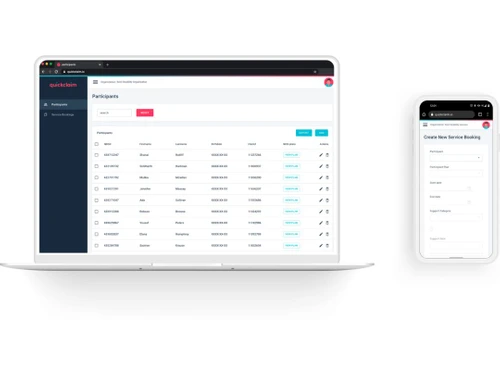
Quickclaim is a billing and claims management software that helps NDIS and aged care providers automate billing, claims processing, payments, and revenue management.

See More

Have you used Quickclaim before?

Share your insights for better experience

Add a Review

Price Available on Request

Questions about pricing or customization? We’re here to help, just a click away.

100% Genuine
Products
Best Price
Guaranteed
Safe & Secure
Payment
  • Description

  • Pricing

  • Features

  • Specification

  • Review

  • Compare

  • Alternatives

  • FAQ

Quickclaim Software Overview

What is Quickclaim?

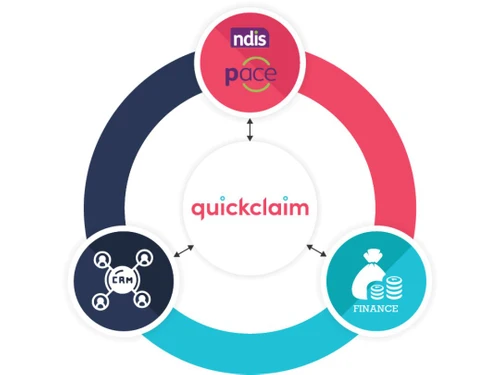
Quickclaim is a specialized, end-to-end billing solution designed primarily for providers within Australia's NDIS (National Disability Insurance Scheme) and Support at Home sectors. It functions as an automated ecosystem that seamlessly integrates with your existing CRM and finance systems, creating a single, unified platform for managing all claiming processes. At its core, Quickclaim leverages direct API connectivity with the NDIA (National Disability Insurance Agency) and Services Australia to streamline and accelerate claim submissions and reconciliation.

Quickclaim also offers Link, positioned as the future of NDIS connectivity, designed to speed up invoicing, automate reconciliation, and add compliance tools such as invoice validation and fraud detection via direct API access to the NDIS ecosystem.

Why Choose Quickclaim?

  • Protect Revenue and Cashflow: By automating the claiming process and ensuring accuracy, Quickclaim helps protect your revenue streams and keeps cashflow steady and predictable.
  • Reduce Administrative Burden: The platform significantly cuts down on manual data entry and repetitive processes, freeing up your team to focus on delivering high-quality services to participants and clients.
  • Centralized Claim Management: Consolidate all your NDIS and Support at Home billing activities into one intuitive interface, eliminating the need to juggle multiple systems.
  • Enhanced Governance: Implementing Quickclaim strengthens your organization's governance and management systems, ensuring compliance and providing a clear audit trail for all transactions.
  • Improved Workflow Efficiency: The software establishes clear lines of communication and standardized workflows, leading to faster, more coordinated work among support and finance staff.
  • Scalable Architecture: Whether you are a small provider or a large, multi-site organization, Quickclaim's scalable system grows with your needs, ensuring long-term value.

Advanced Features of Quickclaim

  • Direct API Integration: Offers a direct, real-time connection to NDIA and Services Australia portals, ensuring claims are submitted correctly and processed faster.
  • CRM & Finance System Connectivity: Seamlessly integrates with your existing software stack to create a single source of truth for financial and participant data, eliminating silos.
  • End-to-End Billing Workflow: Manages the entire revenue cycle, from initial service delivery and invoicing to claim submission, payment tracking, and final reconciliation.

Key Capabilities of Quickclaim

  • NDIS Billing: A purpose-built capability for NDIS providers. It simplifies the complexities of NDIS claims by integrating directly with the NDIA and aligning with your internal finance and CRM systems.
  • Support at Home Billing: A dedicated solution for Aged Care providers. This module is specifically designed to handle the unique billing requirements of the Support at Home program.
  • NDIS API for Developers: For organizations with in-house development teams or those needing custom solutions, this API provides direct access to NDIA data, enabling the creation of bespoke software and integrations.

How to Use Quickclaim?

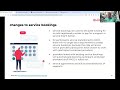
  1. Integrate Your Systems: Begin by connecting Quickclaim to your existing CRM and financial software to establish a unified data environment.
  2. Configure Your Services: Set up the platform to reflect your specific service offerings, pricing structures, and billing rules for NDIS or Support at Home.
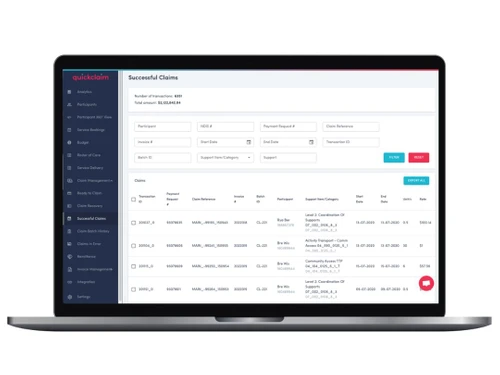
  3. Manage Participant Data: Use the centralized dashboard to manage all participant details and service delivery records securely.
  4. Automate Claim Processing: Leverage the direct API connections to automatically generate, validate, and submit claims to the relevant government agencies.
  5. Monitor and Reconcile: Track the real-time status of all submitted claims, manage incoming payments, and reconcile accounts directly within the platform to maintain financial health.

Quickclaim Pricing

Quickclaim pricing details are available on request on techjockey.com.

The pricing model is based on different parameters, including extra features, deployment type, and the total number of users. For further queries related to the product, you can contact our product team and learn more about the pricing and offers.

Read more

Hype Systems Company Details

Founded Year:  2006

HYPE Systems Inc. provides various software solutions and services to ensure your medical practice runs with the utmost efficiency and security.

Director/Founders Eitan Rooz
Company Size 1-100 Employees

Quickclaim Pricing & Plans

Looking for The Right Pricing?

Share your requirements and get a plan built around your business.

  • Define your business needs
  • Get customised pricing
  • Choose features that fit your workflow

Price Available on Request

Get personalised Quickclaim pricing that fits your needs. Our team will connect with you.

Quickclaim Features

  • icon_check Claims Management
    The software facilitates patients to make insurance claims for quick and easy checkout on billing. 
  • icon_check Electronic Medical Record (EMR)
    The Clinic management software records the medical history of the patients. Doctors can use this feature for better
  • icon_check Patient Record
    Doctors can maintain a personalized patient record for recurring visitors. 
  • icon_check Comprehensive Patient Billing Information
    The software generates detailed bills that give patients an in-depth view of their expenses. 
  • icon_check Physician Management
    Create a thorough list of physicians in the clinic for better assignments of patients according to their specialty. 
  • icon_check Practice Management
    This feature is for doctors to record all the work they do regularly. It records the number of patients visited in a day,
Quickclaim Demo Video play icon

Get Quickclaim Demo

Watch the demo video to explore key features, real workflows, and how the software fits your business needs.

Understand
Key Features
Personal
Demo Insights
Interactive
Demo Support

Quickclaim Specifications

Supported Platforms
Windows Windows Android Android
Devices
Desktop Desktop Mobile Mobile
Deployment
Cloud-Based Cloud-Based
Suitable For
Hospital
Business Specific
Hospitals
Business Size
Small Business Startups Medium Business SMBs
Customer Support
Phone Email
Language
English
Integration
API Integration
Training Resources
Videos

Explore the Best Alternative Solutions Similar to Your Business Size and Needs

Quickclaim Review

4.2

Out of 5

img

Overall Rating

Based on
6 Verified Ratings

Rating Breakdown

  • Features 4.3
  • Value for Money 3.9
  • Ease of Use 4.4
  • Customer Support 4.3

93% Recommend this Product

Add Review

Techjockey Trusted Reviews from Verified Users

No reviews are currently available for Quickclaim. Discover similar Medical Billing Software reviews

  • AdvancedMD

    4.9

    Whats great - Amazing software. Guided training on how to use the system is included in the implementation. read more

  • Vyapar Billing Software

    4.6

    Whats great - You can do all your business transactions through Vyapar software. There is no need to carry account books everywhere or main... read more

  • eVitalRx

    4.9

    Whats great - The best pharmacy software that I have used so far. Extremely user friendly and a responsive support team. read more

Compare Quickclaim With other Medical Billing Software

Products
Ratings
Pricing
Device Supported
Deployment
Supported Platforms
  • img

    Quickclaim

  • 4.2

  • Price On Request

  • Desktop

    Mobile

  • Web based

    On Premises

  • Windows

    Mac OS

  • img

    AdvancedMD

  • 4.9

  • Price On Request

  • Desktop

    Mobile

  • Web based

    On Premises

  • Windows

    Mac OS

  • img

    Meddoz

  • 4.5

  • ₹ 10000

  • Desktop

    Mobile

  • Web based

    On Premises

  • Windows

    Mac OS

  • img

    OpenEMR

  • 4.4

  • Price On Request

  • Desktop

    Mobile

  • Web based

    On Premises

  • Windows

    Mac OS

  • img

    Doctor Sahab

  • 4.2

  • Price On Request

  • Desktop

    Mobile

  • Web based

    On Premises

  • Windows

    Mac OS

  • img

    DigiHealth

  • 4.2

  • Price On Request

  • Desktop

    Mobile

  • Web based

    On Premises

  • Windows

    Mac OS

  • img

    Medisoft

  • 4.2

  • Price On Request

  • Desktop

    Mobile

  • Web based

    On Premises

  • Windows

    Mac OS

  • img

    PracticeSuite

  • Price On Request

  • Desktop

    Mobile

  • Web based

    On Premises

  • Windows

    Mac OS

  • img

    Waystar

  • Price On Request

  • Desktop

    Mobile

  • Web based

    On Premises

  • Windows

    Mac OS

  • img

    Flash Code

  • 4.1

  • Price On Request

  • Desktop

    Mobile

  • Web based

    On Premises

  • Windows

    Mac OS

(0) Product(s) selected

Quickclaim Alternatives

See All Quickclaim Alternatives

Available

Price on Request

Starting Price:

$10 /Month

Starting Price:

$80 /Year

Articles for Quickclaim

See All Related Articles

What are the system requirements for QuickClaim?

QuickClaim is a web-based application that can be accessed through web browsers. There are no mandatory system requirements to run QuickClaim smoothly.

Where does QuickClaim store all my data?

QuickClaim saves all the data on the PC. It is an on-premise software.

How can I see a demo for QuickClaim?

To get the demo of QuickClaim, please request a call. Our sales team will contact you soon.

Are the details of patients and clinic secure?

Yes, QuickClaim has been developed on a secure platform. It works with your computer’s firewall to protect personal data.

Can I integrate a printer with QuickClaim?

Yes, QuickClaim can be integrated with any printer. You can print any document from the software directly.

How much does Quickclaim cost?

Quickclaim pricing details are available on request on techjockey.com.

How do I submit a claim on Quickclaim?

You can submit claims by utilizing the platform's end-to-end billing solution, which uses API connectivity with the NDIA and Services Australia to manage all your claiming processes in one place.

Is Quickclaim web based?

Yes, Quickclaim is a web-based billing solution that you can access through a web browser by logging into the platform.

How do I get a Go Secure ID for Quickclaim?

The documentation for Quickclaim does not mention a requirement for a Go Secure ID, as the software integrates directly with Australian systems like the NDIA and Services Australia.

What types of organizations is Quickclaim designed for?

Quickclaim is an end-to-end billing solution specifically built for NDIS and Support at Home providers in Australia.

Can Quickclaim integrate with my existing CRM and finance systems?

Yes, Quickclaim is designed to connect with your existing CRM and finance systems to create a seamless, automated billing ecosystem.

How does Quickclaim connect with government agencies for billing?

The software uses direct API connectivity with the NDIA and Services Australia, allowing you to manage claiming processes directly within the platform.

20,000+ Software Listed

Best Price Guranteed

Free Expert Consultation

2M+ Happy Customers

Terms and Condtions

close

Users with registered businesses can purchase goods from merchants on the platform to satisfy their business needs. Users are not permitted to utilize any products acquired through the platform for resale, advertising, business, or further distribution.

For each purchase made, users will receive a Tax Invoice (or 'GST invoice') that includes specific details such as:

  • the GSTIN of the user associated with their registered business, and

  • the specified Entity Name for their business.

It should be noted that not all products are eligible for GST Invoice. Only the products displayed by participating sellers with the 'GST-based Invoice Available' callout on the product description page would qualify.

Certain goods and services are not eligible to get a GST Invoice, including items with VAS, i.e., Value Added Services (e.g., Total Mobile Protection/Assured Buyback) and those involving an exchange offer at the time of purchase.

Users must ensure the accuracy of the GSTIN, and business entity name provided for the GST Invoice. Requests for corrections into GST Invoice would not be accommodated by Techjockey.com or any Seller, and any issues arising from user-provided information are the sole responsibility of users.

Techjockey.com is not liable for the GST Invoice or any associated input tax credit. To efficiently claim an input tax credit, users should select the registered place of business address as per the GST authority's data and follow the provisions of the GST Act and rules.

To claim an input tax credit, the delivery and billing addresses must match. Furthermore, input tax credits will not be granted if the delivery address and GSTIN on the invoice are from different states. In case of incorrect GST details provided during the order placement, the order will be canceled automatically.