linkedin
Peoplebox logo
play Peoplebox | Next-gen OKR, Performance Management & Employee Engagement Platform.
peoplebox goals
peoplebox growth

Peoplebox

Brand: Peoplebox Inc

  • 4.3

  • 6 Ratings & 1 Review

Peoplebox is an all-in-one performance management platform that integrates OKRs, performance reviews, 1:1 meetings, and surveys. It aligns team and company goals in real time, offering tools like engagement surveys, customizable reviews, analytics, and seamless integrations.

See More

Have you used Peoplebox before?

Share your insights for better experience

Add a Review
Starting Price
$7

View plans

100% Genuine
Products
Best Price
Guaranteed
Safe & Secure
Payment
  • Description

  • Pricing

  • Features

  • Specification

  • Review

  • Compare

  • Alternatives

  • FAQ

  • Questions

Starting at $7

Peoplebox Software Overview

What is Peoplebox?

Peoplebox is a performance management system that seamlessly integrates OKRs (Objectives and Key Results) with performance reviews, 1:1 meetings, and surveys, all in one place. This software helps businesses align their people and strategies to drive growth and retain top talent. Whether you're managing goals or keeping track of team performance, Peoplebox offers easy-to-use tools to ensure everyone stays on the same page.

Why Choose Peoplebox Performance Management Software?

Here’s why Peoplebox is a top choice for performance management:

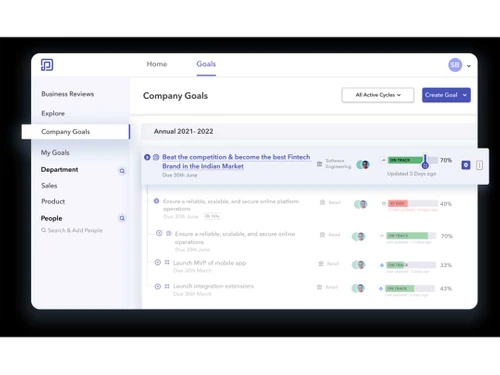
  • Seamless Goal Alignment: This is the main benefit of using Peoplebox. This performance management software helps teams align their individual and company goals in real-time, ensuring that everyone is moving toward the same strategic objectives.
  • Integrated Tools: With ready-to-use integrations for popular databases, HR software, CRM tools, and project management apps, Peoplebox fits effortlessly into your existing workflows.
  • Real-Time Updates: Keep your goals and initiatives updated automatically, ensuring visibility and alignment across the organization.
  • 1:1 Meetings & Check-ins: Schedule and track meaningful 1:1 meetings and check-ins between managers and employees to ensure continuous feedback and support.
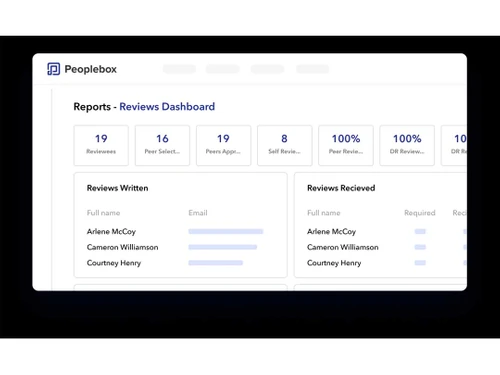
  • Customizable Performance Reviews: Conduct personalized performance reviews that are flexible, integrated, and easy to manage. You can even run 360-degree reviews and performance reviews directly within Slack.
  • People Analytics: Another benefit of using Peoplebox software is that it can help you get deep insights into your workforce with Peoplebox’s advanced analytics that help identify trends, predict challenges, and support better decision-making.

Additional Features of Peoplebox

Peoplebox offers a range of features that help businesses create a high-performance culture. Here are some additional features of Peoplebox to look:

  • OKR Tracking: Align your team’s objectives and key results with your company’s goals and track them effortlessly.
  • Engagement Surveys: With this feature of Peoplebox, you can run regular surveys to understand how engaged your employees are and gather actionable feedback.
  • Org Chart Tool: Visualize your company structure with a dynamic org chart that helps you better manage your talent.
  • Anonymous Messaging: This Peoplebox feature can encourage open communication and get honest feedback with Peoplebox’s anonymous messaging tool.
  • Check-ins and Business Reviews: Keep track of progress with easy-to-manage check-ins and business reviews, ensuring that everyone is aligned and accountable.

Pricing of Peoplebox

Peoplebox offers flexible pricing plans to cater to different needs. The Talent Management plan starts at $7 per month per person, while the OKR Platform plan is priced at $8. For a full suite, the Professional plan costs $12, and the Premium plan is $15 per month per person, billed annually. Enterprise plans are customizable.

Read more

Peoplebox Inc Company Details

Founded Year:  2019

Peoplebox is an OKR & Performance Management platform that helps companies align teams, improve team performance and execute fast.

Director/Founders Abhinav Chugh
Company Size 1-100 Employees

Peoplebox Pricing & Plans

Performance + Engagement
Key Features
  • OKR(Goals)
  • Performance Reviews
  • 1-1 Meetings
Starting at $7
    • Monthly

      Monthly
      Monthly

Key Features

  • OKR(Goals)

  • Performance Reviews

  • 1-1 Meetings

Peoplebox Features

  • icon_check Performance Management
    Streamline goal-setting, feedback, and progress tracking for enhanced employee performance.
  • icon_check Project Management
    Efficiently manage projects and tasks, ensure deadlines are met, and teams collaborate effectively.
  • icon_check Engagement Surveys
    Gauge employee sentiment and satisfaction levels to drive a positive workplace culture.
  • icon_check Task Management
    Simplify task tracking and allocation for improved project efficiency.
  • icon_check Employee Management
    Centralize employee data and foster alignment with organizational goals.
  • icon_check Goal Management
    Align individual and organizational goals to boost motivation and productivity.
  • icon_check Dashboards
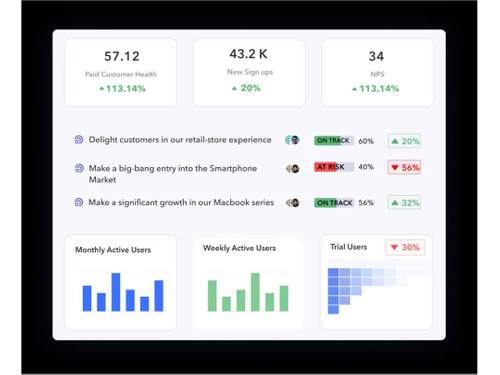
    Access real-time insights and key metrics on a user-friendly dashboard for data-driven decisions.
  • icon_check Collaboration
    Foster cross-functional collaboration, promoting innovation and synergy among teams.
  • icon_check Feedback Management
    Create a culture of growth and communication with robust feedback collection and analysis tools.
Peoplebox Demo Video play icon

Get Peoplebox Demo

Watch the demo video to explore key features, real workflows, and how the software fits your business needs.

Understand
Key Features
Personal
Demo Insights
Interactive
Demo Support

Peoplebox Specifications

Supported Platforms
Windows Windows MacOS MacOS
Devices
Desktop Desktop Mobile Mobile
Deployment
Cloud-Based Cloud-Based
Suitable For
All Industries
Business Specific
All Businesses
Business Size
Small Business Startups Medium Business Enterprises SMBs SMEs MSMBs MSMEs
Customer Support
Email Live Chat Communities
Language
English
Training Resources
Documentation Videos

Explore the Best Alternative Solutions Similar to Your Business Size and Needs

Peoplebox Review

4.3

Out of 5

img

Overall Rating

Based on
1 Verified Review

Rating Breakdown

  • Features 4
  • Value for Money 4.2
  • Ease of Use 4.5
  • Customer Support 4.6

88% Recommend this Product

Add Review

Peoplebox Video Review

youtubeVideoId

4.1

“Peoplebox Review | Peoplebox Annual Deal | Best Remote Team Performance Tool”

Review by: Software Picks Podcast

Compare Peoplebox With other Performance Management System

Products
Ratings
Pricing
Device Supported
Deployment
Supported Platforms
  • img

    Peoplebox

  • 4.3

  • Price On Request

  • Desktop

    Mobile

  • Web based

    On Premises

  • Windows

    Mac OS

  • img

    Synergita

  • 5

  • ₹ 360

  • Desktop

    Mobile

  • Web based

    On Premises

  • Windows

    Mac OS

  • img

    Alt Worklife

  • 4.3

  • Price On Request

  • Desktop

    Mobile

  • Web based

    On Premises

  • Windows

    Mac OS

  • img

    Planful

  • 4.2

  • Price On Request

  • Desktop

    Mobile

  • Web based

    On Premises

  • Windows

    Mac OS

  • img

    Winzard

  • 4.5

  • Price On Request

  • Desktop

    Mobile

  • Web based

    On Premises

  • Windows

    Mac OS

  • img

    Mesh AI

  • 4.5

  • Price On Request

  • Desktop

    Mobile

  • Web based

    On Premises

  • Windows

    Mac OS

  • img

    AssessTEAM

  • 4.2

  • Price On Request

  • Desktop

    Mobile

  • Web based

    On Premises

  • Windows

    Mac OS

  • img

    SkillMetrics

  • 4.5

  • ₹ 60000

  • Desktop

    Mobile

  • Web based

    On Premises

  • Windows

    Mac OS

  • img

    PossibleWorks

  • 4.6

  • Price On Request

  • Desktop

    Mobile

  • Web based

    On Premises

  • Windows

    Mac OS

  • img

    Textio

  • 4.2

  • Price On Request

  • Desktop

    Mobile

  • Web based

    On Premises

  • Windows

    Mac OS

(2) Product(s) selected

Peoplebox Alternatives

See All Peoplebox Alternatives

Available

Price on Request

Available

Price on Request

Starting Price:

$48 /Year

Available

Price on Request

Articles for Peoplebox

See All Related Articles

Can Peoplebox integrate with our existing tools?

Yes, Peoplebox offers seamless integrations with popular tools like HRIS, CRM, project management platforms, and more to make performance management easy.

How much does Peoplebox Cost?

The Peoplebox pricing plan starts at $7/user per month.

Is Peoplebox Performance Management Software Free?

No, Peoplebox Performance Management Software is not available for free.

What size businesses can use Peoplebox?

Peoplebox is perfect for businesses of all sizes, from small startups to large enterprises. Its scalable features grow with your company.

How does Peoplebox improve goal alignment?

Peoplebox tracks both company and individual goals in real-time, ensuring that everyone in the organization is working towards the same objectives.

Is customer support available?

Yes, Peoplebox offers dedicated customer support to help with implementation, setup, and any questions you might have during use.

Can Peoplebox help with employee engagement?

Absolutely! Peoplebox includes engagement surveys and feedback tools to help you monitor and improve employee satisfaction and engagement.

Peoplebox Questions

A:

To create a business review in Peoplebox, follow the steps given below:

  • Open your Peoplebox account
  • Hit ‘Business Reviews’
  • Select ‘Create New Review’
  • Input the details that are required
  • Add relevant metrics and panels for tracking
Aman Nov 20, 2024
A:

To add a new panel or card to a business review in Peoplebox, follow the steps given below:

  • Open your Peoplebox account
  • Go to the Business Reviews section
  • Open the specific review
  • Click on ‘Add New Panel/Card’
  • Setup the card with the desired metrics, text or visuals
Rohitash Choudhary Nov 20, 2024
A:

To create a goal with milestones in Peoplebox, follow the steps given below:

  • Open your Peoplebox account
  • Navigate to the Goals section
  • Hit Create Goal
  • Input the goal details
  • Add milestones under the progress section
  • Save the goal
Dhruv Patel Nov 20, 2024
Q:

How can I duplicate an existing goal in Peoplebox?

R Rakshamzzz Nov 20, 2024
A:

To duplicate an existing goal in Peoplebox, follow the steps given below:

  • Open your Peoplebox account
  • Navigate to the Goals section
  • Choose the goal to duplicate
  • Hit options (three dots)
  • Select ’Duplicate’
  • Alter any necessary details in the duplicate version
Shailendra Kumar Nov 20, 2024
Q:

How can I upload Goals/OKRs in bulk in Peoplebox?

Ashok MURMU Nov 20, 2024
A:

To upload Goals/OKRs in bulk in Peoplebox, follow the steps given below:

  • Open Peoplebox
  • Navigate to the Goals/OKRs section
  • Press on the bulk upload option
  • Download the template provided
  • Input the required data
  • Upload the file back to Peoplebox
  • Review and confirm the entries
Dhruv Patel Nov 20, 2024
See All Peoplebox Questions

20,000+ Software Listed

Best Price Guranteed

Free Expert Consultation

2M+ Happy Customers

Terms and Condtions

close

Users with registered businesses can purchase goods from merchants on the platform to satisfy their business needs. Users are not permitted to utilize any products acquired through the platform for resale, advertising, business, or further distribution.

For each purchase made, users will receive a Tax Invoice (or 'GST invoice') that includes specific details such as:

  • the GSTIN of the user associated with their registered business, and

  • the specified Entity Name for their business.

It should be noted that not all products are eligible for GST Invoice. Only the products displayed by participating sellers with the 'GST-based Invoice Available' callout on the product description page would qualify.

Certain goods and services are not eligible to get a GST Invoice, including items with VAS, i.e., Value Added Services (e.g., Total Mobile Protection/Assured Buyback) and those involving an exchange offer at the time of purchase.

Users must ensure the accuracy of the GSTIN, and business entity name provided for the GST Invoice. Requests for corrections into GST Invoice would not be accommodated by Techjockey.com or any Seller, and any issues arising from user-provided information are the sole responsibility of users.

Techjockey.com is not liable for the GST Invoice or any associated input tax credit. To efficiently claim an input tax credit, users should select the registered place of business address as per the GST authority's data and follow the provisions of the GST Act and rules.

To claim an input tax credit, the delivery and billing addresses must match. Furthermore, input tax credits will not be granted if the delivery address and GSTIN on the invoice are from different states. In case of incorrect GST details provided during the order placement, the order will be canceled automatically.