linkedin
Pipeshub logo
play PipesHub Explainable and Extendible Workplace AI Platform
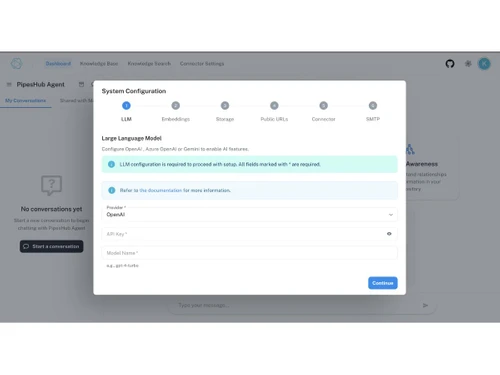
pipeshub-configuration
pipeshub-steps

Pipeshub

Brand: Pipeshub

  • 4.0

  • 5 Ratings

Pipeshub is an open-source workplace AI platform that connects internal apps, creates AI agents, and automates workflows with enterprise search.

See More

Have you used Pipeshub before?

Share your insights for better experience

Add a Review

Price Available on Request

Questions about pricing or customization? We’re here to help, just a click away.

100% Genuine
Products
Best Price
Guaranteed
Safe & Secure
Payment
  • Description

  • Pricing

  • Features

  • Specification

  • Review

  • FAQ

Pipeshub Software Overview

What is Pipeshub?

Pipeshub is an AI tools platform that connects internal applications like Google Drive, Slack, and Jira to create AI agents and automate workflows. This business software features intelligent enterprise search with semantic understanding and source citations, custom no-code AI agents for tasks like RFP response generation, 50+ connectors for Google Workspace, Microsoft 365, Slack, Jira, Confluence, HubSpot, Zendesk, Salesforce, and GitHub, plus a real-time event-streaming architecture. It supports flexible deployment in secure cloud environments or locally via Docker, offers model-agnostic support for OpenAI, Anthropic, Mistral, and Ollama, and strictly respects existing data access permissions.

Why Choose Pipeshub?

  • Intelligent Enterprise Search: Natural language queries return answers with exact source citations and section-level references.
  • Semantic Search: Understands meaning and context rather than relying on keyword matching across documents and tools.
  • Custom AI Agents: Enables creation of agents for complex workflows like RFP/RFI/RFQ responses and vendor comparisons.
  • No-Code Builder: Allows non-technical users to design automation workflows using simple if/then logic.
  • Action-Oriented Agents: Agents can schedule meetings, send emails, and update Jira tickets automatically.
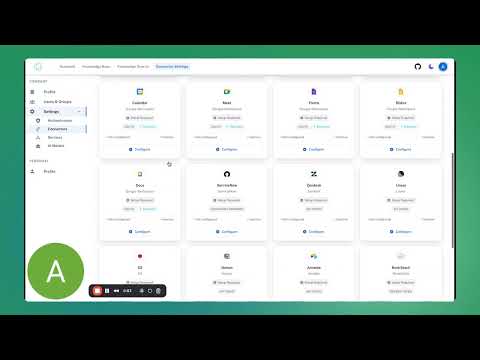
  • 50+ Connectors: Integrates with Google Workspace, Microsoft 365, Slack, Jira, Confluence, HubSpot, Zendesk, Salesforce, GitHub, and more.
  • Unified Knowledge Graph: Builds a consolidated view of organizational data across all connected applications.
  • Permissions Management: Ensures AI only accesses data that users are already authorized to view.

Benefits of Pipeshub

  • Eliminates Vendor Lock-In: Open-source architecture gives enterprises full control over their AI stack.
  • Ensures Data Privacy: AI operates strictly within company data boundaries for secure and private responses.
  • Provides Verifiable Citations: Every response includes traceable sources for transparency and trust.
  • Automates RFP Responses: Reduces manual effort in handling repetitive security and vendor questionnaires.
  • Accelerates Information Retrieval: Employees quickly find answers instead of manually searching across tools.
  • Speeds Up Employee Onboarding: New hires can instantly query internal knowledge and documentation.
  • Enables No-Code Automation: Non-developers can build workflows without writing code.
  • Supports Real-Time Data Processing: Event-streaming architecture handles continuous data ingestion at scale.
  • Developer Friendly: Built using Python, Go, and TypeScript for extensibility and customization.
  • Cost-Effective Alternative: Open-source and flexible deployment make it a lower-cost alternative to enterprise tools like Glean.

Pricing

Pipeshub pricing is available on request at techjockey.com. The pricing model is based on different parameters, including extra features, deployment type, and the total number of users. For further queries related to the product, you can contact our product team and learn more about the pricing and offers.

Read more

Pipeshub Company Details

Founded Year:  2024

PipesHub makes it 10× easier for developers to build AI agents and AI-native products.

Director/Founders Pipeshub
Company Size 1-100 Employees

Pipeshub Pricing & Plans

Looking for The Right Pricing?

Share your requirements and get a plan built around your business.

  • Define your business needs
  • Get customised pricing
  • Choose features that fit your workflow

Price Available on Request

Get personalised Pipeshub pricing that fits your needs. Our team will connect with you.

Pipeshub Features

  • icon_check Connector Configuration Management
    Stores and manages configuration details for all connectors using structured and secure settings.
  • icon_check OAuth Token Lifecycle Handling
    Handles creation, refresh, validation and expiry of OAuth tokens required for external service integration.
  • icon_check Connector State Monitoring
    Tracks connector statuses, connection issues, last sync timestamps and operational activity metrics.
  • icon_check Central Configuration Registry
    Maintains centralized configuration data for all system modules and ensures consistent parameter access.
  • icon_check Config Change Event Broadcasting
    Emits configuration update events that notify dependent services of changes for synchronized behavior.
  • icon_check Crawling Job Scheduling
    Manages scheduling logic for crawl tasks across connected sources with configurable frequency rules.
  • icon_check Failure Handling
    Automates retry workflows and error tracking when crawling operations encounter processing failures.
  • icon_check Document Chunking Engine
    Splits long documents into structured chunks optimized for embedding and semantic index generation.
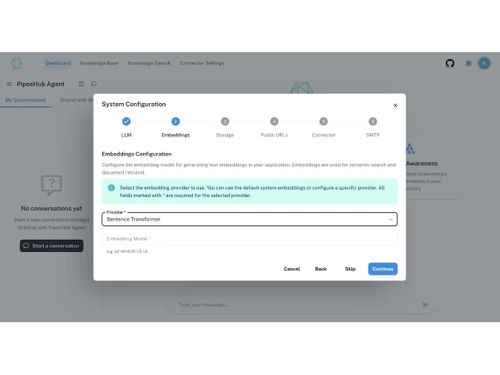
  • icon_check Embedding Generation Service
    Generates vector embeddings from document chunks using user-defined or externally hosted AI models.
  • icon_check Index Storage Management
    Stores, updates and maintains vector and metadata indexes used for semantic and hybrid search queries.
  • icon_check Semantic Search Query Processing
    Executes user queries against vector indexes to retrieve semantically ranked and relevant responses.
  • icon_check Hybrid Search Execution
    Combines semantic, keyword and metadata-based search techniques to improve retrieval accuracy.
  • icon_check User Account Administration
    Provides API-driven operations for creating, updating and managing system user identities and profiles.
  • icon_check Version Tracking
    Maintains version identifiers for documents, enabling updates and rollback logic for stored content.
Pipeshub Demo Video play icon

Get Pipeshub Demo

Watch the demo video to explore key features, real workflows, and how the software fits your business needs.

Understand
Key Features
Personal
Demo Insights
Interactive
Demo Support

Pipeshub Specifications

Supported Platforms
Ubuntu Ubuntu Windows Windows MacOS MacOS Linux Linux
Devices
Desktop Desktop
Deployment
Cloud-Based Cloud-Based
Suitable For
All Industries
Business Specific
All Businesses
Business Size
Enterprises
Customer Support
Email Communities
Language
English
Integration
API Integration
Training Resources
Documentation Videos
AI Features
AI Integrated

Pipeshub Review

4.0

Out of 5

img

Overall Rating

Based on
5 Verified Ratings

Rating Breakdown

  • Features 4.2
  • Value for Money 4.5
  • Ease of Use 3.8
  • Customer Support 3.8

80% Recommend this Product

Add Review

Techjockey Trusted Reviews from Verified Users

No reviews are currently available for Pipeshub. Discover similar AI Tools reviews

  • Chatrly

    5.0

    Whats great - Natural voice and chat experience, easy integration, real-time responsiveness, lead generation, user-friendly interface, exce... read more

  • SyncMonster

    4.3

    Whats great - syncMonster is a User-friendly product and its provides high-quality results read more

  • Krutrim AI

    4.4

    Whats great - It helped me communicate and get information in my preferred language. The AI is also easy to use and helped me generate good... read more

Articles for Pipeshub

See All Related Articles

How much does Pipeshub cost?

Pipeshub pricing is available on request at Techjockey.com.

How does Pipeshub work?

You connect 50+ apps via connectors, Pipeshub builds a unified knowledge graph, users ask natural language questions, and AI returns cited answers from authorized data sources.

Who uses Pipeshub?

It is used by sales, pre-sales, engineering, and HR teams in enterprises needing secure, private workplace AI.

What are custom AI agents?

Agents designed to perform tasks like RFP responses, vendor comparisons, scheduling meetings, and updating tickets automatically.

Does it require coding?

No, it provides a no-code builder for creating workflows using simple if/then logic.

What connectors are available?

Google Workspace, Microsoft 365, Slack, Jira, Confluence, HubSpot, Zendesk, Salesforce, GitHub, and more.

What AI models are supported?

OpenAI, Anthropic, Mistral, and local LLMs via Ollama.

How is data kept private?

AI respects existing permissions, ensuring users only access data they are authorized to see.

Can it be self-hosted?

Yes, it supports secure cloud or local Docker deployment for full data control.

What is semantic search?

Search that understands meaning and context instead of just matching keywords.

20,000+ Software Listed

Best Price Guranteed

Free Expert Consultation

2M+ Happy Customers

Terms and Condtions

close

Users with registered businesses can purchase goods from merchants on the platform to satisfy their business needs. Users are not permitted to utilize any products acquired through the platform for resale, advertising, business, or further distribution.

For each purchase made, users will receive a Tax Invoice (or 'GST invoice') that includes specific details such as:

  • the GSTIN of the user associated with their registered business, and

  • the specified Entity Name for their business.

It should be noted that not all products are eligible for GST Invoice. Only the products displayed by participating sellers with the 'GST-based Invoice Available' callout on the product description page would qualify.

Certain goods and services are not eligible to get a GST Invoice, including items with VAS, i.e., Value Added Services (e.g., Total Mobile Protection/Assured Buyback) and those involving an exchange offer at the time of purchase.

Users must ensure the accuracy of the GSTIN, and business entity name provided for the GST Invoice. Requests for corrections into GST Invoice would not be accommodated by Techjockey.com or any Seller, and any issues arising from user-provided information are the sole responsibility of users.

Techjockey.com is not liable for the GST Invoice or any associated input tax credit. To efficiently claim an input tax credit, users should select the registered place of business address as per the GST authority's data and follow the provisions of the GST Act and rules.

To claim an input tax credit, the delivery and billing addresses must match. Furthermore, input tax credits will not be granted if the delivery address and GSTIN on the invoice are from different states. In case of incorrect GST details provided during the order placement, the order will be canceled automatically.