 USA
USA UAE
UAESmall Business
Designed for startups and growing businesses

See More





Brand: Atlassian
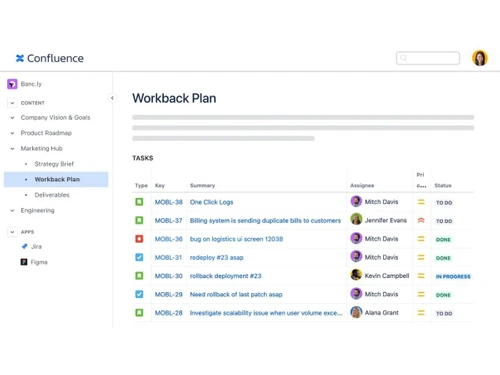
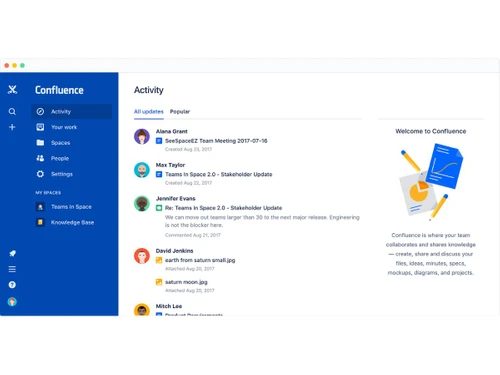
Atlassian Confluence is a cloud-based content collaboration solution for enterprises. It offers an open workspace for remote workers, which allows them to connect digitally and share actionable inputs, facilitating effective task collaboration and knowledge management. The software acts as a source of truth for organizations, where existing knowledge of teams and individuals can be optimized as p...
See MoreHave you used Confluence before?
Share your insights for better experience
Brand: Atlassian
Founded Year: 2002
We're a team of 7000+ Atlassians supporting an international group of 250,000+ customers. We build tools like Jira, Confluence, Bitbucket, and Trello to help teams across the world become more nimble, creative, and aligned.
 Activity Feed Content Labeling Jira Integration Calendar Management Audit Logs Real-Time Collaboration Templates Version History Page Restrictions Advance Search Space Directories User Mentions Data Import/Export

Watch the demo video to explore key features, real workflows, and how the software fits your business needs.
 Ubuntu
  Windows
  iOS
iOS  Android MacOS
  Linux
Linux  Desktop
  Mobile
  Tablet
  iPad
iPad  Cloud-Based
  Perpetual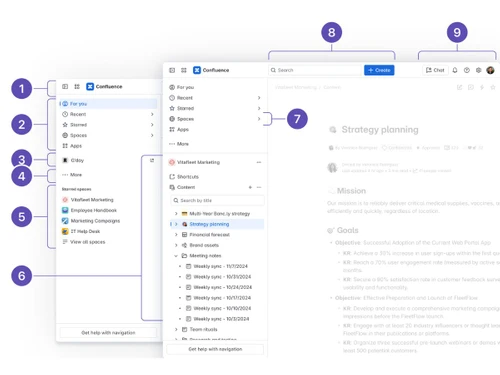

Small Business
Designed for startups and growing businesses
Medium Business
Built for business growth and flexibility
Enterprises
Designed for complex and large-scale business needs
4.8
Out of 5

Overall Rating
Based on
3 Verified Reviews
Rating Breakdown
90% Recommend this Product
Add ReviewCustomers express high satisfaction with Confluence, highlighting its effectiveness in document collaboration and the swift, supportive service from Techjockey. Users appreciate the streamlined process for vendor selection and the ease of communication with team members. However, some limitations are noted, including occasional formatting issues and complexities in permission configurations. Despite these minor drawbacks, the overall sentiment is positive, with many users recommending the product for its collaborative capabilities and responsive support.

Jun 11, 2018
Techjockey Verified
“Techjockey was helpful and responsive”
Pros
Techjockey did a better job in recommending appropriate software for our needs than our software re-seller. Would definitely recommend.
Cons
N/A
Jun 4, 2018
Techjockey Verified
“will recommend it”
Pros
From the first point of contact, it was a matter of hours before I had a list of vendors to choose from. I was able to speak with the vendors and schedule demos within a week. I was THRILLED with the selection. We are in the final stages of determining which platform we are going to use and I am pleased to tell you that it is one of the vendor?s Kevin sent me. This experience has been WONDERFUL! Thank you very much for valuable assistance and time! Your resources and the swift responses from the vendors were amazing! This once daunting task has become a streamlined process that will end up saving my company across the board! Thank you!
Cons
N/A
Apr 15, 2018
Techjockey Verified
“Confluence for document collaboration”
Pros
Document collaboration with team members, wiki-like syntax for markup, notification of updates
Cons
Formatting sometimes gets a little wonky and needs to be reapplied, configuration of permissions can be a little complex, PDF generation could be a little more user-friendly in terms of making a great looking styled document that someone can print if desired

Confluence
Price On Request
Desktop
Mobile
Web based
On Premises
Windows
Mac OS
WrkTalk
₹ 250
Desktop
Mobile
Web based
On Premises
Windows
Mac OS

Microsoft Teams
₹ 138
Desktop
Mobile
Web based
On Premises
Windows
Mac OS

Zoom Meetings
₹ 1449
Desktop
Mobile
Web based
On Premises
Windows
Mac OS

Pyngyn
₹ 999
Desktop
Mobile
Web based
On Premises
Windows
Mac OS

Wokay
₹ 14999
Desktop
Mobile
Web based
On Premises
Windows
Mac OS

Volley
Price On Request
Desktop
Mobile
Web based
On Premises
Windows
Mac OS
Convo AI
Price On Request
Desktop
Mobile
Web based
On Premises
Windows
Mac OS

Google Meet
₹ 720
Desktop
Mobile
Web based
On Premises
Windows
Mac OS

Troop Messenger
₹ 199
Desktop
Mobile
Web based
On Premises
Windows
Mac OS

Brity Works
Price On Request
Desktop
Mobile
Web based
On Premises
Windows
Mac OS
(0) Product(s) selected
Starting Price:
₹250
Starting Price:
₹14,999 /Month
Starting Price:
$29 /Month $49
Available
Price on Request

Starting Price:
$89 /Month

Available
Price on Request

Starting Price:
$15 /Monthly

Starting Price:
$15 /Member/Month

Available
Price on Request

Available
Price on Request






The software can be used by teams as a collaboration tool. Managers can assign tasks to individual employees. Team members can share knowledge and discuss project related requirements as per their convenience.
Atlassian Confluence is a Privacy Shield and GDPR compliant program that offers encryption at rest and in transit, protecting your company’s data. It also facilitates SAML single sign-on, audit log tracking, active directory sync and more.
Yes, you can request an online demo of Atlassian Confluence. Our in-house technical experts will get back to you in real-time.
Yes, Atlassian Confluence offers real-time integration with external platforms like Trello, Jira, Invision, Dropbox, Microsoft Office, Slack, Google Drive and more.
Yes, Atlassian Confluence is also available as dedicated mobile applications for both Android and iOS users.
Site admins can get temporary access to restricted pages using Admin Key. They can use the particular to diagnose specific problems and troubleshoot them in real-time.
20,000+ Software Listed
Best Price Guranteed
Free Expert Consultation
2M+ Happy Customers
Terms and Condtions

Users with registered businesses can purchase goods from merchants on the platform to satisfy their business needs. Users are not permitted to utilize any products acquired through the platform for resale, advertising, business, or further distribution.
For each purchase made, users will receive a Tax Invoice (or 'GST invoice') that includes specific details such as:
the GSTIN of the user associated with their registered business, and
the specified Entity Name for their business.
It should be noted that not all products are eligible for GST Invoice. Only the products displayed by participating sellers with the 'GST-based Invoice Available' callout on the product description page would qualify.
Certain goods and services are not eligible to get a GST Invoice, including items with VAS, i.e., Value Added Services (e.g., Total Mobile Protection/Assured Buyback) and those involving an exchange offer at the time of purchase.
Users must ensure the accuracy of the GSTIN, and business entity name provided for the GST Invoice. Requests for corrections into GST Invoice would not be accommodated by Techjockey.com or any Seller, and any issues arising from user-provided information are the sole responsibility of users.
Techjockey.com is not liable for the GST Invoice or any associated input tax credit. To efficiently claim an input tax credit, users should select the registered place of business address as per the GST authority's data and follow the provisions of the GST Act and rules.
To claim an input tax credit, the delivery and billing addresses must match. Furthermore, input tax credits will not be granted if the delivery address and GSTIN on the invoice are from different states. In case of incorrect GST details provided during the order placement, the order will be canceled automatically.



