linkedin
Tamplo logo
play 25 jours par an en réunion non efficaces !
Tamplo connections
Tamplo meeting management

Tamplo

Brand: Tamplo

  • 4.5

  • 3 Ratings

TAMPLO is an innovative meeting management platform that helps teams optimize their collaboration, increase productivity, and make the most of their time. With TAMPLO, you can prepare for online meetings with several invitees and connect your minutes of a meeting to an action plan and a record of decisions, ensuring that no action item is left behind. By using this collaboration software, you can...

See More

Have you used Tamplo before?

Share your insights for better experience

Add a Review
Starting Price
€5

View plans

100% Genuine
Products
Best Price
Guaranteed
Safe & Secure
Payment
  • Description

  • Pricing

  • Features

  • Specification

  • Review

  • Compare

  • Alternatives

  • FAQ

Starting at €5

Tamplo Software Overview

What is TAMPLO?

TAMPLO is an innovative meeting management platform that helps teams optimize their collaboration, increase productivity, and make the most of their time. With TAMPLO, you can prepare for online meetings with several invitees and connect your minutes of a meeting to an action plan and a record of decisions, ensuring that no action item is left behind.

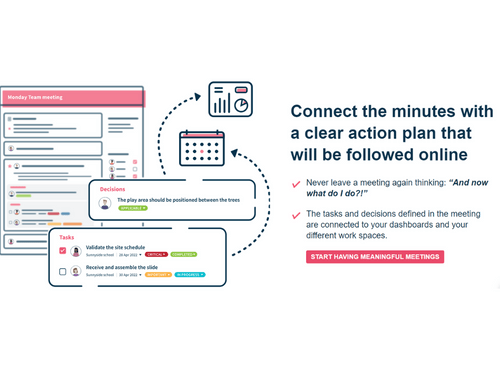
By using this collaboration software, you can connect your meeting minutes with a clear action plan that will be followed online, making it easier for you to keep track of the tasks and decisions defined in the meeting and ensure that everyone is on the same page.

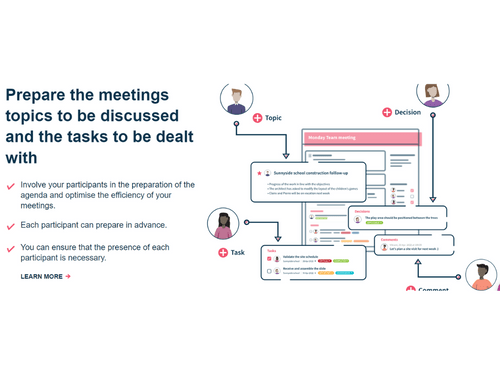
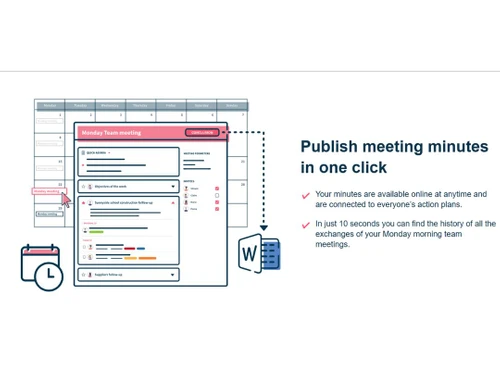
You can also prepare meeting topics and tasks to be dealt with, involve participants in the preparation of the agenda, and optimize the efficiency of your meetings. In addition to this, this tool enables you to publish meeting minutes in just one click, making them available online at any time and connected to everyone's action plans. You can easily follow objectives and the completion of action plans, stay informed in real-time and centralize all your actions on the same platform.

Key Functionalities of TAMPLO

  • Weekly Meeting Management: TAMPLO allows users to make their weekly meetings effective by preparing meeting topics and tasks to be dealt with, involving participants in agenda preparation, and ensuring the presence of each participant is necessary.
  • Action Plan Tracking: Users can track their team's action plans, including deadlines, responsible parties, and progress status.
  • To-Do List Management: The software enables users to manage their daily to-do lists, ensuring that tasks are organized and prioritized efficiently.
  • Agile Collaboration: The platform helps boost collaboration by utilizing the agile method, allowing teams to work together more efficiently and effectively.
  • Project Management: It allows users to organize their projects into working phases, create action plan templates, schedule recurring actions, and track workload and working capacity.
  • Dynamic Dashboards: Users can access dynamic dashboards to gain a 360-degree view of all activities and progress in real-time.

Benefits of Using TAMPLO

  • TAMPLO helps you optimize your collaboration by preparing meeting topics and involving participants in the agenda. This results in more efficient meetings with a clear action plan that everyone can follow.
  • The software allows you to centralize all your tasks in one place, making it easy to track and manage them.
  • This meeting management software allows you to get a 360° view of all your activities, making it easier to manage projects. You can create phase diagrams and manage dependencies within a project.
  • It provides real-time updates, making it easy to follow objectives and the completion of action plans. You can stay informed about what each team member is working on and what information they need to complete their tasks.

TAMPLO Pricing

TAMPLO price starts at Euros 4.90 per month per user at techjockey.com.

TAMPLO price in India may vary based on factors like customization, additional features required, number of users, and the deployment type. Please request a call back for subscription-related details and to avail offers on premium packages.

Read more

Tamplo Company Details

Founded Year:  2014

With Tamplo, make boring and ineffective meetings a thing of the past! Tamplo is a collaborative, intuitive solution to easily but thoroughly transform meetings into efficient and followed up action plans.

Director/Founders Pali Palavathanan
Company Size 1-100 Employees

Tamplo Pricing & Plans

Starting
Starting at €5
    • Users

      Users
      Users
    • Monthly

      Monthly
      Monthly

Key Features

  • 1 to 10 users

  • Unlimited meetings and projects

  • Secured data storage.

Growing
Starting at €10
    • Users

      Users
      Users
    • Monthly

      Monthly
      Monthly

Key Features

  • 11 - 200 users

  • Unlimited meetings and projects

  • Secured data storage.

  • Telephone support.

  • Access to additional modules

  • Kanban Boards

Tamplo Features

  • icon_check Progress Tracking
    Monitor task completion status in real-time with visual boards and timelines to oversee project advancement.
  • icon_check Team Assignment
    Assign tasks to team members directly within the platform, ensuring clear ownership and accountability.
  • icon_check Deadline Management
    Set and adjust due dates for tasks, with automated reminders to prevent delays in project timelines.
  • icon_check File Sharing
    Upload and share documents or files linked to specific tasks for centralized project resource access.
  • icon_check Meeting Integration
    Link meetings to tasks, capturing decisions and action items during sessions for seamless follow-up.
  • icon_check Kanban Boards
    Use drag-and-drop boards to visualize task stages from "To Do" to "Done" for workflow management.
  • icon_check Status Updates
    Update task statuses collaboratively, reflecting real-time progress across the team.
  • icon_check Time Logging
    Log time spent on tasks to track effort and improve future project estimations.
  • icon_check Reporting Dashboards
    Generate overview reports on project health, task completion, and team performance metrics.
  • icon_check Alerts & Notifications
    Receive alerts for task mentions, deadlines, or changes to stay informed.
  • icon_check Search Functionality
    Search across projects for tasks, files, or notes using keywords or filters.
  • icon_check Archive Completed
    Move finished tasks to archives for historical reference without cluttering active views.
Tamplo Demo Video play icon

Get Tamplo Demo

Watch the demo video to explore key features, real workflows, and how the software fits your business needs.

Understand
Key Features
Personal
Demo Insights
Interactive
Demo Support

Tamplo Specifications

Supported Platforms
Ubuntu Ubuntu Windows Windows MacOS MacOS Linux Linux
Devices
Desktop Desktop
Deployment
Cloud-Based Cloud-Based
Suitable For
All Industries
Business Specific
All Businesses
Business Size
Small Business Startups Medium Business SMBs
Customer Support
Email
Language
English
Training Resources
Videos

Explore the Best Alternative Solutions Similar to Your Business Size and Needs

Tamplo Review

4.5

Out of 5

img

Overall Rating

Based on
3 Verified Ratings

Rating Breakdown

  • Features 4.6
  • Value for Money 4.3
  • Ease of Use 4.3
  • Customer Support 5

90% Recommend this Product

Add Review

Techjockey Trusted Reviews from Verified Users

No reviews are currently available for Tamplo. Discover similar Collaboration Software reviews

  • Troop Messenger

    4.9

    Whats great - Troop Messenger offers an easy-to-use interface, smooth team communication, quick messaging, file sharing, and useful collabo... read more

  • Zoom Meetings

    4.6

    Whats great - Zoom is a great tool for connecting students, teachers and students around the world to participate in a single classroom. It... read more

  • Microsoft Teams

    4.4

    Whats great - It increased team productivity and enhanced communication seamlessly read more
Compare Tamplo With other Collaboration Software

Products
Ratings
Pricing
Device Supported
Deployment
Supported Platforms
  • img

    Tamplo

  • 4.5

  • Price On Request

  • Desktop

    Mobile

  • Web based

    On Premises

  • Windows

    Mac OS

  • img

    WrkTalk

  • 4.9

  • ₹ 250

  • Desktop

    Mobile

  • Web based

    On Premises

  • Windows

    Mac OS

  • img

    Microsoft Teams

  • 4.4

  • ₹ 138

  • Desktop

    Mobile

  • Web based

    On Premises

  • Windows

    Mac OS

  • img

    Zoom Meetings

  • 4.5

  • ₹ 1449

  • Desktop

    Mobile

  • Web based

    On Premises

  • Windows

    Mac OS

  • img

    Pyngyn

  • 4.1

  • ₹ 999

  • Desktop

    Mobile

  • Web based

    On Premises

  • Windows

    Mac OS

  • img

    Wokay

  • 4.1

  • ₹ 14999

  • Desktop

    Mobile

  • Web based

    On Premises

  • Windows

    Mac OS

  • img

    Volley

  • 4.2

  • Price On Request

  • Desktop

    Mobile

  • Web based

    On Premises

  • Windows

    Mac OS

  • img

    Convo AI

  • 4.0

  • Price On Request

  • Desktop

    Mobile

  • Web based

    On Premises

  • Windows

    Mac OS

  • img

    Google Meet

  • 4.3

  • ₹ 720

  • Desktop

    Mobile

  • Web based

    On Premises

  • Windows

    Mac OS

  • img

    Troop Messenger

  • 4.9

  • ₹ 199

  • Desktop

    Mobile

  • Web based

    On Premises

  • Windows

    Mac OS

  • img

    Brity Works

  • 4.1

  • Price On Request

  • Desktop

    Mobile

  • Web based

    On Premises

  • Windows

    Mac OS

(2) Product(s) selected

Tamplo Alternatives

See All Tamplo Alternatives

Starting Price:

₹250

Starting Price:

₹14,999 /Month

Starting Price:

$29 /Month $49

SAVE UPTO 41%

Available

Price on Request

Rock

4.2

Starting Price:

$89 /Month

Starting Price:

$15 /Monthly

Starting Price:

$15 /Member/Month

Starting Price:

$7 /User/Month

Articles for Tamplo

See All Related Articles

Which operating system does TAMPLO support?

TAMPLO software is compatible with Windows and macOS operating systems.

Is there any TAMPLO app?

TAMPLO app is not available for mobile devices.

What is the deployment type of TAMPLO?

TAMPLO supports cloud-based deployment.

How much does TAMPLO cost?

TAMPLO pricing starts at Euros 4.90 per month per user at techjockey.com.

Who are the potential users of TAMPLO?

TAMPLO is typically used in startups and small businesses.

Is there any free trial or demo for TAMPLO?

TAMPLO demo is available for free with techjockey.com.

Is TAMPLO free?

TAMPLO offers a free trial. However, the premium plan with advanced features starts at Rs. 1495 per month onwards.

How can you download TAMPLO?

TAMPLO software installation is not required, as it is web-based. Just open the Setup Wizard to get started.

How does TAMPLO work?

TAMPLO collaboration software helps with document storage, team management, and intuitive dashboards. It also helps the users to make a day plan etc.

20,000+ Software Listed

Best Price Guranteed

Free Expert Consultation

2M+ Happy Customers

Terms and Condtions

close

Users with registered businesses can purchase goods from merchants on the platform to satisfy their business needs. Users are not permitted to utilize any products acquired through the platform for resale, advertising, business, or further distribution.

For each purchase made, users will receive a Tax Invoice (or 'GST invoice') that includes specific details such as:

  • the GSTIN of the user associated with their registered business, and

  • the specified Entity Name for their business.

It should be noted that not all products are eligible for GST Invoice. Only the products displayed by participating sellers with the 'GST-based Invoice Available' callout on the product description page would qualify.

Certain goods and services are not eligible to get a GST Invoice, including items with VAS, i.e., Value Added Services (e.g., Total Mobile Protection/Assured Buyback) and those involving an exchange offer at the time of purchase.

Users must ensure the accuracy of the GSTIN, and business entity name provided for the GST Invoice. Requests for corrections into GST Invoice would not be accommodated by Techjockey.com or any Seller, and any issues arising from user-provided information are the sole responsibility of users.

Techjockey.com is not liable for the GST Invoice or any associated input tax credit. To efficiently claim an input tax credit, users should select the registered place of business address as per the GST authority's data and follow the provisions of the GST Act and rules.

To claim an input tax credit, the delivery and billing addresses must match. Furthermore, input tax credits will not be granted if the delivery address and GSTIN on the invoice are from different states. In case of incorrect GST details provided during the order placement, the order will be canceled automatically.