linkedin
Microsoft Loop logo
play Microsoft Loop - think, plan and create together like never before!
Microsoft Loop Summary
Microsoft Loop Project

Microsoft Loop

Brand: Microsoft Corporation

  • 4.4

  • 3 Ratings & 3 Reviews

Microsoft Loop combines flexible workspaces and portable components, allowing teams to organize and share information seamlessly across various Microsoft 365 apps.

See More

Have you used Microsoft Loop before?

Share your insights for better experience

Add a Review

Price Available on Request

Questions about pricing or customization? We’re here to help, just a click away.

100% Genuine
Products
Best Price
Guaranteed
Safe & Secure
Payment
  • Description

  • Pricing

  • Features

  • Specification

  • Review

  • Compare

  • Alternatives

  • FAQ

Microsoft Loop Software Overview

What is Microsoft Loop?

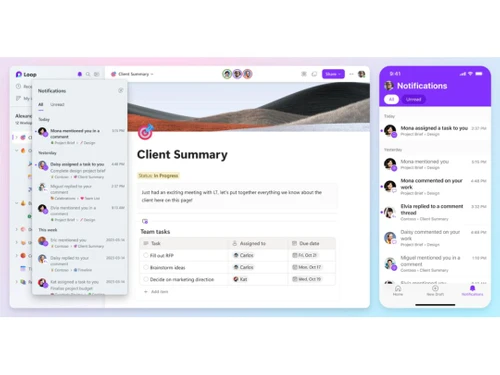
Microsoft Loop is a collaborative workspace developed by Microsoft that allows teams to work together seamlessly across various applications. It features Loop components, which are dynamic content blocks like tables, task lists, and notes that can be shared and edited in real-time within Microsoft 365 apps such as Teams, Outlook, and Word.

Loop helps organize projects and tasks in one place, making it easier for users to access all necessary tools and information. This collaboration software supports fluid collaboration, allowing multiple users to edit content simultaneously while keeping everything synchronized. Designed for the hybrid work environment, Microsoft Loop enhances productivity by breaking down barriers between different tools and enabling efficient teamwork. It integrates with existing Microsoft services, providing a flexible solution for managing workflows and sharing ideas.

Why Choose Microsoft Loop Software?

  • Enhanced Collaboration: Microsoft Loop facilitates real-time co-authoring, allowing team members to work together seamlessly across different applications and share ideas instantly.
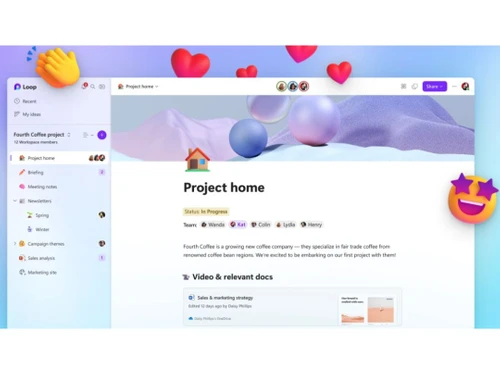
  • Centralized Workspace: It provides a unified space where all project-related materials, such as documents, tasks, and discussions, can be organized and accessed easily.
  • Fluid Components: Loop components can be created and shared across Microsoft 365 apps, ensuring that updates are reflected in real-time wherever they are used.
  • Flexible Canvases: Users can customize their workspaces using flexible canvases that accommodate various types of content and layouts, enhancing creativity.
  • Integration with Microsoft 365: Loop integrates smoothly with other Microsoft tools like Teams, Outlook, and Planner, streamlining workflows and enhancing productivity.
  • Task Management: It allows for effective task tracking and management through features that sync with Microsoft Planner and To Do, keeping everyone on the same page.
  • Supports Hybrid Work: Designed for the modern workplace, Microsoft Loop caters to hybrid work environments by enabling collaboration from anywhere.
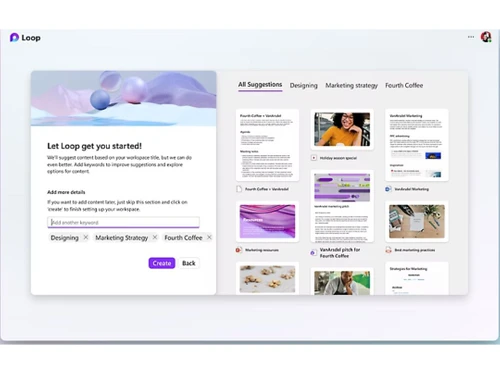
  • AI Assistance: The integration of AI features like Copilot provides helpful suggestions and prompts to streamline the creation process and improve efficiency.

Benefits of Microsoft Loop Software

  • Modular Information Management: Loop allows teams to manage information in a modular style, making it easier to track progress and responsibilities within projects.
  • Dynamic Content Sharing: Users can create and share interactive content, such as notes and files, that automatically updates across different platforms, ensuring everyone has the latest information.
  • Enhanced Meeting Productivity: Loop can be used during meetings for collaborative note-taking and generating minutes, streamlining post-meeting follow-ups.
  • Visual Project Tracking: Teams can visualize project timelines and tasks within Loop workspaces, improving clarity on project status and deadlines.
  • AI-Powered Features: The integration of AI tools helps users brainstorm ideas and optimize workflows, enhancing overall productivity.
  • Cross-Platform Accessibility: Loop's components can be accessed and edited across various Microsoft 365 applications, allowing for flexibility in how teams work together.
  • Customizable Templates: Users can create personalized templates for different projects or tasks, making it easier to maintain consistency across teams.
  • Improved Knowledge Sharing: Loop facilitates better knowledge management by providing a centralized location for all project-related information, making it easier for team members to find what they need.

Pricing of Microsoft Loop

Microsoft Loop price details are available on request at techjockey.com.

The pricing model is based on different parameters, including extra features, deployment type, and the total number of users. For further queries related to the product, you can contact our product team and learn more about the pricing and offers.

Read more

Microsoft Corporation Company Details

Founded Year:  1975

Microsoft Corporation is an American multinational technology company with headquarters in Redmond, Washington.

Director/Founders Paul Allen , Bill Gates
Company Size 1000+ Employees

Microsoft Loop Pricing & Plans

Looking for The Right Pricing?

Share your requirements and get a plan built around your business.

  • Define your business needs
  • Get customised pricing
  • Choose features that fit your workflow

Price Available on Request

Get personalised Microsoft Loop pricing that fits your needs. Our team will connect with you.

Microsoft Loop Features

  • icon_check Component Search
    A discovery mechanism that allows users to find and insert existing Loop components into different pages or chat windows.
  • icon_check Version History
    A tracking system that records content changes over time, allowing users to review previous iterations and restore data.
  • icon_check Presence Indicators
    Visual cues showing which collaborators are currently active on a page or component to improve synchronous coordination.
  • icon_check Role-Based Access Control (RBAC)
    Granular permission settings used to manage who can view or edit specific workspaces, pages, and individual components.
  • icon_check Templates
    A collection of pre-defined page layouts tailored for common collaborative workflows like brainstorming or project kicks.
  • icon_check Collaboration Tools
    Work together in real-time with shared content.
  • icon_check Task Management
    Assign, track, and complete tasks efficiently.
  • icon_check Idea Management
    Capture, organize, and refine creative ideas.
  • icon_check Project Management
    Plan and execute projects with ease.
  • icon_check Content Management
    Store, edit, and manage content collaboratively.
  • icon_check Project Tracking
    Monitor progress and deadlines in one place.
  • icon_check Activity Dashboard
    View team updates and recent activities.
  • icon_check File Sharing
    Share and edit files seamlessly with teammates.
Microsoft Loop Demo Video play icon

Get Microsoft Loop Demo

Watch the demo video to explore key features, real workflows, and how the software fits your business needs.

Understand
Key Features
Personal
Demo Insights
Interactive
Demo Support

Microsoft Loop Specifications

Supported Platforms
Ubuntu Ubuntu Windows Windows iOS iOS Android Android MacOS MacOS Linux Linux
Devices
Desktop Desktop Mobile Mobile Tablet Tablet iPad iPad
Deployment
Cloud-Based Cloud-Based
Suitable For
All Industries
Business Specific
All Businesses
Business Size
Individual Small Business Startups Medium Business Enterprises SMBs SMEs MSMBs MSMEs Freelancers
Customer Support
Email
Language
English
Integration
API Integration
Training Resources
Webinars Documentation Videos
AI Features
AI Integrated
Compliance Regulation
COPPA HIPAA CCPA CPRA ECPA

Explore the Best Alternative Solutions Similar to Your Business Size and Needs

Microsoft Loop Reviews

4.4

Out of 5

img

Overall Rating

Based on
3 Verified Reviews

Rating Breakdown

  • Features 4.3
  • Value for Money 4.3
  • Ease of Use 4.6
  • Customer Support 4.5

83% Recommend this Product

Add Review

Microsoft Loop Video Reviews

youtubeVideoId

4.6

“Microsoft Loop Review - New Note Taking Productivity App”

Review by: The Inventar

youtubeVideoId

4.5

“Microsoft Loop Review -Taking Productivity to the Next Level”

Review by: Jonathan Edwards

KARTIKTEST

Digital Marketer

Industry: Market Research

4.2

Reviewed on: Jan 27, 2025

Techjockey Verified

“Transforming Team Collaboration”

Pros

Real-time collaboration, interactive components, easy to share and access, integrates seamlessly with other Microsoft products, improves team productivity.

Cons

Still under development, some features are limited, user interface could be more intuitive.

Compare Microsoft Loop With other Collaboration Software

Products
Ratings
Pricing
Device Supported
Deployment
Supported Platforms
  • img

    Microsoft Loop

  • 4.4

  • Price On Request

  • Desktop

    Mobile

  • Web based

    On Premises

  • Windows

    Mac OS

  • img

    WrkTalk

  • 4.9

  • ₹ 250

  • Desktop

    Mobile

  • Web based

    On Premises

  • Windows

    Mac OS

  • img

    Microsoft Teams

  • 4.4

  • ₹ 138

  • Desktop

    Mobile

  • Web based

    On Premises

  • Windows

    Mac OS

  • img

    Skype

  • 4

  • Price On Request

  • Desktop

    Mobile

  • Web based

    On Premises

  • Windows

    Mac OS

  • img

    SharePoint

  • 4.3

  • ₹ 300

  • Desktop

    Mobile

  • Web based

    On Premises

  • Windows

    Mac OS

  • img

    Zoom Meetings

  • 4.5

  • ₹ 1449

  • Desktop

    Mobile

  • Web based

    On Premises

  • Windows

    Mac OS

  • img

    Pyngyn

  • 4.1

  • ₹ 999

  • Desktop

    Mobile

  • Web based

    On Premises

  • Windows

    Mac OS

  • img

    Wokay

  • 4.1

  • ₹ 14999

  • Desktop

    Mobile

  • Web based

    On Premises

  • Windows

    Mac OS

  • img

    Volley

  • 4.2

  • Price On Request

  • Desktop

    Mobile

  • Web based

    On Premises

  • Windows

    Mac OS

  • img

    Convo AI

  • 4.0

  • Price On Request

  • Desktop

    Mobile

  • Web based

    On Premises

  • Windows

    Mac OS

  • img

    Google Meet

  • 4.3

  • ₹ 720

  • Desktop

    Mobile

  • Web based

    On Premises

  • Windows

    Mac OS

(0) Product(s) selected

Microsoft Loop Alternatives

See All Microsoft Loop Alternatives

Starting Price:

₹250

Available

Price on Request

SAVE UPTO 41%

Starting Price:

₹14,999 /Month

Starting Price:

$29 /Month $49

SAVE UPTO 41%

Available

Price on Request

Rock

4.2

Starting Price:

$89 /Month

Starting Price:

$15 /Monthly

Starting Price:

$15 /Member/Month

Starting Price:

$7 /User/Month

Articles for Microsoft Loop

See All Related Articles

What is the cost of Microsoft Loop Software?

The pricing details for Microsoft Loop are available upon request at techjockey.com.

Is there a Microsoft Loop Software mobile app?

Yes, Microsoft Loop offers an Android and iOS mobile app.

How does Microsoft Loop Software operate?

Microsoft Loop operates by allowing users to create and collaborate on dynamic content in real-time across various Microsoft 365 applications.

Who can benefit from using Microsoft Loop Software?

Teams and individuals looking for enhanced collaboration and project management can benefit from using Microsoft Loop.

Is Microsoft Loop Software available for free?

Microsoft Loop is available for free with a personal Microsoft account, but some features require a paid Microsoft 365 subscription.

Does Microsoft Loop Software offer a free trial?

Yes, Microsoft Loop offers a free trial.

Is a free demo available for Microsoft Loop Software?

Yes, a free demo is available for users interested in exploring Microsoft Loop's features.

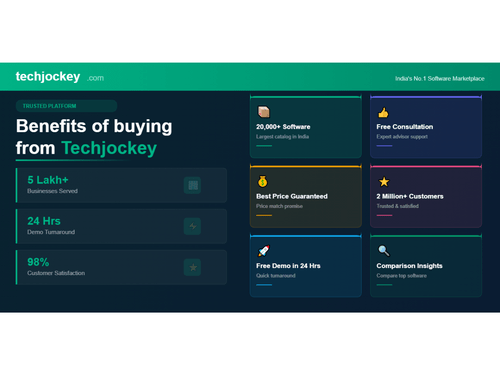
20,000+ Software Listed

Best Price Guranteed

Free Expert Consultation

2M+ Happy Customers

Terms and Condtions

close

Users with registered businesses can purchase goods from merchants on the platform to satisfy their business needs. Users are not permitted to utilize any products acquired through the platform for resale, advertising, business, or further distribution.

For each purchase made, users will receive a Tax Invoice (or 'GST invoice') that includes specific details such as:

  • the GSTIN of the user associated with their registered business, and

  • the specified Entity Name for their business.

It should be noted that not all products are eligible for GST Invoice. Only the products displayed by participating sellers with the 'GST-based Invoice Available' callout on the product description page would qualify.

Certain goods and services are not eligible to get a GST Invoice, including items with VAS, i.e., Value Added Services (e.g., Total Mobile Protection/Assured Buyback) and those involving an exchange offer at the time of purchase.

Users must ensure the accuracy of the GSTIN, and business entity name provided for the GST Invoice. Requests for corrections into GST Invoice would not be accommodated by Techjockey.com or any Seller, and any issues arising from user-provided information are the sole responsibility of users.

Techjockey.com is not liable for the GST Invoice or any associated input tax credit. To efficiently claim an input tax credit, users should select the registered place of business address as per the GST authority's data and follow the provisions of the GST Act and rules.

To claim an input tax credit, the delivery and billing addresses must match. Furthermore, input tax credits will not be granted if the delivery address and GSTIN on the invoice are from different states. In case of incorrect GST details provided during the order placement, the order will be canceled automatically.