 USA
USA UAE
UAESmall Business
Designed for startups and growing businesses


See More



Brand: Microsoft Corporation
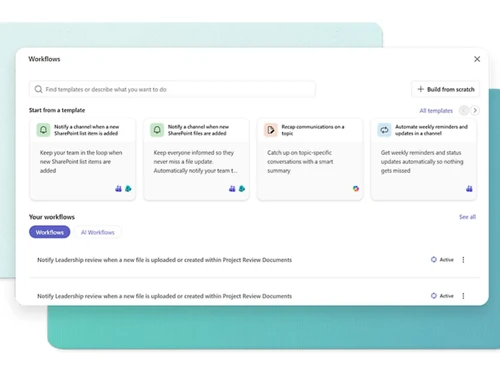
SharePoint is a web-based collaborative platform that integrates with Microsoft Office. It is used for document management, content management, and business process automation. SharePoint allows teams to work together on projects, share information, and automate tasks.
See MoreHave you used SharePoint before?
Share your insights for better experience
View plans
 Save upto 18%, Get GST Invoice on your business purchase T&C Buy Now & Pay Later, Check offer on payment page.
 Brand: Microsoft Corporation
Founded Year: 1975
Microsoft Corporation is an American multinational technology company with headquarters in Redmond, Washington.
 Collaboration File Management Content Management Customization Cloud Based Installation Deployment Management Electronic forms and signatures Data Security Data Storage Mobile App

Watch the demo video to explore key features, real workflows, and how the software fits your business needs.
 Ubuntu
  Windows
  iOS
iOS  Android MacOS
  Linux
Linux  Desktop
  Mobile
  Tablet
  iPad
iPad  Cloud-Based
  Perpetual
Small Business
Designed for startups and growing businesses
Medium Business
Built for business growth and flexibility
Enterprises
Designed for complex and large-scale business needs
4.3
Out of 5

Overall Rating
Based on
5 Verified Ratings
Rating Breakdown
96% Recommend this Product
Add ReviewTechjockey Trusted Reviews from Verified Users
No reviews are currently available for SharePoint. Discover similar Collaboration Software reviews

Troop Messenger
Whats great - Troop Messenger offers an easy-to-use interface, smooth team communication, quick messaging, file sharing, and useful collabo... read more

Zoom Meetings
Whats great - Zoom is a great tool for connecting students, teachers and students around the world to participate in a single classroom. It... read more

Microsoft Teams
Whats great - It increased team productivity and enhanced communication seamlessly read more
SharePoint
₹ 300.00 excl. GST
Desktop
Mobile
Web based
On Premises
Windows
Mac OS
WrkTalk
₹ 250
Desktop
Mobile
Web based
On Premises
Windows
Mac OS
Microsoft Teams
₹ 138
Desktop
Mobile
Web based
On Premises
Windows
Mac OS

Microsoft Loop
Price On Request
Desktop
Mobile
Web based
On Premises
Windows
Mac OS

Skype
Price On Request
Desktop
Mobile
Web based
On Premises
Windows
Mac OS
Zoom Meetings
₹ 1449
Desktop
Mobile
Web based
On Premises
Windows
Mac OS

Pyngyn
₹ 999
Desktop
Mobile
Web based
On Premises
Windows
Mac OS

Wokay
₹ 14999
Desktop
Mobile
Web based
On Premises
Windows
Mac OS

Volley
Price On Request
Desktop
Mobile
Web based
On Premises
Windows
Mac OS
Convo AI
Price On Request
Desktop
Mobile
Web based
On Premises
Windows
Mac OS

Google Meet
₹ 720
Desktop
Mobile
Web based
On Premises
Windows
Mac OS
(0) Product(s) selected
Starting Price:
₹250
Available
Price on Request
Available
Price on Request
Starting Price:
₹14,999 /Month
Starting Price:
$29 /Month $49
Available
Price on Request

Starting Price:
$89 /Month

Starting Price:
$15 /Monthly

Starting Price:
$15 /Member/Month

Available
Price on Request




SharePoint software pricing starts at INR 300 per user per month on techjockey.com.
SharePoint facilitates collaboration and document management by providing a centralized platform for teams to store, share, and co-author files. It enables automated workflows, simplifies business processes, and integrates with other Microsoft products for seamless productivity. SharePoint enhances communication and streamlines tasks for efficient teamwork.
SharePoint supports Windows, macOS, Android and iOS.
Yes, the SharePoint app is available for Android and iOS users.
A demo of SharePoint is available at techjockey.com. You can contact our product experts for more information.
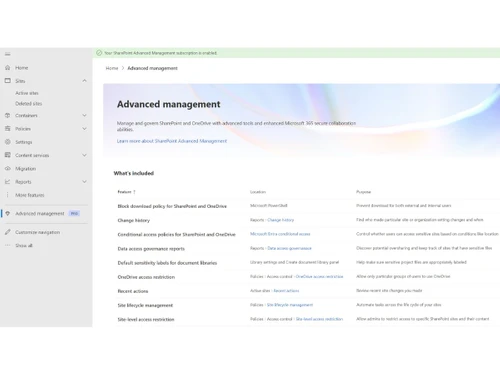
SharePoint offers document management, collaboration tools, intranets and portals, workflow automation, enterprise search, business intelligence, and mobile access. You can contact our product experts for more information.
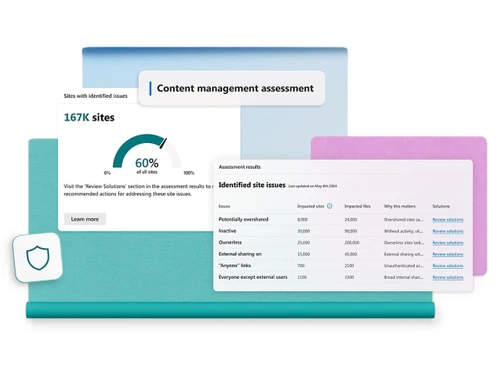
SharePoint provides robust security features including data encryption, access controls, and threat protection to safeguard sensitive information. These features help in protecting against unauthorized access, data breaches, and malware, ensuring data confidentiality and integrity.
Yes, SharePoint can be suitable for small businesses seeking to improve collaboration, streamline document management, and automate simple workflows. It can help small teams to centralize information, improve communication, and enhance productivity. However, the complexity and cost might be a consideration for very small businesses with limited budgets and technical expertise.
SharePoint is targeted towards teams and individuals in organizations of all sizes who require a centralized platform for collaboration, document management, and workflow automation. It caters to diverse roles, from general employees to project managers and executives, empowering them to work together effectively, regardless of their geographical region.
Yes, multiple content types can indeed be added to a document library in SharePoint. This feature allows site users to use the New Document command to create specialized content quickly. To add multiple content types to a list or library, you must have at least the Design permission level for that list or library. You also need to have multiple content types enabled. The steps to add a content type to a list or library are as follows:
Please note that if the list or library isn't set up to allow multiple content types, the Content Types section does not appear on the Settings page for the list or library. To learn how to allow multiple content types, see Turn on support for multiple content types in a list or library.
0 0
Sharepoint 2013 workflows run every 5 minutes in the timer job by default.
0 0
All site collections and sites within a web application shareThe same content database.
0 0
Site collection, site, and list/library are the three levels where security handled in SharePoint.
0 0
In SharePoint, you can create several types of lists based on your specific needs like Communication Lists, Tracking Lists and Custom Lists
0 0
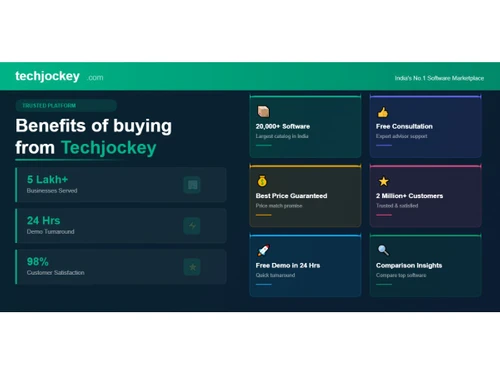
20,000+ Software Listed
Best Price Guranteed
Free Expert Consultation
2M+ Happy Customers
Terms and Condtions

Users with registered businesses can purchase goods from merchants on the platform to satisfy their business needs. Users are not permitted to utilize any products acquired through the platform for resale, advertising, business, or further distribution.
For each purchase made, users will receive a Tax Invoice (or 'GST invoice') that includes specific details such as:
the GSTIN of the user associated with their registered business, and
the specified Entity Name for their business.
It should be noted that not all products are eligible for GST Invoice. Only the products displayed by participating sellers with the 'GST-based Invoice Available' callout on the product description page would qualify.
Certain goods and services are not eligible to get a GST Invoice, including items with VAS, i.e., Value Added Services (e.g., Total Mobile Protection/Assured Buyback) and those involving an exchange offer at the time of purchase.
Users must ensure the accuracy of the GSTIN, and business entity name provided for the GST Invoice. Requests for corrections into GST Invoice would not be accommodated by Techjockey.com or any Seller, and any issues arising from user-provided information are the sole responsibility of users.
Techjockey.com is not liable for the GST Invoice or any associated input tax credit. To efficiently claim an input tax credit, users should select the registered place of business address as per the GST authority's data and follow the provisions of the GST Act and rules.
To claim an input tax credit, the delivery and billing addresses must match. Furthermore, input tax credits will not be granted if the delivery address and GSTIN on the invoice are from different states. In case of incorrect GST details provided during the order placement, the order will be canceled automatically.



