 USA
USA UAE
UAESmall Business
Designed for startups and growing businesses


See More





Brand: Microsoft Corporation
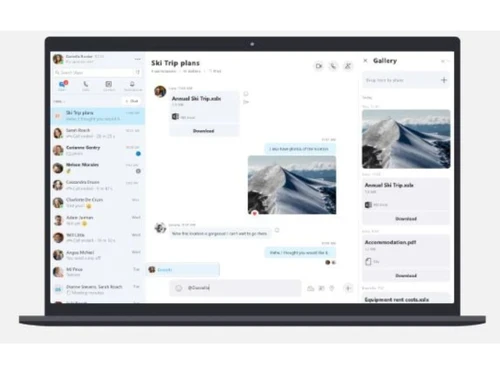
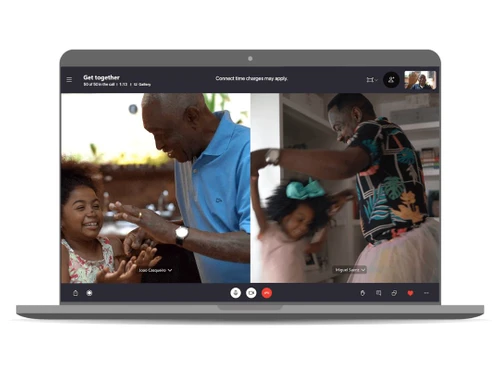
Skype is an advanced audio, video conferencing and best online meeting software designed for personal communication as well as for corporate meetings with up to 50 clients. You can even record all the audio and video calls, write live captions in a meeting or add subtitles while presenting an idea to your clients. Further, the smart messaging feature of the software allows its users to add GIFs, ...
See MoreHave you used Skype before?
Share your insights for better experience
Brand: Microsoft Corporation
Founded Year: 1975
Microsoft Corporation is an American multinational technology company with headquarters in Redmond, Washington.
Looking for The Right Pricing?
Share your requirements and get a plan built around your business.
Price Available on Request
Get personalised Skype pricing that fits your needs. Our team will connect with you.
 Generate Link Secure Share Video Call Recording Blur your background before entering the call Screen Sharing Audio / Video Conferencing Smart Message Share Location Send FIles Call Forwarding Caller ID Cortana Integration

Watch the demo video to explore key features, real workflows, and how the software fits your business needs.
 Ubuntu
  Windows
  iOS
iOS  Android MacOS
  Linux
Linux  Desktop
  Mobile
  Tablet
  iPad
iPad  Cloud-Based
  Perpetual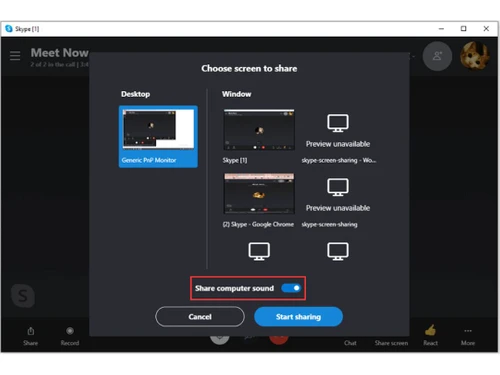

Small Business
Designed for startups and growing businesses
Medium Business
Built for business growth and flexibility
Enterprises
Designed for complex and large-scale business needs
4
Out of 5

Overall Rating
Based on
3 Verified Reviews
Rating Breakdown
76% Recommend this Product
Add ReviewUsers generally appreciate Skype for its effective collaboration features, including video and audio calls, which facilitate teamwork and communication with international clients. Many find the call quality to be satisfactory, although some report issues with video clarity and background noise affecting overall experience. A common complaint is the software's slow launch time on Windows devices, which can be frustrating for users needing quick access. Overall, while Skype is viewed as a reliable tool, there are areas for improvement that users hope to see addressed.

May 27, 2020
Techjockey Verified
“Promoted teamwork”
Pros
Skype assists in managing the team work with its video and audio calls, and messaging features. The collaboration tool is quite user-friendly and also allows one to create group chats to facilitate seamless collaboration and share documents with ease.
Cons
I am looking for the next updates to get a more stable calling facility via Skype. Moreover, Skype captures background noises easily, which ruins the call quality.
Apr 14, 2020
Techjockey Verified
“Great call quality”
Pros
Skype is the best platform that one can trust upon to get connected with their international clients and business partners. I am really satisfied with the quality of the calls provided by the software. The stability is also excellent.
Cons
The only problem that I am facing for the past few days is with video calls. The images are getting blurred during calls. I have checked my internet connection, they are all fine. I hope the developing team works on making the necessary improvements in the call quality.
Jan 29, 2020
Techjockey Verified
“Efficiently useful software”
Pros
I wanted a software that will help manage all my business-related conference calls with ease. Skype is the best platform for me. Skype allows me to add new meeting attendees as per my requirement, reroute the calls and mute the unwanted calls while on a conference.
Cons
The major problem I faced with Skype is that it takes longer than usual to launch itself in my Windows operated device. It gets really irritating at times when I am in a hurry and need to make calls as soon as possible.

Skype
Price On Request
Desktop
Mobile
Web based
On Premises
Windows
Mac OS
WrkTalk
₹ 250
Desktop
Mobile
Web based
On Premises
Windows
Mac OS

Microsoft Teams
₹ 138
Desktop
Mobile
Web based
On Premises
Windows
Mac OS

Microsoft Loop
Price On Request
Desktop
Mobile
Web based
On Premises
Windows
Mac OS
SharePoint
₹ 300
Desktop
Mobile
Web based
On Premises
Windows
Mac OS

Zoom Meetings
₹ 1449
Desktop
Mobile
Web based
On Premises
Windows
Mac OS

Pyngyn
₹ 999
Desktop
Mobile
Web based
On Premises
Windows
Mac OS

Wokay
₹ 14999
Desktop
Mobile
Web based
On Premises
Windows
Mac OS

Volley
Price On Request
Desktop
Mobile
Web based
On Premises
Windows
Mac OS
Convo AI
Price On Request
Desktop
Mobile
Web based
On Premises
Windows
Mac OS

Google Meet
₹ 720
Desktop
Mobile
Web based
On Premises
Windows
Mac OS
(0) Product(s) selected
Starting Price:
₹250
Available
Price on Request
Starting Price:
₹300 /Month ₹507
Starting Price:
₹14,999 /Month
Starting Price:
$29 /Month $49
Available
Price on Request

Starting Price:
$89 /Month

Starting Price:
$15 /Monthly

Starting Price:
$15 /Member/Month

Available
Price on Request





All messages sent using Skype instant messages are end-to-end encrypted. Thus, ensuring protection against third party interventions.
Yes, you can share music by incorporating the Spotify app within your Skype chat.
Yes, Techjockey provides an online demo for Skype at your preferred date and time.
Users need to have the following system setup: For Windows: 1.RAM: minimum of 512MB, 2.Processor: 1GHz processor or above. For Mac OS: 1.RAM: minimum 1GB, 2.Processor: 1GHz dual-core processor.
Skype has a dedicated mobile app, which is compatible with Android and iOS devices.
20,000+ Software Listed
Best Price Guranteed
Free Expert Consultation
2M+ Happy Customers
Terms and Condtions

Users with registered businesses can purchase goods from merchants on the platform to satisfy their business needs. Users are not permitted to utilize any products acquired through the platform for resale, advertising, business, or further distribution.
For each purchase made, users will receive a Tax Invoice (or 'GST invoice') that includes specific details such as:
the GSTIN of the user associated with their registered business, and
the specified Entity Name for their business.
It should be noted that not all products are eligible for GST Invoice. Only the products displayed by participating sellers with the 'GST-based Invoice Available' callout on the product description page would qualify.
Certain goods and services are not eligible to get a GST Invoice, including items with VAS, i.e., Value Added Services (e.g., Total Mobile Protection/Assured Buyback) and those involving an exchange offer at the time of purchase.
Users must ensure the accuracy of the GSTIN, and business entity name provided for the GST Invoice. Requests for corrections into GST Invoice would not be accommodated by Techjockey.com or any Seller, and any issues arising from user-provided information are the sole responsibility of users.
Techjockey.com is not liable for the GST Invoice or any associated input tax credit. To efficiently claim an input tax credit, users should select the registered place of business address as per the GST authority's data and follow the provisions of the GST Act and rules.
To claim an input tax credit, the delivery and billing addresses must match. Furthermore, input tax credits will not be granted if the delivery address and GSTIN on the invoice are from different states. In case of incorrect GST details provided during the order placement, the order will be canceled automatically.



