 USA
USA UAE
UAESmall Business
Designed for startups and growing businesses


See More




Brand: Atlassian
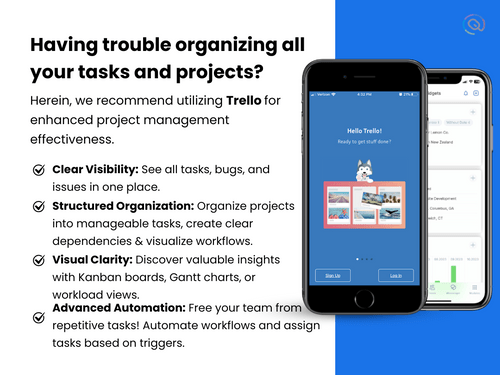
Trello is a project management tool that helps users organize projects into boards and manage tasks. The tool allows users to track the project's progress at a glance.
See MoreHave you used Trello before?
Share your insights for better experience
Brand: Atlassian
Founded Year: 2002
We're a team of 7000+ Atlassians supporting an international group of 250,000+ customers. We build tools like Jira, Confluence, Bitbucket, and Trello to help teams across the world become more nimble, creative, and aligned.


Not sure which plan is best for you? We'll help you
Core Functionalities
 Workflow Management Risk Management Task Management Backlog Management Resource Management Pipeline Management Sprint Management Workforce Management Incident Management Issue Management
 Task & Workflow Management
Workflow Automation Recurring Tasks Task Creation & Assignment Sub-Task Creation Task Dependencies Notifications/Reminders Task Prioritization Automated Task Assignment Task Views
Kanban Boards Task List Calendar View Timeline View Spreadsheet View Gantt Chart Mind Map Progress & Performance Tracking
Time Tracking Milestone Tracking Team Capacity Tracking Resource & Budget Management
Budget Planning Automated Resource Allocation Dynamic Budgeting Risk Scoring System Workload Distribution Auto Scaling Collaboration & Communication
Real-Time Collaboration Integrated Chat & Messaging File Sharing & Document Collaboration Version Control Access Control & Security
User Access Management Activity Logs Data Backup and Disaster Recovery Multi-Factor Authentication (MFA) Compliance Tracking Customization
Templates Custom Fields Task Customization Custom Layouts Custom Views Integrations
CRM Integration API Integration Communication and Collaboration Tools File Storage and Sharing Time Tracking Tools Automation Tools Issue Tracking Tools AI-Based Integrations ERP Integration Third Party Integrations Reporting & Analytics
Predictive Analytics Dashboards Benchmarking Automated Reports Project Progress Reports Resource Reports Risk Reports Timesheet Reports Sprint Reports Burndown & Burnup Charts Real-Time Reporting Report Customization Workload Reports Bottleneck Reports 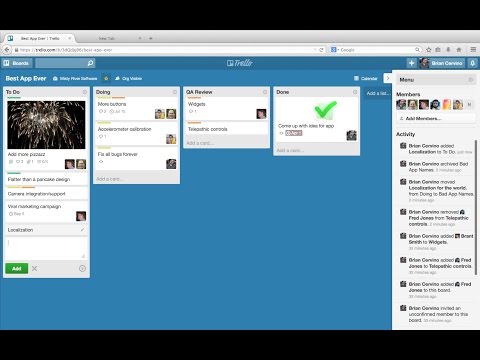

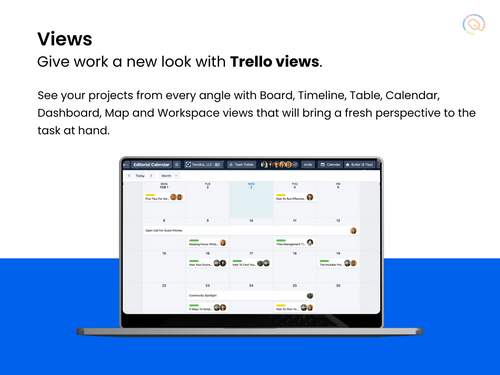
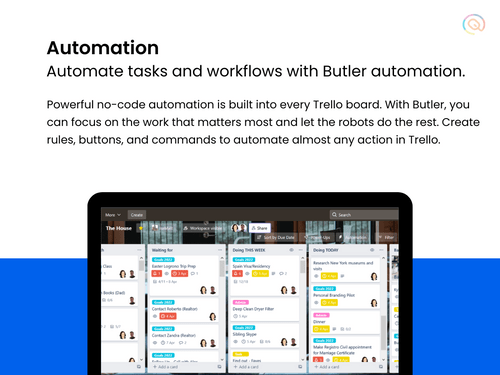
Watch the demo video to explore key features, real workflows, and how the software fits your business needs.
 Ubuntu
  Windows
  MacOS
MacOS  Linux
Linux  Desktop
  Mobile
  Tablet
  iPad
iPad  Cloud-Based
Small Business
Designed for startups and growing businesses
Medium Business
Built for business growth and flexibility
Enterprises
Designed for complex and large-scale business needs
4.4
Out of 5

Overall Rating
Based on
13 Verified Reviews
Rating Breakdown
85% Recommend this Product
Add ReviewTrello is generally well-received for its user-friendly interface and flexibility, making it a popular choice among small teams for project management and collaboration. Users appreciate its ability to help organize tasks and ideas effectively, with many highlighting its accessibility across devices. However, some users note limitations when managing larger projects or working with bigger teams, as well as occasional connectivity issues. The free version is seen as somewhat restrictive, prompting some to consider upgrading for additional features. Overall, Trello is recommended for its simplicity and effectiveness in team settings.
Pros
"Trello is flexible and comes with a range of features including task management, project management, integration, and resource management for managing all my tasks."
"I really recommend it. It is easy to use, the interface is very friendly and there are a lot of options for everything you want to do."
"I really like to use Trello for all my projects, it helps me see the big picture and manage the details. I also like the fact that it’s free for teams of up to 5 users."
Cons
"If you’re managing bigger projects with a big team, Trello feels a bit difficult."
"Sending an email consistently gets interrupted by notifications from other apps."
"Trello is limited for Mac users as it is not available for this platform Trello’s interface can be a bit basic and hard to customize with all different add-on software."




Mar 9, 2022
Techjockey Verified
“Trello is an easy-to-use, free, web-based project management tool.”
Pros
Trello allows you to organize your projects into a series of cards, displaying them in the order you want. With Trello, you can assign tasks to yourself or others, set deadlines and reminders, and organize your ideas visually.
Cons
Unfortunately, apps can be very insecure. Some bad people can use the app for their ill purpose.
Reason to switch
It has great features then other softwares.
Mar 9, 2022
Techjockey Verified
“Trello is a great product for managing projects.”
Pros
Trello allows for a lot of flexibility and creativity. I used this product in a project management class to track campaigns and manage workflow, and I was very satisfied with the results. The free version is a bit limited, but you can upgrade to the paid version if you need more features.
Cons
Trello is limited for Mac users as it is not available for this platform Trello’s interface can be a bit basic and hard to customize with all different add-on software.
Reason to switch
Trello is one of the best project management tools out there, and it’s definitely worth checking out.
Mar 8, 2022
Techjockey Verified
“Visual tool to organize projects and tasks.”
Pros
Benefits of using this tool allowed me to handle bigger projects with more efficiency and oversight. Even though one person may take charge of a project, it is used for team spirit as well as organization.
Cons
There are a few drawbacks, the communication boards might be challenging to use in an office setting where individuals may discuss items in passing or during a meeting.

Trello
Price On Request
Desktop
Mobile
Web based
On Premises
Windows
Mac OS

Jira
Price On Request
Desktop
Mobile
Web based
On Premises
Windows
Mac OS

Jira Align
Price On Request
Desktop
Mobile
Web based
On Premises
Windows
Mac OS
TrackPM
Price On Request
Desktop
Mobile
Web based
On Premises
Windows
Mac OS

Swatle
Price On Request
Desktop
Mobile
Web based
On Premises
Windows
Mac OS

Birdview PMS
Price On Request
Desktop
Mobile
Web based
On Premises
Windows
Mac OS

Forecast
Price On Request
Desktop
Mobile
Web based
On Premises
Windows
Mac OS

Favro
Price On Request
Desktop
Mobile
Web based
On Premises
Windows
Mac OS

Zoho Projects
₹ 3360
Desktop
Mobile
Web based
On Premises
Windows
Mac OS

Clickup
Price On Request
Desktop
Mobile
Web based
On Premises
Windows
Mac OS

SmartSuite
Price On Request
Desktop
Mobile
Web based
On Premises
Windows
Mac OS
(0) Product(s) selected
Starting Price:
$77,400 /Year
Starting Price:
$9 /User/Month
Available
Price on Request
Starting Price:
$12 /Month
Starting Price:
$10 /User/Month

Starting Price:
$10 /User/Month

Starting Price:
$19 /Month

Starting Price:
$13 /Month

Starting Price:
$179 /Month

Starting Price:
$35 /Month

Starting Price:
$10 /User/Month




Yes, you can request an online demo of Trello. Experts from Techjockey will get back to you as per your mentioned time schedule.
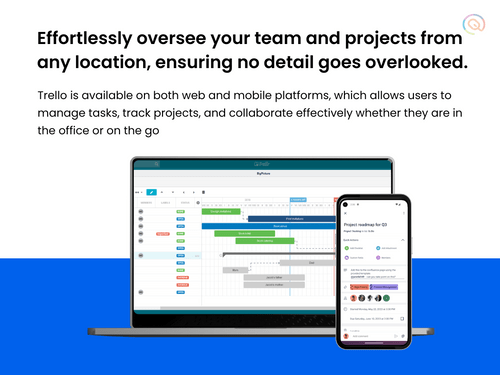
Yes, Trello has a mobile app that is available on iOS and Android platforms.
Trello is used for organising tasks and projects using boards, lists, and cards. Teams can create boards to represent projects, with lists for different stages. Cards are used for individual tasks or items within the lists. You can assign tasks, set due dates, add checklists, and collaborate by commenting and attaching files directly to the cards.
Trello is used for project management, task tracking, and team collaboration. It’s commonly used by marketing teams, product managers, developers, designers, startups, and remote teams to manage everything from daily tasks to large, complex projects.
Yes, Trello has a free plan with basic features for users and teams getting started with project management.
The free plan allows unlimited users but limits boards to 10 per workspace. There are also limitations on features like automation and integrations.
Trello offers a 14-day free trial for its premium plans, which include additional features like unlimited boards, advanced views, automation, and security options.
Trello cost per user varies depending on the plan. While there is a free plan available for users, the standard plan starts at USD 6/user/month.
Here’s how you can integrate Trello with Google Calendar:
0 0
To create a workflow in Trello:
0 0
If Trello isn't syncing properly, here are some troubleshooting steps you can try:
Basic Fixes
Advanced Fixes
0 0
Step-by-Step Integration Guide
0 0
Trello can be used as a simple CRM by creating boards to track sales pipelines, using lists for stages like leads, prospects, and closed deals, and attaching customer information and communication history to cards.
0 0
20,000+ Software Listed
Best Price Guranteed
Free Expert Consultation
2M+ Happy Customers
Terms and Condtions

Users with registered businesses can purchase goods from merchants on the platform to satisfy their business needs. Users are not permitted to utilize any products acquired through the platform for resale, advertising, business, or further distribution.
For each purchase made, users will receive a Tax Invoice (or 'GST invoice') that includes specific details such as:
the GSTIN of the user associated with their registered business, and
the specified Entity Name for their business.
It should be noted that not all products are eligible for GST Invoice. Only the products displayed by participating sellers with the 'GST-based Invoice Available' callout on the product description page would qualify.
Certain goods and services are not eligible to get a GST Invoice, including items with VAS, i.e., Value Added Services (e.g., Total Mobile Protection/Assured Buyback) and those involving an exchange offer at the time of purchase.
Users must ensure the accuracy of the GSTIN, and business entity name provided for the GST Invoice. Requests for corrections into GST Invoice would not be accommodated by Techjockey.com or any Seller, and any issues arising from user-provided information are the sole responsibility of users.
Techjockey.com is not liable for the GST Invoice or any associated input tax credit. To efficiently claim an input tax credit, users should select the registered place of business address as per the GST authority's data and follow the provisions of the GST Act and rules.
To claim an input tax credit, the delivery and billing addresses must match. Furthermore, input tax credits will not be granted if the delivery address and GSTIN on the invoice are from different states. In case of incorrect GST details provided during the order placement, the order will be canceled automatically.


