linkedin

Get Free Advice

Get Quote

Jira Align logo
Gallery Jira Align Product Overview | Jira Align Product Demos | Atlassian
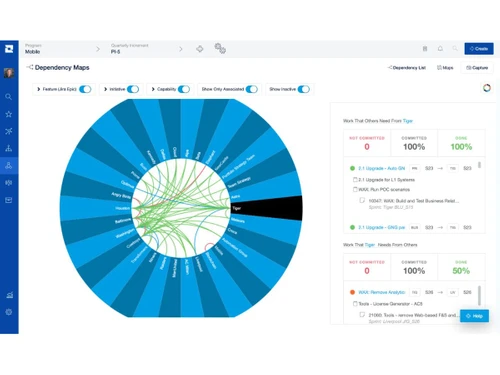
jira align-product jira align-reports jira align-dependency
play Jira Align Product Overview | Jira Align Product Demos | Atlassian
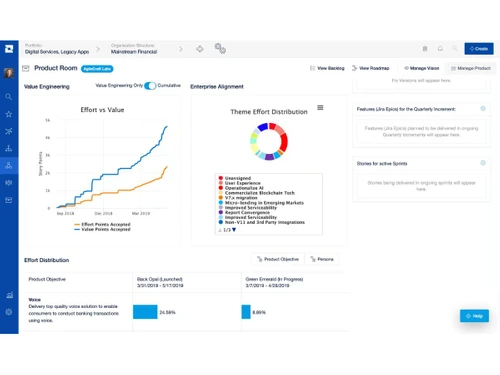
jira align-product
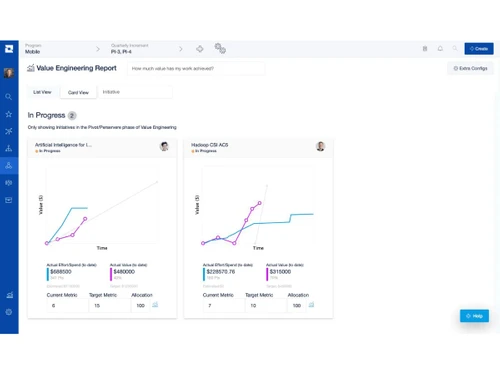
jira align-reports
jira align-dependency

Jira Align

Brand : Atlassian

Starting at

$ 77400

Save Extra with 2 Offers

  • offer_icon Save upto 18%, Get GST Invoice on your business purchase |
  • offer_icon Buy Now & Pay Later, Check offer on payment page.

Jira Align links strategic goals with team execution to enhance visibility, alignment, and delivery. ...Read more

  • AdviceGet Instant Expert
    Advice
  • PaymentSafe & Secure
    Payment
  • GuaranteedAssured Best Price
    Guaranteed

Jira Align Software Pricing, Features & Reviews

What is Jira Align?

Jira Align is a project management software by Atlassian that connects company strategy with team-level execution.

It offers real-time visibility across teams, programs, and portfolios, enabling organizations to track dependencies, progress, and outcomes effectively.

With support for frameworks like SAFe and hybrid models, Jira Align helps enterprises align goals, manage execution, and achieve business objectives efficiently.

Why Choose Jira Align Software?

  • Enterprise-Wide Visibility: Provides complete visibility across teams, programs, and portfolios.
  • Strategic Alignment: Bridges the gap between company strategy and team execution.
  • Real-Time Data Insights: Delivers live insights into progress, dependencies, and performance.
  • Supports Agile Frameworks: Works with SAFe, LeSS, Scrum@Scale, and other agile models.
  • Improved Collaboration: Promotes cross-team communication and shared goals.
  • Portfolio Management: Enables strategic portfolio planning and investment tracking.
  • Dependency Tracking: Identifies and manages inter-team dependencies efficiently.

Benefits of Jira Align Software

  • Enhanced Transparency: Increases clarity and accountability across all teams.
  • Faster Time-to-Market: Aligns teams to accelerate delivery and outcomes.
  • Comprehensive Reporting: Generates detailed progress and productivity reports.
  • Risk Management: Detects and mitigates risks across projects and portfolios.
  • Continuous Improvement: Encourages measurement and ongoing process enhancement.

Jira Align Pricing

Jira Align price starts at USD 77400 at techjockey.com.The pricing model is based on different parameters, including extra features, deployment type, and the total number of users. For further queries related to the product, you can contact our product team and learn more about the pricing and offers.

Jira Align Pricing & Plans

Strategy Collection
  • Visualize your strategy
  • Atlassian platform integration
  • AI-powered insights
  • Strategy that scales
  • Map talent to strategy
  • Plan and design your workforce
  • Explore your data with greater control
    • Users
    • Yearly
Starting at $ 77400

Get Jira Align Demo

We make it happen! Get your hands on the best solution based on your needs.

Interacted

Jira Align Features

Core Functionalities

  • icon_check Workforce Management Manage and allocate teams efficiently across projects
  • icon_check Issue Management Track and resolve issues quickly to avoid delays.
  • icon_check Workflow Management Streamline processes with defined workflows.
  • icon_check Resource Management Optimize the use of available resources.
  • icon_check Risk Management Identify and mitigate potential risks early.
  • icon_check Task Management Create, assign, and monitor tasks easily.
  • icon_check Backlog Management Prioritize and manage product backlogs effectively.
  • icon_check Sprint Management Plan and track sprints for agile teams.
  • icon_check Pipeline Management Tracks the flow of tasks, processes, or projects through various stages to ensure smooth progression.
  • icon_check Incident Management Manages unforeseen incidents or disruptions within a project, often found in industries requiring high reliability, such as IT or

Task & Workflow Management

  • icon_check Workflow Automation Automate repetitive steps in workflows.
  • icon_check Task Creation & Assignment Quickly create and assign tasks to team members.
  • icon_check Task Prioritization Organize tasks by urgency or importance.
  • icon_check Sub-Task Creation Break down large tasks into smaller actionable items.
  • icon_check Task Dependencies Define task relationships to manage sequences.
  • icon_check Notifications/Reminders Get alerts for task updates and deadlines.
  • icon_check Recurring Tasks Schedule tasks to repeat at regular intervals to streamline ongoing project activities.
  • icon_check Automated Task Assignment Automatically assigns tasks to team members based on workload, availability, and skill sets, helping to distribute work evenly as

Task Views

  • icon_check Task List View all tasks in a list format.
  • icon_check Timeline View See project schedules and deadlines visually.
  • icon_check Kanban Boards Tasks are represented as cards that move across the columns.
  • icon_check Gantt Chart Provides a visual timeline of the project with their durations and dependencies.
  • icon_check Calendar View Displays tasks and deadlines on a calendar.
  • icon_check Spreadsheet View Tasks are displayed in a table format similar to a spreadsheet.
  • icon_check Mind Map Visual representation of tasks and ideas branching out from a central concept.

Progress & Performance Tracking

  • icon_check Milestone Tracking Monitor key project achievements.
  • icon_check Team Capacity Tracking Measure workload and availability of team members.
  • icon_check Time Tracking Record the time spent on tasks for better project budgeting.

Resource & Budget Management

  • icon_check Workload Distribution Balance workloads among team members.
  • icon_check Automated Resource Allocation Automatically adjusts resource allocation, such as server capacity, storage, or bandwidth, based on current project needs during
  • icon_check Budget Planning Set a spending plan for your project based on data insights.
  • icon_check Dynamic Budgeting Tracks project expenses and scales budget management features dynamically based on the project's financial requirements.
  • icon_check Risk Scoring System Quantify and score potential project risks based on severity.
  • icon_check Auto Scaling Dynamically scale resources (e.g., team size, server resources) based on project requirements.

Collaboration & Communication

  • icon_check Real-Time Collaboration Work together instantly across teams.
  • icon_check Integrated Chat & Messaging Real-time communication with team members.
  • icon_check File Sharing & Document Collaboration Upload, share, and edit documents.
  • icon_check Version Control Track changes made to documents and files.

Access Control & Security

  • icon_check User Access Management Control access to project information based on user roles.
  • icon_check Activity Logs Track user activity within the project management software
  • icon_check Data Backup and Disaster Recovery Ensure data security with regular backups and recovery plans.
  • icon_check Compliance Tracking Ensure adherence to relevant data and security compliance (e.g., GDPR, CCPA).
  • icon_check Multi-Factor Authentication (MFA) Enhance login security through MFA.

Customization

  • icon_check Custom Fields Add fields to capture specific data.
  • icon_check Task Customization Modify tasks to fit team needs.
  • icon_check Custom Layouts Personalize dashboard and workspace layouts.
  • icon_check Custom Views Create tailored task and project views.
  • icon_check Templates Use pre-defined project and timeline structures to save time.

Integrations

  • icon_check API Integration Connect with third-party applications.
  • icon_check Issue Tracking Tools Integrate with tools like Jira Software
  • icon_check Automation Tools Link with automation systems to reduce manual work.
  • icon_check Third Paty Integration Integration with external tools via third party applications
  • icon_check Communication and Collaboration Tools Integrate with various collaboration tools to streamline real-time communication and collaboration within project workflows.
  • icon_check File Storage and Sharing Connect cloud storage solutions to enable seamless file sharing and document management within projects.
  • icon_check Time Tracking Tools Integrate time tracking tools to monitor work hours and resource allocation directly in your project management system.
  • icon_check CRM Integration Sync with CRM systems to align customer relationships and sales data with project tasks and deliverables.
  • icon_check AI-Based Integrations Use AI for predictive analysis and workflow suggestions.
  • icon_check ERP Integration Connect ERP systems to unify project management with broader business operations, including finance, HR, and procurement.

Reporting & Analytics

  • icon_check Dashboards Display real-time data visually.
  • icon_check Automated Reports Generate reports automatically.
  • icon_check Project Progress Reports Track project completion status
  • icon_check Risk Reports Analyze potential risks and impacts.
  • icon_check Sprint Reports Measure sprint performance and outcomes.
  • icon_check Burndown & Burnup Charts Track task completion and progress.
  • icon_check Real-Time Reporting Get up-to-date project metrics instantly.
  • icon_check Report Customization Customize reports as per requirements.
  • icon_check Benchmarking Compare project performance against industry standards or internal benchmarks.
  • icon_check Resource Reports Allocation and utilization of resources (people, equipment, materials).
  • icon_check Workload Reports Analyze workload distribution among team members, identify potential imbalances.
  • icon_check Timesheet Reports Track time spent on tasks by team members, assess project efficiency and billing accuracy.
  • icon_check Bottleneck Reports Identification of task dependencies and potential bottlenecks.
  • icon_check Predictive Analytics Forecasting tools to predict future project outcomes based on historical data.

Jira Align Specifications

  • Supported Platforms :
  • Device:
  • Deployment :
  • Suitable For :
  • Business Specific:
  • Business Size:
  • Customer Support:
  • Training:
  • Language:
  • AI Features:
  • Ubuntu Windows MacOS Linux
  • Desktop
  • Web-Based
  • All Industries
  • All Businesses
  • Enterprises
  • Email, Communities
  • Webinars, Documentation, Videos
  • English
  • AI Integrated

Jira Align Reviews and Ratings

banner

Would you like to review this product?

Submit Reviews

Atlassian Company Details

Brand Name Atlassian
Information We're a team of 7000+ Atlassians supporting an international group of 250,000+ customers. We build tools like Jira, Confluence, Bitbucket, and Trello to help teams across the world become more nimble, creative, and aligned.
Founded Year 2002
Director/Founders Mike Cannon-Brookes, Scott Farquhar
Company Size 1000+ Employees
Other Products Trello, Confluence, Jira, Bitbucket , Opsgenie

Jira Align FAQ

A Jira Align Software price starts at USD 77,400 at techjockey.com.
A No, Jira Align does not offer a mobile app.
A Jira Align is a cloud-based solution accessible via any modern web browser on Ubuntu, Windows, macOS, or Linux.
A No, Jira Align does not provide a free trial.
A Jira Align connects business strategy with team-level execution, providing real-time visibility, planning, and reporting.
A Jira Align is used by large enterprises, agile teams, and organizations practicing scaled agile frameworks like SAFe.
A Yes, Jira Align offers a free demo upon request through its official website.
A No, Jira Align is a premium enterprise solution and is not available for free.

Jira Align Alternatives

See All
Why Choose Techjockey?

Software icon representing 20,000+ Software Listed 20,000+ Software Listed

Price tag icon for best price guarantee Best Price Guaranteed

Expert consultation icon Free Expert Consultation

Happy customer icon representing 2 million+ customers 2M+ Happy Customers