linkedin
Planning Center logo
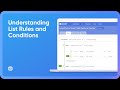
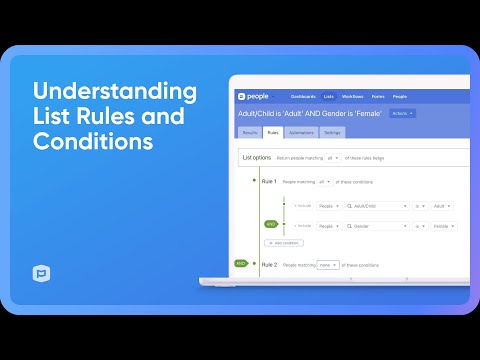
play Understanding List Rules and Conditions
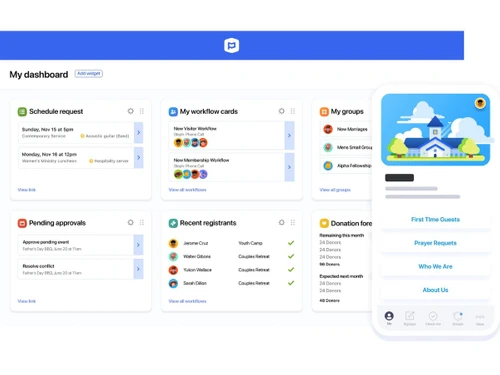
planning center-dashboard
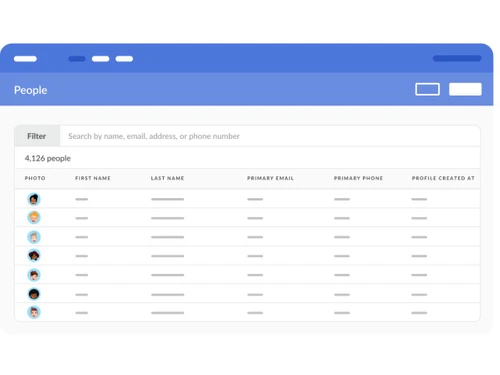
planning center-people

Planning Center

Brand: Planning Center

  • 4.2

  • 4 Ratings

A church management software that is designed to help churches manage people, events, services, and giving efficiently.

See More

Have you used Planning Center before?

Share your insights for better experience

Add a Review

Price Available on Request

Questions about pricing or customization? We’re here to help, just a click away.

100% Genuine
Products
Best Price
Guaranteed
Safe & Secure
Payment
  • Description

  • Pricing

  • Features

  • Specification

  • Review

  • Compare

  • Alternatives

  • FAQ

Planning Center Software Overview

What is Planning Center?

Planning Center is a cloud-based church management software that helps churches organize and manage their daily work easily.

It provides different tools like People for member records, Giving for online donations, and Services for worship and volunteer scheduling.

Church members can use the Church Center app or website to give donations, join groups, and register for events.

The Home dashboard helps church staff manage tasks and stay organized. It also allows churches to create and share content like sermon notes and event pages.

Planning Center is flexible, so churches can choose only the tools they need. It is suitable for small to large churches as it grows with their needs.

Why Choose Planning Center Software?

  • Church Management: Manages people, services, events, and giving in one platform.
  • Modular System: Subscribe only to the modules you need for flexibility and savings.
  • Cloud-Based Convenience: Access from anywhere with automatic updates and no installation.
  • User-Friendly Interface: Simple, intuitive design for easy onboarding.
  • Centralized People Database: Keeps all member information connected across ministries.
  • Powerful Scheduling Tools: Helps organize volunteers, teams, and staff efficiently.
  • Streamlined Service Planning: Plan worship services, songs, and orders of service easily.
  • Efficient Check-In System: Secure check-ins for kids, events, and attendance tracking.
  • Group Management Support: Manages small groups, attendance, communication, and events.
  • Online Giving & Donations: Supports mobile, web, and recurring digital giving.
  • Mobile Apps Available: Dedicated apps for services, check-ins, and giving.

Benefits of Planning Center Software

  • Custom Forms & Registrations: Build forms for events, sign-ups, and payments.
  • Volunteer Management: Automates volunteer scheduling, communication, and reminders.
  • Automated Workflows: Create follow-up sequences and automated tasks to save time.
  • Real-Time Reporting: Provides insights on attendance, giving, groups, and engagement.
  • Integrations with Other Tools: Connects with platforms like Zoom and Mailchimp.
  • Strong Data Security: Protects sensitive data with robust security standards.
  • Scalable for All Church Sizes: Works for small churches to large multi-campus setups.
  • Affordable Pricing: Transparent, flexible, and usage-based pricing.
  • Excellent Support & Resources: Offers tutorials, help articles, and responsive customer support.

Planning Center Pricing

Planning Center price details are available on request at Techjockey.com. The pricing model is based on different parameters, including extra features, deployment type, and the total number of users. For further queries related to the product, you can contact our product team and learn more about the pricing and offers.

Read more

Planning Center Company Details

Founded Year:  2006

At Planning Center, we build powerful, beautiful applications specifically for churches. Each of our apps has a dedicated team of designers and developers who are committed to refining and expanding their specific app in response to real customer needs.

Director/Founders Aaron Stewart, Jeff Berg
Company Size 101-500 Employees

Planning Center Pricing & Plans

Looking for The Right Pricing?

Share your requirements and get a plan built around your business.

  • Define your business needs
  • Get customised pricing
  • Choose features that fit your workflow

Price Available on Request

Get personalised Planning Center pricing that fits your needs. Our team will connect with you.

Planning Center Features

  • icon_check People Management
    Maintain a centralized member database with profiles, contact details, and engagement history.
  • icon_check Custom Fields
    Add personalized profile fields to track unique congregation data such as skills, interests, or roles.
  • icon_check Reporting & Analytics
    Generate detailed reports and insights on attendance, giving, volunteer activity, and engagement.
  • icon_check Workflow Automation
    Automate profile updates, email sequences, and task assignments triggered by member actions.
  • icon_check Form Builder
    Create customizable forms for registrations, sign-ups, or feedback, linked directly to member records.
  • icon_check Email Management
    Send targeted bulk emails to selected groups or lists for announcements and ministry updates.
  • icon_check Background Screening
    Conduct and manage secure volunteer background checks integrated with Checkr services.
  • icon_check Check-in/Check-out
    Track attendance with secure child check-in and volunteer sign-in across devices.
  • icon_check Print Management 
    Print custom labels with names, allergies, birthdays, or security codes for safe child pick-up.
  • icon_check Alerts & Notifications
    Send instant emergency texts to parents or guardians directly from check-in stations.
  • icon_check Template Management
    Save and reuse service templates to streamline planning for recurring worship events.
  • icon_check Media Management
    Store, organize, and attach documents, videos, and images to service plans or team resources.
  • icon_check Volunteer Scheduling
    Assign volunteers to roles, manage shifts, avoid conflicts, and confirm participation.
  • icon_check Availability Tracking
    Allow volunteers to block out unavailable dates to prevent scheduling conflicts.
  • icon_check Music library
    Maintain a searchable library of songs, chord charts, and audio files for worship preparation.
Planning Center Demo Video play icon

Get Planning Center Demo

Watch the demo video to explore key features, real workflows, and how the software fits your business needs.

Understand
Key Features
Personal
Demo Insights
Interactive
Demo Support

Planning Center Specifications

Supported Platforms
Ubuntu Ubuntu Windows Windows iOS iOS Android Android MacOS MacOS Linux Linux
Devices
Desktop Desktop Mobile Mobile Tablet Tablet iPad iPad
Deployment
Cloud-Based Cloud-Based
Suitable For
Religious Institutions
Business Specific
church
Business Size
Small Business Startups Medium Business Enterprises
Customer Support
Email Communities
Language
English
Integration
API Integration
Training Resources
Videos

Explore the Best Alternative Solutions Similar to Your Business Size and Needs

Planning Center Review

4.2

Out of 5

img

Overall Rating

Based on
4 Verified Ratings

Rating Breakdown

  • Features 4.3
  • Value for Money 4.2
  • Ease of Use 4.6
  • Customer Support 3.8

80% Recommend this Product

Add Review

Be the First to Review

This product has no reviews yet. Be the first to leave your feedback.

Add Review

Compare Planning Center With other Church Management Software

Products
Ratings
Pricing
Device Supported
Deployment
Supported Platforms
  • img

    Planning Center

  • 4.2

  • Price On Request

  • Desktop

    Mobile

  • Web based

    On Premises

  • Windows

    Mac OS

  • img

    Tithely

  • 4.3

  • Price On Request

  • Desktop

    Mobile

  • Web based

    On Premises

  • Windows

    Mac OS

  • img

    Pushpay

  • 4.1

  • Price On Request

  • Desktop

    Mobile

  • Web based

    On Premises

  • Windows

    Mac OS

  • img

    CHUMS

  • 3.9

  • Price On Request

  • Desktop

    Mobile

  • Web based

    On Premises

  • Windows

    Mac OS

  • img

    Aplos

  • 4.2

  • Price On Request

  • Desktop

    Mobile

  • Web based

    On Premises

  • Windows

    Mac OS

  • img

    Anedot

  • 4.2

  • Price On Request

  • Desktop

    Mobile

  • Web based

    On Premises

  • Windows

    Mac OS

  • img

    Vanco Faith

  • 4.4

  • Price On Request

  • Desktop

    Mobile

  • Web based

    On Premises

  • Windows

    Mac OS

  • img

    Churchteams

  • 4.5

  • Price On Request

  • Desktop

    Mobile

  • Web based

    On Premises

  • Windows

    Mac OS

  • img

    CristO

  • 4.4

  • Price On Request

  • Desktop

    Mobile

  • Web based

    On Premises

  • Windows

    Mac OS

  • img

    Tabernacle

  • Price On Request

  • Desktop

    Mobile

  • Web based

    On Premises

  • Windows

    Mac OS

(0) Product(s) selected

Planning Center Alternatives

See All Planning Center Alternatives

Starting Price:

$72 /Month

Available

Price on Request

Available

Price on Request

Available

Price on Request

How much does Planning Center cost?

Planning Center pricing information can be obtained on request through Techjockey.com.

Is there a mobile app available for Planning Center Software?

Yes, Planning Center offers an Android and iOS mobile app.

Which operating systems are compatible with Planning Center Software?

Planning Center works on Ubuntu, Linux, Windows, macOS, Android, and iOS devices.

Does Planning Center Software offer a free trial?

Yes, Planning Center provides a free 30-day trial for all modules.

How does Planning Center Software function?

Planning Center functions as a cloud-based church management system for organizing people, services, events, donations, and volunteer workflows.

Who uses Planning Center Software?

Churches of all sizes, ministries, leaders, and volunteers use the Planning Center.

Is a free demo available for Planning Center Software?

Yes, Planning Center offers demo access and walkthrough resources on its website.

Is Planning Center Software available for free?

No, Planning Center is not fully free, but it offers a 30-day free trial for all modules.

20,000+ Software Listed

Best Price Guranteed

Free Expert Consultation

2M+ Happy Customers

Terms and Condtions

close

Users with registered businesses can purchase goods from merchants on the platform to satisfy their business needs. Users are not permitted to utilize any products acquired through the platform for resale, advertising, business, or further distribution.

For each purchase made, users will receive a Tax Invoice (or 'GST invoice') that includes specific details such as:

  • the GSTIN of the user associated with their registered business, and

  • the specified Entity Name for their business.

It should be noted that not all products are eligible for GST Invoice. Only the products displayed by participating sellers with the 'GST-based Invoice Available' callout on the product description page would qualify.

Certain goods and services are not eligible to get a GST Invoice, including items with VAS, i.e., Value Added Services (e.g., Total Mobile Protection/Assured Buyback) and those involving an exchange offer at the time of purchase.

Users must ensure the accuracy of the GSTIN, and business entity name provided for the GST Invoice. Requests for corrections into GST Invoice would not be accommodated by Techjockey.com or any Seller, and any issues arising from user-provided information are the sole responsibility of users.

Techjockey.com is not liable for the GST Invoice or any associated input tax credit. To efficiently claim an input tax credit, users should select the registered place of business address as per the GST authority's data and follow the provisions of the GST Act and rules.

To claim an input tax credit, the delivery and billing addresses must match. Furthermore, input tax credits will not be granted if the delivery address and GSTIN on the invoice are from different states. In case of incorrect GST details provided during the order placement, the order will be canceled automatically.