linkedin
CristO logo
cristo denomination entry
cristo organise
cristo subscription

CristO

Brand: BoscoSoft

  • 4.4

  • 5 Ratings

A church management ERP solution designed to help churches and religious organizations of all sizes manage their administrative, financial, and spiritual activities.

See More

Have you used CristO before?

Share your insights for better experience

Add a Review

Price Available on Request

Questions about pricing or customization? We’re here to help, just a click away.

100% Genuine
Products
Best Price
Guaranteed
Safe & Secure
Payment
  • Description

  • Pricing

  • Features

  • Specification

  • Review

  • Compare

  • Alternatives

  • FAQ

CristO Software Overview

What is CristO?

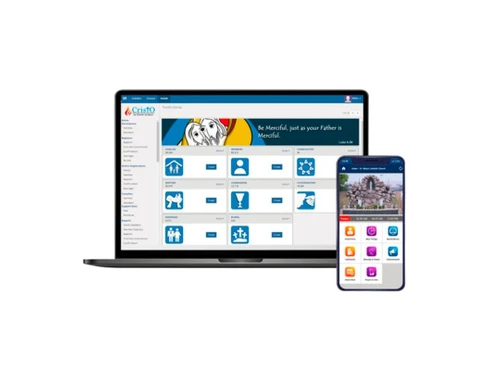
CristO is a church management software designed to help religious organizations efficiently manage their administrative tasks. It offers a variety of features, including member management, event scheduling, donation tracking, and communication tools, making it easier for churches to handle their operations.

With CristO, church leaders can keep track of congregational data, monitor attendance at services and events, and facilitate online giving for members. The software is user-friendly, allowing staff and volunteers to navigate it without extensive training. Additionally, CristO fosters better community engagement by streamlining communication between church leaders and members. Overall, it aims to enhance the organizational efficiency of churches while supporting their mission and community connections.

Why Choose CristO Software?

  • ERP Solution: It serves as a complete church management system, suitable for churches and parish homes of all sizes, streamlining various administrative tasks.
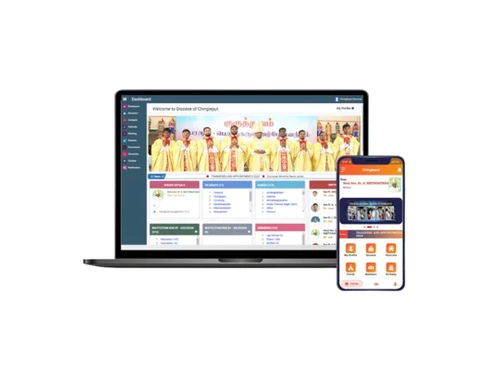
  • Flexible Access Levels: The software provides different access levels for diocesan leaders, parish priests, families, and individual members, allowing for efficient data management and oversight.
  • Digital Transformation: It facilitates the transition from traditional paper records to digital storage, enhancing data security and operational efficiency.
  • Enhanced Communication Tools: It includes integrated email and SMS gateways for effective communication with parishioners, ensuring important information is easily shared.
  • Financial Management Features: The software helps track donations and subscriptions, providing reminders for collections to aid in financial management.
  • User-Friendly Interface: Known for its ease of use, CristO is accessible for users with varying levels of technical expertise, making it easy to adopt.
  • Customizable Features: The platform offers customizable certificates and reports, catering to diverse administrative needs within different church contexts.
  • Positive User Feedback: It has received high ratings from users, indicating satisfaction with its functionality and support.
  • Event Management Capabilities: It allows churches to plan and manage events efficiently, helping to enhance community engagement.
  • Mobile Accessibility: It supports mobile access, enabling users to manage church activities and communicate with members on the go.

Benefits of CristO Software

  • Integrated Sacrament Management: It allows for the easy tracking and management of sacraments, ensuring that records are updated and accessible.
  • Volunteer Coordination: The software includes tools for managing volunteers, helping churches organize and assign tasks effectively.
  • Customizable User Roles: Users can define specific roles and permissions within the software, allowing for tailored access based on responsibilities.
  • Online Registration Capabilities: It supports online registration for events and activities, simplifying the process for members and reducing administrative burden.
  • Real-Time Data Updates: Changes made in the system are reflected in real-time, ensuring that all users have access to the most current information.
  • Analytics and Insights: The software provides analytical tools that help church leaders understand trends in attendance, donations, and member engagement.
  • Multi-Location Support: For churches with multiple locations, CristO can manage data across various sites, centralizing administration while maintaining local oversight.
  • Integration with Other Tools: It can be integrated with other software solutions, enhancing its functionality and allowing for a more comprehensive management experience.
  • Training and Support Resources: The platform offers training materials and customer support to help users maximize the software's capabilities.
  • Community Engagement Features: It includes tools designed to foster community involvement, such as surveys and feedback forms, enabling churches to better understand their members' needs.

Pricing of CristO

CristO price is available upon request at techjockey.com.

The pricing model is based on different parameters, including extra features, deployment type, and the total number of users. For further queries related to the product, you can contact our product team and learn more about the pricing and offers.

Read more

BoscoSoft Company Details

Founded Year:  2011

The company operates by proven professional practice of customer_focus in compliance with latest industry standards.

Director/Founders Fr. Don Bosco Lourdusamy SDB
Company Size 1-100 Employees

CristO Pricing & Plans

Looking for The Right Pricing?

Share your requirements and get a plan built around your business.

  • Define your business needs
  • Get customised pricing
  • Choose features that fit your workflow

Price Available on Request

Get personalised CristO pricing that fits your needs. Our team will connect with you.

CristO Features

  • icon_check Denomination Entry
    Supports diverse denominations like Catholic, Anglican, Lutheran, Pentecostal, and more.
  • icon_check Adaptable
    Customizable for Catholic Dioceses and Religious Congregations.
  • icon_check Family Information System
    A comprehensive system to manage family-related data within the church.
  • icon_check Organize
    Efficiently schedule and manage church activities, including liturgical services.
  • icon_check Subscription
    Maintain a subscription book with pledge tracking.
  • icon_check Digital Register
    Digitally record and manage sacramental records for easy access.
  • icon_check User Friendly
    Generate reports and certificates effortlessly with a user-friendly interface.
  • icon_check Tablets & Mobiles
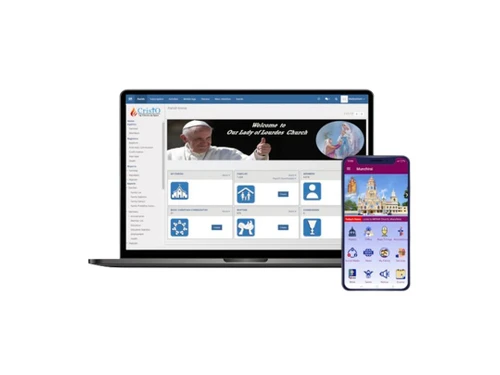
    Compatible with mobile devices and tablets for on-the-go usage.
  • icon_check User Interface
    Intuitive and easy-to-navigate user interface for all functionalities.

CristO Specifications

Supported Platforms
Windows Windows iOS iOS Android Android Linux Linux
Devices
Desktop Desktop Mobile Mobile Tablet Tablet
Deployment
Cloud-Based Cloud-Based Perpetual Perpetual
Suitable For
Church
Business Specific
church
Business Size
Small Business Startups Medium Business Enterprises
Customer Support
Phone Email Live Chat Communities Forums
Language
English
Integration
API Integration
Training Resources
In Person Live Online Webinars Documentation Videos

Explore the Best Alternative Solutions Similar to Your Business Size and Needs

CristO Review

4.4

Out of 5

img

Overall Rating

Based on
5 Verified Ratings

Rating Breakdown

  • Features 4.3
  • Value for Money 4.5
  • Ease of Use 4.6
  • Customer Support 4.5

88% Recommend this Product

Add Review

Be the First to Review

This product has no reviews yet. Be the first to leave your feedback.

Add Review

Compare CristO With other Church Management Software

Products
Ratings
Pricing
Device Supported
Deployment
Supported Platforms
  • img

    CristO

  • 4.4

  • Price On Request

  • Desktop

    Mobile

  • Web based

    On Premises

  • Windows

    Mac OS

  • img

    Tithely

  • 4.3

  • Price On Request

  • Desktop

    Mobile

  • Web based

    On Premises

  • Windows

    Mac OS

  • img

    Pushpay

  • 4.1

  • Price On Request

  • Desktop

    Mobile

  • Web based

    On Premises

  • Windows

    Mac OS

  • img

    CHUMS

  • 3.9

  • Price On Request

  • Desktop

    Mobile

  • Web based

    On Premises

  • Windows

    Mac OS

  • img

    Planning Center

  • 4.2

  • Price On Request

  • Desktop

    Mobile

  • Web based

    On Premises

  • Windows

    Mac OS

  • img

    Aplos

  • 4.2

  • Price On Request

  • Desktop

    Mobile

  • Web based

    On Premises

  • Windows

    Mac OS

  • img

    Anedot

  • 4.2

  • Price On Request

  • Desktop

    Mobile

  • Web based

    On Premises

  • Windows

    Mac OS

  • img

    Vanco Faith

  • 4.4

  • Price On Request

  • Desktop

    Mobile

  • Web based

    On Premises

  • Windows

    Mac OS

  • img

    Churchteams

  • 4.5

  • Price On Request

  • Desktop

    Mobile

  • Web based

    On Premises

  • Windows

    Mac OS

  • img

    Elvanto

  • 4.1

  • Price On Request

  • Desktop

    Mobile

  • Web based

    On Premises

  • Windows

    Mac OS

(2) Product(s) selected

CristO Alternatives

See All CristO Alternatives

Starting Price:

$72 /Month

Available

Price on Request

Available

Price on Request

Available

Price on Request

How much does CristO Software Cost?

CristO price in India is available upon request at techjockey.com.

Is there any CristO Software App?

Yes, CristO has an app available for Android and iOS.

Which operating system does CristO Software Support?

CristO supports Windows and Linux operating systems.

Does CristO offer a free trial?

Yes, CristO offers a free trial for users to explore its features.

How does CristO Software Work?

CristO software works by providing a comprehensive platform for church management, enabling users to manage member information, track donations, schedule events, and facilitate communication within the congregation.

Who are the potential users of CristO Software?

Potential users of CristO software include church leaders, administrators, parish staff, and volunteers involved in managing church operations.

Is there any free demo for CristO Software?

Yes, CristO provides a free demo upon request at techjockey.com.

Is CristO Software Free?

CristO software is not entirely free; while it offers a free trial, ongoing use requires a subscription after the trial period ends.

Is CristO suitable for small churches?

Yes, CristO is designed to accommodate churches of all sizes, including small congregations.

Are there any additional costs associated with using CristO?

While there is a free trial, ongoing use of CristO requires a subscription after the trial period ends.

20,000+ Software Listed

Best Price Guranteed

Free Expert Consultation

2M+ Happy Customers

Terms and Condtions

close

Users with registered businesses can purchase goods from merchants on the platform to satisfy their business needs. Users are not permitted to utilize any products acquired through the platform for resale, advertising, business, or further distribution.

For each purchase made, users will receive a Tax Invoice (or 'GST invoice') that includes specific details such as:

  • the GSTIN of the user associated with their registered business, and

  • the specified Entity Name for their business.

It should be noted that not all products are eligible for GST Invoice. Only the products displayed by participating sellers with the 'GST-based Invoice Available' callout on the product description page would qualify.

Certain goods and services are not eligible to get a GST Invoice, including items with VAS, i.e., Value Added Services (e.g., Total Mobile Protection/Assured Buyback) and those involving an exchange offer at the time of purchase.

Users must ensure the accuracy of the GSTIN, and business entity name provided for the GST Invoice. Requests for corrections into GST Invoice would not be accommodated by Techjockey.com or any Seller, and any issues arising from user-provided information are the sole responsibility of users.

Techjockey.com is not liable for the GST Invoice or any associated input tax credit. To efficiently claim an input tax credit, users should select the registered place of business address as per the GST authority's data and follow the provisions of the GST Act and rules.

To claim an input tax credit, the delivery and billing addresses must match. Furthermore, input tax credits will not be granted if the delivery address and GSTIN on the invoice are from different states. In case of incorrect GST details provided during the order placement, the order will be canceled automatically.