linkedin
Pushpay logo
play Pushpay November 2024 Product Release
pushpay-dashboard
pushpay-gifts

Pushpay

Brand: Pushpay

  • 4.1

  • 5 Ratings

A church management software that enables churches and faith-based organizations to manage donations, events, and community engagement efficiently.

See More

Have you used Pushpay before?

Share your insights for better experience

Add a Review

Price Available on Request

Questions about pricing or customization? We’re here to help, just a click away.

100% Genuine
Products
Best Price
Guaranteed
Safe & Secure
Payment
  • Description

  • Pricing

  • Features

  • Specification

  • Review

  • Compare

  • Alternatives

  • FAQ

Pushpay Software Overview

What is Pushpay?

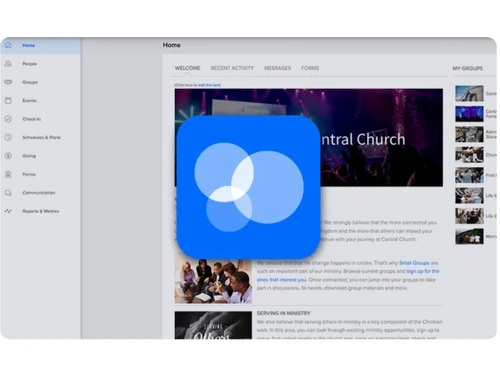
Pushpay is a simple church management software that helps churches collect donations, manage members, and stay connected with their community. It allows people to give money easily using mobile phones, websites, text messages, or cards.

Churches can also use it to manage attendance, events, volunteers, and member details in one place. Pushpay provides tools for sending messages, notifications, and updates to church members.

It comes with a mobile app where people can give, join groups, and access church content. The platform also shows reports and insights to track giving and engagement. It is designed to save time and make church work more organized and smooth for both staff and members.

Why Choose Pushpay Software?

  • Easy Online Giving: Pushpay makes it simple and convenient for donors to contribute online using either a web browser or mobile device, increasing participation and giving.
  • Mobile App Integration: The platform includes a dedicated mobile app that allows members to give, register for events, and stay engaged with church activities anytime, anywhere.
  • Recurring Donations: Donors can set up automated recurring contributions, ensuring consistent support and helping churches maintain reliable cash flow.
  • Church Management System: Pushpay provides a robust church management system that tracks member information, attendance, and engagement, making administrative tasks easier.
  • Event Management: Churches can easily create, schedule, promote, and manage events, ensuring smooth participation and better organization.
  • User-Friendly Interface: The platform is designed with simplicity in mind, allowing staff, volunteers, and donors to navigate and use all features without difficulty.
  • Donation Tracking: Real-time tracking of donations helps churches monitor contributions, identify trends, and make informed financial decisions.
  • Customizable Reports: Pushpay generates detailed reports that can be tailored to provide insights on finances, engagement, and donor behavior.

Benefits of Pushpay Software

  • Secure Payment Processing: The platform ensures that all payment transactions are fully secure, protecting sensitive donor information through encryption.
  • Automated Receipts: Donors receive instant digital receipts for every donation, improving transparency and record-keeping.
  • Communication Tools: Pushpay includes features to send newsletters, reminders, announcements, and updates directly to church members and donors.
  • Analytics Dashboard: The platform provides visual dashboards that offer insights into donor behavior, engagement levels, and overall giving trends.
  • Integration with Resi Media: Pushpay supports live-streaming and multimedia content, allowing churches to reach a broader audience through video and media integration.
  • Customizable Giving Pages: Churches can design and brand their giving pages to align with campaigns, events, or organizational identity, enhancing donor experience.
  • Flexible Payment Options: Donors can choose from multiple payment methods, including credit cards, ACH transfers, and mobile wallets, providing convenience.
  • Member Engagement Tools: Pushpay helps track volunteer activity, small group participation, and other forms of engagement to strengthen community involvement.
  • Data Import & Export: Existing church data can be easily imported into the platform or exported for analysis, making transitions and backups seamless.
  • Dedicated Support: Pushpay provides ongoing customer support and onboarding assistance to ensure smooth adoption and effective use of the platform.

Pushpay Pricing

Pushpay price details are available on request at Techjockey.com. The pricing model is based on different parameters, including extra features, deployment type, and the total number of users. For further queries related to the product, you can contact our product team and learn more about the pricing and offers.

Read more

Pushpay Company Details

Founded Year:  2011

Pushpay empowers mission-based organizations to engage their communities by bringing people together and fostering meaningful connections. Our innovative suite of products helps build cultures of generosity by streamlining donations, enhancing communication, and strengthening relationships.

Director/Founders Eliot Crowther
Company Size 101-500 Employees

Pushpay Pricing & Plans

Looking for The Right Pricing?

Share your requirements and get a plan built around your business.

  • Define your business needs
  • Get customised pricing
  • Choose features that fit your workflow

Price Available on Request

Get personalised Pushpay pricing that fits your needs. Our team will connect with you.

Pushpay Features

  • icon_check Donor Management
    Track donor journeys, manage relationships, and build generosity through detailed donor engagement tools.
  • icon_check Communication Management
    Deliver personalized, multi-channel messages that keep church members engaged and connected year-round.
  • icon_check Worship Planning
    Plan and organize worship services with editable templates, song libraries, and volunteer collaboration tools.
  • icon_check Reporting & Analytics
    Access visual dashboards and data insights to measure giving, track engagement, and guide ministry strategies.
  • icon_check Volunteer Scheduling
    Easily schedule volunteers, manage preferences, and send automated reminders to keep teams organized.
  • icon_check Event Management
    Create, promote, and manage church events with tools for registration, coordination, and follow-up outreach.
  • icon_check Content Management
    Centralize church media and resources in one hub to share messages, videos, and content with your community.
  • icon_check Online Giving
    Simplify generosity with digital giving options, including recurring donations, pledges, and mobile payments.
  • icon_check Live Streaming
    Broadcast worship services reliably with high-quality streaming tools that expand your reach beyond the walls.
  • icon_check Recurring Donations
    Allow members to set automated giving schedules, ensuring consistent and reliable financial contributions.
  • icon_check Third Party Integration
    Connect seamlessly with over 80 platforms and tools to enhance workflows, sync data, and improve efficiency.
  • icon_check Pledge Management
    Track donor pledges, align schedules with church systems, and encourage consistent long-term giving habits.
  • icon_check Custom Forms
    Design and deploy digital forms for registrations, surveys, and signups, with automated workflows and routing.
  • icon_check Duplicate Management
    Identify and merge duplicate donor or member records, ensuring clean, accurate, and consolidated data.
  • icon_check Push Notifications
    Send instant mobile alerts with text, images, or videos to keep your congregation engaged and informed.
Pushpay Demo Video play icon

Get Pushpay Demo

Watch the demo video to explore key features, real workflows, and how the software fits your business needs.

Understand
Key Features
Personal
Demo Insights
Interactive
Demo Support

Pushpay Specifications

Supported Platforms
Ubuntu Ubuntu Windows Windows iOS iOS Android Android MacOS MacOS Linux Linux
Devices
Desktop Desktop Mobile Mobile Tablet Tablet iPad iPad
Deployment
Cloud-Based Cloud-Based
Suitable For
Religious Institutions
Business Specific
church
Business Size
Small Business Startups Medium Business Enterprises
Customer Support
Email Communities
Language
English
Integration
API Integration
Training Resources
Webinars Videos

Explore the Best Alternative Solutions Similar to Your Business Size and Needs

Pushpay Review

4.1

Out of 5

img

Overall Rating

Based on
5 Verified Ratings

Rating Breakdown

  • Features 4
  • Value for Money 4.6
  • Ease of Use 4.1
  • Customer Support 4.1

80% Recommend this Product

Add Review

Be the First to Review

This product has no reviews yet. Be the first to leave your feedback.

Add Review

Compare Pushpay With other Church Management Software

Products
Ratings
Pricing
Device Supported
Deployment
Supported Platforms
  • img

    Pushpay

  • 4.1

  • Price On Request

  • Desktop

    Mobile

  • Web based

    On Premises

  • Windows

    Mac OS

  • img

    Tithely

  • 4.3

  • Price On Request

  • Desktop

    Mobile

  • Web based

    On Premises

  • Windows

    Mac OS

  • img

    CHUMS

  • 3.9

  • Price On Request

  • Desktop

    Mobile

  • Web based

    On Premises

  • Windows

    Mac OS

  • img

    Planning Center

  • 4.2

  • Price On Request

  • Desktop

    Mobile

  • Web based

    On Premises

  • Windows

    Mac OS

  • img

    Aplos

  • 4.2

  • Price On Request

  • Desktop

    Mobile

  • Web based

    On Premises

  • Windows

    Mac OS

  • img

    Anedot

  • 4.2

  • Price On Request

  • Desktop

    Mobile

  • Web based

    On Premises

  • Windows

    Mac OS

  • img

    Vanco Faith

  • 4.4

  • Price On Request

  • Desktop

    Mobile

  • Web based

    On Premises

  • Windows

    Mac OS

  • img

    Churchteams

  • 4.5

  • Price On Request

  • Desktop

    Mobile

  • Web based

    On Premises

  • Windows

    Mac OS

  • img

    CristO

  • 4.4

  • Price On Request

  • Desktop

    Mobile

  • Web based

    On Premises

  • Windows

    Mac OS

  • img

    Tabernacle

  • Price On Request

  • Desktop

    Mobile

  • Web based

    On Premises

  • Windows

    Mac OS

(0) Product(s) selected

Pushpay Alternatives

See All Pushpay Alternatives

Starting Price:

$72 /Month

Available

Price on Request

Available

Price on Request

How much does Pushpay cost?

Pushpay pricing information can be obtained on request at Techjockey.com.

Is there a mobile app available for Pushpay Software?

Yes, Pushpay offers a mobile app for both iOS and Android.

Which operating systems are compatible with Pushpay Software?

Pushpay works on Ubuntu, Linux, Windows, MacOS, iOS, and Android devices.

Does Pushpay Software offer a free trial?

Yes, Pushpay provides a free trial for new users.

How does Pushpay Software function?

Pushpay manages digital giving, church operations, events, and member engagement.

Who uses Pushpay Software?

Churches, ministries, and faith-based organizations use Pushpay.

Is a free demo available for Pushpay Software?

Yes, a free demo can be requested from Pushpay.

Is Pushpay Software available for free?

No, Pushpay is a paid platform, though trial/demo options are available.

20,000+ Software Listed

Best Price Guranteed

Free Expert Consultation

2M+ Happy Customers

Terms and Condtions

close

Users with registered businesses can purchase goods from merchants on the platform to satisfy their business needs. Users are not permitted to utilize any products acquired through the platform for resale, advertising, business, or further distribution.

For each purchase made, users will receive a Tax Invoice (or 'GST invoice') that includes specific details such as:

  • the GSTIN of the user associated with their registered business, and

  • the specified Entity Name for their business.

It should be noted that not all products are eligible for GST Invoice. Only the products displayed by participating sellers with the 'GST-based Invoice Available' callout on the product description page would qualify.

Certain goods and services are not eligible to get a GST Invoice, including items with VAS, i.e., Value Added Services (e.g., Total Mobile Protection/Assured Buyback) and those involving an exchange offer at the time of purchase.

Users must ensure the accuracy of the GSTIN, and business entity name provided for the GST Invoice. Requests for corrections into GST Invoice would not be accommodated by Techjockey.com or any Seller, and any issues arising from user-provided information are the sole responsibility of users.

Techjockey.com is not liable for the GST Invoice or any associated input tax credit. To efficiently claim an input tax credit, users should select the registered place of business address as per the GST authority's data and follow the provisions of the GST Act and rules.

To claim an input tax credit, the delivery and billing addresses must match. Furthermore, input tax credits will not be granted if the delivery address and GSTIN on the invoice are from different states. In case of incorrect GST details provided during the order placement, the order will be canceled automatically.