linkedin
QCommission logo
Commission Sales
Commission Calendar
qcommission Sales Organization

QCommission

Brand: CellarStone Inc

  • 4.5

  • 3 Ratings

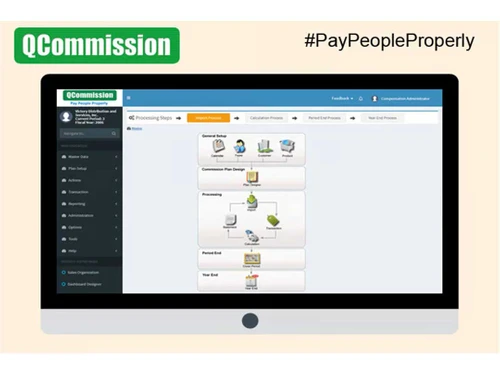
QCommission is a software that automates commission calculation and payment processes, helping businesses accurately track, calculate, and distribute sales commissions to employees.

See More

Have you used QCommission before?

Share your insights for better experience

Add a Review
Starting Price
$15

View plans

100% Genuine
Products
Best Price
Guaranteed
Safe & Secure
Payment
  • Description

  • Pricing

  • Features

  • Specification

  • Review

  • Compare

  • Alternatives

  • FAQ

Starting at $15

QCommission Software Overview

What is QCommission?

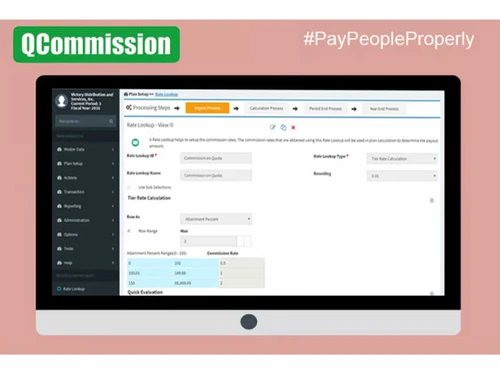
QCommission is a sales management software designed to simplify and automate the process of calculating sales commissions for businesses. It provides features such as commission tracking, quota management, and performance analytics, enabling companies to efficiently manage their sales compensation plans. QCommission supports multi-tiered and split commissions, allowing for flexible compensation structures tailored to different sales roles.

The software integrates seamlessly with various CRM and ERP systems, facilitating data import and export for streamlined operations. Users benefit from customizable reports and automated payment processing, reducing administrative workload and errors associated with manual calculations. QCommission also ensures compliance with industry standards like GDPR and ASC 606, enhancing data security and transparency. With its user-friendly interface, QCommission is suitable for businesses of all sizes looking to improve their commission management processes.

Why Choose QCommission Software?

  • Accuracy in Calculations: It automates commission calculations, significantly reducing errors associated with manual processes or spreadsheets.
  • Timely Payments: The software enables quick calculation and processing of commissions, ensuring that payments are made on time, which enhances sales team satisfaction.
  • Flexibility with Complex Plans: It supports a variety of commission structures, including tiered, quota-based, and split commissions, accommodating diverse business needs.
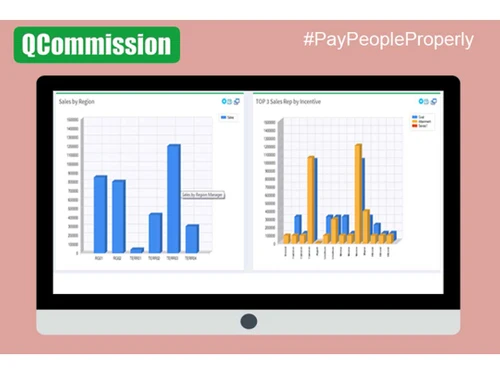
  • Comprehensive Reporting: It provides over 150 customizable reports and analytics, allowing businesses to analyze sales performance and commission data effectively.
  • Seamless Integration: The software integrates easily with popular CRM and ERP systems like Salesforce and QuickBooks, streamlining data management across platforms.
  • User-Friendly Interface: Designed for ease of use, it allows users to navigate the system without extensive training, facilitating quicker adoption.
  • Enhanced Trust and Transparency: Clear communication of commission statements and accessible data, fosters trust among sales teams regarding their compensation.
  • Compliance and Security: It meets various compliance standards (GDPR, SOC), ensuring data security and regulatory adherence.
  • Reduced Administrative Workload: Automating many aspects of commission management, frees up time for administrators to focus on more strategic tasks.
  • Scalability: The software is suitable for businesses of all sizes and can grow with the organization as its commission structures become more complex or as the team expands.

Benefits of QCommission Platform

  • Commission Calculation: Automates the calculation of various commission structures, including flat rates, tiered rates, and quota-based commissions.
  • Quota Management: Allows users to set and manage sales quotas for individual sales representatives or teams.
  • Sales Performance Tracking: Monitors and analyzes sales performance metrics to evaluate the effectiveness of sales strategies.
  • Multi-Tiered Commissions: Supports complex commission plans that can vary based on performance tiers or levels.
  • Split Commissions: Facilitates commission sharing among multiple sales representatives for a single sale, accommodating team-based selling.
  • Draws and Advances: Manages advances on commissions and allows for drawing adjustments against future earnings.
  • Customizable Reports: Generates a wide range of reports tailored to specific business needs, providing insights into sales and commission data.
  • Integration Capabilities: Integrates seamlessly with popular CRM and ERP systems such as Salesforce, QuickBooks, and Microsoft Dynamics for streamlined data management.
  • Automated Payments: Facilitates timely commission payments through automated processing, reducing administrative workload.
  • Dispute Management: Provides tools for resolving commission disputes efficiently, ensuring clarity and transparency in compensation processes.

Pricing of QCommission

QCommission price in India starts at $15 at techjockey.com.

The pricing model is based on different parameters, including extra features, deployment type, and the total number of users. For further queries related to the product, you can contact our product team and learn more about the pricing and offers.

Read more

CellarStone Inc Company Details

Founded Year:  2000

CellarStone Inc. specializes in Sales Commissions, Incentive Compensation software services, and Data Integration Solutions.

Director/Founders CellarStone
Company Size 1-100 Employees

QCommission Pricing & Plans

QCommission
Key Features
  • Sales Organization
  • Customer Management
  • Commission & Bonus Calculations
  • Reporting
  • Security & Auditing
  • Alerts & Notifications
  • Workflow
  • Issue/Case Management
Starting at $15
    • Licenses

      Licenses
      Licenses
    • Monthly

      Monthly
      Monthly

Key Features

  • Sales Organization

  • Customer Management

  • Commission & Bonus Calculations

  • Reporting

  • Security & Auditing

  • Alerts & Notifications

  • Workflow

  • Issue/Case Management

QCommission Features

  • icon_check Sales Organization
    Manages sales data, tracks performance, and organizes sales team structures.
  • icon_check Customer Management
    Allows tracking and managing customer information for better relationship management.
  • icon_check Commission Management
    Automates the calculation, tracking, and payment of commissions based on various plans.
  • icon_check Reporting
    Generates detailed reports on commissions, sales performance, and payouts for transparency.
  • icon_check Security & Auditing
    Ensures data security with audit trails to track changes and ensure compliance.
  • icon_check Alerts & Notifications
    Sends automated alerts and notifications for commission updates, approvals, and payments.
  • icon_check Automated Workflow Optimization
    Streamlines commission workflows, improving efficiency and reducing manual tasks.
  • icon_check Issue/Case Management
    Handles and resolves commission-related issues and cases to ensure smooth operations.

QCommission Specifications

Supported Platforms
Windows Windows MacOS MacOS Windows(Phone) Windows(Phone) Linux Linux
Devices
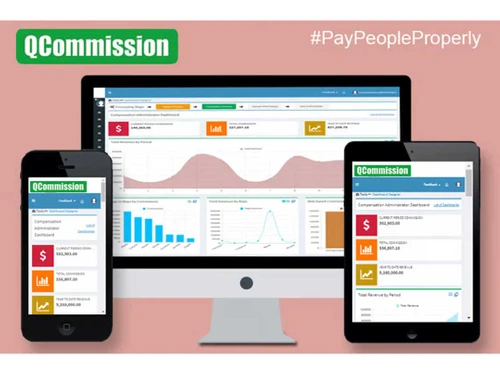
Desktop Desktop Mobile Mobile Tablet Tablet iPad iPad
Deployment
Cloud-Based Cloud-Based Perpetual Perpetual
Suitable For
All Industries
Business Specific
All Businesses
Business Size
Small Business Startups Medium Business Enterprises SMBs SMEs MSMBs MSMEs
Customer Support
Phone Email Communities Forums
Language
English
Training Resources
In Person Live Online Documentation
Compliance Regulation
GDPR

Explore the Best Alternative Solutions Similar to Your Business Size and Needs

QCommission Review

4.5

Out of 5

img

Overall Rating

Based on
3 Verified Ratings

Rating Breakdown

  • Features 4.6
  • Value for Money 4.8
  • Ease of Use 4.6
  • Customer Support 4.1

93% Recommend this Product

Add Review

Techjockey Trusted Reviews from Verified Users

No reviews are currently available for QCommission. Discover similar Sales Management Software reviews

  • SalesScreen

    4.2

    Whats great - Motivational leaderboards, easy tracking. read more

  • Sales Tracker

    5.0

    Whats great - User friendly interface with quick adoption for team . read more

  • Reckon Sales FMCG

    4.8

    Whats great - They suggested several good matches for the solution I was looking for and followed up. I will certainly use their service ag... read more

Compare QCommission With other Sales Management Software

Products
Ratings
Pricing
Device Supported
Deployment
Supported Platforms
  • img

    QCommission

  • 4.5

  • Price On Request

  • Desktop

    Mobile

  • Web based

    On Premises

  • Windows

    Mac OS

  • img

    Sales Tracker

  • 5

  • ₹ 225

  • Desktop

    Mobile

  • Web based

    On Premises

  • Windows

    Mac OS

  • img

    Intandemly ABS

  • 4.5

  • ₹ 2500

  • Desktop

    Mobile

  • Web based

    On Premises

  • Windows

    Mac OS

  • img

    Reckon Sales FMCG

  • 4.7

  • Price On Request

  • Desktop

    Mobile

  • Web based

    On Premises

  • Windows

    Mac OS

  • img

    Sweet Show

  • 4.3

  • Price On Request

  • Desktop

    Mobile

  • Web based

    On Premises

  • Windows

    Mac OS

  • img

    Notch

  • 4.4

  • Price On Request

  • Desktop

    Mobile

  • Web based

    On Premises

  • Windows

    Mac OS

  • img

    Outreach

  • 4.2

  • Price On Request

  • Desktop

    Mobile

  • Web based

    On Premises

  • Windows

    Mac OS

  • img

    Toutapp

  • 4.3

  • Price On Request

  • Desktop

    Mobile

  • Web based

    On Premises

  • Windows

    Mac OS

  • img

    Kixie

  • 4.2

  • Price On Request

  • Desktop

    Mobile

  • Web based

    On Premises

  • Windows

    Mac OS

  • img

    Seamless AI

  • 4.7

  • Price On Request

  • Desktop

    Mobile

  • Web based

    On Premises

  • Windows

    Mac OS

  • img

    WittyParrot

  • 4.1

  • Price On Request

  • Desktop

    Mobile

  • Web based

    On Premises

  • Windows

    Mac OS

(0) Product(s) selected

QCommission Alternatives

See All QCommission Alternatives

Starting Price:

€19 /Month

Starting Price:

€20 /Month

Available

Price on Request

Available

Price on Request

Available

Price on Request

Starting Price:

$1,299 /Month

Starting Price:

$15

Articles for QCommission

See All Related Articles

What is the cost of QCommission Software?

QCommission's pricing in India begins at $15 on techjockey.com.

Is there a QCommission Software app available?

The QCommission app is not available.

Which operating systems are supported by QCommission Software?

QCommission supports Windows, MacOS, Windows(Phone) and Linux.

Does QCommission Software offer a free trial?

QCommission does not provide a free trial.

How does QCommission Software function?

QCommission Software functions by automating the calculation of sales commissions based on various compensation plans, integrating with CRM and ERP systems to streamline data management and ensuring accurate, timely payments for sales representatives.

Who can benefit from using QCommission Software?

QCommission Software can benefit a wide range of users, including small to midsize businesses and larger enterprises looking to automate and accurately manage their sales commission calculations and compensation plans.

Is there a free demo available for QCommission Software?

Yes, QCommission offers a free demo.

Is QCommission Software available for free?

QCommission is not available for free.

Can QCommission handle complex commission structures?

Yes, QCommission supports various commission plans and structures, allowing for customization.

Does QCommission offer notifications for commission updates?

Yes, QCommission sends automated alerts and notifications for commission approvals and payments.

20,000+ Software Listed

Best Price Guranteed

Free Expert Consultation

2M+ Happy Customers

Terms and Condtions

close

Users with registered businesses can purchase goods from merchants on the platform to satisfy their business needs. Users are not permitted to utilize any products acquired through the platform for resale, advertising, business, or further distribution.

For each purchase made, users will receive a Tax Invoice (or 'GST invoice') that includes specific details such as:

  • the GSTIN of the user associated with their registered business, and

  • the specified Entity Name for their business.

It should be noted that not all products are eligible for GST Invoice. Only the products displayed by participating sellers with the 'GST-based Invoice Available' callout on the product description page would qualify.

Certain goods and services are not eligible to get a GST Invoice, including items with VAS, i.e., Value Added Services (e.g., Total Mobile Protection/Assured Buyback) and those involving an exchange offer at the time of purchase.

Users must ensure the accuracy of the GSTIN, and business entity name provided for the GST Invoice. Requests for corrections into GST Invoice would not be accommodated by Techjockey.com or any Seller, and any issues arising from user-provided information are the sole responsibility of users.

Techjockey.com is not liable for the GST Invoice or any associated input tax credit. To efficiently claim an input tax credit, users should select the registered place of business address as per the GST authority's data and follow the provisions of the GST Act and rules.

To claim an input tax credit, the delivery and billing addresses must match. Furthermore, input tax credits will not be granted if the delivery address and GSTIN on the invoice are from different states. In case of incorrect GST details provided during the order placement, the order will be canceled automatically.