USA
USA UAE
UAESmall Business
Designed for startups and growing businesses
See More


Brand: Dogu
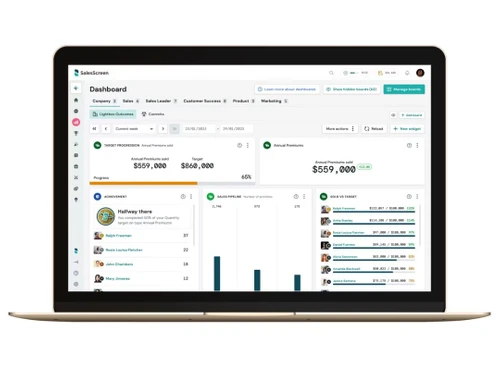
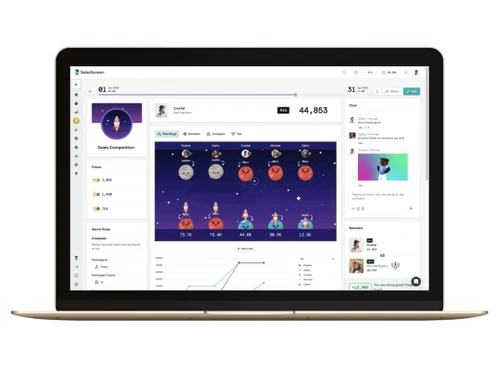
SalesScreen helps businesses boost sales performance through gamification, real-time leaderboards, and analytics. It enhances team motivation and tracks sales activities to improve productivity.
See MoreHave you used SalesScreen before?
Share your insights for better experience
Looking for The Right Pricing?
Share your requirements and get a plan built around your business.
Price Available on Request
Get personalised SalesScreen pricing that fits your needs. Our team will connect with you.
 Alerts & Notifications Activity Tracking Awards Management Contact Management Data Import/Export Leaderboard Visualizations Access Controls
  Windows
  Desktop
  Cloud-Based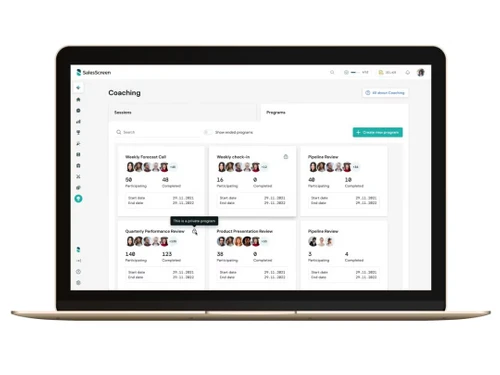
Small Business
Designed for startups and growing businesses
Medium Business
Built for business growth and flexibility
Enterprises
Designed for complex and large-scale business needs
4.1
Out of 5

Overall Rating
Based on
10 Verified Reviews
Rating Breakdown
86% Recommend this Product
Add ReviewSalesScreen receives positive feedback for its ability to motivate sales teams through gamification and engaging leaderboards, making the sales process more enjoyable. Users appreciate its ease of use and the way it fosters competition and teamwork. However, some common limitations include slow report loading times, a need for better customization options, and occasional bugs following updates. Additionally, users have noted that the mobile experience could be improved and that it may be pricey for smaller teams.

Mar 11, 2025
Techjockey Verified
“Makes Sales Performance Exciting”
I enjoy using SalesScreen because it makes sales fun! The leaderboards are a great way to stay motivated. I just wish the reports had more customization options.
Pros
Motivational leaderboards, easy tracking.
Cons
Limited customization in reports.
Reason to switch
SalesScreen had better competition-based features.
Mar 3, 2025
Techjockey Verified
“Perfect for Sales Teams”
SalesScreen is a great way to see how well I’m doing compared to my teammates. It’s fun and motivating, but sometimes reports take a little while to load.
Pros
Helps visualize progress, fun to use.
Cons
Can be slow when loading reports.
Reason to switch
SalesScreen had more engaging features.
Feb 27, 2025
Techjockey Verified
“Great for Sales Competitions”
We use SalesScreen to run sales competitions, and it’s fantastic! The custom challenges keep things fresh. Sometimes, though, new updates bring small bugs.
Pros
Custom challenges, easy to use.
Cons
Some minor bugs in updates.
Reason to switch
SalesScreen had better gamification.

SalesScreen
Price On Request
Desktop
Mobile
Web based
On Premises
Windows
Mac OS

Sales Tracker
₹ 225
Desktop
Mobile
Web based
On Premises
Windows
Mac OS

Intandemly ABS
₹ 2500
Desktop
Mobile
Web based
On Premises
Windows
Mac OS

Reckon Sales FMCG
Price On Request
Desktop
Mobile
Web based
On Premises
Windows
Mac OS

Outreach
Price On Request
Desktop
Mobile
Web based
On Premises
Windows
Mac OS

Kixie
Price On Request
Desktop
Mobile
Web based
On Premises
Windows
Mac OS

Sweet Show
Price On Request
Desktop
Mobile
Web based
On Premises
Windows
Mac OS

WittyParrot
Price On Request
Desktop
Mobile
Web based
On Premises
Windows
Mac OS

Notch
Price On Request
Desktop
Mobile
Web based
On Premises
Windows
Mac OS

Second Nature
Price On Request
Desktop
Mobile
Web based
On Premises
Windows
Mac OS

Toutapp
Price On Request
Desktop
Mobile
Web based
On Premises
Windows
Mac OS
(0) Product(s) selected
Available
Price on Request
Available
Price on Request
Starting Price:
€19 /Month
Starting Price:
€20 /Month
Available
Price on Request

Available
Price on Request

Starting Price:
$1,299 /Month

Available
Price on Request

Available
Price on Request

Starting Price:
$15

Starting Price:
$75
SalesScreen pricing details are available upon request at TechJockey.com.
No, SalesScreen does not offer a mobile app for on-the-go access.
SalesScreen supports Windows only.
Yes, SalesScreen offers a free trial for users to explore its features.
SalesScreen uses gamification, analytics, and CRM integration to boost sales performance.
Sales teams, managers, and businesses of all sizes can use SalesScreen.
Yes, SalesScreen provides a free demo upon request.
No, SalesScreen is a paid software, but it offers a free trial.
Yes, SalesScreen is a cloud-based platform, accessible from anywhere with an internet connection.
20,000+ Software Listed
Best Price Guranteed
Free Expert Consultation
2M+ Happy Customers
Terms and Condtions

Users with registered businesses can purchase goods from merchants on the platform to satisfy their business needs. Users are not permitted to utilize any products acquired through the platform for resale, advertising, business, or further distribution.
For each purchase made, users will receive a Tax Invoice (or 'GST invoice') that includes specific details such as:
the GSTIN of the user associated with their registered business, and
the specified Entity Name for their business.
It should be noted that not all products are eligible for GST Invoice. Only the products displayed by participating sellers with the 'GST-based Invoice Available' callout on the product description page would qualify.
Certain goods and services are not eligible to get a GST Invoice, including items with VAS, i.e., Value Added Services (e.g., Total Mobile Protection/Assured Buyback) and those involving an exchange offer at the time of purchase.
Users must ensure the accuracy of the GSTIN, and business entity name provided for the GST Invoice. Requests for corrections into GST Invoice would not be accommodated by Techjockey.com or any Seller, and any issues arising from user-provided information are the sole responsibility of users.
Techjockey.com is not liable for the GST Invoice or any associated input tax credit. To efficiently claim an input tax credit, users should select the registered place of business address as per the GST authority's data and follow the provisions of the GST Act and rules.
To claim an input tax credit, the delivery and billing addresses must match. Furthermore, input tax credits will not be granted if the delivery address and GSTIN on the invoice are from different states. In case of incorrect GST details provided during the order placement, the order will be canceled automatically.