 USA
USA UAE
UAESmall Business
Designed for startups and growing businesses

See More
.jpg?d=350)



Brand: Quest
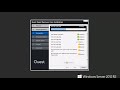
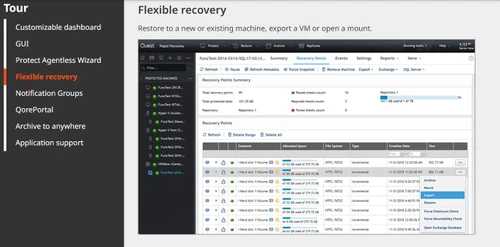
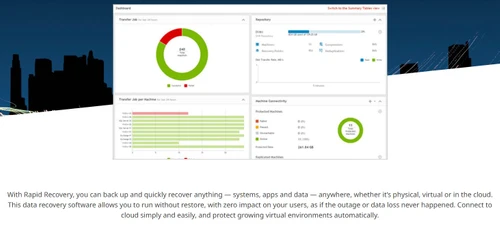
Get instant backup and recovery for physical, virtual & cloud systems with Rapid Recovery, your solution for demanding RTOs and RPOs with zero user impact.
See MoreHave you used Rapid Recovery before?
Share your insights for better experience
Brand: Quest
Founded Year: 1987
Quest
Looking for The Right Pricing?
Share your requirements and get a plan built around your business.
Price Available on Request
Get personalised Rapid Recovery pricing that fits your needs. Our team will connect with you.
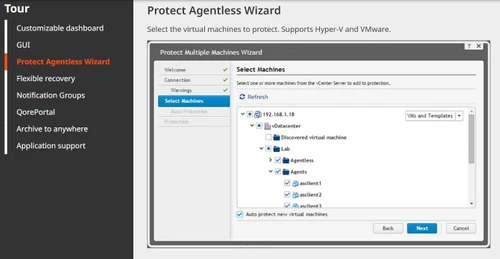
 Backup Data Theft Protection Device Protection Security Integration Cloud Archive Rapid Snap for Applications Rapid Snap for Virtual Live Recovery Verified Recovery Universal Recovery Virtual Standby Easy DRaaS in Azure • File Search-and-Restore Wizard Changed-block tracking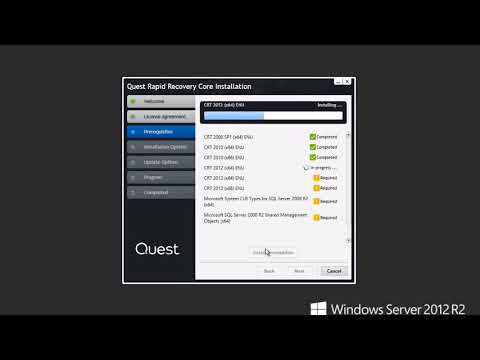

Watch the demo video to explore key features, real workflows, and how the software fits your business needs.
 Windows
  Desktop
  Perpetual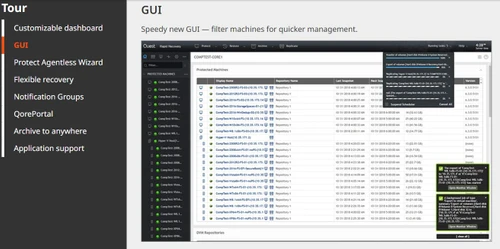
Small Business
Designed for startups and growing businesses
Medium Business
Built for business growth and flexibility
Enterprises
Designed for complex and large-scale business needs
4.5
Out of 5

Overall Rating
Based on
2 Verified Reviews
Rating Breakdown
100% Recommend this Product
Add Review
Mar 16, 2018
Techjockey Verified
“Great backup application - specially for active directory!”
Pros
Very few products can backup active directory and restore users, computers, etc within the global catalog. Even works with DNS entries - fantastic when accidental deletion happens
Cons
Confusing setup, takes knowledge of what your wanting to backup for it to actually work - support takes a little bit of time to respond back
Aug 25, 2018
Techjockey Verified
“Amazing product”
Pros
The sheer ease and speed in which you can restore a virtual machine is borderline magic and is something I've been dreaming about for years.
Cons
Nothing other than the fact that the product isn't free.
.jpg)
Rapid Recovery
Price On Request
Desktop
Mobile
Web based
On Premises
Windows
Mac OS

Avast Ultimate Business Security
₹ 399
Desktop
Mobile
Web based
On Premises
Windows
Mac OS

Singularity Complete
Price On Request
Desktop
Mobile
Web based
On Premises
Windows
Mac OS
Resecurity
Price On Request
Desktop
Mobile
Web based
On Premises
Windows
Mac OS

NVADR
Price On Request
Desktop
Mobile
Web based
On Premises
Windows
Mac OS
ThreatCop
Price On Request
Desktop
Mobile
Web based
On Premises
Windows
Mac OS

Kela
Price On Request
Desktop
Mobile
Web based
On Premises
Windows
Mac OS

IObit Advanced SystemCare
₹ 2393
Desktop
Mobile
Web based
On Premises
Windows
Mac OS
RiskAnalytics
Price On Request
Desktop
Mobile
Web based
On Premises
Windows
Mac OS
ImmuniWeb Discovery
Price On Request
Desktop
Mobile
Web based
On Premises
Windows
Mac OS

Avast Essential Business Security
₹ 2343
Desktop
Mobile
Web based
On Premises
Windows
Mac OS
(2) Product(s) selected
Available
Price on Request
Available
Price on Request
Available
Price on Request
Starting Price:
€14,995 /Year

Available
Price on Request

Available
Price on Request

Starting Price:
$34 /Year

Starting Price:
$3 /Month
Available
Price on Request

Available
Price on Request

Starting Price:
$49 /Month




No. This is a limitation of the Synology HW and SW. Please see What's the maximum file size Synology NAS supports (for DSM 3.0 and onward) for more information.
You may not. According to our STA, and EULA which must be accepted during the FTBU (First Time Boot Utility), the appliance may not be changed. In addition, the Dell limited hardware warranty, limits the hardware to an as is state, and no changes may be made without authorization. Unauthorized changes may prevent Support from working on service request or warranty related issues until the appliance is reverted to the original factory delivered configuration (hardware and operating system). Current authorized changes to DL series appliances are limited to additions of Quest sold MD trays for storage and Quest sold RAM for some DL series appliances.
Yes. Rapid Recovery can restore virtual machines using any restore method available to Nutanix using the HyperV or VMware hypervisors.
Yes. Rapid Recovery supports backup of Virtual Machines with supported operating systems using the agent software. Agentless backup is fully supported for Hyper-V and VMware only. For VMware agentless backup, Rapid Recovery will incorrectly show disk usage due to a limitation between VMware and NFS datastores. More info about the limitation can be found here
Windows Server 2016 is now supported. It has been tested with release 6.1 of Rapid Recovery and verified to be compatible with the software.
Rapid Recovery now offers support for SQL Server 2016. It has been tested with release 6.1 of Rapid Recovery and verified to be compatible with the software.
Quest Rapid Recovery is a data protection software that provides fast backup and instant recovery for systems, applications, and data across physical, virtual, and cloud environments.
Rapid Recovery is used for comprehensive data protection, including the backup, archiving, and instant recovery of entire systems to meet demanding recovery time objectives (RTOs) and recovery point objectives (RPOs).
Rapid Recovery works by taking frequent, image-based snapshots of your systems, as often as every five minutes, and tracking only the changed data blocks to accelerate the backup process.
Rapid Recovery is the next generation of the software formerly known as AppAssure, offering enhanced features and capabilities after being rebranded and evolved by Quest.
Rapid Recovery protects cloud archives from ransomware using cloud object locking, which makes the backup data immutable so it cannot be altered or deleted by malicious actors.
Rapid Recovery reduces backup storage requirements and associated costs by up to 95 percent through its built-in data compression and global deduplication technologies.
Yes, you can monitor and manage your entire backup and recovery environment across multiple sites from a single, centralized cloud-based management console.
No, Rapid Recovery is a single solution that protects both physical and virtual environments, including agentless backup for applications residing on your virtual machines.
Rapid Recovery price is available on request at Techjockey.com.
Rapid Recovery is ideal for IT administrators, system architects and managed service providers across industries who need to protect physical servers, virtual machines and cloud workloads with minimal downtime. It suits businesses of all sizes, from small enterprises to large organizations running Microsoft, VMware and Linux environments who need fast, reliable backup and disaster recovery.
20,000+ Software Listed
Best Price Guranteed
Free Expert Consultation
2M+ Happy Customers
Terms and Condtions

Users with registered businesses can purchase goods from merchants on the platform to satisfy their business needs. Users are not permitted to utilize any products acquired through the platform for resale, advertising, business, or further distribution.
For each purchase made, users will receive a Tax Invoice (or 'GST invoice') that includes specific details such as:
the GSTIN of the user associated with their registered business, and
the specified Entity Name for their business.
It should be noted that not all products are eligible for GST Invoice. Only the products displayed by participating sellers with the 'GST-based Invoice Available' callout on the product description page would qualify.
Certain goods and services are not eligible to get a GST Invoice, including items with VAS, i.e., Value Added Services (e.g., Total Mobile Protection/Assured Buyback) and those involving an exchange offer at the time of purchase.
Users must ensure the accuracy of the GSTIN, and business entity name provided for the GST Invoice. Requests for corrections into GST Invoice would not be accommodated by Techjockey.com or any Seller, and any issues arising from user-provided information are the sole responsibility of users.
Techjockey.com is not liable for the GST Invoice or any associated input tax credit. To efficiently claim an input tax credit, users should select the registered place of business address as per the GST authority's data and follow the provisions of the GST Act and rules.
To claim an input tax credit, the delivery and billing addresses must match. Furthermore, input tax credits will not be granted if the delivery address and GSTIN on the invoice are from different states. In case of incorrect GST details provided during the order placement, the order will be canceled automatically.



