USA
USA UAE
UAE
InVideo AI
Whats great - InVideo has a massive collection of templates and assets, including premium images and footage from Shutterstock and iStock. ... read more



Brand: Reelmind
Reelmind AI is an AI-powered platform that automatically creates videos from text or images with built-in editing, voiceovers, and effects.
See MoreHave you used Reelmind AI before?
Share your insights for better experience
Core Features
 Text-to-Video Generation AI Audio Enhancement Voiceover Generation AI Scene Detection Auto Color Correction Background Removal Object Detection Subtitle Generation Template-Based Editing
 Advanced Features
AI Motion Tracking Dynamic Background Replacement Emotion Recognition Scene Reframing Video Summarization AI Avatar Generation AI Voice Cloning Deepfake Detection Editing Tools & Effects
Basic Editing Tools Visual and Sound Effects Keyframe Animations Transition Effects Overlays and Animations Split-Screen Effect Speed Adjustments Video Stabilization Multi-Layered Editing Chroma Key Support Real-Time Previews Collaboration & Workflow
Cloud Storage Project Sharing Export Options Batch Processing Real-Time Collaboration Direct Social Media Sharing Performance Insights Role-Based Access Control (RBAC) Version Control Integration & Automation
Third Party Integrations Automated Video Creation & Scheduling Social Media Integration API Publishing Others
Nolan AI Director Multi Image Fusion Style Transfer SEO Content Automation Model Training and Publishing  Ubuntu
  Windows
  MacOS
MacOS  Linux
Linux  Desktop
  Cloud-Based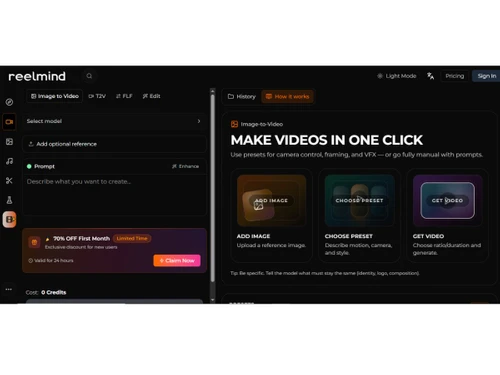

Techjockey Trusted Reviews from Verified Users
No reviews are currently available for Reelmind AI. Discover similar AI Video Generators reviews
InVideo AI
Whats great - InVideo has a massive collection of templates and assets, including premium images and footage from Shutterstock and iStock. ... read more

Fliki
Whats great - Fliki is very easy to learn and user-friendly. Editing is easy and it makes the process enjoyable. read more

Pictory AI
Whats great - We can easily convert blog post into video with minimal efforts and makes video making task a calk walk read more
Reelmind AI pricing starts at USD 12, as listed on techjockey.com.
Reelmind AI does not currently have a dedicated mobile application.
Reelmind AI is a web-based platform compatible with Ubuntu, Windows, macOS, and Linux systems.
Yes, Reelmind AI provides a free trial.
Reelmind AI uses artificial intelligence to transform text, images, or ideas into videos with automated scripts, visuals, and voiceovers.
Reelmind AI is used by content creators, marketers, educators, and businesses.
Yes, users can access a demo or trial through the official website.
Yes, Reelmind AI is available for free.
20,000+ Software Listed
Best Price Guranteed
Free Expert Consultation
2M+ Happy Customers
Terms and Condtions

Users with registered businesses can purchase goods from merchants on the platform to satisfy their business needs. Users are not permitted to utilize any products acquired through the platform for resale, advertising, business, or further distribution.
For each purchase made, users will receive a Tax Invoice (or 'GST invoice') that includes specific details such as:
the GSTIN of the user associated with their registered business, and
the specified Entity Name for their business.
It should be noted that not all products are eligible for GST Invoice. Only the products displayed by participating sellers with the 'GST-based Invoice Available' callout on the product description page would qualify.
Certain goods and services are not eligible to get a GST Invoice, including items with VAS, i.e., Value Added Services (e.g., Total Mobile Protection/Assured Buyback) and those involving an exchange offer at the time of purchase.
Users must ensure the accuracy of the GSTIN, and business entity name provided for the GST Invoice. Requests for corrections into GST Invoice would not be accommodated by Techjockey.com or any Seller, and any issues arising from user-provided information are the sole responsibility of users.
Techjockey.com is not liable for the GST Invoice or any associated input tax credit. To efficiently claim an input tax credit, users should select the registered place of business address as per the GST authority's data and follow the provisions of the GST Act and rules.
To claim an input tax credit, the delivery and billing addresses must match. Furthermore, input tax credits will not be granted if the delivery address and GSTIN on the invoice are from different states. In case of incorrect GST details provided during the order placement, the order will be canceled automatically.