linkedin
Salesforce Revenue Cloud logo
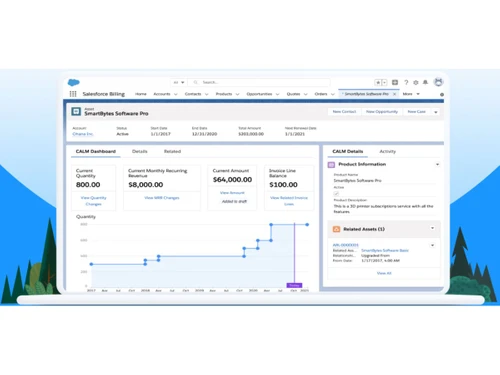
Salesforce Revenue Cloud-dashboard
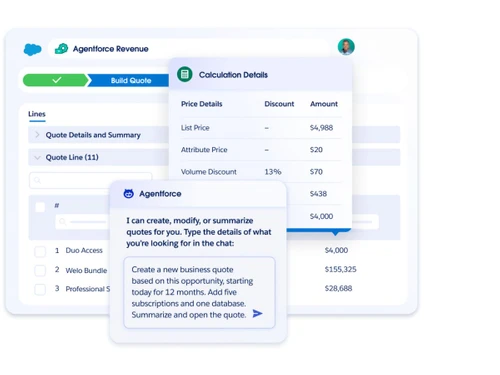
Salesforce Revenue Cloud-agentforce
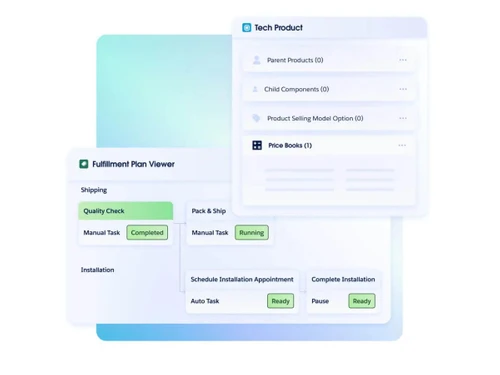
Salesforce Revenue Cloud-order automation

Salesforce Revenue Cloud

Brand: Salesforce

  • 4.4

  • 5 Ratings

Have you used Salesforce Revenue Cloud before?

Share your insights for better experience

Add a Review
Starting Price
$150

View plans

100% Genuine
Products
Best Price
Guaranteed
Safe & Secure
Payment
  • Description

  • Pricing

  • Features

  • Specification

  • Review

Starting at $150

Salesforce Revenue Cloud Software Overview

Salesforce Company Details

Founded Year:  1999

We're Salesforce, the customer company. CRM + Data + AI + Trust.

Director/Founders Adam Evans, Halsey Minor, Marc Benioff, Max Comparetto, Parker Harris
Company Size 1000+ Employees

Salesforce Revenue Cloud Pricing & Plans

Growth(Billed annually)
Starting at $150
    • Users

      Users
      Users
    • Monthly

      Monthly
      Monthly

Key Features

  • Quoting & Configurator

  • Order Capture

  • Subscriptions

  • Product Catalogue & Price Management

  • Order and Asset Lifecycle Management

Advanced(Billed annually)
Starting at $200
    • Users

      Users
      Users
    • Monthly

      Monthly
      Monthly

Key Features

  • Everything in Growth

  • Contracts & Orders

  • Consumption & Invoicing

  • Product Catalogue & Price Management

  • Order and Asset Lifecycle Management

Salesforce Revenue Cloud Features

  • icon_check Catalog Management
    Centralized product and service catalog with attributes, bundles, and versions to ensure consistent selling across teams.
  • icon_check Pricing Management
    Rule-based pricing, volume discounts, and approvals ensure accurate, compliant pricing across all sales channels.
  • icon_check Configure Price & Quote (CPQ)
    Guided selling tools help reps configure complex products and generate accurate quotes faster with fewer errors.
  • icon_check Quote Management
    Create, revise, and track customer quotes with version control, approvals, and real-time pricing validation.
  • icon_check Contract Lifecycle Management
    Automates contract creation, negotiation, approvals, renewals, and storage within a single CRM workflow.
  • icon_check Order Management
    Converts approved quotes into orders while managing fulfillment, amendments, cancellations, and order tracking.
  • icon_check Subscription Management
    Supports recurring, usage-based, and hybrid billing models with upgrades, downgrades, and renewals.
  • icon_check Billing & Invoicing
    Automates invoice generation, billing schedules, and proration to reduce manual effort and billing errors.
  • icon_check Revenue Recognition Support
    Provides structured revenue data to support compliance with accounting standards like ASC 606 and IFRS.
  • icon_check Amendments & Renewals
    Handles mid-term contract changes, renewals, and expansions while maintaining accurate revenue records.
  • icon_check Workflow Automation
    Configurable approval flows for pricing, discounts, and contracts ensure governance without slowing deals.
  • icon_check Sales Analysis
    Dashboards and reports track ARR, pipeline health, billing status, and revenue performance in real time.
  • icon_check AI-Assisted Selling
    AI agents assist with quoting, renewals, and invoice explanations to improve speed and sales productivity.
  • icon_check CRM & ERP Integrations
    Native integrations connect sales, finance, and operations systems to ensure a single source of revenue truth.
  • icon_check Role-Based Access Control (RBAC)
    Granular permissions ensure users see and manage only relevant revenue, pricing, and contract data.

Salesforce Revenue Cloud Specifications

Supported Platforms
Windows Windows MacOS MacOS Linux Linux
Devices
Desktop Desktop
Deployment
Cloud-Based Cloud-Based
Suitable For
All Industries
Business Specific
All Businesses
Business Size
Small Business Startups Medium Business Enterprises
Customer Support
Email Communities
Language
English
Training Resources
Videos
AI Features
AI Integrated

Salesforce Revenue Cloud Review

4.4

Out of 5

img

Overall Rating

Based on
5 Verified Ratings

Rating Breakdown

  • Features 4.4
  • Value for Money 4.4
  • Ease of Use 4.9
  • Customer Support 4.2

80% Recommend this Product

Add Review

Be the First to Review

This product has no reviews yet. Be the first to leave your feedback.

Add Review

Articles for Salesforce Revenue Cloud

See All Related Articles

20,000+ Software Listed

Best Price Guranteed

Free Expert Consultation

2M+ Happy Customers

Terms and Condtions

close

Users with registered businesses can purchase goods from merchants on the platform to satisfy their business needs. Users are not permitted to utilize any products acquired through the platform for resale, advertising, business, or further distribution.

For each purchase made, users will receive a Tax Invoice (or 'GST invoice') that includes specific details such as:

  • the GSTIN of the user associated with their registered business, and

  • the specified Entity Name for their business.

It should be noted that not all products are eligible for GST Invoice. Only the products displayed by participating sellers with the 'GST-based Invoice Available' callout on the product description page would qualify.

Certain goods and services are not eligible to get a GST Invoice, including items with VAS, i.e., Value Added Services (e.g., Total Mobile Protection/Assured Buyback) and those involving an exchange offer at the time of purchase.

Users must ensure the accuracy of the GSTIN, and business entity name provided for the GST Invoice. Requests for corrections into GST Invoice would not be accommodated by Techjockey.com or any Seller, and any issues arising from user-provided information are the sole responsibility of users.

Techjockey.com is not liable for the GST Invoice or any associated input tax credit. To efficiently claim an input tax credit, users should select the registered place of business address as per the GST authority's data and follow the provisions of the GST Act and rules.

To claim an input tax credit, the delivery and billing addresses must match. Furthermore, input tax credits will not be granted if the delivery address and GSTIN on the invoice are from different states. In case of incorrect GST details provided during the order placement, the order will be canceled automatically.