 USA
USA UAE
UAESmall Business
Designed for startups and growing businesses

See More


Brand: Sanity
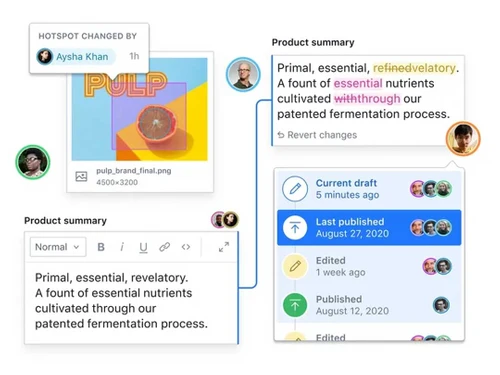
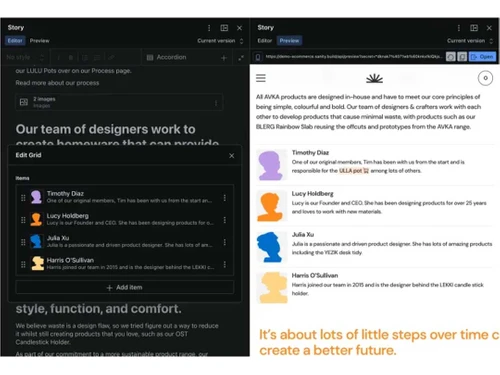
Sanity CMS is a flexible, headless content management system that supports real-time collaboration, customizable editing, and AI assistance. Ideal for developers and content teams, it offers robust localization, mobile responsiveness, and scheduled publishing, enhancing productivity.
See MoreHave you used Sanity Studio before?
Share your insights for better experience
Brand: Sanity
Founded Year: 2018
The Sanity Composable Content Cloud is the modern content management system chosen by industry-leading companies like PUMA, AT&T, Burger King, Tata, and Figma.
 Content Scheduling Workflow Management Plugins and Extensions Document Management Real-Time Collaboration Content Blocks
  Windows
  Desktop
  Cloud-Based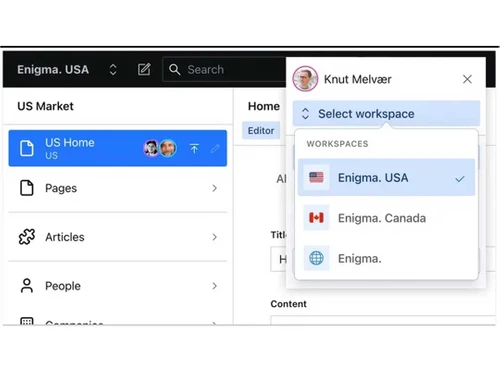

Small Business
Designed for startups and growing businesses
Medium Business
Built for business growth and flexibility
Enterprises
Designed for complex and large-scale business needs
4.3
Out of 5

Overall Rating
Based on
10 Verified Reviews
Rating Breakdown
87% Recommend this Product
Add ReviewUsers generally appreciate Sanity Studio for its real-time collaboration and content management capabilities, highlighting its effectiveness for team projects and structured content creation. Many find the interface user-friendly and the software reliable, especially for small to medium-sized teams. However, common limitations include a lack of offline support, a steep learning curve for advanced features, and limited pre-made templates. Some users also mention occasional bugs and performance issues when integrating with other applications, which can hinder productivity.
Pros
"It works well with other applications I use, and I like how versatile the workflows are. The processes can be modified to suit many tasks. This keeps everything in order."
"I adore the team-friendly features and real-time updates that greatly simplify communication. It readily keeps my team in sync and increases our productivity."
"I can design and develop my CMS as I see fit, which allows me to customize material for my target audience."
Cons
"Takes time to get used to the feature sets and learn them all and requires more manual inputs rather than automated actions."
"There are very limited pre-made templates and external plugins for multi-language support."
"Gets buggy and occasionally lags when using it with other applications."

Nov 17, 2024
Techjockey Verified
“Real-Time Preview and Collaboration Make it Stand Out”
Offers top-notch real-time preview and collaboration features that are ideal for creating dynamic content.
Pros
It is useful and easy to understand, and the real-time preview option is amazing. I can observe the changes right away, which saves me time and facilitates prompt decision-making. Working together on drafts is easy!
Cons
It is a basic editor with a slow content studio. I did not like the fact that it had limited support for localization and authentication.
Reason to switch
I was in search of a CMS with customization and open-source flexibility. I made the decision to switch to Sanity Studios for its real-time preview options.
Nov 17, 2024
Techjockey Verified
“High-Level Performance”
The built-in capabilities of the software address a lot of our needs, and it operates smoothly with little to no lag. It would be beneficial if they added an offline mode for instant use.
Pros
I like its speed and the variety of useful functions it provides. The lack of latency is good for productivity. The integrated tools are useful and adequately meet my needs and specifications.
Cons
Limited offline support and Sanity’s Portable Text was not easy to use at first.
Reason to switch
ButterCMS performance and tool integration was not the best option for me. Other online reviews led me to use Sanity Studio because of its high-level performance.
Nov 18, 2024
Techjockey Verified
“Perfect CMS for Structured Content Creation”
Sanity Studios is good at overseeing content and makes building structured content simple which is ideal for content strategies.
Pros
It’s useful for managing intricate tasks, in my opinion, and the interface is tidy. It makes handling several components of complicated content easier. My work is easy to manage because of this clarity.
Cons
Takes time to get used to the feature sets and learn them all and requires more manual inputs rather than automated actions.
Reason to switch
Prismic did not have an advanced set of tools to handle and support structured content as well as Sanity Studios.

Sanity Studio
Price On Request
Desktop
Mobile
Web based
On Premises
Windows
Mac OS
Grav
Price On Request
Desktop
Mobile
Web based
On Premises
Windows
Mac OS

OpenText Web CMS
Price On Request
Desktop
Mobile
Web based
On Premises
Windows
Mac OS

Wix
Price On Request
Desktop
Mobile
Web based
On Premises
Windows
Mac OS
Cosmic AI
Price On Request
Desktop
Mobile
Web based
On Premises
Windows
Mac OS

Scrintal
Price On Request
Desktop
Mobile
Web based
On Premises
Windows
Mac OS

Contentful
Price On Request
Desktop
Mobile
Web based
On Premises
Windows
Mac OS

Wordable
Price On Request
Desktop
Mobile
Web based
On Premises
Windows
Mac OS

Bear CMS
Price On Request
Desktop
Mobile
Web based
On Premises
Windows
Mac OS

Genei
Price On Request
Desktop
Mobile
Web based
On Premises
Windows
Mac OS

Scalenut
Price On Request
Desktop
Mobile
Web based
On Premises
Windows
Mac OS
(0) Product(s) selected
Available
Price on Request
Available
Price on Request
Starting Price:
$99 /Month
Starting Price:
$5 /Month

Starting Price:
$149

Starting Price:
€29

Starting Price:
$5

Starting Price:
$99

Starting Price:
$170

Starting Price:
$18 /Month

Available
Price on Request



A headless CMS like Sanity separates the part where you create content from the part where it’s shown to people. This means you can use the same content on different platforms, like websites, apps, and more, without having to create it all over again.
Yes! Sanity CMS can easily work with your current website or app. It supports different coding frameworks like React, Vue, and others, so you can connect Sanity to what you already have.
Sanity lets multiple people work on the same content at the same time. You can see changes as they happen, and if someone makes a mistake, you can go back to an earlier version. It also makes sure that people don’t accidentally overwrite each other’s work.
Sanity CMS is very flexible. You can change how it looks and works to fit your needs. Developers can create custom forms, tools, and even add new features to make it work just the way you want.
Sanity CMS offers plenty of help, including easy-to-follow guides, a community where you can ask questions, and direct support if you’re on a business plan. There are also lots of resources to help you learn how to use it better.
20,000+ Software Listed
Best Price Guranteed
Free Expert Consultation
2M+ Happy Customers
Terms and Condtions

Users with registered businesses can purchase goods from merchants on the platform to satisfy their business needs. Users are not permitted to utilize any products acquired through the platform for resale, advertising, business, or further distribution.
For each purchase made, users will receive a Tax Invoice (or 'GST invoice') that includes specific details such as:
the GSTIN of the user associated with their registered business, and
the specified Entity Name for their business.
It should be noted that not all products are eligible for GST Invoice. Only the products displayed by participating sellers with the 'GST-based Invoice Available' callout on the product description page would qualify.
Certain goods and services are not eligible to get a GST Invoice, including items with VAS, i.e., Value Added Services (e.g., Total Mobile Protection/Assured Buyback) and those involving an exchange offer at the time of purchase.
Users must ensure the accuracy of the GSTIN, and business entity name provided for the GST Invoice. Requests for corrections into GST Invoice would not be accommodated by Techjockey.com or any Seller, and any issues arising from user-provided information are the sole responsibility of users.
Techjockey.com is not liable for the GST Invoice or any associated input tax credit. To efficiently claim an input tax credit, users should select the registered place of business address as per the GST authority's data and follow the provisions of the GST Act and rules.
To claim an input tax credit, the delivery and billing addresses must match. Furthermore, input tax credits will not be granted if the delivery address and GSTIN on the invoice are from different states. In case of incorrect GST details provided during the order placement, the order will be canceled automatically.



