linkedin
Sender logo
play Introduce to Email Campaign Creation with Sender - Sender Demo
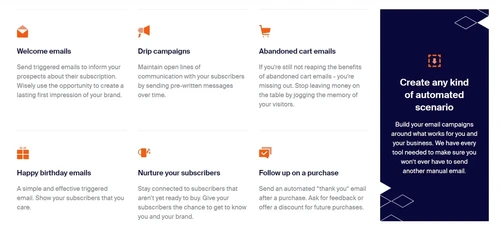
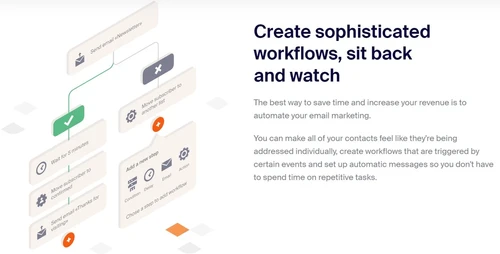
sender create email scenario
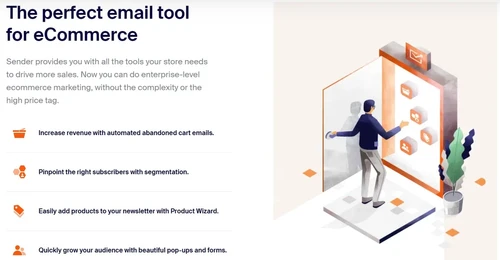
sender product wizard

Sender

Brand: Sender.net

  • 4.4

  • 4 Ratings

Boost your email campaigns with Sender's powerful suite of tools, including customizable templates, automated workflows, detailed analytics, and advanced segmentation.

See More

Have you used Sender before?

Share your insights for better experience

Add a Review
Starting Price
$19

View plans

100% Genuine
Products
Best Price
Guaranteed
Safe & Secure
Payment
  • Description

  • Pricing

  • Features

  • Specification

  • Review

  • Compare

  • Alternatives

  • FAQ

Starting at $19

Sender Software Overview

What is Sender Software?

Sender.net is an online platform that facilitates email marketing automation. This web-based platform allows organizations and people to make, send, and track email marketing campaigns. It makes it simple and quick to stay in touch with your clients and grow your business at a lower cost. Using it, you can instantly create and send beautiful, branded, appealing emails, email newsletters, and marketing messages.

Sender has a vast library comprising professionally designed templates that users can use and customize. Users can create their distinctive designs in minutes without knowing how to code. Email blocks can be moved around by dragging, dropping, and customizing the templates. It comes with an HTML editor that makes it simple to code a unique email template instantly. It provides functionalities like email automation, email editor, SMS services, bulk SMS services etc., to allow you to reach your audience on time.

WordPress, PrestaShop, WooCommerce, Magento, Shopify, and other popular e-commerce platforms can all be seamlessly integrated with Sender. It makes it possible for business organizations to communicate with customers, attract customers and timely reach customers. It also supports advanced analytics tools that help to determine what is most effective for a company's marketing strategy.

Why Choose Sender Software?

  • Email Campaign & Newsletter: Using a drag-and-drop editor or customizable templates, users can design and create visually appealing email campaigns & newsletters. It lets users personalize their emails and provides a variety of design elements.
  • Contact management: It provides tools for managing contact lists, organizing subscribers into various groups, and segmenting them for targeted messaging. It enhances proper communication.
  • Automated communication: Users can create email workflows based on triggers, such as subscriber actions or time. This personalized and timely email communication reduces workload and ensures timely customer communication.
  • Reporting: Data insights and analytics, such as open rates, click-through rates, bounce rates, and other metrics, can be obtained and analyzed. Users can monitor how well their campaigns are doing and make optimization decisions based on data.
  • API integration: The platform integrates with various third-party tools and applications like CRMs, e-commerce, and social media platforms, allowing effective email marketing.

Benefits of Sender Email Marketing Software

  • Ease of Use: With its intuitive user interface and drag-and-drop editor, it is simple for users to create and personalize email campaigns without requiring extensive technical expertise.
  • Reduces manual effort: By creating automated email sequences with the help of automation features, users can communicate with subscribers in a targeted and timely manner, reducing manual effort and saving time.
  • Decision-making: Users gain valuable insight into the performance of their email campaigns thanks to the platform's in-depth analytics and reporting. Strategies can be improved using this data to increase engagement and conversions.
  • Flexibility: It integrates with other applications, allowing better control and flexibility.
  • Compliance: It focuses on maintaining high email deliverability rates and provides compliance tools to ensure users adhere to email marketing regulations.

Sender Pricing

Sender Pricing varies with multiple plans such as: For Free: $0; Standard: $19 per year; Professional: $35 per year & for Enterprise plan, you need to request a call back at techjockey.com.

The overall pricing model is based on different factors such as personalization, extra features required, total users, and the deployment type. Please feel free to request a call from our product experts if you want to learn more about our subscription plans or premium package deals.

Read more

Sender.net Company Details

Founded Year:  2012

Sender.net is a simple and straightforward email marketing tool

Director/Founders Sender.net
Company Size 1-100 Employees

Sender Pricing & Plans

Standard
Starting at $19
    • Licenses

      Licenses
      Licenses
    • Monthly

      Monthly
      Monthly

Key Features

  • Up to 30k emails/month

  • SMS messaging

  • No Sender branding

  • Multi-user access

Professional
Starting at $35
    • Licenses

      Licenses
      Licenses
    • Monthly

      Monthly
      Monthly

Key Features

  • Up to 60k emails/month

  • Free SMS

  • Animated countdown timers

  • Advanced automation

Sender Features

  • icon_check Increase email deliverability
    Ensuring emails reach recipients' inboxes effectively by maintaining high email deliverability rates.
  • icon_check Automation
    Create personalized email workflows based on subscriber behaviour, actions, and triggers through automation features.
  • icon_check Templates
    Create instant campaigns that are professional and visually appealing through customizable templates
  • icon_check Analyze
    Get detailed insights into email campaign performance with analytics and reporting tools for effective decision-making.
  • icon_check GDPR Compliant
    Safeguards your subscribers' data and privacy by ensuring compliance with GDPR.
  • icon_check Integrations
    Streamline your workflow by seamlessly integrating with other platforms and tools.
  • icon_check API
    Expand the functionality and incorporate it into your applications or systems using the API.
  • icon_check Push Notification
    Offers push notification services with email marketing to engage your audience across multiple channels.
  • icon_check SMS Marketing
    Supports SMS marketing campaigns, enabling communication with the audience via bulk text messages and emails.
  • icon_check Drag & Drop
    With an intuitive drag-and-drop editor, quickly design and customize email campaigns and newsletters.
Sender Demo Video play icon

Get Sender Demo

Watch the demo video to explore key features, real workflows, and how the software fits your business needs.

Understand
Key Features
Personal
Demo Insights
Interactive
Demo Support

Sender Specifications

Supported Platforms
Ubuntu Ubuntu Windows Windows MacOS MacOS Linux Linux
Devices
Desktop Desktop Mobile Mobile Tablet Tablet iPad iPad
Deployment
Cloud-Based Cloud-Based
Suitable For
All Industries
Business Specific
All Businesses
Business Size
Small Business Startups Medium Business Enterprises SMBs SMEs MSMEs
Customer Support
Email Live Chat Communities
Language
English
Integration
API Integration
Training Resources
Documentation Videos

Explore the Best Alternative Solutions Similar to Your Business Size and Needs

Sender Review

4.4

Out of 5

img

Overall Rating

Based on
4 Verified Ratings

Rating Breakdown

  • Features 4.5
  • Value for Money 4.5
  • Ease of Use 4.1
  • Customer Support 4.5

95% Recommend this Product

Add Review

Techjockey Trusted Reviews from Verified Users

No reviews are currently available for Sender. Discover similar Email Marketing Software reviews

  • SendinBlue

    4.4

    Whats great - Easy to set up and use, suitable for basic email campaigns read more

  • Microsoft Office Exchange Essentials

    4.5

    Whats great - Seamless integration between email, Teams, OneDrive, Excel web read more

  • GetResponse

    4.5

    Whats great - Simple to create a landing page that is mobile-responsive for email marketing campaigns and tests it before sending it to cli... read more

Compare Sender With other Email Marketing Software

Products
Ratings
Pricing
Device Supported
Deployment
Supported Platforms
  • img

    Sender

  • 4.4

  • Price On Request

  • Desktop

    Mobile

  • Web based

    On Premises

  • Windows

    Mac OS

  • img

    Privy

  • 4.0

  • Price On Request

  • Desktop

    Mobile

  • Web based

    On Premises

  • Windows

    Mac OS

  • img

    PostyMan

  • 5

  • ₹ 2000

  • Desktop

    Mobile

  • Web based

    On Premises

  • Windows

    Mac OS

  • img

    Litmus

  • 4.4

  • Price On Request

  • Desktop

    Mobile

  • Web based

    On Premises

  • Windows

    Mac OS

  • img

    Knak

  • 4.2

  • Price On Request

  • Desktop

    Mobile

  • Web based

    On Premises

  • Windows

    Mac OS

  • img

    Mumara One

  • 4.6

  • ₹ 1390

  • Desktop

    Mobile

  • Web based

    On Premises

  • Windows

    Mac OS

  • img

    Zoho Campaigns

  • 4.8

  • ₹ 240

  • Desktop

    Mobile

  • Web based

    On Premises

  • Windows

    Mac OS

  • img

    Convertkit

  • 4.6

  • Price On Request

  • Desktop

    Mobile

  • Web based

    On Premises

  • Windows

    Mac OS

  • img

    SendinBlue

  • 4.3

  • Price On Request

  • Desktop

    Mobile

  • Web based

    On Premises

  • Windows

    Mac OS

  • img

    MailTact

  • 4.3

  • Price On Request

  • Desktop

    Mobile

  • Web based

    On Premises

  • Windows

    Mac OS

(0) Product(s) selected

Sender Alternatives

See All Sender Alternatives

Starting Price:

$30 /Month

Starting Price:

$500 /Month

Knak

4.2

Available

Price on Request

Starting Price:

$29

Starting Price:

$38 /Month

Starting Price:

$15 /Month

Starting Price:

$59 /month

Articles for Sender

See All Related Articles

Which operating system does the Sender?

Sender is compatible with Windows and macOS operating systems.

Is there any Sender Email Marketing app?

Sender Email Marketing app is unavailable on Android and iOS devices.

What is the deployment type of the Sender Email Marketing Software?

Sender Email Marketing system supports web-based deployment.

How much does the Sender cost?

Sender Email Marketing software is free to use at techjockey.com.

Who uses Sender Email Marketing Software?

Sender Email Marketing Software can be used by marketers, digital marketers, email marketers and entrepreneurs who need AI-powered email marketing software.

Is there any free trial or demo for Sender?

Sender demo is available for free with techjockey.com.

Is the Sender Platform free?

Sender platform does not offer a free trial.

How can you download the Sender Email Marketing software?

Sender is a web-based platform. So, you need not download any software or app to use it.

How does the Sender work?

Sender is an effective email marketing software that empowers users to create and distribute visually appealing, personalized emails effortlessly. It offers a wide selection of expertly crafted templates for quick use or allows the option to design bespoke emails, resulting in engaging and on-brand communications.

20,000+ Software Listed

Best Price Guranteed

Free Expert Consultation

2M+ Happy Customers

Terms and Condtions

close

Users with registered businesses can purchase goods from merchants on the platform to satisfy their business needs. Users are not permitted to utilize any products acquired through the platform for resale, advertising, business, or further distribution.

For each purchase made, users will receive a Tax Invoice (or 'GST invoice') that includes specific details such as:

  • the GSTIN of the user associated with their registered business, and

  • the specified Entity Name for their business.

It should be noted that not all products are eligible for GST Invoice. Only the products displayed by participating sellers with the 'GST-based Invoice Available' callout on the product description page would qualify.

Certain goods and services are not eligible to get a GST Invoice, including items with VAS, i.e., Value Added Services (e.g., Total Mobile Protection/Assured Buyback) and those involving an exchange offer at the time of purchase.

Users must ensure the accuracy of the GSTIN, and business entity name provided for the GST Invoice. Requests for corrections into GST Invoice would not be accommodated by Techjockey.com or any Seller, and any issues arising from user-provided information are the sole responsibility of users.

Techjockey.com is not liable for the GST Invoice or any associated input tax credit. To efficiently claim an input tax credit, users should select the registered place of business address as per the GST authority's data and follow the provisions of the GST Act and rules.

To claim an input tax credit, the delivery and billing addresses must match. Furthermore, input tax credits will not be granted if the delivery address and GSTIN on the invoice are from different states. In case of incorrect GST details provided during the order placement, the order will be canceled automatically.