linkedin
TaxCloud logo
play How to prepare Tax Audit Return using TaxCloud?
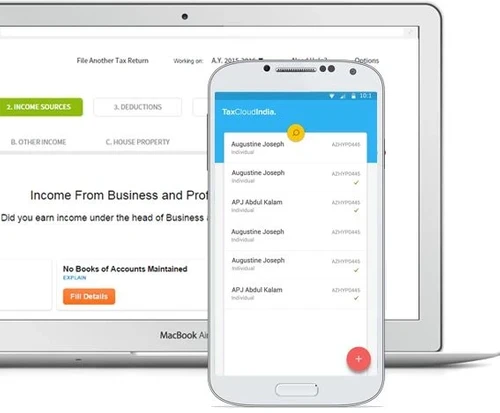
Taxcloud mobile app
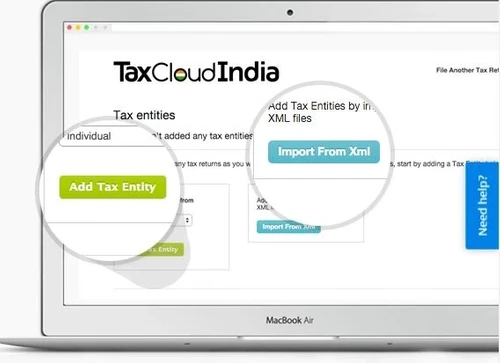
Tax cloud entities

TaxCloud

Brand: ClearTax

  • 4

  • 4 Ratings & 4 Reviews

TaxCloud helps businesses and CAs to prepare and submit their online income tax and TDS returns with the aid of TaxCloud. India has seen a migration of thousands of CA firms to TaxCloud.

See More

Have you used TaxCloud before?

Share your insights for better experience

Add a Review
Starting Price
₹2999

View plans

100% Genuine
Products
Best Price
Guaranteed
Safe & Secure
Payment
  • Description

  • Pricing

  • Features

  • Specification

  • Review

  • Compare

  • Alternatives

  • FAQ

Starting at ₹2,999

TaxCloud Software Overview

What is TaxCloud?

TaxCloud India is a web-based ITR and e-TDS software used for filing income tax returns digitally. The software is used by accounting professionals for its compliance with the accounting laws of Govt. of India. It offers a highly efficient way of managing the client’s information. Aside from robust tools for doing income tax calculations, the application is perfect for managing the client's information.

TaxCloud TDS offers cloud-storage solutions so that employees can work from any location at any time hassle-free. In addition to all these, this income tax software software also offers a stringent data security system. Businesses and accounting professionals use the platform for filing TDS and tax returns besides doing capital gains calculations and selecting ITRs.

What are the key features of TaxCloud Login?

Taxcloud India offers a wide variety of features to boost the productivity of your organization. Here are some of those:

  1. Auto-Filling: Save your as well as your clients' data in the software, use it to fill entries automatically and work without pause.
  2. Multiple Login: Users can access their account from several devices so that remote working is never an issue.
  3. Calculation: Compute the data of all your clients effectively in real-time for maximizing client-based reporting. Your employees can easily change the data when necessary to update the reports.
  4. Backups: Create data backups for all your data and client reports. It helps you to introspect and perform better.
  5. Collaboration: Several people can collaborate on a project and work together without hampering each other’s work.

How to file income tax return preparation in TaxCloud income tax login?

Here is a step by step by step guide for using TaxCloud India:

  1. Open the browser to access the web application and log in to user account.
  2. Once logged in, users can see all the features at glance.
  3. Users are not required to individually select the ITR files and documents for clients. The software automatically does it and categorizes it on its own.
  4. Users can select the type of client for further accounting management tasks.
  5. In the case of bulk client data uploading scenario, the software offers import through XML file option.

TaxCloud Software Price

TaxCloud pricing starts from Rs 2999/- at techjockey.com. It alters with user demands and modules required. For further price queries, please request a call. Our sales team will get in touch with you at the earliest possibility.

Read more

ClearTax Company Details

Founded Year:  2011

we are on a mission to simplify financial lives for all Indians. We are India’s leading fintech company, helping individuals, tax practitioners and businesses master taxes and save money and time through hassle-free filings.

Director/Founders Ankit Solanki, Archit Gupta, Srivatsan Chari
Company Size 101-500 Employees

TaxCloud Pricing & Plans

Basic
Key Features
  • ITRs Limit
  • Multi system login with same email ID
  • End to end filing for ITR 1 to 6
  • Pre-fill ITR data via APIs and JSON
Starting at ₹2999
    • Quantity

      Quantity
      Quantity

Key Features

  • ITRs Limit

  • Multi system login with same email ID

  • End to end filing for ITR 1 to 6

  • Pre-fill ITR data via APIs and JSON

TaxCloud Features

  • icon_check Income Tax & TDS
    With Tax Cloud India, users can efficiently prepare and file their Income Tax along with TDS Returns from anywhere.
  • icon_check ITR Forms
    Supports e-filing ITR‑1 through ITR‑6, including resume support and auto-form selection.
  • icon_check Online TDS Declaration Management
    The software allows users to file their TDS along with other IT returns with ease.
  • icon_check Cloud Practice Manager
    Allows tax professionals to manage their entire client database, documents, and filing statuses from any location securely online.
  • icon_check Income Tax Calculator
    Features a robust engine to compute tax liabilities under both the old and new regimes to help clients choose the better option.
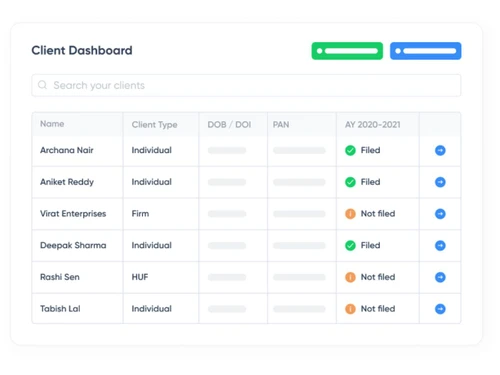
  • icon_check Client Dashboard View
    Offers a centralized summary of all client activities, pending tasks, and historical filing records for better practice control.
  • icon_check Automated Reminder
    Sends periodic notifications to clients via email or SMS regarding upcoming tax deadlines, document requirements, and payments.
  • icon_check Secure Document Vault
    Provides a safe cloud-based storage system for maintaining client permanent folders, previous returns, and essential identity
  • icon_check Multi-User Collaboration
    Allows firm partners and articles to work on the same platform with specific role-based access to maintain data confidentiality.
  • icon_check Rectification Filing
    Includes a dedicated module to process and file rectification requests for processed returns that contain arithmetical errors.
  • icon_check MIS Analytics Engine
    Generates detailed reports on firm productivity, filing counts, and revenue trends to help manage the growth of the tax practice.
  • icon_check Real-Time Tax Updates
    Notifies users about the latest circulars, notifications, and amendment acts from the CBDT to keep the practice fully compliant.
  • icon_check Backup
    Automatic data backup and restore ensures secure record keeping across clients.
  • icon_check Multiple User
    Allows multiple logins with role‑based access—ideal for team-based filing.
  • icon_check e-Filing
    The software has an ERI license that allows users to directly e-file their returns without using XML.
TaxCloud Demo Video play icon

Get TaxCloud Demo

Watch the demo video to explore key features, real workflows, and how the software fits your business needs.

Understand
Key Features
Personal
Demo Insights
Interactive
Demo Support
Product Enrichment Section Image

TaxCloud Specifications

Supported Platforms
Windows Windows Android Android MacOS MacOS
Devices
Desktop Desktop Mobile Mobile
Deployment
Cloud-Based Cloud-Based
Suitable For
All Industries
Business Specific
All Businesses
Business Size
Small Business Startups Medium Business SMBs SMEs MSMBs MSMEs
Customer Support
Email Communities Forums
Language
English
Training Resources
Documentation Videos

Explore the Best Alternative Solutions Similar to Your Business Size and Needs

TaxCloud Reviews

4

Out of 5

img

Overall Rating

Based on
4 Verified Reviews

Rating Breakdown

  • Features 4.3
  • Value for Money 3.7
  • Ease of Use 4
  • Customer Support 3.8

67% Recommend this Product

Add Review

TaxCloud Video Reviews

youtubeVideoId

4.8

“Best Income Tax Filing Software - TaxCloudIndia Review | Best Tax Filing Software in India in hindi”

Review by: myonlineca

youtubeVideoId

4.8

“INCOME TAX RETURN SOFTWARE | TAXCLOUD INDIA | in hindi”

Review by: CommerceAddaLatur

youtubeVideoId

4.8

“How to file Income Tax Return | TaxCloud”

Review by: CleartaxIndia

POONAM SUTHAR

Co-founder

Industry: Accounting

1.7

Reviewed on: Apr 17, 2024

Techjockey Verified

“Worst to worst experience of m life.”

Their sales teams are well trained in misleading of sales, as well their management and customer support always try to save their sales team.

Pros

None

Cons

Back team is super fast, they took more than one month to activate few features on software.

See All TaxCloud Reviews

Compare TaxCloud With other Income Tax Software

Products
Ratings
Pricing
Device Supported
Deployment
Supported Platforms
  • img

    TaxCloud

  • 4

  • Price On Request

  • Desktop

    Mobile

  • Web based

    On Premises

  • Windows

    Mac OS

  • img

    EasyOFFICE

  • 4.6

  • ₹ 3900

  • Desktop

    Mobile

  • Web based

    On Premises

  • Windows

    Mac OS

  • img

    Winman CA-ERP

  • 4.1

  • ₹ 9850

  • Desktop

    Mobile

  • Web based

    On Premises

  • Windows

    Mac OS

  • img

    FreeTaxUSA

  • 4.4

  • Price On Request

  • Desktop

    Mobile

  • Web based

    On Premises

  • Windows

    Mac OS

  • img

    TdsPac

  • 5

  • Price On Request

  • Desktop

    Mobile

  • Web based

    On Premises

  • Windows

    Mac OS

  • img

    GEN Income Tax

  • 4.8

  • ₹ 7000

  • Desktop

    Mobile

  • Web based

    On Premises

  • Windows

    Mac OS

  • img

    CompuTax

  • 3.7

  • Price On Request

  • Desktop

    Mobile

  • Web based

    On Premises

  • Windows

    Mac OS

  • img

    DAVO

  • 4.4

  • Price On Request

  • Desktop

    Mobile

  • Web based

    On Premises

  • Windows

    Mac OS

  • img

    GEN Genius

  • 4.3

  • ₹ 7000

  • Desktop

    Mobile

  • Web based

    On Premises

  • Windows

    Mac OS

  • img

    Eztax It Filing

  • 4.3

  • ₹ 990

  • Desktop

    Mobile

  • Web based

    On Premises

  • Windows

    Mac OS

(0) Product(s) selected

TaxCloud Alternatives

See All TaxCloud Alternatives

Available

Price on Request

Available

Price on Request

DAVO

4.4

Starting Price:

$58 /Month

SAVE UPTO 10%

Starting Price:

₹899 /User/Year

Available

Price on Request

Articles for TaxCloud

See All Related Articles

Who uses Taxcloud India?

Taxcloud India is prominently used by accounting and CA firms.

Is Taxcloud available for demo?

Yes, Taxcloud India is available for demo. To avail the demo, please request a call and our sales team will get in touch with you.

Which mobile platforms does Taxcloud India support?

Taxcloud India is available for both Androids and iPhones.

What is the deployment type for Taxcloud India?

Taxcloud India is available on cloud.

How much does taxCloud Costs?

TaxCloud Software price starts from Rs 2999/- at techjockey.com.

How do I use TaxCloud?

Make an account on TaxCloud by filling in the basic details. Now it's up to you, if you want to upload your data one by one or in a bulk format. Choose Bulk Upload and then import the JSON file that contains the details of your client.

20,000+ Software Listed

Best Price Guranteed

Free Expert Consultation

2M+ Happy Customers

Terms and Condtions

close

Users with registered businesses can purchase goods from merchants on the platform to satisfy their business needs. Users are not permitted to utilize any products acquired through the platform for resale, advertising, business, or further distribution.

For each purchase made, users will receive a Tax Invoice (or 'GST invoice') that includes specific details such as:

  • the GSTIN of the user associated with their registered business, and

  • the specified Entity Name for their business.

It should be noted that not all products are eligible for GST Invoice. Only the products displayed by participating sellers with the 'GST-based Invoice Available' callout on the product description page would qualify.

Certain goods and services are not eligible to get a GST Invoice, including items with VAS, i.e., Value Added Services (e.g., Total Mobile Protection/Assured Buyback) and those involving an exchange offer at the time of purchase.

Users must ensure the accuracy of the GSTIN, and business entity name provided for the GST Invoice. Requests for corrections into GST Invoice would not be accommodated by Techjockey.com or any Seller, and any issues arising from user-provided information are the sole responsibility of users.

Techjockey.com is not liable for the GST Invoice or any associated input tax credit. To efficiently claim an input tax credit, users should select the registered place of business address as per the GST authority's data and follow the provisions of the GST Act and rules.

To claim an input tax credit, the delivery and billing addresses must match. Furthermore, input tax credits will not be granted if the delivery address and GSTIN on the invoice are from different states. In case of incorrect GST details provided during the order placement, the order will be canceled automatically.