linkedin
Teachmint X logo
Teachmint X-whiteboard
Teachmint X-AI powered
Teachmint X-recording

Teachmint X

Brand: Teachmint

  • No Ratings & Reviews

Teachmint X is an AI-powered connected classroom platform that combines interactive digital boards and smart assistant features to support engaging and collaborative learning.

See More

Have you used Teachmint X before?

Share your insights for better experience

Add a Review

Price Available on Request

Questions about pricing or customization? We’re here to help, just a click away.

100% Genuine
Products
Best Price
Guaranteed
Safe & Secure
Payment
  • Description

  • Pricing

  • Features

  • Specification

  • Review

  • Compare

  • Alternatives

  • FAQ

Teachmint X Software Overview

What is Teachmint X?

Teachmint X is an AI-powered connected classroom platform designed to modernize teaching and learning. It combines an interactive digital whiteboard, AI-powered teaching tools, and smart classroom features to support schools, coaching and training institutions, and higher education across physical, hybrid, and online learning environments.

The platform combines classroom hardware with AI-powered teaching tools and connected classroom features. It helps educators plan lessons, create teaching materials, engage students, monitor classrooms, and manage classroom activities through an integrated ecosystem.

Why Choose Teachmint X?

  • Unified Ecosystem: It combines an interactive whiteboard, AI-powered teaching tools, and smart classroom features in a connected platform, helping educators manage teaching and classroom activities from a single ecosystem.
  • AI-Enhanced Teaching: With its built-in AI teaching assistant, EduAI, the platform helps educators save time on lesson preparation, content creation, and student assessment, allowing them to focus more on personalized instruction.
  • Increased Engagement: The interactive digital board, combined with features like screen sharing (ShareX) and real-time monitoring (VisionX), transforms traditional classrooms into dynamic, collaborative learning spaces.
  • Streamlined Operations: Simplify classroom tasks such as attendance tracking, lesson management, assessments, and student performance monitoring, helping educators improve productivity and efficiency.
  • Data-Driven Decision Making: The platform provides insights into student performance, attendance, homework, and classroom activities, helping educators and institutions make informed decisions.
  • Seamless Communication: It enables communication between teachers and students through integrated chat and notice features, helping keep classroom communication organized.

Advanced Features of Teachmint X

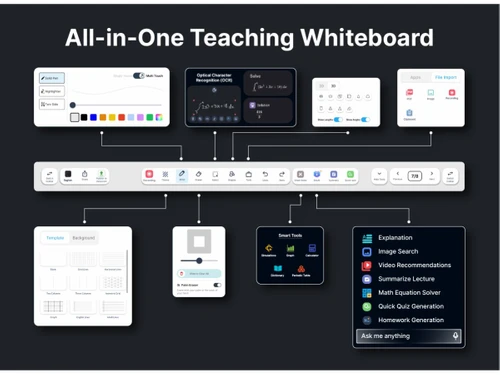
  • EduAI Teaching Assistant: An intelligent, AI-powered assistant designed to support educators in real-time. Its capabilities include:
    1. Lecture Summarization: Instantly generates concise summaries of lessons.
    2. Content Generation: Creates quizzes, homework assignments, and finds relevant images or videos.
    3. Mathematics Solver: Provides step-by-step solutions to complex math problems.
    4. Voice Assistant: Enables hands-free interaction with the Teachmint X whiteboard using voice commands.
  • VisionX Classroom Monitoring: A real-time classroom visibility system that provides insights across devices, teachers, and classrooms, helping institutions monitor classroom engagement and performance.
  • ShareX Screen Sharing: A dedicated screen-sharing solution for classrooms, allowing teachers and students to share content from their devices to the main digital board effortlessly, fostering collaboration.
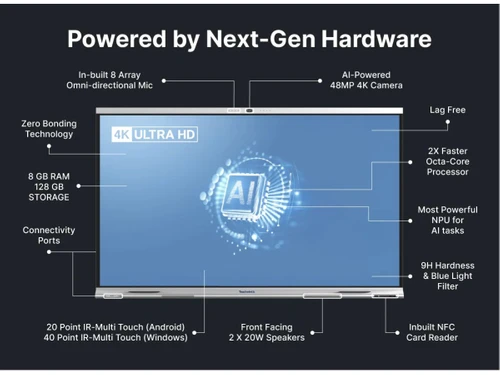
  • Interactive Digital Whiteboard: The hardware centerpiece of the platform. It is a Google EDLA Certified, all-in-one device that functions as a powerful teaching tool, supporting touch-based interaction, digital ink, and multimedia content.
  • Connected Classroom Platform: Teachmint X combines interactive classroom hardware with cloud-enabled learning and connected classroom features to support teaching and classroom management.

Modules of Teachmint X

  • Connected Classroom Platform: Helps educators plan lessons, manage classroom activities, track attendance, record and share classes, and monitor student performance.
  • Interactive Whiteboard: Provides digital teaching tools for writing, annotation, multimedia content, and collaborative classroom activities.
  • EduAI: Supports teachers with AI-powered lesson preparation, quizzes, homework, summaries, presentations, and in-class assistance.
  • VisionX: Provides real-time visibility across classrooms, including device, teacher, and classroom-level monitoring.
  • ShareX: Enables wireless screen sharing between compatible devices and Teachmint X classroom panels.

How to Use Teachmint X?

  1. Initial Consultation: The process begins by scheduling a demo with the Teachmint team to discuss the specific requirements of your institution and understand how the platform can be tailored to meet them.
  2. Hardware Installation: Certified technicians handle the professional installation of the Teachmint X interactive digital boards in designated classrooms, ensuring optimal setup and connectivity.
  3. Software Setup: Teachmint X is configured to support the institution's classroom and teaching requirements, including device setup, classroom setup, and relevant user configuration.
  4. Training & Onboarding: Teachmint provides expert-led training and onboarding support to help educators and institutions adopt Teachmint X effectively.
  5. Go-Live & Support: Once the system is live, Teachmint provides dedicated customer support to address any queries and ensure the platform operates seamlessly, offering ongoing assistance for long-term success.

Teachmint X Pricing

Teachmint X pricing details are available on request on techjockey.com.

The pricing model is based on different parameters, including extra features, deployment type, and the total number of users. For further queries related to the product, you can contact our product team and learn more about the pricing and offers.

Read more

Teachmint X Pricing & Plans

Looking for The Right Pricing?

Share your requirements and get a plan built around your business.

  • Define your business needs
  • Get customised pricing
  • Choose features that fit your workflow

Price Available on Request

Get personalised Teachmint X pricing that fits your needs. Our team will connect with you.

Teachmint X Features

  • icon_check Student Management
    Maintain complete student records, admissions, academic history, documents, and profile information centrally.
  • icon_check Attendance Management
    Record and monitor student and staff attendance with automated tracking and detailed reports.
  • icon_check Fee Management
    Manage fee structures, collect payments, generate receipts, and track pending dues efficiently.
  • icon_check Admission Management
    Streamline admission workflows from inquiries and applications to enrollment and student onboarding.
  • icon_check Examination Management
    Create exams, manage grading processes, publish results, and analyze academic performance data.
  • icon_check Learning Management
    Deliver digital courses, assignments, assessments, and study materials through a unified platform.
  • icon_check Time Table Management
    Create and manage class schedules, teacher allocations, and timetable updates with ease.
  • icon_check Assignment Management
    Assign homework, collect submissions, evaluate performance, and provide feedback digitally.
  • icon_check Parent Portal
    Enable parents to track attendance, fees, grades, notices, and academic progress in real time.
  • icon_check Teacher Management
    Manage teacher profiles, schedules, workload distribution, attendance, and performance records.
  • icon_check Communication Management
    Send announcements, notifications, alerts, and messages to students, parents, and staff instantly.
  • icon_check Online Classes
    Conduct virtual classes with scheduling, attendance tracking, recordings, and engagement tools.
  • icon_check Document Management
    Store, organize, access, and share academic and administrative documents securely online.
  • icon_check Performance Analytics
    Analyze academic trends, attendance patterns, and institutional performance through dashboards.
  • icon_check Library Management
    Manage book inventory, circulation, returns, fines, and member records from one platform.
  • icon_check Alerts & Notifications
    Deliver automated reminders for fees, exams, events, attendance, and important updates.

Teachmint X Specifications

Supported Platforms
Windows Windows iOS iOS Android Android MacOS MacOS
Devices
Desktop Desktop Mobile Mobile Tablet Tablet iPad iPad
Deployment
Cloud-Based Cloud-Based
Suitable For
Education
Business Specific
School/Colleges/Coaching
Business Size
Individual Small Business Startups Medium Business Enterprises SMBs SMEs MSMEs
Customer Support
Phone Email Live Chat
Language
English
Integration
API Integration
Training Resources
In Person Live Online Webinars Documentation Videos
AI Features
AI Integrated
Technology
Next Generation
Compliance Regulation
COPPA

Explore the Best Alternative Solutions Similar to Your Business Size and Needs

Teachmint X Review

Be the First to Review

This product has no reviews yet. Be the first to leave your feedback.

Add Review
Compare Teachmint X With other School Management Software

Products
Ratings
Pricing
Device Supported
Deployment
Supported Platforms
  • img

    Teachmint X

  • Price On Request

  • Desktop

    Mobile

  • Web based

    On Premises

  • Windows

    Mac OS

  • img

    School Magica

  • 4.7

  • ₹ 20000

  • Desktop

    Mobile

  • Web based

    On Premises

  • Windows

    Mac OS

  • img

    Edunext School ERP

  • 4.7

  • Price On Request

  • Desktop

    Mobile

  • Web based

    On Premises

  • Windows

    Mac OS

  • img

    E-School ERP

  • 4.6

  • ₹ 40000

  • Desktop

    Mobile

  • Web based

    On Premises

  • Windows

    Mac OS

  • img

    Edu Manage Plus

  • 4.9

  • ₹ 18

  • Desktop

    Mobile

  • Web based

    On Premises

  • Windows

    Mac OS

  • img

    Vedcool

  • 4.6

  • ₹ 11000

  • Desktop

    Mobile

  • Web based

    On Premises

  • Windows

    Mac OS

  • img

    Gati School ERP

  • 5

  • Price On Request

  • Desktop

    Mobile

  • Web based

    On Premises

  • Windows

    Mac OS

  • img

    SchoolEZY

  • 4.5

  • ₹ 25000

  • Desktop

    Mobile

  • Web based

    On Premises

  • Windows

    Mac OS

  • img

    EducateSync

  • 4.7

  • ₹ 999

  • Desktop

    Mobile

  • Web based

    On Premises

  • Windows

    Mac OS

  • img

    EduOpus

  • 5

  • Price On Request

  • Desktop

    Mobile

  • Web based

    On Premises

  • Windows

    Mac OS

(0) Product(s) selected

Teachmint X Alternatives

See All Teachmint X Alternatives

Available

Price on Request

Available

Price on Request

Starting Price:

₹5,000 /Year

Articles for Teachmint X

See All Related Articles

Is Teachmint app free?

Teachmint X is an AI-powered connected classroom technology for which institutions can book a demo; official pricing details are not publicly listed, so it's best to contact the techjockey.com for a quote.

What is Teachmint used for?

Teachmint X is an AI-powered connected classroom technology used to transform teaching and learning through an all-in-one interactive whiteboard, AI-powered digital board, and a classroom platform for various educational environments like schools, higher education, and coaching centers.

How do I use Teachmint?

To use Teachmint X, institutions typically book a demo to understand its features, and upon implementation, they receive installation and training for the AI-powered digital board and its integrated classroom software components like EduAI, VisionX, and ShareX.

Is Teachmint safe to use?

Yes, Teachmint X is designed to be a safe and intelligent teaching assistant, and its AI-powered connected classroom device is Google EDLA Certified, indicating adherence to certain security and privacy standards.

Can I use Teachmint on laptop?

Teachmint X is primarily an AI-powered connected classroom technology centered around a digital interactive whiteboard device, such as the Teachmint X2 75 or 86; its core functionalities are integrated into this classroom platform rather than being a standalone laptop application.

Who can use Teachmint X?

Teachmint X is designed for various roles within educational institutions, including teachers, students, administrators, principals, owners, and parents, and is applicable across schools, higher education, and coaching centers.

What are the key components or features of Teachmint X?

Key components of Teachmint X include an AI-powered digital board for teaching, an interactive whiteboard, EduAI as a personal teaching assistant, VisionX for real-time classroom monitoring, and ShareX for screen sharing.

What devices are available with Teachmint X?

Teachmint X offers dedicated digital board devices, specifically the Teachmint X2 75-inch (1.90 m) and Teachmint X2 86-inch (2.18 m) models, designed for interactive teaching.

What kind of AI capabilities does Teachmint X offer?

Teachmint X leverages AI through EduAI, an intelligent personal teaching assistant that offers features like lecture summarization, mathematics solving, quiz creation, homework generation, speech-to-text conversion, and quick class recaps.

How much does Teachmint X cost?

Teachmint X pricing details are available on request on techjockey.com.

20,000+ Software Listed

Best Price Guranteed

Free Expert Consultation

2M+ Happy Customers

Terms and Condtions

close

Users with registered businesses can purchase goods from merchants on the platform to satisfy their business needs. Users are not permitted to utilize any products acquired through the platform for resale, advertising, business, or further distribution.

For each purchase made, users will receive a Tax Invoice (or 'GST invoice') that includes specific details such as:

  • the GSTIN of the user associated with their registered business, and

  • the specified Entity Name for their business.

It should be noted that not all products are eligible for GST Invoice. Only the products displayed by participating sellers with the 'GST-based Invoice Available' callout on the product description page would qualify.

Certain goods and services are not eligible to get a GST Invoice, including items with VAS, i.e., Value Added Services (e.g., Total Mobile Protection/Assured Buyback) and those involving an exchange offer at the time of purchase.

Users must ensure the accuracy of the GSTIN, and business entity name provided for the GST Invoice. Requests for corrections into GST Invoice would not be accommodated by Techjockey.com or any Seller, and any issues arising from user-provided information are the sole responsibility of users.

Techjockey.com is not liable for the GST Invoice or any associated input tax credit. To efficiently claim an input tax credit, users should select the registered place of business address as per the GST authority's data and follow the provisions of the GST Act and rules.

To claim an input tax credit, the delivery and billing addresses must match. Furthermore, input tax credits will not be granted if the delivery address and GSTIN on the invoice are from different states. In case of incorrect GST details provided during the order placement, the order will be canceled automatically.