linkedin
eTechSchoolBus logo
play eTechTracker: Complete GPS tracking solutions - eTechSchoolBus Demo
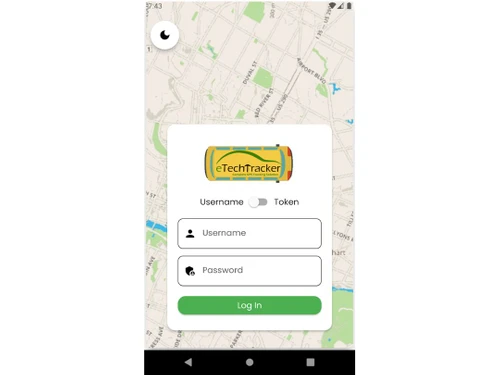
eTechSchoolBus login
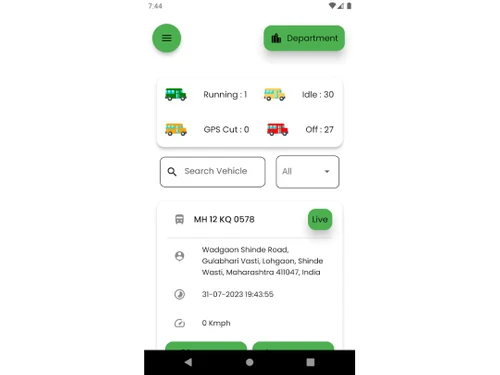
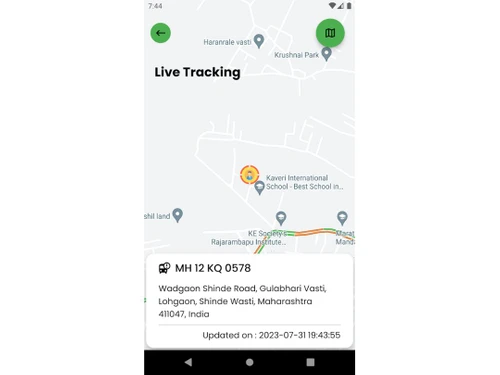
eTechSchoolBus detail

eTechSchoolBus

Brand: Techlead

  • 4.7

  • 1 Rating & 1 Review

eTechSchoolBus helps schools enhance student safety with live bus tracking, RFID-based attendance, instant alerts, and comprehensive school bus management.

See More

Have you used eTechSchoolBus before?

Share your insights for better experience

Add a Review

Price Available on Request

Questions about pricing or customization? We’re here to help, just a click away.

100% Genuine
Products
Best Price
Guaranteed
Safe & Secure
Payment
  • Description

  • Pricing

  • Features

  • Specification

  • Review

  • Compare

  • Alternatives

  • FAQ

eTechSchoolBus Software Overview

What is eTechSchoolBus?

eTechSchoolBus is a comprehensive security and tracking solution designed specifically for school transportation fleets. It integrates Global Positioning System (GPS) technology for real-time vehicle tracking with Radio-Frequency Identification (RFID) for monitoring individual student attendance. This dual-system approach provides a robust platform for schools and parents to ensure the safety and security of children during their daily commute.

The system addresses common parental concerns such as rash driving, route deviations, and lack of visibility into a child's journey. By providing live location data, automated alerts, and detailed reports, eTechSchoolBus creates a transparent and secure environment. The platform sends instant SMS and Android app notifications to parents at key moments, such as when their child boards or alights from the bus, confirming their safe transit to and from school. The system also offers hardware compliant with the AIS 140 standard, meeting regulatory requirements for vehicle tracking devices in India.

Why Choose eTechSchoolBus?

  • Peace of Mind for Parents: The system's core benefit is the assurance it provides to parents. Real-time notifications for pick-ups and drop-offs, coupled with the ability to track the bus's location via a dedicated Android app, eliminates uncertainty and anxiety.
  • Centralized School Administration: School management gains complete oversight of their entire bus fleet from a single, intuitive dashboard. Administrators can monitor the real-time location, speed, and student count of every vehicle, ensuring compliance with safety protocols and schedules.
  • Enhanced Emergency Response: An integrated panic button allows the driver or bus escort to send an immediate alert to school administrators in an emergency. This feature, combined with remote vehicle immobilization, enables a swift and effective response to unforeseen events like breakdowns or security threats.
  • Improved Fleet Management: The platform generates regular, detailed reports on vehicle performance, including data on speed, routes, and unscheduled halts. This information is invaluable for transport managers looking to optimize routes, monitor driver behavior, and maintain the fleet efficiently.

Advanced Features of eTechSchoolBus

  • Live Vehicle Tracking: Monitor the exact location of each bus on a map in real-time, complete with data on speed, direction, and a timestamp.
  • Student-Specific Alerts: Parents receive alerts if their child does not board the bus when it leaves school, ensuring no child is left behind.
  • Route Deviation & Unscheduled Halt Alerts: The system automatically flags any deviation from the pre-assigned route or any unscheduled stops, alerting administrators to potential issues.
  • Emergency Panic Button: A discreetly placed button allows the driver or staff to instantly notify the control center of an emergency situation.
  • Remote Vehicle Immobilization: In the event of theft or an emergency, administrators can remotely disable the vehicle's engine, preventing further movement.
  • Multi-User Access Control: Provides separate, secure login credentials for school administrators, transport managers, and individual parents, ensuring each user only sees relevant information.
  • Data Storage & Reporting: The system securely stores GPS and event data for up to 120 days, allowing for historical analysis and the generation of detailed activity reports.
  • Hardware with Battery Backup: The GPS device includes an internal battery backup to ensure continued operation even if the main vehicle power is disconnected.

Key Capabilities of eTechSchoolBus

  • GPS Tracking Module: At the heart of the system is an AIS 140 compliant GPS device installed in each bus. This unit continuously transmits location, speed, and directional data to the central server, enabling live tracking and historical playback.
  • RFID Attendance System: Each student is issued a smart RFID card. An RFID reader installed at the bus entrance logs each student's entry and exit when they tap their card. This automates attendance and triggers personalized alerts for parents.
  • Centralized Software Platform: A web-based dashboard and a dedicated Android mobile app serve as the user interface. This platform visualizes data on a map, manages user access, configures alerts, and generates comprehensive reports for analysis.
  • Alert & Notification Engine: This powerful engine processes data from the GPS and RFID systems to send automated, real-time alerts via SMS and push notifications. It covers events like bus arrival, student pick-up/drop-off, route deviations, and emergency signals.

How to Use eTechSchoolBus?

  1. Morning Pick-up: The student taps their RFID card on the reader when boarding the bus. The system instantly logs the attendance and sends an SMS/app notification to the parent confirming their child is on board.
  2. Arrival at School: Upon reaching the school, the student taps their card again when alighting. This confirms their safe arrival at the school premises.
  3. Afternoon Departure: For the return journey, the student taps their card while boarding the bus after school. The parent is immediately notified that their child has started the trip home.
  4. Arrival at Home Drop-off: The student taps their card a final time when getting off at their designated stop. The parent receives a final notification confirming their child has been dropped off safely.

eTechSchoolBus Pricing

eTechSchoolBus pricing details are available on request on techjockey.com.

The pricing model is based on different parameters, including extra features, deployment type, and the total number of users. For further queries related to the product, you can contact our product team and learn more about the pricing and offers.

Read more

Techlead Company Details

Founded Year:  2014

Techlead

Director/Founders Patrick Shyu
Company Size 1-100

eTechSchoolBus Pricing & Plans

Looking for The Right Pricing?

Share your requirements and get a plan built around your business.

  • Define your business needs
  • Get customised pricing
  • Choose features that fit your workflow

Price Available on Request

Get personalised eTechSchoolBus pricing that fits your needs. Our team will connect with you.

eTechSchoolBus Features

  • icon_check Live Vehicle Tracking
    Live tracking ie. the system provides real-time location data that displays the movement of the bus along with the date and time
  • icon_check GPS Tracking
    GPS device with internal battery back – up
  • icon_check Reports
    Regular and up-to-date reports of vehicles
  • icon_check Remote Immobilization
    Remote Immobilization : Remotely stop your vehicle  
eTechSchoolBus Demo Video play icon

Get eTechSchoolBus Demo

Watch the demo video to explore key features, real workflows, and how the software fits your business needs.

Understand
Key Features
Personal
Demo Insights
Interactive
Demo Support

eTechSchoolBus Specifications

Supported Platforms
Windows Windows
Devices
Desktop Desktop
Deployment
Cloud-Based Cloud-Based
Suitable For
Automobiles
Business Specific
School/Colleges
Language
English

Explore the Best Alternative Solutions Similar to Your Business Size and Needs

eTechSchoolBus Review

4.7

Out of 5

img

Overall Rating

Based on
1 Verified Review

Rating Breakdown

  • Features 4.5
  • Value for Money 5
  • Ease of Use 5
  • Customer Support 4.5

100% Recommend this Product

Add Review

Rahul kumar

User

4.7

Reviewed on: Jan 2, 2019

Techjockey Verified

“Good functioning”

Pros

Application is functioning admirably. Last time I whined about postponement in guide live area. It is because of deferral of 30 secs in each update . Still there is extension for increasingly unique.

Cons

NO CONS

Compare eTechSchoolBus With other GPS Vehicle Tracking System

Products
Ratings
Pricing
Device Supported
Deployment
Supported Platforms
  • img

    eTechSchoolBus

  • 4.7

  • Price On Request

  • Desktop

    Mobile

  • Web based

    On Premises

  • Windows

    Mac OS

  • img

    VTMS

  • 4.5

  • ₹ 550

  • Desktop

    Mobile

  • Web based

    On Premises

  • Windows

    Mac OS

  • img

    Trakom

  • 4.6

  • ₹ 45

  • Desktop

    Mobile

  • Web based

    On Premises

  • Windows

    Mac OS

  • img

    Lynktrac

  • 4.6

  • ₹ 4200

  • Desktop

    Mobile

  • Web based

    On Premises

  • Windows

    Mac OS

  • img

    CarX

  • 4.1

  • Price On Request

  • Desktop

    Mobile

  • Web based

    On Premises

  • Windows

    Mac OS

  • img

    Falcon Trackers

  • 4.1

  • Price On Request

  • Desktop

    Mobile

  • Web based

    On Premises

  • Windows

    Mac OS

  • img

    Fleet Stack

  • 5

  • ₹ 3499

  • Desktop

    Mobile

  • Web based

    On Premises

  • Windows

    Mac OS

  • img

    SeTrack

  • 4.3

  • Price On Request

  • Desktop

    Mobile

  • Web based

    On Premises

  • Windows

    Mac OS

(0) Product(s) selected

eTechSchoolBus Alternatives

See All eTechSchoolBus Alternatives

CarX

4.1

Available

Price on Request

Available

Price on Request

Available

Price on Request

Available

Price on Request

Available

Price on Request

Articles for eTechSchoolBus

See All Related Articles

Which operating system does eTechSchoolBus support?

eTechSchoolBus is compatible with Windows operating systems.

Is there any eTechSchoolBus app?

eTechSchoolBus app is not available.

What is deployment type of eTechSchoolBus?

eTechSchoolBus supports Web-Based.

Who are the potential users of eTechSchoolBus?

eTechSchoolBus is typically used in Automobiles.

Is there any eTechSchoolBus demo or free trial?

eTechSchoolBus demo is available for free with Techjockey.com. Please request a call back.

Is eTechSchoolBus free?

eTechSchoolBus offers a free trial. However, the premium plan with advanced features available at Techjockey.

How can you download eTechSchoolBus?

For eTechSchoolBus installation, insert the given CD/USB flash storage in your system and open the Setup Wizard to get started. The web-based version can be accessed directly through eTechSchoolBus portal.

How does eTechSchoolBus work?

eTechSchoolBus GPS Vehicle Tracking System helps with Live Vehicle Tracking,GPS Tracking,Reports and Remote Immobilization.

Are there any hidden charges for eTechSchoolBus updates?

eTechSchoolBus regular updates are available free of cost. There are no hidden software update charges.

What is eTechSchoolBus used for?

eTechSchoolBus GPS Vehicle Tracking System used for Live Vehicle Tracking,GPS Tracking,Reports and Remote Immobilization.

How do I contact eTechSchoolBus support?

You can directly visit eTechSchoolBus portal and get in touch with eTechSchoolBus customer support for any software-related query.

How to get eTechSchoolBus lifetime deal?

Please contact our product experts to get eTechSchoolBus lifetime deal with exclusive offers.

How do I log into eTechSchoolBus?

Parents and school administrators can log into the system using the individual user ID and password provided by the school for the eTechTracker/eTechSchool Android App or web dashboard.

What is the use of eTechSchoolBus app?

The eTechSchoolBus app allows parents to track the live location of their child's school bus and receive real-time updates when their child boards or leaves the bus.

How do I get eTechSchoolBus notification?

Parents automatically receive instant alerts via SMS and Android app notifications for events such as bus arrival, student pickup and drop-off, and unscheduled bus halts.

How do I track my school bus location on eTechSchoolBus?

You can track the school bus's live location, speed, and direction on a map through the eTechTracker/eTechSchool Android App or the web-based dashboard using your provided login credentials.

How does eTechSchoolBus' RFID system work for student attendance?

Each student is given a smart RFID card that they tap on a reader when boarding and leaving the bus, automatically logging their attendance and triggering alerts to parents.

What is eTechSchoolBus' emergency (Panic) button feature?

The emergency Panic Button allows the driver or escort to immediately send an alert to school administrators and bus controllers to enable a rapid response in case of an emergency.

Is eTechSchoolBus compliant with government regulations?

Yes, eTechSchoolBus provides AIS 140 compliant GPS devices, adhering to the mandatory vehicle tracking standards required by government authorities in India.

Can the school administration monitor all buses from one place using eTechSchoolBus?

Yes, the School Admin Dashboard provides a centralized platform for school management to monitor the real-time location, speed, and student count of every bus in the fleet.

How much does eTechSchoolBus cost?

eTechSchoolBus pricing details are available on request on techjockey.com.

Who can use eTechSchoolBus?

eTechSchoolBus is ideal for schools, educational institutions, parents, guardians, and school transport operators seeking safer, more efficient student transportation management.

20,000+ Software Listed

Best Price Guranteed

Free Expert Consultation

2M+ Happy Customers

Terms and Condtions

close

Users with registered businesses can purchase goods from merchants on the platform to satisfy their business needs. Users are not permitted to utilize any products acquired through the platform for resale, advertising, business, or further distribution.

For each purchase made, users will receive a Tax Invoice (or 'GST invoice') that includes specific details such as:

  • the GSTIN of the user associated with their registered business, and

  • the specified Entity Name for their business.

It should be noted that not all products are eligible for GST Invoice. Only the products displayed by participating sellers with the 'GST-based Invoice Available' callout on the product description page would qualify.

Certain goods and services are not eligible to get a GST Invoice, including items with VAS, i.e., Value Added Services (e.g., Total Mobile Protection/Assured Buyback) and those involving an exchange offer at the time of purchase.

Users must ensure the accuracy of the GSTIN, and business entity name provided for the GST Invoice. Requests for corrections into GST Invoice would not be accommodated by Techjockey.com or any Seller, and any issues arising from user-provided information are the sole responsibility of users.

Techjockey.com is not liable for the GST Invoice or any associated input tax credit. To efficiently claim an input tax credit, users should select the registered place of business address as per the GST authority's data and follow the provisions of the GST Act and rules.

To claim an input tax credit, the delivery and billing addresses must match. Furthermore, input tax credits will not be granted if the delivery address and GSTIN on the invoice are from different states. In case of incorrect GST details provided during the order placement, the order will be canceled automatically.