 USA
USA UAE
UAESmall Business
Designed for startups and growing businesses

See More





Brand: Typo3
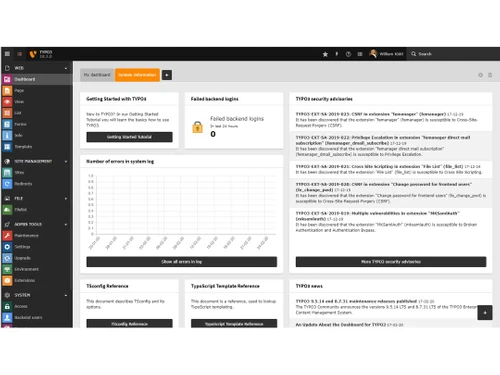
TYPO3 is an open-source CMS ideal for businesses needing scalable, secure, and customizable web solutions. It supports multilingual sites, offers robust security, and integrates well with digital marketing tools. TYPO3 is backed by a strong global community and professional support.
See MoreHave you used Typo3 before?
Share your insights for better experience
Looking for The Right Pricing?
Share your requirements and get a plan built around your business.
Price Available on Request
Get personalised Typo3 pricing that fits your needs. Our team will connect with you.
 Performance Monitoring Tools WYSIWYG Editor Media Library Multi-Site Management Content Versioning Page Creation and Management Drag and Drop Functionality Permissions Management Analytics & Reporting Plugins and Extensions

Watch the demo video to explore key features, real workflows, and how the software fits your business needs.
 Windows
  Desktop
  Cloud-Based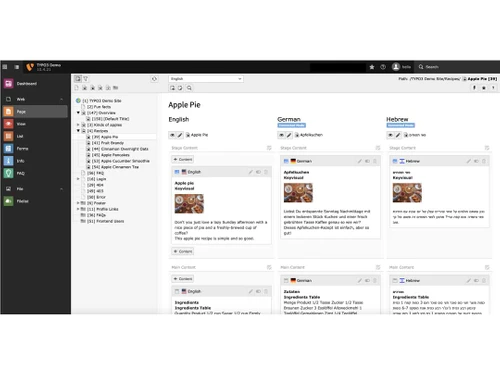
Small Business
Designed for startups and growing businesses
Medium Business
Built for business growth and flexibility
Enterprises
Designed for complex and large-scale business needs
3.7
Out of 5

Overall Rating
Based on
11 Verified Reviews
Rating Breakdown
80% Recommend this Product
Add ReviewUsers appreciate TYPO3 for its strong security, extensive customization options, and versatility in managing various types of websites, particularly large-scale applications and multi-domain functionality. The active community support enhances its reliability, making it a solid choice for web development. However, many reviews highlight a steep learning curve, the need for regular maintenance, and challenges in finding skilled developers, which can complicate the user experience. Additionally, performance issues on mobile devices and the lack of a robust e-commerce solution are noted limitations.
Pros
"TYPO3 is ideal for large-scale enterprise applications, offering limitless extension possibilities and a high level of customization."
"TYPO3’s modular structure and page tree concept make it great for managing complex sites. Its active community is also a plus, offering support and resources."
"TYPO3 offers great possibilities due to its open-source nature and extensive expandability. It's a secure choice with many customization options."
Cons
"The main drawback is the ongoing need for maintenance to address security issues, which can be time-consuming. "
"One issue is that not all users contribute to the community, which can limit the amount of available help and resources. "
"The focus of TYPO3 activity is often centered in Germany, which can make it harder for non-Germans to find local resources and support. "

Sep 2, 2024
Techjockey Verified
“TYPO3: A CMS with Great Potential for Those Ready to Learn”
TYPO3’s open-source nature and expandability provide significant potential for those willing to invest time in learning it. Its security and customization options are strong points, but the learning curve and lack of official templates can be challenging.
Pros
TYPO3 offers great possibilities due to its open-source nature and extensive expandability. It's a secure choice with many customization options.
Cons
Difficult to understand
Reason to switch
I chose TYPO3 for its extensive customization and security features. Despite the steep learning curve, its open-source nature and expandability made it a worthwhile investment for those ready to tackle its complexities.
Sep 10, 2024
Techjockey Verified
“TYPO3: An Excellent CMS for Large-Scale Applications”
TYPO3 is a great CMS for handling large-scale applications, providing extensive customization and extension options. While it requires regular maintenance to manage security updates, its capabilities make it a top choice for large projects.
Pros
TYPO3 is ideal for large-scale enterprise applications, offering limitless extension possibilities and a high level of customization.
Cons
The main drawback is the ongoing need for maintenance to address security issues, which can be time-consuming.
Reason to switch
I selected TYPO3 for its extensive customization and scalability for large applications. Despite the maintenance requirements, its ability to handle complex projects made it the best choice.
Sep 2, 2024
Techjockey Verified
“TYPO3: A Great CMS for Multi-Domain Functionality”
TYPO3 is highly effective for managing multiple domains, providing a versatile solution for various website needs. While I haven't encountered major issues, the initial setup might be a bit challenging for some users.
Pros
TYPO3 excels in multi-domain functionality, allowing you to manage various domains efficiently. Its capabilities make it a great choice for diverse website needs.
Cons
One downside is that there are no significant issues I’ve encountered with TYPO3, but some users may find the initial setup challenging.
Reason to switch
I chose TYPO3 for its impressive multi-domain functionality. Despite the potential challenges during setup, its ability to handle multiple domains made it an ideal choice.

Typo3
Price On Request
Desktop
Mobile
Web based
On Premises
Windows
Mac OS
Grav
Price On Request
Desktop
Mobile
Web based
On Premises
Windows
Mac OS

OpenText Web CMS
Price On Request
Desktop
Mobile
Web based
On Premises
Windows
Mac OS

Wix
Price On Request
Desktop
Mobile
Web based
On Premises
Windows
Mac OS

Cosmic AI
Price On Request
Desktop
Mobile
Web based
On Premises
Windows
Mac OS

Scrintal
Price On Request
Desktop
Mobile
Web based
On Premises
Windows
Mac OS

Contentful
Price On Request
Desktop
Mobile
Web based
On Premises
Windows
Mac OS

Wordable
Price On Request
Desktop
Mobile
Web based
On Premises
Windows
Mac OS
Bear CMS
Price On Request
Desktop
Mobile
Web based
On Premises
Windows
Mac OS

Genei
Price On Request
Desktop
Mobile
Web based
On Premises
Windows
Mac OS

Scalenut
Price On Request
Desktop
Mobile
Web based
On Premises
Windows
Mac OS
(2) Product(s) selected
Available
Price on Request
Available
Price on Request
Starting Price:
$99 /Month
Starting Price:
$5 /Month

Starting Price:
$149

Starting Price:
€29

Starting Price:
$5

Starting Price:
$99

Starting Price:
$170

Starting Price:
$18 /Month

Available
Price on Request





TYPO3 is used for managing websites, intranets, and online applications. It is designed for professional web applications, ranging from small websites to large-scale, multinational online presences.
No, TYPO3 is not outdated. It is actively supported by a global community and the TYPO3 Association, which regularly updates the platform with new features, security improvements, and performance enhancements.
No, TYPO3 is not a framework. It is an Enterprise Content Management System (CMS) that offers flexibility, customization, and robust features for managing content and web applications.
Learning TYPO3 may have a learning curve, especially for beginners, but with the support of the TYPO3 community, professional training, and extensive documentation, it is manageable for developers and content creators.
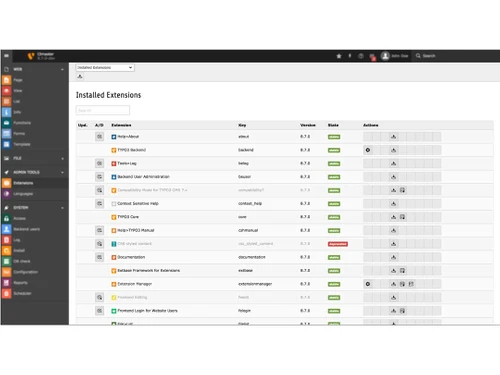
The best modules for TYPO3 include extensions and add-ons from its vast repository. These can enhance functionality in areas like e-commerce, SEO, and content personalization, allowing customization to meet specific business needs.
You cannot send multiple Authorization headers in one request. Instead, combine credentials into one header (if the API supports it) or use a custom header for the second credential.
Example using Guzzle in TYPO3:

0 0
To integrate a REST API into your CI with TYPO3, follow the steps given below:
Use Guzzle for API calls in TYPO3:

Write PHPUnit tests for API interaction in your TYPO3 extension.
Include tests in your CI pipeline to verify API integration automatically.
0 0
To create an access token in TYPO3, follow the steps given below:
Use PHP to generate a token, such as with
bin2hex() :

Create a database table to store the token and its related data (e.g., user ID, expiration date).
Example SQL:

Pass the token in API requests, typically using the Authorization header:

0 0
To build a website on TYPO3, follow the steps given below:
Install TYPO3 using Composer:

Go to Web > Page in the backend
Create a root page and other necessary pages for your website
Install an existing theme or create a custom one using the Extension Manager
Use ‘Fluid’ templates and ‘TypoScript’ for customization
Use Web > Page to add text, images, and other content elements to your pages
Go to Site Management > Sites to configure domain, language, and other settings.
0 0
To change the base URL in TYPO3, follow the steps given below:
0 0
20,000+ Software Listed
Best Price Guranteed
Free Expert Consultation
2M+ Happy Customers
Terms and Condtions

Users with registered businesses can purchase goods from merchants on the platform to satisfy their business needs. Users are not permitted to utilize any products acquired through the platform for resale, advertising, business, or further distribution.
For each purchase made, users will receive a Tax Invoice (or 'GST invoice') that includes specific details such as:
the GSTIN of the user associated with their registered business, and
the specified Entity Name for their business.
It should be noted that not all products are eligible for GST Invoice. Only the products displayed by participating sellers with the 'GST-based Invoice Available' callout on the product description page would qualify.
Certain goods and services are not eligible to get a GST Invoice, including items with VAS, i.e., Value Added Services (e.g., Total Mobile Protection/Assured Buyback) and those involving an exchange offer at the time of purchase.
Users must ensure the accuracy of the GSTIN, and business entity name provided for the GST Invoice. Requests for corrections into GST Invoice would not be accommodated by Techjockey.com or any Seller, and any issues arising from user-provided information are the sole responsibility of users.
Techjockey.com is not liable for the GST Invoice or any associated input tax credit. To efficiently claim an input tax credit, users should select the registered place of business address as per the GST authority's data and follow the provisions of the GST Act and rules.
To claim an input tax credit, the delivery and billing addresses must match. Furthermore, input tax credits will not be granted if the delivery address and GSTIN on the invoice are from different states. In case of incorrect GST details provided during the order placement, the order will be canceled automatically.



