linkedin
Unolo logo
play How to create a free Unolo account
unolo attendance management
unolo location tracking

Unolo

Brand: Smartsense

  • 4.0

  • 3 Ratings

Helps businesses automate and track their field sales and service operations using features like GPS tracking, attendance management, and geo-verified client visits.

See More

Have you used Unolo before?

Share your insights for better experience

Add a Review

Price Available on Request

Questions about pricing or customization? We’re here to help, just a click away.

100% Genuine
Products
Best Price
Guaranteed
Safe & Secure
Payment
  • Description

  • Pricing

  • Features

  • Specification

  • Review

  • Compare

  • Alternatives

  • FAQ

Unolo Software Overview

What is Unolo?

Unolo is a field force management software designed to streamline and automate the operations of field sales and service teams. It offers features like GPS tracking, location-based attendance, and geo-verified client visits, allowing businesses to monitor their employees in real-time. With Unolo, companies can easily manage attendance, track sales progress, and assign targets to their field staff.

The software also includes tools for expense management and order booking, making it a comprehensive solution for businesses with mobile workforces. Trusted by over 1,000 companies and 20,000 field staff, Unolo aims to improve efficiency and decision-making in field operations. The platform is user-friendly and can be set up quickly, enabling organizations to start managing their field teams within minutes.

Why Choose Unolo Software?

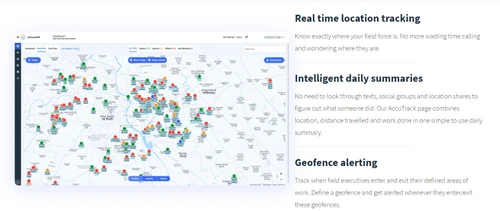
  • Real-Time Tracking: It provides GPS tracking to monitor the real-time location of field employees, ensuring better oversight and management of your workforce.
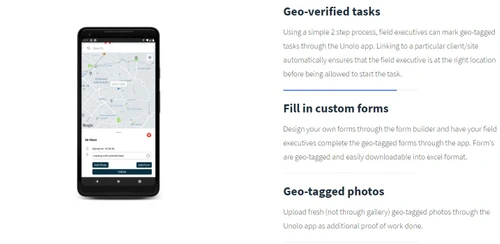
  • Geo-Verified Client Visits: The software offers geo-tagged photos and OTP verification for client visits, ensuring accountability and accuracy in field operations.
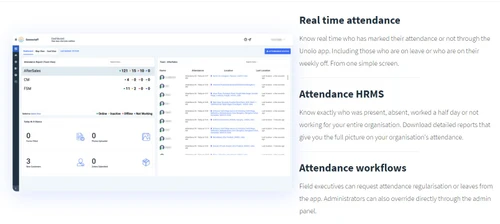
  • Automated Attendance Management: It simplifies attendance tracking with location-based features, allowing businesses to monitor working hours effortlessly.
  • Seamless Expense Management: The platform enables quick validation and processing of conveyance claims with high precision, streamlining expense management for field staff.
  • Sales Tracking and Target Management: Users can assign targets to their teams and monitor progress in real-time, enhancing productivity and sales performance.
  • Order Booking on the Go: It allows field staff to book orders directly through the application, improving efficiency in sales processes.
  • Easy Integration: The software integrates seamlessly with existing CRM and HRMS tools, centralizing data management and saving time.
  • User-Friendly Setup: It can be set up quickly in just 10 minutes, making it easy for businesses to start managing their field operations without extensive training.
  • Comprehensive Dashboard: The intuitive dashboard provides valuable insights into field operations, helping businesses make informed decisions.
  • Trusted by Many: With over 1,000 companies and 20,000 field staff using Unolo, it demonstrates reliability and effectiveness in field force management.

Benefits of Unolo Software

  • Route Optimization: It helps field teams plan the most efficient routes for their daily tasks, reducing travel time and increasing productivity.
  • Offline Functionality: The software can operate in areas with no connectivity, allowing field staff to continue working and syncing data once a connection is restored.
  • Customizable Reports: Users can generate tailored reports based on specific metrics and KPIs, providing insights that align with their business objectives.
  • Employee Directory: It includes a centralized employee directory that makes it easy to manage and access information about team members.
  • Push Notifications: The software sends real-time push notifications to keep employees informed about important updates or changes in their schedules.
  • Performance Analytics: It offers analytics tools to evaluate employee performance, helping managers identify top performers and areas needing improvement.
  • Multi-Language Support: The platform supports multiple languages, making it suitable for diverse teams operating in various regions.
  • API Access: Unolo provides API access, allowing businesses to integrate the software with other systems and enhance its functionality further.
  • User Roles and Permissions: The software allows for customizable user roles and permissions, ensuring that sensitive data is accessible only to authorized personnel.
  • Comprehensive Customer Support: It offers extensive customer support options, including phone, live chat, and ticketing systems, ensuring users receive assistance when needed.

Pricing of Unolo

Unolo price details are available on request at techjockey.com.

The pricing model is based on different parameters, including extra features, deployment type, and the total number of users. For further queries related to the product, you can contact our product team and learn more about the pricing and offers.

Read more

Smartsense Company Details

Founded Year:  2005

Smartsense

Director/Founders Anand Tanna
Company Size 1-100 Employees

Unolo Pricing & Plans

Looking for The Right Pricing?

Share your requirements and get a plan built around your business.

  • Define your business needs
  • Get customised pricing
  • Choose features that fit your workflow

Price Available on Request

Get personalised Unolo pricing that fits your needs. Our team will connect with you.

Unolo Features

  • icon_check Location Tracking
    Allows real-time tracking of employee and service team locations, ensuring better coordination and visibility.
  • icon_check Attendance Management
    Automates the process of recording attendance, including clock-in/out times, absenteeism, and leaves.
  • icon_check Task Management
    Helps assign, track, and manage tasks efficiently, ensuring deadlines are met and work is completed on time.
  • icon_check Sales & Marketing
    Facilitates managing sales activities, lead generation, and marketing campaigns to boost business growth.
  • icon_check Operations
    Streamlines operational workflows, enhancing efficiency in managing daily tasks and business processes.
  • icon_check Security
    Ensures secure access to employee and operational data with robust security protocols and user permissions.
  • icon_check Expense Management
    Tracks and manages business expenses, helping to control costs and improve financial oversight.
  • icon_check Advance Order Booking
    Enables customers to book services or products in advance, optimizing scheduling and inventory management.
  • icon_check Dashboards
    Provides visual, real-time insights into key business metrics, helping managers make data-driven decisions.
Unolo Demo Video play icon

Get Unolo Demo

Watch the demo video to explore key features, real workflows, and how the software fits your business needs.

Understand
Key Features
Personal
Demo Insights
Interactive
Demo Support

Unolo Specifications

Supported Platforms
Windows Windows iOS iOS Android Android
Devices
Desktop Desktop Mobile Mobile Tablet Tablet iPad iPad
Deployment
Cloud-Based Cloud-Based
Suitable For
All Industries
Business Specific
All Businesses
Business Size
Small Business Startups Medium Business Enterprises
Customer Support
Email Live Chat Communities
Language
English
Training Resources
Videos

Explore the Best Alternative Solutions Similar to Your Business Size and Needs

Unolo Review

4.0

Out of 5

img

Overall Rating

Based on
3 Verified Ratings

Rating Breakdown

  • Features 4.3
  • Value for Money 3.6
  • Ease of Use 3.6
  • Customer Support 4.5

86% Recommend this Product

Add Review

Techjockey Trusted Reviews from Verified Users

No reviews are currently available for Unolo. Discover similar Field Service Management Software reviews

  • Empfly Field Service Management

    4.8

    Whats great - We urgently needed offline capabilities since our field teams often work in no-network zones, and this solution delivered. Da... read more
  • Service CRM

    4.6

    Whats great - I am looking for Car Wash Management System since long time. I am fully satisfied with the product. read more

  • Field Force Connect

    4.6

    Whats great - Had a great experience. Our service agent was very knowledgeable and wanted to now how to help our organization. It was wonde... read more

Compare Unolo With other Field Service Management Software

Products
Ratings
Pricing
Device Supported
Deployment
Supported Platforms
  • img

    Unolo

  • 4.0

  • Price On Request

  • Desktop

    Mobile

  • Web based

    On Premises

  • Windows

    Mac OS

  • img

    Service CRM

  • 4.6

  • Price On Request

  • Desktop

    Mobile

  • Web based

    On Premises

  • Windows

    Mac OS

  • img

    QuikAllot

  • 4.5

  • ₹ 9000

  • Desktop

    Mobile

  • Web based

    On Premises

  • Windows

    Mac OS

  • img

    Lystloc

  • 4.3

  • Price On Request

  • Desktop

    Mobile

  • Web based

    On Premises

  • Windows

    Mac OS

  • img

    TrackoField

  • 4.3

  • ₹ 3600

  • Desktop

    Mobile

  • Web based

    On Premises

  • Windows

    Mac OS

  • img

    Intelomatic

  • 4.3

  • Price On Request

  • Desktop

    Mobile

  • Web based

    On Premises

  • Windows

    Mac OS

  • img

    Fieldy

  • 4.2

  • ₹ 6000

  • Desktop

    Mobile

  • Web based

    On Premises

  • Windows

    Mac OS

  • img

    Zuper

  • 4.7

  • Price On Request

  • Desktop

    Mobile

  • Web based

    On Premises

  • Windows

    Mac OS

  • img

    Zoho FSM

  • 4.2

  • ₹ 1800

  • Desktop

    Mobile

  • Web based

    On Premises

  • Windows

    Mac OS

  • img

    MetricInfo

  • 4.3

  • ₹ 1000

  • Desktop

    Mobile

  • Web based

    On Premises

  • Windows

    Mac OS

(0) Product(s) selected

Unolo Alternatives

See All Unolo Alternatives

Available

Price on Request

Starting Price:

$40 /Month

Starting Price:

$39 /Month

Starting Price:

$7 /License

Starting Price:

₹199 /Month ₹699

SAVE UPTO 72%

Starting Price:

$225 /Month

Available

Price on Request

Available

Price on Request

Articles for Unolo

See All Related Articles

What is the cost of Unolo Software?

The pricing details for Unolo are available upon request at techjockey.com.

Is there a mobile app for Unolo Software?

Yes, Unolo Software offers a mobile app for both Android and iOS devices.

Which operating systems are compatible with Unolo Software?

Unolo Software supports both web-based platforms and mobile apps for Windows, Android and iOS.

Does Unolo Software offer a free trial?

Yes, Unolo Software offers a free trial for users to explore its features.

How does Unolo Software function?

Unolo Software streamlines employee and field service management by automating tasks, tracking attendance, and providing real-time updates.

Who can benefit from using Unolo Software?

Businesses with a mobile workforce, including field service teams, sales teams, and customer service organizations, can benefit from Unolo.

Is a free demo available for Unolo Software?

Yes, Unolo Software provides a free demo for interested users to explore its functionalities.

Is Unolo Software available for free?

No, Unolo Software is not available for free, but it may offer a free trial or demo version.

What types of businesses can use Unolo Software?

Unolo Software is ideal for businesses in industries like field services, sales, logistics, and customer support.

20,000+ Software Listed

Best Price Guranteed

Free Expert Consultation

2M+ Happy Customers

Terms and Condtions

close

Users with registered businesses can purchase goods from merchants on the platform to satisfy their business needs. Users are not permitted to utilize any products acquired through the platform for resale, advertising, business, or further distribution.

For each purchase made, users will receive a Tax Invoice (or 'GST invoice') that includes specific details such as:

  • the GSTIN of the user associated with their registered business, and

  • the specified Entity Name for their business.

It should be noted that not all products are eligible for GST Invoice. Only the products displayed by participating sellers with the 'GST-based Invoice Available' callout on the product description page would qualify.

Certain goods and services are not eligible to get a GST Invoice, including items with VAS, i.e., Value Added Services (e.g., Total Mobile Protection/Assured Buyback) and those involving an exchange offer at the time of purchase.

Users must ensure the accuracy of the GSTIN, and business entity name provided for the GST Invoice. Requests for corrections into GST Invoice would not be accommodated by Techjockey.com or any Seller, and any issues arising from user-provided information are the sole responsibility of users.

Techjockey.com is not liable for the GST Invoice or any associated input tax credit. To efficiently claim an input tax credit, users should select the registered place of business address as per the GST authority's data and follow the provisions of the GST Act and rules.

To claim an input tax credit, the delivery and billing addresses must match. Furthermore, input tax credits will not be granted if the delivery address and GSTIN on the invoice are from different states. In case of incorrect GST details provided during the order placement, the order will be canceled automatically.