
linkedin
Veem logo
play The Veem Difference
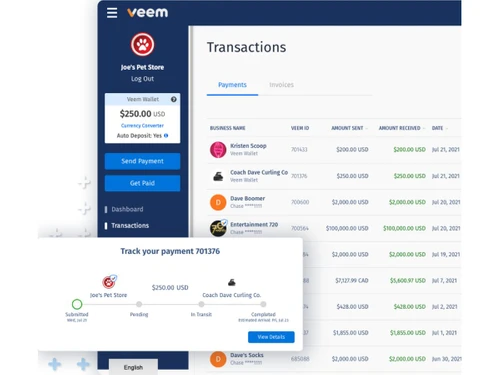
Veem-dashboard
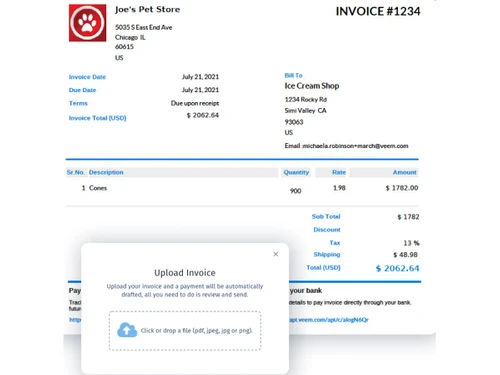
Veem-send invoice

Veem

Brand: Veem

  • 4.1

  • 4 Ratings

Veem helps businesses send, receive, and manage domestic and international payments quickly and securely.

See More

Have you used Veem before?

Share your insights for better experience

Add a Review

Price Available on Request

Questions about pricing or customization? We’re here to help, just a click away.

100% Genuine
Products
Best Price
Guaranteed
Safe & Secure
Payment
  • Description

  • Pricing

  • Features

  • Specification

  • Review

  • FAQ

Veem Software Overview

What is Veem?

Veem is a payment processing software that helps businesses send and receive money online, especially for international payments. It allows companies to transfer money to suppliers, freelancers, and clients in more than 100 countries and different currencies. Veem makes payments easier by reducing the need for traditional bank wire transfers, which are often slow and expensive. Businesses can pay through bank transfers, debit cards, credit cards, checks, and digital wallets.

The platform also provides real-time payment tracking, so users can see where their money is during the transaction process. Veem integrates with accounting software like QuickBooks and Xero to simplify bookkeeping and invoicing. It helps companies automate recurring payments, approvals, and bill management to save time. Many small businesses use Veem because it offers lower fees and competitive exchange rates for global payments.

Why Choose Veem Software?

  • Easy International Payments: Veem simplifies sending and receiving payments across multiple countries.
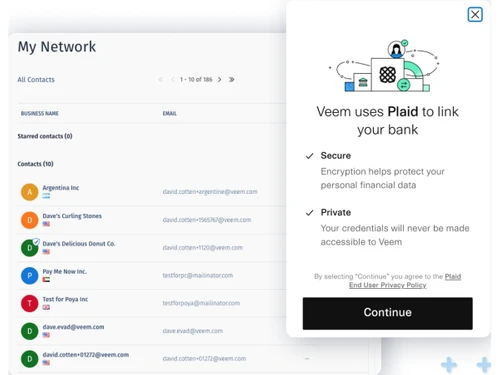
  • Secure Transactions: The platform uses advanced security measures to protect financial data and payments.
  • Multi-Currency Support: Users can pay and get paid in different currencies with ease.
  • Fast Payment Processing: Veem helps businesses complete transactions quickly and efficiently.
  • Transparent Pricing: The software offers clear pricing with fewer hidden charges.
  • Invoice Management: Users can create, send, and track invoices directly within the platform.
  • Payment Tracking: Businesses can monitor the status of payments in real time.
  • User-Friendly Interface: The platform is easy to navigate, even for non-technical users.
  • Accounting Integrations: Veem integrates with accounting tools like QuickBooks and Xero.
  • Supports Small Businesses: The software is designed to meet the needs of startups and SMEs.
  • Automated Workflows: It reduces manual work by automating payment-related tasks.
  • Global Reach: Veem supports transactions in over 100 countries worldwide.

Benefits of Veem Software

  • Reduced Banking Hassles: The platform minimizes the complexity of traditional bank transfers.
  • Digital Payment Solution: Businesses can handle payments completely online without paperwork.
  • Team Collaboration Features: Multiple team members can manage payment operations together.
  • Improved Cash Flow Management: Businesses can better track incoming and outgoing payments.
  • Custom Payment Requests: Users can send customized payment requests to clients and vendors.
  • Reliable Customer Support: Veem provides customer assistance for payment and account-related issues.
  • Centralized Financial Management: Veem allows businesses to manage payments, invoices, and records from one platform.

Veem Pricing

Veem price details are available on request at techjockey.com.

The pricing model is based on different parameters, including extra features, deployment type, and the total number of users. For further queries related to the product, you can contact our product team and learn more about the pricing and offers.

Read more

Veem Company Details

Founded Year:  2014

Veem is a payment service provider that helps simplify the way businesses send and receive funds.

Director/Founders Aldo Carrascoso, Marwan Forzley
Company Size 101-500 Employees

Veem Pricing & Plans

Looking for The Right Pricing?

Share your requirements and get a plan built around your business.

  • Define your business needs
  • Get customised pricing
  • Choose features that fit your workflow

Price Available on Request

Get personalised Veem pricing that fits your needs. Our team will connect with you.

Veem Features

  • icon_check Global Payments
    Send and receive business payments across 100+ countries using optimized payment rails for speed and cost efficiency.
  • icon_check Multi-Currency Support
    Pay and get paid in 80+ currencies with automatic conversion and localized settlement to reduce cross-border friction.
  • icon_check Accounts Payable
    Automate vendor payments, approvals, and scheduling to reduce manual work and improve payment accuracy.
  • icon_check Accounts Receivable
    Create invoices, request payments, and track receivables in one place to improve cash-flow visibility.
  • icon_check Invoice Generation
    Generate and send professional invoices directly from the platform with built-in payment options.
  • icon_check Pay Links
    Share secure payment links that allow customers to pay online without creating a Veem account.
  • icon_check Bulk Payments
    Process mass payouts to suppliers, contractors, or partners in a single workflow to save time.
  • icon_check Payment Tracking
    Track payments end-to-end with real-time status updates and notifications for full transparency.
  • icon_check Accounting Integration
    Sync transactions with accounting tools like QuickBooks, Xero, and NetSuite for easy reconciliation.
  • icon_check API Integration
    Use APIs to embed Veem payments into existing systems and automate payment workflows programmatically.
  • icon_check Compliance & Security
    Built-in compliance checks, encryption, and regulatory controls ensure secure global transactions.
  • icon_check Reporting & Analytics
    Generate detailed payment reports to monitor spend, cash flow, and transaction history.
  • icon_check Vendor Management
    Store and manage vendor details securely to simplify repeat and recurring payments.
Veem Demo Video play icon

Get Veem Demo

Watch the demo video to explore key features, real workflows, and how the software fits your business needs.

Understand
Key Features
Personal
Demo Insights
Interactive
Demo Support

Veem Specifications

Supported Platforms
Windows Windows MacOS MacOS Linux Linux
Devices
Desktop Desktop
Deployment
Cloud-Based Cloud-Based
Suitable For
All Industries
Business Specific
All Businesses
Business Size
Small Business Medium Business Enterprises
Customer Support
Email
Language
English
Integration
API Integration
Training Resources
Videos
Compliance Regulation
SOC 2

Veem Review

4.1

Out of 5

img

Overall Rating

Based on
4 Verified Ratings

Rating Breakdown

  • Features 4.5
  • Value for Money 4
  • Ease of Use 3.7
  • Customer Support 4.2

80% Recommend this Product

Add Review

Be the First to Review

This product has no reviews yet. Be the first to leave your feedback.

Add Review

Articles for Veem

See All Related Articles

How much does Veem Software cost?

Veem pricing details are available upon request at techjockey.

Is there a mobile app available for Veem Software?

No, Veem does not offer a mobile app for convenient payment management.

Which operating systems are compatible with Veem Software?

Veem is compatible with Windows, MacOS and Linux.

Does Veem Software offer a free trial?

Yes, Veem offers free account registration with access to its core features.

How does Veem Software function?

Veem enables businesses to send, receive, track, and manage domestic and international payments digitally.

Who uses Veem Software?

Small businesses, startups, freelancers, and enterprises use Veem for payment management.

Is a free demo available for Veem Software?

Yes, users can request a demo or explore the platform through the official website.

Is Veem Software available for free?

Veem offers free signup, but transaction fees may apply for certain payment services.

20,000+ Software Listed

Best Price Guranteed

Free Expert Consultation

2M+ Happy Customers

Terms and Condtions

close

Users with registered businesses can purchase goods from merchants on the platform to satisfy their business needs. Users are not permitted to utilize any products acquired through the platform for resale, advertising, business, or further distribution.

For each purchase made, users will receive a Tax Invoice (or 'GST invoice') that includes specific details such as:

  • the GSTIN of the user associated with their registered business, and

  • the specified Entity Name for their business.

It should be noted that not all products are eligible for GST Invoice. Only the products displayed by participating sellers with the 'GST-based Invoice Available' callout on the product description page would qualify.

Certain goods and services are not eligible to get a GST Invoice, including items with VAS, i.e., Value Added Services (e.g., Total Mobile Protection/Assured Buyback) and those involving an exchange offer at the time of purchase.

Users must ensure the accuracy of the GSTIN, and business entity name provided for the GST Invoice. Requests for corrections into GST Invoice would not be accommodated by Techjockey.com or any Seller, and any issues arising from user-provided information are the sole responsibility of users.

Techjockey.com is not liable for the GST Invoice or any associated input tax credit. To efficiently claim an input tax credit, users should select the registered place of business address as per the GST authority's data and follow the provisions of the GST Act and rules.

To claim an input tax credit, the delivery and billing addresses must match. Furthermore, input tax credits will not be granted if the delivery address and GSTIN on the invoice are from different states. In case of incorrect GST details provided during the order placement, the order will be canceled automatically.