USA
USA UAE
UAESmall Business
Designed for startups and growing businesses
See More





Brand: Wise US
Wise software provides financial management tools for individuals and businesses, aiding in budgeting, expense tracking, and financial planning.
See MoreHave you used Wise before?
Share your insights for better experience
Brand: Wise US
Founded Year: 2011
Wise is an software devoloping company that provides money transfer services.
Looking for The Right Pricing?
Share your requirements and get a plan built around your business.
Price Available on Request
Get personalised Wise pricing that fits your needs. Our team will connect with you.
 Activity Dashboard Data Import/Export Electronic Payments Reporting & Analytics Data Security Payment Processing Alerts & Notifications Multi-Currency Accounting Currency Conversion Invoice Management Payment Tracking

Watch the demo video to explore key features, real workflows, and how the software fits your business needs.
 Ubuntu
  Windows
  iOS
iOS  Android MacOS
  Linux
Linux  Desktop
  Mobile
  Tablet
  iPad
iPad  Cloud-Based

Small Business
Designed for startups and growing businesses
Medium Business
Built for business growth and flexibility
Enterprises
Designed for complex and large-scale business needs
4.5
Out of 5

Overall Rating
Based on
12 Verified Reviews
Rating Breakdown
88% Recommend this Product
Add ReviewUsers generally appreciate Wise for its reliability, transparency in fees, and ease of use, particularly for small to medium transfers and recurring payments. Many find the multi-currency features beneficial for travel and expat needs. However, common frustrations include delays during compliance checks, slow customer service responses, and limitations on larger transfers or specific payment methods. Overall, while the platform is well-regarded, some users experience occasional hiccups that can disrupt their transactions.
Pros
"Most of the time, Wise works as expected: money arrives, rates are good, fees are clear, the platform is dependable."
"For small to medium international payments, Wise is excellent: low fees, speedy delivery, good customer satisfaction."
"The Wise app/web interface is clean, easy to use, and transaction tracking is good. Many users comment that UI/UX is pleasing and helpful."
Cons
"When issues occur—verifications, frozen accounts, support tickets—they can take longer to resolve. Some users say support uses canned responses."
"If I try to send large sums, fees scale, limits apply, and verification is stricter which can delay things."
"But in some countries, certain payment methods aren’t supported (e.g. funding via local bank transfer vs card), or delays are bigger."



Oct 12, 2025
Techjockey Verified
“Some Frustration with Customer Service but Overall Dependable”
Over several years I’ve used Wise for personal and business transfers. Nearly all transfers have been smooth. Only occasionally, when something goes wrong, I feel uninformed or stuck until it resolves.
Pros
Most of the time, Wise works as expected: money arrives, rates are good, fees are clear, the platform is dependable.
Cons
When issues occur—verifications, frozen accounts, support tickets—they can take longer to resolve. Some users say support uses canned responses.
Reason to switch
I moved from my bank for international transfers because banks were slower, more expensive, and harder to track. Wise gave me better control and visibility, even if support isn’t perfect.
Sep 26, 2025
Techjockey Verified
“Good for Medium Amounts, Not Ideal for Very Large Transfers”
My personal use involves amounts up to a few thousand USD/EUR. Wise handles those well. But for large business transfers, the process becomes more bureaucratic, requiring extra documentation and taking longer.
Pros
For small to medium international payments, Wise is excellent: low fees, speedy delivery, good customer satisfaction.
Cons
If I try to send large sums, fees scale, limits apply, and verification is stricter which can delay things.
Reason to switch
I switched from bank wires for medium amounts because bank markups + fees + delays were worse. Wise is far better for amounts under certain thresholds.
Aug 28, 2025
Techjockey Verified
“Good UX & App Experience, Minor Regional Limitations”
I use the mobile app daily to check balances, send money, and track transfers. Most of the time it works smoothly. Occasionally I hit regional limits or longer transfer times due to local banking/regulations.
Pros
The Wise app/web interface is clean, easy to use, and transaction tracking is good. Many users comment that UI/UX is pleasing and helpful.
Cons
But in some countries, certain payment methods aren’t supported (e.g. funding via local bank transfer vs card), or delays are bigger.
Reason to switch
I switched because the previous app I used had a clunky interface and often ambiguous fees; Wise offered better clarity and a more polished user experience.

Wise
Price On Request
Desktop
Mobile
Web based
On Premises
Windows
Mac OS

Payfunnels
Price On Request
Desktop
Mobile
Web based
On Premises
Windows
Mac OS

IXOPAY
Price On Request
Desktop
Mobile
Web based
On Premises
Windows
Mac OS

Hyperswitch
Price On Request
Desktop
Mobile
Web based
On Premises
Windows
Mac OS

RazorpayX Business Banking+
Price On Request
Desktop
Mobile
Web based
On Premises
Windows
Mac OS

Rapyd
Price On Request
Desktop
Mobile
Web based
On Premises
Windows
Mac OS

Melio
Price On Request
Desktop
Mobile
Web based
On Premises
Windows
Mac OS

Noda
Price On Request
Desktop
Mobile
Web based
On Premises
Windows
Mac OS

Airwallex
Price On Request
Desktop
Mobile
Web based
On Premises
Windows
Mac OS

Veem
Price On Request
Desktop
Mobile
Web based
On Premises
Windows
Mac OS

Square Payments
Price On Request
Desktop
Mobile
Web based
On Premises
Windows
Mac OS
(0) Product(s) selected
Available
Price on Request
Available
Price on Request
Available
Price on Request
Available
Price on Request

Available
Price on Request

Available
Price on Request

Available
Price on Request

Available
Price on Request

Available
Price on Request

Available
Price on Request

Available
Price on Request
Wise Software is compatible with Ubuntu, Windows, Linux, and MacOS.
Yes, Wise Software is available for Android and iOS app users.
Wise software supports web-based deployment.
Wise price details are available on request at techjockey.com.
Wise Software is typically used by all industries for financial management, budgeting, and expense tracking, aiding individuals and businesses in better managing their finances efficiently.
Yes, a demo of Wise is available at techjockey.com.
Wise Software is not available for free. You can connect with our product experts to learn more about the pricing plans.
Wise Software does not offer a free trial.
Wise Software installation is not required, as it is web-based. Just open the Setup Wizard to get started.
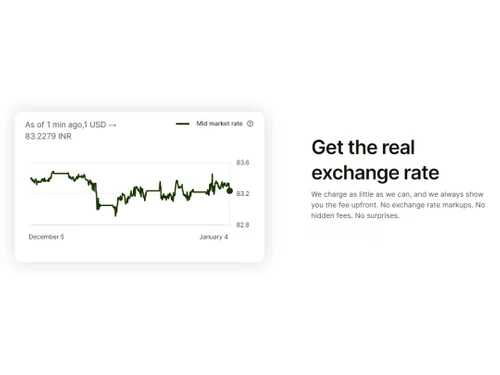
Wise software facilitates international money transfers with transparent fees and real exchange rates, allowing users to initiate transfers online or via the mobile app, providing recipient details and funding sources for efficient execution and delivery of funds.
20,000+ Software Listed
Best Price Guranteed
Free Expert Consultation
2M+ Happy Customers
Terms and Condtions

Users with registered businesses can purchase goods from merchants on the platform to satisfy their business needs. Users are not permitted to utilize any products acquired through the platform for resale, advertising, business, or further distribution.
For each purchase made, users will receive a Tax Invoice (or 'GST invoice') that includes specific details such as:
the GSTIN of the user associated with their registered business, and
the specified Entity Name for their business.
It should be noted that not all products are eligible for GST Invoice. Only the products displayed by participating sellers with the 'GST-based Invoice Available' callout on the product description page would qualify.
Certain goods and services are not eligible to get a GST Invoice, including items with VAS, i.e., Value Added Services (e.g., Total Mobile Protection/Assured Buyback) and those involving an exchange offer at the time of purchase.
Users must ensure the accuracy of the GSTIN, and business entity name provided for the GST Invoice. Requests for corrections into GST Invoice would not be accommodated by Techjockey.com or any Seller, and any issues arising from user-provided information are the sole responsibility of users.
Techjockey.com is not liable for the GST Invoice or any associated input tax credit. To efficiently claim an input tax credit, users should select the registered place of business address as per the GST authority's data and follow the provisions of the GST Act and rules.
To claim an input tax credit, the delivery and billing addresses must match. Furthermore, input tax credits will not be granted if the delivery address and GSTIN on the invoice are from different states. In case of incorrect GST details provided during the order placement, the order will be canceled automatically.