linkedin
Xurrent logo
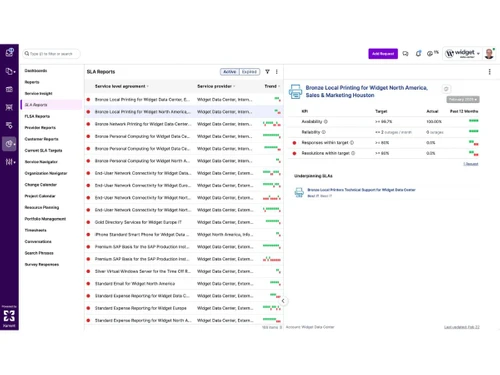
xurrent-dashboard
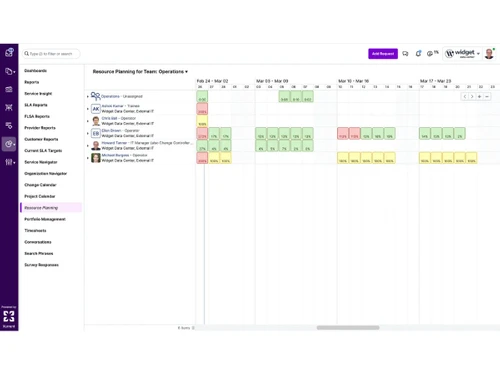
xurrent-projects
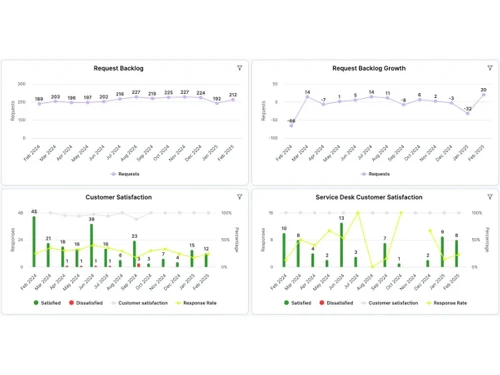
xurrent-analytics

Xurrent

Brand: Xurrent

  • 4.2

  • 4 Ratings

IT service management tool that automates and streamlines IT and business operations for faster, smarter workflow management.

See More

Have you used Xurrent before?

Share your insights for better experience

Add a Review

Price Available on Request

Questions about pricing or customization? We’re here to help, just a click away.

100% Genuine
Products
Best Price
Guaranteed
Safe & Secure
Payment
  • Description

  • Pricing

  • Features

  • Specification

  • Review

  • FAQ

Xurrent Software Overview

What is Xurrent?

Xurrent is a modern cloud-based IT service management tool that helps businesses handle IT and other service work in one place.

It connects and automates tasks like IT support requests, incident handling, and change management so teams can work faster and smarter.

Xurrent uses builtin AI tools to sort tickets, suggest solutions, and reduce manual work. It follows industry standards (ITIL) and can go live quickly with low code setup. Large companies use it to improve service quality, speed, and team collaboration.

Why Choose Xurrent Software?

  • Unified Service Management: Centralizes IT and business service workflows on one platform for better coordination.
  • Cloud-Based Platform: Enables anytime, anywhere access without complex on-premise infrastructure.
  • AI-Driven Automation: Automates routine tasks to reduce errors and improve efficiency.
  • Fast Implementation: Allows quick deployment with minimal setup and configuration.
  • Improved Collaboration: Enhances communication and teamwork across departments.
  • Efficient Incident Management: Speeds up issue resolution with smart routing and tracking.
  • Scalable Solution: Easily adapts to growing organizational needs and workloads.
  • User-Friendly Interface: Offers an intuitive design for quick user adoption.
  • Workflow Standardization: Ensures consistent and reliable processes across teams.
  • Real-Time Visibility: Provides live insights into service performance and operations.
  • Smart Ticket Management: Automatically prioritizes and assigns service requests.
  • Reduced Operational Costs: Lowers expenses by minimizing manual effort through automation.
  • Cross-Department Use: Supports IT, HR, facilities, and other business functions.

Benefits of Xurrent Software

  • High System Reliability: Delivers stable and dependable performance for daily operations.
  • Customizable Processes: Adapts workflows to match specific business requirements.
  • Enhanced Productivity: Frees teams from repetitive tasks to focus on high-value work.
  • Data-Driven Decisions: Uses analytics and reports to support informed decision-making.
  • Secure Environment: Protects sensitive data with strong security controls.
  • Future-Ready Technology: Evolves continuously to meet modern service management needs.
  • Customer-Centric Design: Focuses on improving service quality and user satisfaction.

Xurrent Pricing

Xurrent price details are available on request at Techjockey.com. The pricing model is based on different parameters, including extra features, deployment type, and the total number of users. For further queries related to the product, you can contact our product team and learn more about the pricing and offers.

Read more

Xurrent Company Details

Founded Year:  2010

The Xurrent platform seamlessly connects teams to optimize IT service management through its AI-forward, service-oriented, and multi-tenant SaaS architecture.

Director/Founders Cor Winkler Prins, Laurens Pit, Mathijs Sterk
Company Size 101-500 Employees

Xurrent Pricing & Plans

Looking for The Right Pricing?

Share your requirements and get a plan built around your business.

  • Define your business needs
  • Get customised pricing
  • Choose features that fit your workflow

Price Available on Request

Get personalised Xurrent pricing that fits your needs. Our team will connect with you.

Xurrent Features

  • icon_check Self Service Portal
    Mobile‑friendly portal for users to request, track, and manage service needs anytime on any device from one interface.
  • icon_check Incident Management
    Streamlined incident logging, collaboration, escalation and resolution workflows to enhance IT support efficiency.
  • icon_check Knowledge Management
    AI‑assisted creation and updates of knowledge base articles to improve problem resolution and content accuracy.
  • icon_check Workflow Automation
    No‑code orchestration engine automates approvals, notifications and escalations to remove process bottlenecks.
  • icon_check Real Time Analytics
    Real‑time dashboards and over 400 reports offering insights into service metrics, performance, trends and KPIs.
  • icon_check Project Management
    Built‑in project and task tracking integrated with ITSM workflows eliminates context switching across tools.
  • icon_check Root Cause Analysis
    Root‑cause analysis and issue tracking to prevent recurring incidents and minimize service interruptions.
  • icon_check Time Tracking
    Built‑in module for logging work effort and time within service workflows to optimize resource allocation and billing.
  • icon_check SLA Management
    Automated SLA configuration and monitoring ensures service commitments are tracked and met consistently.
  • icon_check Service Hierarchy Browser
    Browse and manage a structured service hierarchy to visualize dependencies and service performance.
  • icon_check Risk Management
    Tools to identify, assess and mitigate operational risks to ensure service continuity and compliance readiness.
  • icon_check Configuration Management
    Maintain CMDB with service asset relationships to improve impact analysis and change decision making.
  • icon_check Multi Channel Support
    Handle tickets and user interactions across email, chat, portal, and more within a single unified interface.
  • icon_check Release Management
    Plan, schedule, and deploy new features or fixes efficiently while maintaining system integrity and uptime.

Xurrent Specifications

Supported Platforms
Windows Windows iOS iOS Android Android MacOS MacOS
Devices
Desktop Desktop Mobile Mobile Tablet Tablet iPad iPad
Deployment
Cloud-Based Cloud-Based
Suitable For
All Industries
Business Specific
All Businesses
Business Size
Medium Business Enterprises
Customer Support
Email Communities
Language
English
Integration
API Integration
Training Resources
Webinars Videos
AI Features
AI Integrated

Xurrent Review

4.2

Out of 5

img

Overall Rating

Based on
4 Verified Ratings

Rating Breakdown

  • Features 4.6
  • Value for Money 4.3
  • Ease of Use 4.2
  • Customer Support 3.8

80% Recommend this Product

Add Review

Be the First to Review

This product has no reviews yet. Be the first to leave your feedback.

Add Review

How much does Xurrent cost?

Xurrent pricing information can be obtained on request through Techjockey.com.

Is there a mobile app available for Xurrent Software?

Xurrent mobile app is available on iOS and Android.

Which operating systems are compatible with Xurrent Software?

Xurrent works on Windows, iOS, Android and MacOS operating systems.

Does Xurrent Software offer a free trial?

No, Xurrent does not offer a free trial.

How does Xurrent Software function?

Xurrent streamlines service and operations management using cloud-based workflows and automation.

Who uses Xurrent Software?

Xurrent is used by IT teams, service managers, and enterprises across multiple departments.

Is a free demo available for Xurrent Software?

Yes, a free demo can be requested from the official Xurrent team.

Is Xurrent Software available for free?

No, Xurrent is a paid enterprise solution with customized pricing plans.

20,000+ Software Listed

Best Price Guranteed

Free Expert Consultation

2M+ Happy Customers

Terms and Condtions

close

Users with registered businesses can purchase goods from merchants on the platform to satisfy their business needs. Users are not permitted to utilize any products acquired through the platform for resale, advertising, business, or further distribution.

For each purchase made, users will receive a Tax Invoice (or 'GST invoice') that includes specific details such as:

  • the GSTIN of the user associated with their registered business, and

  • the specified Entity Name for their business.

It should be noted that not all products are eligible for GST Invoice. Only the products displayed by participating sellers with the 'GST-based Invoice Available' callout on the product description page would qualify.

Certain goods and services are not eligible to get a GST Invoice, including items with VAS, i.e., Value Added Services (e.g., Total Mobile Protection/Assured Buyback) and those involving an exchange offer at the time of purchase.

Users must ensure the accuracy of the GSTIN, and business entity name provided for the GST Invoice. Requests for corrections into GST Invoice would not be accommodated by Techjockey.com or any Seller, and any issues arising from user-provided information are the sole responsibility of users.

Techjockey.com is not liable for the GST Invoice or any associated input tax credit. To efficiently claim an input tax credit, users should select the registered place of business address as per the GST authority's data and follow the provisions of the GST Act and rules.

To claim an input tax credit, the delivery and billing addresses must match. Furthermore, input tax credits will not be granted if the delivery address and GSTIN on the invoice are from different states. In case of incorrect GST details provided during the order placement, the order will be canceled automatically.