linkedin
Zoho Flow logo
play Zoho Flow
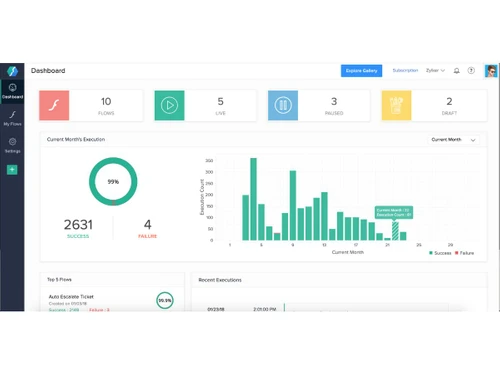
Zoho Flow-dashboard
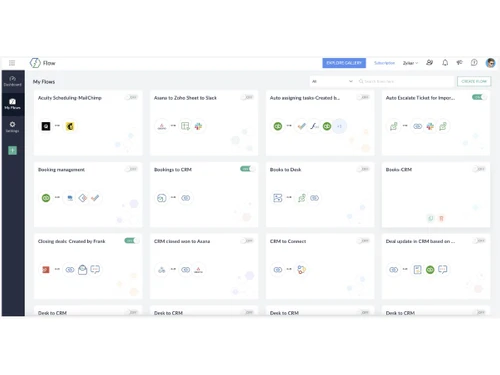
Zoho Flow-overview

Zoho Flow

Brand: Zoho Corporation

  • 4.1

  • 3 Ratings

Zoho Flow is a cloud-based integration platform that helps you connect different apps and automate workflows without coding.

See More

Have you used Zoho Flow before?

Share your insights for better experience

Add a Review
Starting Price
₹1,740 excl.GST
₹ 2,053 incl. GST

View plans

offer Save upto 18%, Get GST Invoice on your business purchase T&C
offer Buy Now & Pay Later, Check offer on payment page.
Buy Now
100% Genuine
Products
Best Price
Guaranteed
Safe & Secure
Payment
  • Description

  • Pricing

  • Features

  • Specification

  • Review

  • FAQ

Starting at ₹1,740
Buy Now

Zoho Flow Software Overview

What is Zoho Flow?

Zoho Flow is a workflow automation software and a project management software that helps businesses connect different apps and automate processes without coding. It allows you to create automated workflows (flows) that trigger actions and transfer data between Zoho apps and third-party applications, reducing manual work and improving operational efficiency.

Why Choose Zoho Flow?

  • No-Code Workflow Automation: Zoho Flow Workflow Management Software lets you automate complex workflows without writing a single line of code, making it easy for both technical and non-technical users.
  • Seamless App Integrations: Connect Zoho applications with hundreds of popular third-party tools, ensuring smooth data flow across your entire business ecosystem.
  • Eliminates Manual Tasks: By automating repetitive processes, Zoho Flow reduces human effort and minimizes errors, allowing teams to focus on more important work.
  • Boosts Team Productivity: Automated workflows help teams collaborate better by ensuring information is shared instantly and consistently between apps.
  • Real-Time Triggers and Actions: With Zoho Flow Workflow Management Software, workflows run automatically the moment an event occurs, ensuring faster response times and improved operational efficiency.

Benefits of Zoho Flow

  • Automates Business Processes: Zoho Flow helps automate repetitive tasks and workflows, reducing manual effort and operational delays.
  • Improves Efficiency and Accuracy: Automated data transfers between apps minimise human errors and ensure consistency across systems.
  • Saves Time and Operational Costs: By streamlining workflows, teams spend less time on routine work and more time on strategic tasks.
  • Enhances Cross-Team Collaboration: Zoho Workflow Management Software ensures information flows smoothly between departments, improving coordination and communication.
  • Easy to Use with No Coding Required: The intuitive interface allows users to build and manage workflows without technical expertise.
  • Supports Multiple App Integrations: Connect Zoho apps with a wide range of third-party tools to create a unified work environment.

Pricing of Zoho Flow

Zoho Flow pricing starts at INR 1740 at techjockey.com.

The pricing model is based on different parameters, including the amount of bandwidth you need, the number of servers you need, and the features you need. For further queries related to the product, you can contact our product team and learn more about the pricing and offers.

Read more

Zoho Corporation Company Details

Founded Year:  1996

Zoho Corporation is an Indian multinational company that specialises in software development, cloud computing, and web-based business tools. It is best known for Zoho Office suite and its enterprise IT management division, ManageEngine

Director/Founders Sridhar Vembu / Tony Thomas
Company Size 1000+ Employees

Zoho Flow Pricing & Plans

Standard

Calculated Price

1740 Exclusive of all taxes
    • Licenses

      Licenses
      Licenses
    • Monthly

      Monthly
      Monthly

Key Features

  • 5k tasks/month

  • 60-day flow history

  • 15-mins polling

  • Base apps

  • Custom functions

  • Logic and utilities

Professional

Calculated Price

2940 Exclusive of all taxes
    • Licenses

      Licenses
      Licenses
    • Monthly

      Monthly
      Monthly

Key Features

  • 10k tasks/month

  • 90-day flow history

  • 5-mins polling

  • Premium apps

  • On prem integration

  • Auto rerun

Zoho Flow Features

  • icon_check Drag-and-Drop Builder
    Create automated workflows easily with a visual, drag-and-drop interface that connects apps and actions.
  • icon_check Multi-App Integration
    Connect hundreds of popular business apps to enable seamless data exchange and task automation.
  • icon_check Conditional Logic & Calculations
    Build smart workflows using if/then conditions to execute actions based on specific triggers or data values.
  • icon_check Custom Functions
    Write custom code snippets using Deluge or JavaScript to extend automation beyond built-in actions.
  • icon_check Webhooks
    Receive or send data in real time via webhooks, enabling dynamic integrations between systems.
  • icon_check Multi-Step Flows
    Design complex workflows involving multiple steps, apps, and logic sequences for advanced automation.
  • icon_check Collaboration Tools
    Share workflows with team members, manage permissions, and collaborate on building integrations.
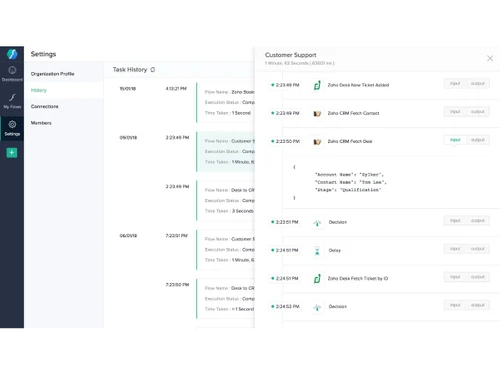
  • icon_check Real Time Monitoring
    View live execution logs, track task history, and analyze data flow for performance insights.
  • icon_check Pre-Built Templates
    Use ready-to-deploy flow templates for popular app combinations to save setup time and effort.
  • icon_check Version Control
    Maintain multiple versions of flows to test, modify, and roll back automations safely when needed.
  • icon_check Scheduling and Delays
    Set time-based triggers or delays between actions to manage workflow execution timing effectively.
  • icon_check Data Transformation
    Modify, map, or format data between apps using built-in functions before transferring information.
  • icon_check Audit Logs and Reporting
    Track user activity, workflow changes, and execution details for compliance and transparency.
Zoho Flow Demo Video play icon

Get Zoho Flow Demo

Watch the demo video to explore key features, real workflows, and how the software fits your business needs.

Understand
Key Features
Personal
Demo Insights
Interactive
Demo Support

Zoho Flow Specifications

Supported Platforms
Windows Windows MacOS MacOS
Devices
Desktop Desktop
Deployment
Cloud-Based Cloud-Based
Suitable For
All Industries
Business Specific
All Businesses
Business Size
Small Business Medium Business Enterprises
Customer Support
Phone Email Communities
Language
English
Training Resources
Videos
Compliance Regulation
GDPR

Zoho Flow Review

4.1

Out of 5

img

Overall Rating

Based on
3 Verified Ratings

Rating Breakdown

  • Features 4.1
  • Value for Money 4
  • Ease of Use 3.8
  • Customer Support 4.8

80% Recommend this Product

Add Review

Techjockey Trusted Reviews from Verified Users

No reviews are currently available for Zoho Flow. Discover similar Workflow Automation Software reviews

  • Pipefy

    4.3

    Whats great - Great company! Excellent customer service and just generally smooth sailing. Would highly recommend. read more
  • Monday.com

    4.0

    Whats great - monday.com’s design and functionality make it a perfect choice for managing projects. read more

  • Wrike

    4.0

    Whats great - ssions and manage user rights, ensuring that sensitive information is only available to the right people. Further, the two-fa... read more

How much does Zoho Flow cost?

Zoho Flow pricing starts at INR 1740 at techjockey.com. Pricing is customised based on specific business needs.

Which operating system does Zoho Flow Workflow Management Software support?

Zoho Flow is cloud-based and works on any operating system with a web browser, including Windows, macOS, and Linux.

How does Zoho Flow work?

This Workflow Management Software automates workflows by connecting different apps, allowing data to move seamlessly, and triggering actions based on predefined conditions.

Is Zoho Flow suitable for small businesses?

Yes, it is ideal for small businesses to automate repetitive tasks, save time, and improve efficiency without heavy IT resources.

Does Zoho Flow offer a free trial or a demo?

Yes, Zoho Flow Workflow Management Software provides a free trial so users can explore its features before committing to a paid plan.

What features does Zoho Flow offer?

It offers features like multi-app workflows, conditional logic, task automation, app integration, and real-time monitoring of flows.

Is there a Zoho Flow App?

Yes, Zoho Flow Workflow Management Software has a mobile app that lets users manage workflows and monitor automation on the go.

Who are the potential users of Zoho Flow Workflow Management Software?

Potential users include small to medium businesses, IT teams, operations managers, and anyone looking to automate app workflows.

How secure is Zoho Flow?

Zoho Flow follows strict security standards, including data encryption, role-based access, and compliance with international regulations.

What is Zoho Flow Workflow Management Software used for?

It is used to automate business processes, integrate multiple applications, and streamline workflow management efficiently.

20,000+ Software Listed

Best Price Guranteed

Free Expert Consultation

2M+ Happy Customers

Terms and Condtions

close

Users with registered businesses can purchase goods from merchants on the platform to satisfy their business needs. Users are not permitted to utilize any products acquired through the platform for resale, advertising, business, or further distribution.

For each purchase made, users will receive a Tax Invoice (or 'GST invoice') that includes specific details such as:

  • the GSTIN of the user associated with their registered business, and

  • the specified Entity Name for their business.

It should be noted that not all products are eligible for GST Invoice. Only the products displayed by participating sellers with the 'GST-based Invoice Available' callout on the product description page would qualify.

Certain goods and services are not eligible to get a GST Invoice, including items with VAS, i.e., Value Added Services (e.g., Total Mobile Protection/Assured Buyback) and those involving an exchange offer at the time of purchase.

Users must ensure the accuracy of the GSTIN, and business entity name provided for the GST Invoice. Requests for corrections into GST Invoice would not be accommodated by Techjockey.com or any Seller, and any issues arising from user-provided information are the sole responsibility of users.

Techjockey.com is not liable for the GST Invoice or any associated input tax credit. To efficiently claim an input tax credit, users should select the registered place of business address as per the GST authority's data and follow the provisions of the GST Act and rules.

To claim an input tax credit, the delivery and billing addresses must match. Furthermore, input tax credits will not be granted if the delivery address and GSTIN on the invoice are from different states. In case of incorrect GST details provided during the order placement, the order will be canceled automatically.