linkedin
Ableton Live logo
play Ableton Live 10: Capture
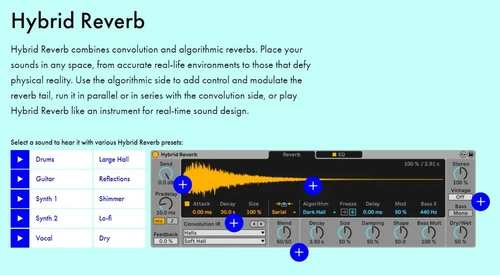
ableton hybrid reverb
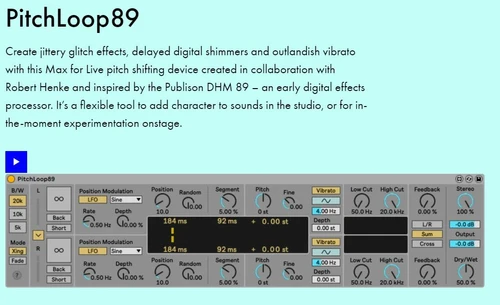
ableton pitchloop89

Ableton Live

Brand: Ableton

  • 4.3

  • 6 Ratings & 2 Reviews

Ableton is a versatile audio editing software designed for music producers and live performers. With features like MIDI transformations, Max for Live, and granular synthesis, it’s perfect for creativity and sound design.

See More

Have you used Ableton Live before?

Share your insights for better experience

Add a Review
Starting Price
$99

View plans

100% Genuine
Products
Best Price
Guaranteed
Safe & Secure
Payment
  • Description

  • Pricing

  • Features

  • Specification

  • Review

  • Compare

  • Alternatives

  • FAQ

Starting at $99

Ableton Live Software Overview

What is Ableton?

Ableton is a versatile, cutting-edge audio editing software designed for music producers, DJs, and anyone who wants to experiment with sound. Whether you're composing tracks, performing live, or manipulating audio samples, Ableton provides a dynamic platform that empowers you to create with freedom and precision. 

The latest version, Ableton Live 12, offers a comprehensive suite of tools for creating, editing, and transforming music, making it an industry standard for professionals and hobbyists alike. With its intuitive interface and powerful features, Ableton is perfect for crafting any genre of music or sound design.

Why Choose Ableton Audio Editing Software?

Here are the top reasons why Ableton stands out among audio editing tools:

  • Tailored for Creativity: One major benefit of using Ableton audio editing software is its creativity tools. Ableton offers an environment where creativity thrives. With features like MIDI transformations, Max for Live, and MPE (MIDI Polyphonic Expression) capabilities, you can easily create, edit, and manipulate music in real-time.
  • Perfect for Live Performance: Ableton is not just for studio work; it's built for live performances. Its flexibility allows artists to use it on stage, remixing and adding effects to tracks on the fly, making it an essential tool for DJs and live performers.
  • Integrated Sound Design: This is another benefit of using Ableton audio editing software. With built-in synthesizers like Meld and effects like Roar, Ableton gives you the tools to design complex and unique sounds. Whether you're into subtle textures or wild, distorted tones, Ableton can handle it all.
  • Cross-Platform: Ableton is compatible with both Windows and macOS, ensuring that no matter what system you use, you can produce high-quality music and audio.
  • Endless Expansion with Plugins: Ableton supports an array of plugins, including Max for Live, allowing users to extend their creativity with unique sound processing options and advanced functionalities.

Additional Features of Ableton

Ableton Live offers a wide range of features that set it apart from other audio editing software. Below are some of the best features of Ableton:

  • MIDI Transformations: With this feature of Ableton, you can reshape your MIDI clips with complex variations, adding articulations, curves, or even simulating instruments like a guitar. Ableton’s MIDI tools let you effortlessly create sophisticated musical ideas.
  • Max for Live: This powerful tool lets you build custom devices, add new transformations, or integrate advanced features into your workflow. Whether it's manipulating MIDI patterns or designing sound effects, Max for Live opens up endless creative possibilities.
  • Advanced Modulation: With this Ableton feature, you can stay in control of modulated parameters with Ableton’s updated modulation tools, including LFOs and envelope followers, giving you greater flexibility over the sound design.
  • Granular Synthesis: With Granulator III, you can create atmospheric soundscapes by manipulating real-time audio and adding expressive control such as vibrato or glissando.
  • Performance Packs: This Ableton feature provides various Performance Packs, like the Golden Era Hip Hop Drums and Trap Drums, that include multi-sampled instruments, drum racks, and MPE functionality for added expression and creative control.
  • Sound Similarity Search: With Ableton’s new neural-network-based Sound Similarity Search, you can quickly find similar sounds and samples, making sound selection faster and more intuitive.

Pricing of Ableton

Ableton offers three main editions tailored to different needs:

  • Ableton Live Intro: Perfect for beginners, this edition provides essential features for creating music at a starting price of $99.
  • Ableton Live Standard: For producers looking for a more complete set of features, including advanced instruments and effects, this version is priced at $449.
  • Ableton Live Suite: The full experience, with unlimited sound packs, Max for Live integration, and all available features, can be purchased for $749.
Read more

Ableton Company Details

Founded Year:  1999

Ableton develops software and hardware for creating, producing and performing music.

Director/Founders Bernd Roggendorf, Gerhard Behles
Company Size 101-500 Employees

Ableton Live Pricing & Plans

Live 12 Intro
Starting at $99
    • Licenses

      Licenses
      Licenses

Key Features

  • Essentials – 16 tracks and 5+ GB of sounds

  • 16 scenes

  • 2 send and return tracks

  • 8 mono audio input channels

  • Unique Session View for quick, intuitive compositi

Live 12 Standard
Starting at $439
    • Licenses

      Licenses
      Licenses

Key Features

  • Unlimited Audio and MIDI tracks

  • Unlimited Scenes

  • 12 Send and Return tracks

  • 256 mono audio input channels

  • Unique Session View for quick, intuitive compositi

Live 12 Suite
Starting at $749
    • Licenses

      Licenses
      Licenses

Key Features

  • Unlimited Audio and MIDI tracks

  • Unlimited Scenes

  • 12 Send and Return tracks

  • 256 mono audio input channels

  • Unique Session View for quick, intuitive compositi

Ableton Live Features

  • icon_check Audio Recording
    The software has an in-built sound recording module that uses the microphone to record clean and distortion-free sound.
  • icon_check Multitrack MIDI Editing
     Sound Designers/Music Producers/DJs can edit multiple MIDI tracks in real-time on DAW. 
  • icon_check Flexible Performance
    The software allows users to toggle between different soundboards to mix and match audio samples and audio effects flexibly. 
  • icon_check Effects
    The audio editing software offers access to special effects like bass, echo, reverb, etc.
  • icon_check Virtual Instruments
    Ableton Live provides virtual version of musical instruments for users to work along. 
  • icon_check Sound Editor
    The software allows users to edit sounds and make both destructive & non-destructive changes. 
  • icon_check Soundtracks
    Ableton Live can be used to create fully furnished soundtracks. 
Ableton Live Demo Video play icon

Get Ableton Live Demo

Watch the demo video to explore key features, real workflows, and how the software fits your business needs.

Understand
Key Features
Personal
Demo Insights
Interactive
Demo Support

Ableton Live Specifications

Supported Platforms
Windows Windows MacOS MacOS
Devices
Desktop Desktop
Deployment
Cloud-Based Cloud-Based
Suitable For
Media House
Business Specific
Media
Language
English

Explore the Best Alternative Solutions Similar to Your Business Size and Needs

Ableton Live Reviews

4.3

Out of 5

img

Overall Rating

Based on
2 Verified Reviews

Rating Breakdown

  • Features 4.1
  • Value for Money 4.4
  • Ease of Use 4.4
  • Customer Support 4.5

90% Recommend this Product

Add Review

Ableton Live Video Reviews

youtubeVideoId

4.6

“Ableton Live 11 Review - What's new and is it worth it?”

Review by: Weaver Beats

youtubeVideoId

4.5

“Ableton Live 11 REVIEW ”

Review by: EdTalenti

Compare Ableton Live With other DAW Software

Products
Ratings
Pricing
Device Supported
Deployment
Supported Platforms
  • img

    Ableton Live

  • 4.3

  • Price On Request

  • Desktop

    Mobile

  • Web based

    On Premises

  • Windows

    Mac OS

  • img

    FL Studio

  • 4.5

  • ₹ 2599

  • Desktop

    Mobile

  • Web based

    On Premises

  • Windows

    Mac OS

  • img

    SynthMaster

  • 4.6

  • Price On Request

  • Desktop

    Mobile

  • Web based

    On Premises

  • Windows

    Mac OS

  • img

    Nuendo

  • 4.4

  • ₹ 64477

  • Desktop

    Mobile

  • Web based

    On Premises

  • Windows

    Mac OS

  • img

    Resolume

  • 4.3

  • Price On Request

  • Desktop

    Mobile

  • Web based

    On Premises

  • Windows

    Mac OS

  • img

    Mixcraft 10.6

  • 4.5

  • Price On Request

  • Desktop

    Mobile

  • Web based

    On Premises

  • Windows

    Mac OS

  • img

    n-Track Studio

  • 4.2

  • Price On Request

  • Desktop

    Mobile

  • Web based

    On Premises

  • Windows

    Mac OS

  • img

    Addictive Drums 2

  • 4.1

  • Price On Request

  • Desktop

    Mobile

  • Web based

    On Premises

  • Windows

    Mac OS

  • img

    Groove Agent

  • 4.2

  • ₹ 19109

  • Desktop

    Mobile

  • Web based

    On Premises

  • Windows

    Mac OS

  • img

    RipX DAW

  • 4.3

  • ₹ 9400

  • Desktop

    Mobile

  • Web based

    On Premises

  • Windows

    Mac OS

  • img

    Pro Tools

  • 4.5

  • Price On Request

  • Desktop

    Mobile

  • Web based

    On Premises

  • Windows

    Mac OS

(0) Product(s) selected

Ableton Live Alternatives

See All Ableton Live Alternatives
SAVE UPTO 30%

Starting Price:

€299 /Quantity

Starting Price:

$10 /Month

Starting Price:

$49 /Quantity
LMMS

4.2

Available

Price on Request

Available

Price on Request

Articles for Ableton Live

See All Related Articles

Can I get Ableton for free?

Yes, Ableton offers a free trial version of Ableton Live 12, allowing users to explore its full range of features before making a purchase. However, to access it permanently, you'll need to buy one of its editions.

How expensive is Ableton?

Ableton offers three pricing tiers: Live Intro ($99), Live Standard ($449), and Live Suite ($749). Each edition provides different features, catering to beginners, intermediate, and advanced users, ensuring there's a suitable option for everyone.

Can beginners use Ableton?

Yes, beginners can use Ableton. The Intro edition is ideal for newcomers, offering essential tools for creating music. Additionally, its intuitive interface and tutorial resources make learning music production accessible for users at any level.

Is Ableton similar to Audacity?

Ableton and Audacity serve different purposes. While Audacity focuses on basic audio editing and recording, Ableton is more advanced, providing comprehensive tools for music production, live performances, sound design, and MIDI manipulation.

Is there AutoTune in Ableton?

Ableton itself does not have a built-in AutoTune, but it supports third-party plugins like Auto-Tune by Antares. This flexibility allows users to add AutoTune effects to their projects using external VST plugins.

Can you mix vocals in Ableton?

Yes, Ableton is excellent for mixing vocals. It offers various tools like EQ, compression, reverb, and delay, as well as advanced audio effects to enhance and mix vocals with professional precision.

20,000+ Software Listed

Best Price Guranteed

Free Expert Consultation

2M+ Happy Customers

Terms and Condtions

close

Users with registered businesses can purchase goods from merchants on the platform to satisfy their business needs. Users are not permitted to utilize any products acquired through the platform for resale, advertising, business, or further distribution.

For each purchase made, users will receive a Tax Invoice (or 'GST invoice') that includes specific details such as:

  • the GSTIN of the user associated with their registered business, and

  • the specified Entity Name for their business.

It should be noted that not all products are eligible for GST Invoice. Only the products displayed by participating sellers with the 'GST-based Invoice Available' callout on the product description page would qualify.

Certain goods and services are not eligible to get a GST Invoice, including items with VAS, i.e., Value Added Services (e.g., Total Mobile Protection/Assured Buyback) and those involving an exchange offer at the time of purchase.

Users must ensure the accuracy of the GSTIN, and business entity name provided for the GST Invoice. Requests for corrections into GST Invoice would not be accommodated by Techjockey.com or any Seller, and any issues arising from user-provided information are the sole responsibility of users.

Techjockey.com is not liable for the GST Invoice or any associated input tax credit. To efficiently claim an input tax credit, users should select the registered place of business address as per the GST authority's data and follow the provisions of the GST Act and rules.

To claim an input tax credit, the delivery and billing addresses must match. Furthermore, input tax credits will not be granted if the delivery address and GSTIN on the invoice are from different states. In case of incorrect GST details provided during the order placement, the order will be canceled automatically.