linkedin
Adobe Audience Manager logo
play Adobe Audience Manager: Making Your Marketing More Effective
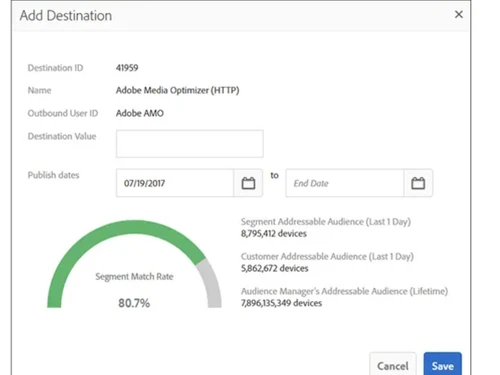
adobe audience manager-destination
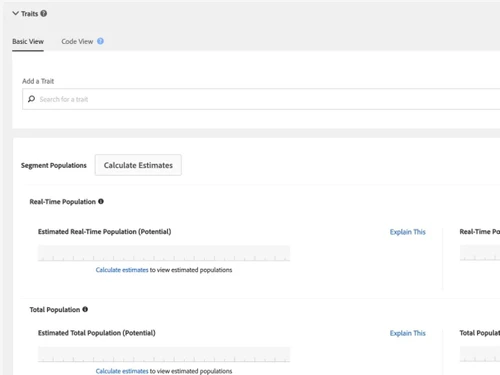
adobe audience manager-traits

Adobe Audience Manager

Brand: Adobe

  • 4.1

  • 5 Ratings

Boost productivity and achieve operational efficiency through automation and real-time alerts with Adobe Audience Manager, the ultimate data management software.

See More

Have you used Adobe Audience Manager before?

Share your insights for better experience

Add a Review

Price Available on Request

Questions about pricing or customization? We’re here to help, just a click away.

100% Genuine
Products
Best Price
Guaranteed
Safe & Secure
Payment
  • Description

  • Pricing

  • Features

  • Specification

  • Review

  • Compare

  • Alternatives

  • FAQ

Adobe Audience Manager Overview

What is Adobe Audience Manager?

Adobe Audience Manager is a sophisticated Data Management Platform (DMP) designed to help businesses collect, unify, and analyze large volumes of audience data from virtually any source. As a central component of the Adobe Experience Cloud, it empowers organizations to build unique audience profiles, uncover intelligent insights, and deliver more relevant and personalized customer experiences across all marketing channels. The platform consolidates first-party data (from websites, CRM, etc.), second-party data (from partners), and third-party data to create a holistic view of the customer. This unified profile allows marketers to move beyond generic messaging and engage with precisely defined audience segments in real-time, driving higher engagement and return on investment.

The core function of Audience Manager is to transform raw, disparate data points into actionable audience intelligence. By organizing data into hierarchical segments, businesses can identify their most valuable customers, discover new look-alike audiences, and activate these segments across advertising and personalization platforms. This automation significantly reduces the need for manual data handling, freeing up teams to focus on strategic initiatives and creative problem-solving.

Why Choose Adobe Audience Manager?

  • Unified Audience Profiles: It excels at merging data from online and offline sourcesincluding web analytics, CRM systems, mobile apps, and email campaignsto create comprehensive and persistent audience profiles.
  • Intelligent Segmentation: The platform offers powerful tools to segment audiences based on demographics, behaviors, and intent signals. This allows for the creation of high-value segments that can be targeted with precision.
  • Enhanced Personalization: By integrating seamlessly with other Adobe Experience Cloud solutions like Adobe Target and Adobe Campaign, Audience Manager enables the delivery of highly personalized content and offers across websites, apps, and email.
  • Operational Efficiency: Automation is a key benefit. The software handles monotonous data collection and organization tasks, allowing marketing and analytics teams to focus on higher-value activities like strategy and campaign optimization. Real-time alerts and a comprehensive view of processes help businesses make smarter, faster decisions.
  • Data Privacy and Control: Adobe provides robust tools for data governance and privacy, helping businesses manage user consent and comply with regulations like GDPR and CCPA while still leveraging valuable audience insights.

Advanced Features of Adobe Audience Manager

  1. Audience Marketplace: A private data marketplace that allows companies to securely buy and sell second-party and third-party data. This feature helps enrich existing audience profiles and expand reach by accessing unique data sets from trusted partners.
  2. Look-Alike Modeling: This powerful algorithmic feature analyzes the traits of your most valuable audience segments (e.g., high-converting customers) and identifies other users across the web who exhibit similar behaviors and characteristics, helping you scale your campaigns effectively.
  3. Data Export Controls: Granular controls allow you to manage precisely which data is shared with which third-party activation platform. This ensures data is used appropriately and protects proprietary audience segments.
  4. Audience Lab: A testing framework that enables marketers to compare the performance of different audience segments against each other. This helps in optimizing targeting strategies by identifying which segments respond best to specific campaigns.
  5. Cross-Device Identification: Using both deterministic and probabilistic methods, Audience Manager can link a single user's identity across multiple devices (desktop, mobile, tablet), ensuring a consistent and seamless customer experience.

Key Capabilities of Adobe Audience Manager

  • Data Collection & Ingestion: Seamlessly collect first-party data from all digital properties using Adobe's tracking code or server-to-server integrations. It also supports onboarding offline data from CRM or point-of-sale systems.
  • Trait & Segment Creation: Define specific user attributes or actions as Traits (e.g., viewed pricing page). Combine these traits using Boolean logic (AND, OR, NOT) to build complex and highly specific audience Segments (e.g., users who viewed pricing but did not convert).
  • Audience Analytics & Reporting: Utilize built-in reporting tools like the Audience Optimization Reports to gain deep insights into segment composition, overlap, and unique traits. This helps in understanding audience behavior and refining segmentation strategy.
  • Real-Time Activation: Push audience segments to a wide array of destinations in real-time, including demand-side platforms (DSPs), ad networks, social media platforms, and content personalization engines, to execute targeted campaigns instantly.

How to Use Adobe Audience Manager?

  1. Define Data Sources: Identify all relevant online and offline data sources you want to integrate, such as website analytics, mobile app data, CRM records, and third-party data providers.
  2. Implement Data Collection: Deploy tracking tags on your digital properties or set up server-to-server integrations to begin collecting user data and sending it to the platform.
  3. Build Traits and Segments: Within the Audience Manager interface, create rules to define traits based on user actions, demographics, or other data points. Combine these traits to build actionable audience segments.
  4. Analyze and Gain Insights: Use the platform's analytics tools to analyze your segments. Understand their size, unique characteristics, and how they overlap with other audiences.
  5. Activate Segments: Choose your activation channels (e.g., Google Ads, Facebook, Adobe Target) and map your segments to these destinations to launch targeted campaigns and personalized experiences.
  6. Measure and Optimize: Continuously monitor campaign performance and use the insights to refine your segments and targeting strategies for better results.

Adobe Audience Manager Price

Adobe Audience Manager price is available on request at Techjockey. The pricing model is based on different parameters, including extra features, deployment type, and the total number of users. For further queries related to the product, you can contact our product expert and learn more about the pricing and offers.

Read more

Adobe Company Details

Founded Year:  1982

Adobe is the global leader in digital media and digital marketing solutions.

Director/Founders Charles Geschke, Jason Lemkin
Company Size 1000+ Employees

Adobe Audience Manager Pricing & Plans

Looking for The Right Pricing?

Share your requirements and get a plan built around your business.

  • Define your business needs
  • Get customised pricing
  • Choose features that fit your workflow

Price Available on Request

Get personalised Adobe Audience Manager pricing that fits your needs. Our team will connect with you.

Adobe Audience Manager Features

  • icon_check Data Explorer
    Create traits from structured and unstructured data for immediate audience segmentation and action.
  • icon_check Data Ingestion
    Incorporate online and offline data from various touchpoints like CRM, call centers, and IoT devices.
  • icon_check Audience Marketplace
    Engage in buying or selling third-party data securely through a private marketplace environment.
  • icon_check Identity Management
    Define device stitching rules at user or household levels to manage identities across devices.
  • icon_check A/B Testing
    Split segments into exclusive groups to test performance across different platforms or models.
  • icon_check Data Integration Library
    Use JavaScript library to simplify data collection and transmission from websites to the platform.
  • icon_check Data Export
    Manage how audience data is shared with external partners, maintaining privacy and security.
Adobe Audience Manager Demo Video play icon

Get Adobe Audience Manager Demo

Watch the demo video to explore key features, real workflows, and how the software fits your business needs.

Understand
Key Features
Personal
Demo Insights
Interactive
Demo Support

Adobe Audience Manager Specification

Supported Platforms
Ubuntu Ubuntu Windows Windows MacOS MacOS Linux Linux
Devices
Desktop Desktop
Deployment
Web-Based Web-Based
Suitable For
All Industries
Business Specific
All Businesses
Business Size
Small Business Startups Medium Business Enterprises
Customer Support
Email Communities
Language
English
Training Resources
Videos

Explore the Best Alternative Solutions Similar to Your Business Size and Needs

Adobe Audience Manager Review

4.1

Out of 5

img

Overall Rating

Based on
5 Verified Ratings

Rating Breakdown

  • Features 4.2
  • Value for Money 4
  • Ease of Use 4.1
  • Customer Support 4.4

86% Recommend this Product

Add Review

Techjockey Trusted Reviews from Verified Users

No reviews are currently available for Adobe Audience Manager . Discover similar Data Management Software reviews

  • MagicBot

    4.5

    Whats great - “I’m no accounting expert and yet l I’ve had no problems to feel comfortable using SlickPie” read more

  • Mink InfoTech Data Extraction System

    4.9

    Whats great - Good software to use saved my time by extracting data in a pattern, and saving in a file. The software requires no technical ... read more

  • WeighMAST

    4.8

    Whats great - The system integrates seamlessly with your organization. Its key strength is the ability to be customized with features and w... read more

Compare Adobe Audience Manager With other Data Management Software

Products
Ratings
Pricing
Device Supported
Deployment
Supported Platforms
  • img

    Adobe Audience Manager

  • 4.1

  • Price On Request

  • Desktop

    Mobile

  • Web based

    On Premises

  • Windows

    Mac OS

  • img

    Dancing Numbers

  • 4.4

  • Price On Request

  • Desktop

    Mobile

  • Web based

    On Premises

  • Windows

    Mac OS

  • img

    Zoho DataPrep

  • 4.3

  • ₹ 28800

  • Desktop

    Mobile

  • Web based

    On Premises

  • Windows

    Mac OS

  • img

    OpenRefine

  • 4.4

  • Price On Request

  • Desktop

    Mobile

  • Web based

    On Premises

  • Windows

    Mac OS

  • img

    Zapper Edge

  • 4.1

  • Price On Request

  • Desktop

    Mobile

  • Web based

    On Premises

  • Windows

    Mac OS

  • img

    Squeezely

  • 4.4

  • Price On Request

  • Desktop

    Mobile

  • Web based

    On Premises

  • Windows

    Mac OS

  • img

    Teamscope

  • 4.4

  • Price On Request

  • Desktop

    Mobile

  • Web based

    On Premises

  • Windows

    Mac OS

  • img

    Tibco Rendezvous

  • 4.2

  • Price On Request

  • Desktop

    Mobile

  • Web based

    On Premises

  • Windows

    Mac OS

  • img

    Harmonize

  • 4.1

  • Price On Request

  • Desktop

    Mobile

  • Web based

    On Premises

  • Windows

    Mac OS

  • img

    Anomalo

  • 4.1

  • Price On Request

  • Desktop

    Mobile

  • Web based

    On Premises

  • Windows

    Mac OS

(2) Product(s) selected

Adobe Audience Manager Alternatives

See All Adobe Audience Manager Alternatives

Available

Price on Request

Available

Price on Request

Starting Price:

€399 /year

Available

Price on Request

Available

Price on Request

Available

Price on Request

Articles for Adobe Audience Manager

See All Related Articles

Is there any free trial or demo for Adobe Audience Manager ?

Adobe Audience Manager Data Management Software demo is available for free at Techjockey.

Is Adobe Audience Manager free?

Adobe Audience Manager Data Management Software offers a free trial. However, the premium plan with advanced features available at Techjockey.

How can you download Adobe Audience Manager ?

For Adobe Audience Manager Data Management Software installation, insert the given CD/USB flash storage in your system and open the Setup Wizard to get started.

What is Adobe Audience Manager used for?

Adobe Audience Manager is a data management platform used to collect and combine audience data from various sources to build unique audience segments for targeted advertising and content personalization.

Is Adobe Audience Manager a DMP?

Yes, Adobe Audience Manager is a Data Management Platform (DMP) designed to collect, organize, and activate first, second, and third-party audience data from various online and offline sources.

What is the difference between Adobe Analytics and Audience Manager?

Adobe Analytics primarily collects and analyzes user behavior data on your own digital properties for reporting, while Adobe Audience Manager builds portable audience segments from multiple data sources for activation in advertising and personalization campaigns.

Is Adobe Audience Manager being replaced?

Adobe is transitioning the core capabilities of Audience Manager into the more comprehensive Adobe Real-Time Customer Data Platform (RT-CDP), which combines DMP features with real-time customer profiles.

How does Adobe Audience Manager work?

Adobe Audience Manager works by collecting data from various online and offline sources, organizing it into audience segments based on shared characteristics, and then activating these segments across marketing and advertising platforms.

How much does Adobe Audience Manager cost?

Adobe Audience Manager price is available on request at Techjockey.com.

Can Adobe Audience Manager be customized for my business?

Yes, the platform offers feature-level customization options, allowing you to get a tailored solution and pricing plan based on the specific size and requirements of your organization.

How does automation in Adobe Audience Manager help businesses?

The platform's automation features help businesses by reducing the need for employees to handle monotonous data management tasks, freeing them to focus on more critical and creative problem-solving.

What is the benefit of real-time alerts in the software?

Real-time alerts provide a comprehensive overview of data processes, enabling users to make smarter, timely decisions and achieve greater operational efficiency in their audience management.

20,000+ Software Listed

Best Price Guranteed

Free Expert Consultation

2M+ Happy Customers

Terms and Condtions

close

Users with registered businesses can purchase goods from merchants on the platform to satisfy their business needs. Users are not permitted to utilize any products acquired through the platform for resale, advertising, business, or further distribution.

For each purchase made, users will receive a Tax Invoice (or 'GST invoice') that includes specific details such as:

  • the GSTIN of the user associated with their registered business, and

  • the specified Entity Name for their business.

It should be noted that not all products are eligible for GST Invoice. Only the products displayed by participating sellers with the 'GST-based Invoice Available' callout on the product description page would qualify.

Certain goods and services are not eligible to get a GST Invoice, including items with VAS, i.e., Value Added Services (e.g., Total Mobile Protection/Assured Buyback) and those involving an exchange offer at the time of purchase.

Users must ensure the accuracy of the GSTIN, and business entity name provided for the GST Invoice. Requests for corrections into GST Invoice would not be accommodated by Techjockey.com or any Seller, and any issues arising from user-provided information are the sole responsibility of users.

Techjockey.com is not liable for the GST Invoice or any associated input tax credit. To efficiently claim an input tax credit, users should select the registered place of business address as per the GST authority's data and follow the provisions of the GST Act and rules.

To claim an input tax credit, the delivery and billing addresses must match. Furthermore, input tax credits will not be granted if the delivery address and GSTIN on the invoice are from different states. In case of incorrect GST details provided during the order placement, the order will be canceled automatically.