linkedin
Altair ESD logo
play Altair SmartWorks: Overview
Altair Library
Altair PCB

Altair ESD

Brand: Altair Engineering

  • 4.3

  • 4 Ratings

Altair ESD Engineering Design Software empowers engineers with advanced tools for static analysis, system-level modeling, and efficient design optimization.

See More

Have you used Altair ESD before?

Share your insights for better experience

Add a Review

Price Available on Request

Questions about pricing or customization? We’re here to help, just a click away.

100% Genuine
Products
Best Price
Guaranteed
Safe & Secure
Payment
  • Description

  • Pricing

  • Features

  • Specification

  • Review

  • Compare

  • Alternatives

  • FAQ

Altair ESD Software Overview

What is Altair ESD Software?

Altair ESD is an electronic system design simulation tool developed by Altair company. It provides engineering and development teams with an advanced integrated platform for electronic system design, simulation, and optimization. This engineering design software uses IoT, high-performance computing, and artificial intelligence technology to create designs and simulations. IoT technology integrates sensors and IoT devices to provide real-time data. Simulation models and optimization is done through high-performance computing and machine learning tools.

Engineers can create a system model including components, subsystems, and interconnections. Altair ESD is then used to simulate the model behavior under various input conditions. The outputs predicted can be optimized to find the optimal solution. Supported by advanced visualization tools, further improvements, and analysis can be done. The entire process can be collaborated, and complex systems can be efficiently designed.

Altair ESD can accelerate PCB development and be used for EMI vulnerability analysis and optimization of wireless connectivity. It also can be integrated with electronic code development and automation tools for enhancing smart electronic system designs.

Why Choose Altair ESD?

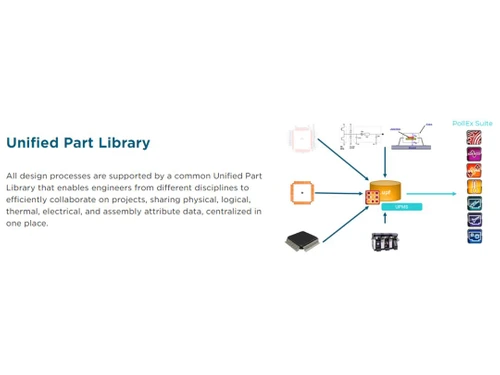
  • Designing and simulation of circuits: It helps in interactive circuit designs, simulation, exploring its performance, optimization, and analyzing for finalizing the product. Through real-world simulation of various parameters, engineers can find weaknesses, and make decisions, for a good and reliable product.
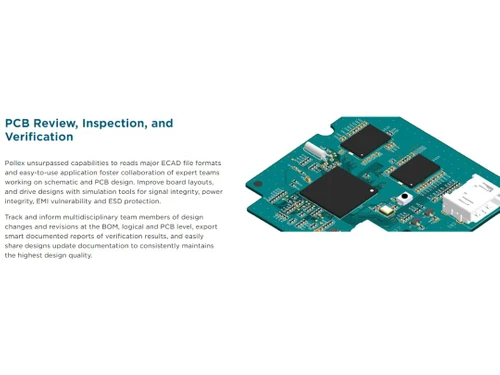
  • Complete PCB verification environment: this tool helps in correctly designing the complex electronic circuit board layout, reviewing it, simulating it, analyzing analyze vulnerability, and increasing the efficiency of PCB fabrication.
  • Wireless Connectivity: It optimizes wireless connectivity, performing radar cross-section (RCS) and scattering analysis, the strategy of antenna placement, etc.
  • Collaborative work: Work by collaborating on team members' ideas, sharing data across the team from concepts to manufacturing, and ultimately eradicating design-related errors.
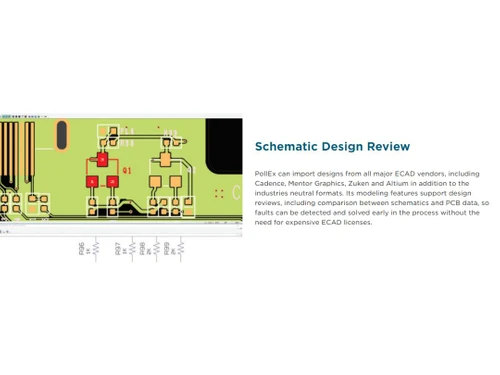
  • Integration with Existing tools: It offers connectivity with all the major ECAD systems with third-party physics simulation tools and exports.
  • Versatile solution: It provides tools and functionalities for many use cases like EDA job scheduling optimization, PCB fabrication, Antenna settings, I/O profiling, monitoring, etc.

Benefits of Altair ESD Engineering Software

  • Real-world simulation: It allows the simulation of proposed designs and specifications through advanced technology and improves the quality of the designed product.
  • Collaborative working: This tool provides collaboration among various product development stages, thus making the development process smoother and more accessible.
  • Early design simulation: this tool checks for EMI vulnerability, signal integrity, balanced differential pairs, and verified return path routing.
  • Complete performance analysis: a complete analysis of the performance and usability of the product across all disciplines can be quickly done.
  • Manufacturing support: this tool offers exceptional manufacturing support by improving PCB fabrication efficiency, assembly, and end-of-line testing.
  • Broad product development suite: this tool is part of a more comprehensive product development suite, offering the most advanced solution to fulfill all the criteria.

Altair ESD Price

Altair ESD engineering software pricing is available on request at techjockey.com.

The overall pricing model is based on different factors such as personalization, extra features required, total users, and the deployment type. Please feel free to request a call from our product experts if you want to learn more about our subscription plans or premium package deals.

Read more

Altair Engineering Company Details

Founded Year:  1985

Altair Engineering, Inc. provides enterprise analytics, engineering, and on-demand computing software technologies. Its technology.

Director/Founders James R. Scapa
Company Size 1000+ Employees

Altair ESD Pricing & Plans

Looking for The Right Pricing?

Share your requirements and get a plan built around your business.

  • Define your business needs
  • Get customised pricing
  • Choose features that fit your workflow

Price Available on Request

Get personalised Altair ESD pricing that fits your needs. Our team will connect with you.

Altair ESD Features

  • icon_check Collaborations
    It connects the team from the conceptualization of the product to its manufacturing for teamwork and minimizing error.
  • icon_check PCB Development
    Improve the overall layout of PCB with simulation tools to assess EMI vulnerability, ESD protection, and power integrity.
  • icon_check Wireless Connectivity
    Optimise the wireless connectivity through electromagnetic compatibility (EMC) analysis and placement of the antenna.
  • icon_check Structural Analysis
    Use optimization and engineering analysis tools for accurate structural analysis of complex assemblies.
  • icon_check Optimization
    Optimise designs and desired parameters of the products in real-time through simulation and optimization algorithms.
  • icon_check Thermal & Flow Analysis
    It offers thermal and flow analysis tools for analyzing integrated flow, heat transfer, and fluid dynamics.
  • icon_check Multiphysics Modeling
    Use Multiphysics-enabled software for simulating and analyzing various interactive physical models.
Altair ESD Demo Video play icon

Get Altair ESD Demo

Watch the demo video to explore key features, real workflows, and how the software fits your business needs.

Understand
Key Features
Personal
Demo Insights
Interactive
Demo Support

Altair ESD Specifications

Supported Platforms
Ubuntu Ubuntu Windows Windows MacOS MacOS Linux Linux
Devices
Desktop Desktop Mobile Mobile Tablet Tablet iPad iPad
Deployment
Cloud-Based Cloud-Based
Suitable For
All Industries
Business Specific
All Businesses
Business Size
Small Business Startups Medium Business Enterprises
Customer Support
Email Communities
Language
English
Training Resources
Webinars Documentation Videos

Explore the Best Alternative Solutions Similar to Your Business Size and Needs

Altair ESD Review

4.3

Out of 5

img

Overall Rating

Based on
4 Verified Ratings

Rating Breakdown

  • Features 4.6
  • Value for Money 4.2
  • Ease of Use 4.1
  • Customer Support 4.3

97% Recommend this Product

Add Review

Techjockey Trusted Reviews from Verified Users

No reviews are currently available for Altair ESD. Discover similar Engineering Design Software reviews

  • CSiBridge

    4.7

    Whats great - I purchased this tool a half year back and can gladly say that this product is one of a kind for modeling and designing of br... read more

  • CSI SAP 2000

    4.0

    Whats great - From 2D static frame analysis to 3D nonlinear dynamic analysis, it has got practically everything covered. I felt so easy wor... read more

  • Power Translator Pro

    4.4

    Whats great - Exquisite on the grounds that its planners imagined the sorts of reports and situations that individuals need to decipher. read more

Compare Altair ESD With other Engineering Design Software

Products
Ratings
Pricing
Device Supported
Deployment
Supported Platforms
  • img

    Altair ESD

  • 4.3

  • Price On Request

  • Desktop

    Mobile

  • Web based

    On Premises

  • Windows

    Mac OS

  • img

    Staad Pro

  • 4.3

  • ₹ 92608

  • Desktop

    Mobile

  • Web based

    On Premises

  • Windows

    Mac OS

  • img

    ClearCalcs

  • 4.5

  • Price On Request

  • Desktop

    Mobile

  • Web based

    On Premises

  • Windows

    Mac OS

  • img

    Catia

  • 4.5

  • Price On Request

  • Desktop

    Mobile

  • Web based

    On Premises

  • Windows

    Mac OS

  • img

    Collimator AI

  • 4.5

  • Price On Request

  • Desktop

    Mobile

  • Web based

    On Premises

  • Windows

    Mac OS

  • img

    CSiBridge

  • 4.6

  • Price On Request

  • Desktop

    Mobile

  • Web based

    On Premises

  • Windows

    Mac OS

  • img

    OnScale Solve

  • 4.3

  • Price On Request

  • Desktop

    Mobile

  • Web based

    On Premises

  • Windows

    Mac OS

  • img

    Autodesk Civil 3D

  • 4.3

  • Price On Request

  • Desktop

    Mobile

  • Web based

    On Premises

  • Windows

    Mac OS

  • img

    nTop

  • 4.1

  • Price On Request

  • Desktop

    Mobile

  • Web based

    On Premises

  • Windows

    Mac OS

(0) Product(s) selected

Altair ESD Alternatives

See All Altair ESD Alternatives

nTop

4.1

Available

Price on Request

Available

Price on Request

Available

Price on Request

Available

Price on Request

Available

Price on Request

Articles for Altair ESD

See All Related Articles

Which operating system does the Altair ESD Software Support?

Altair ESD software is compatible with Windows and macOS operating systems.

Is there any Altair ESD App?

Altair ESD app is unavailable on Android and iOS devices.

What is the deployment type of the Altair ESD Software?

Altair ESD system supports on-premises deployment.

How much does the Altair ESD cost?

Altair ESD pricing starts from $10 at techjockey.com.

Who are the potential users of the Altair ESD?

Altair ESD can be used by professionals in aerospace, automotive, manufacturing, and civil engineering who seek advanced tools to optimize designs, simulate complex systems, and enhance overall productivity.

Is there any free trial or demo for Altair ESD?

Altair ESD demo is available for free with techjockey.com.

Is the Altair ESD System free?

Altair ESD does not offer a free trial.

How can you download the Altair ESD Software?

You can download Altair ESD software through their official website.

How does Altair ESD work?

Altair ESD is an Engineering Design software that aids in developing smart connected devices. It offers simulation-driven design tools for electronic system design, allowing specialized engineers to collaborate on various aspects of printed circuit board development.

20,000+ Software Listed

Best Price Guranteed

Free Expert Consultation

2M+ Happy Customers

Terms and Condtions

close

Users with registered businesses can purchase goods from merchants on the platform to satisfy their business needs. Users are not permitted to utilize any products acquired through the platform for resale, advertising, business, or further distribution.

For each purchase made, users will receive a Tax Invoice (or 'GST invoice') that includes specific details such as:

  • the GSTIN of the user associated with their registered business, and

  • the specified Entity Name for their business.

It should be noted that not all products are eligible for GST Invoice. Only the products displayed by participating sellers with the 'GST-based Invoice Available' callout on the product description page would qualify.

Certain goods and services are not eligible to get a GST Invoice, including items with VAS, i.e., Value Added Services (e.g., Total Mobile Protection/Assured Buyback) and those involving an exchange offer at the time of purchase.

Users must ensure the accuracy of the GSTIN, and business entity name provided for the GST Invoice. Requests for corrections into GST Invoice would not be accommodated by Techjockey.com or any Seller, and any issues arising from user-provided information are the sole responsibility of users.

Techjockey.com is not liable for the GST Invoice or any associated input tax credit. To efficiently claim an input tax credit, users should select the registered place of business address as per the GST authority's data and follow the provisions of the GST Act and rules.

To claim an input tax credit, the delivery and billing addresses must match. Furthermore, input tax credits will not be granted if the delivery address and GSTIN on the invoice are from different states. In case of incorrect GST details provided during the order placement, the order will be canceled automatically.