USA
USA UAE
UAESmall Business
Designed for startups and growing businesses

See More


Brand: CircuitLab
CircuitLab is a browser-based circuit simulation and engineering design software for analog and digital circuits. Users can create, test, and analyze both analog and digital circuits directly from the browser.
See MoreHave you used Circuitlab before?
Share your insights for better experience
Looking for The Right Pricing?
Share your requirements and get a plan built around your business.
Price Available on Request
Get personalised Circuitlab pricing that fits your needs. Our team will connect with you.
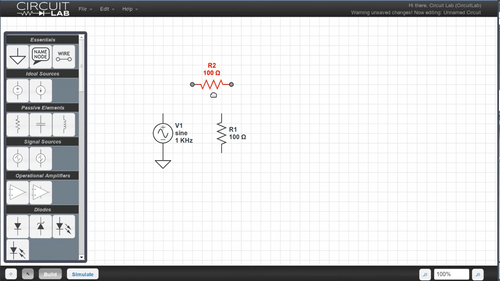
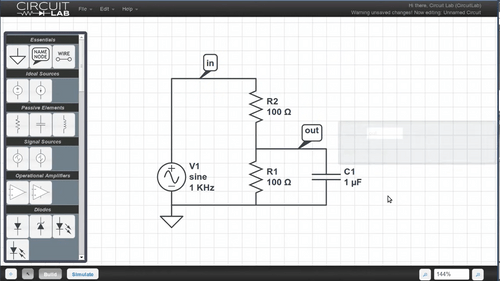
 Electronics Designers & Engineers Easy-to-use Power Tools Inbuilt Designer Circuit simulation & schematics Design tools Wiring diagrams

Watch the demo video to explore key features, real workflows, and how the software fits your business needs.
 Windows
  Desktop
  Cloud-Based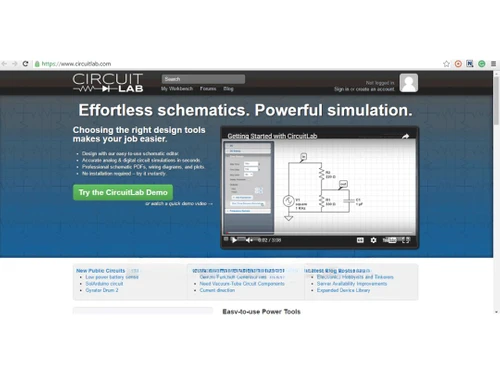
Small Business
Designed for startups and growing businesses
Medium Business
Built for business growth and flexibility
Enterprises
Designed for complex and large-scale business needs
4.0
Out of 5

Overall Rating
Based on
4 Verified Ratings
Rating Breakdown
82% Recommend this Product
Add ReviewTechjockey Trusted Reviews from Verified Users
No reviews are currently available for Circuitlab. Discover similar Engineering Design Software reviews

CSiBridge
Whats great - I purchased this tool a half year back and can gladly say that this product is one of a kind for modeling and designing of br... read more

CSI SAP 2000
Whats great - From 2D static frame analysis to 3D nonlinear dynamic analysis, it has got practically everything covered. I felt so easy wor... read more

Power Translator Pro
Whats great - Exquisite on the grounds that its planners imagined the sorts of reports and situations that individuals need to decipher. read more

Circuitlab
Price On Request
Desktop
Mobile
Web based
On Premises
Windows
Mac OS

Staad Pro
₹ 92608
Desktop
Mobile
Web based
On Premises
Windows
Mac OS

ClearCalcs
Price On Request
Desktop
Mobile
Web based
On Premises
Windows
Mac OS

Catia
Price On Request
Desktop
Mobile
Web based
On Premises
Windows
Mac OS

Collimator AI
Price On Request
Desktop
Mobile
Web based
On Premises
Windows
Mac OS

Softbit Electrical Panel Design
₹ 27500
Desktop
Mobile
Web based
On Premises
Windows
Mac OS

Softbit Transformer Design Software
₹ 14500
Desktop
Mobile
Web based
On Premises
Windows
Mac OS
CSiBridge
Price On Request
Desktop
Mobile
Web based
On Premises
Windows
Mac OS

OnScale Solve
Price On Request
Desktop
Mobile
Web based
On Premises
Windows
Mac OS

Autodesk Civil 3D
Price On Request
Desktop
Mobile
Web based
On Premises
Windows
Mac OS

nTop
Price On Request
Desktop
Mobile
Web based
On Premises
Windows
Mac OS
(0) Product(s) selected
Starting Price:
$400
Starting Price:
$500 /Month
Available
Price on Request

Available
Price on Request

Available
Price on Request

Available
Price on Request

Available
Price on Request

Available
Price on Request
CircuitLab is a browser-based software application and thus can run on any OS with a modern web browser.
CircuitLab price details are available on request at techjockey.com.
Yes, CircuitLab offers a demo video and free access to try before making purchasing decisions. Contact experts at www.techjockey.com for further details.
Yes, a user can analyze AC circuits with the help of CircuitLab by configuring the AC analysis settings in the simulation tool.
A user can export schematics from CircuitLab by saving them as PDF files or image files directly from the editor.
Yes, a user can perform transient analysis with CircuitLab by setting the desired time range and step size for the simulation.
CircuitLab uses a SPICE-like simulation engine to provide highly accurate results for both analog and digital circuits.
Yes, CircuitLab supports mixed-mode simulations, allowing the combination of analog and digital components in one circuit.
Yes, CircuitLab helps users in frequency-domain simulations for small-signal analysis and frequency response testing.
Yes, CircuitLab allows users to create custom symbols and define behaviors using programmable behavioral sources and expressions.
A user can import SPICE models into CircuitLab by uploading the SPICE file and integrating it into their circuit design.
20,000+ Software Listed
Best Price Guranteed
Free Expert Consultation
2M+ Happy Customers
Terms and Condtions

Users with registered businesses can purchase goods from merchants on the platform to satisfy their business needs. Users are not permitted to utilize any products acquired through the platform for resale, advertising, business, or further distribution.
For each purchase made, users will receive a Tax Invoice (or 'GST invoice') that includes specific details such as:
the GSTIN of the user associated with their registered business, and
the specified Entity Name for their business.
It should be noted that not all products are eligible for GST Invoice. Only the products displayed by participating sellers with the 'GST-based Invoice Available' callout on the product description page would qualify.
Certain goods and services are not eligible to get a GST Invoice, including items with VAS, i.e., Value Added Services (e.g., Total Mobile Protection/Assured Buyback) and those involving an exchange offer at the time of purchase.
Users must ensure the accuracy of the GSTIN, and business entity name provided for the GST Invoice. Requests for corrections into GST Invoice would not be accommodated by Techjockey.com or any Seller, and any issues arising from user-provided information are the sole responsibility of users.
Techjockey.com is not liable for the GST Invoice or any associated input tax credit. To efficiently claim an input tax credit, users should select the registered place of business address as per the GST authority's data and follow the provisions of the GST Act and rules.
To claim an input tax credit, the delivery and billing addresses must match. Furthermore, input tax credits will not be granted if the delivery address and GSTIN on the invoice are from different states. In case of incorrect GST details provided during the order placement, the order will be canceled automatically.