linkedin
Autodesk Civil 3D logo
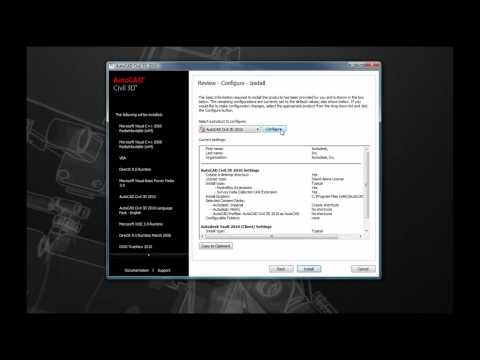
play AutoCAD Civil 3D demo
Autodesk autocad
Autodesk autocad

Autodesk Civil 3D

Brand: Autodesk

  • 4.3

  • 5 Ratings

Autodesk Civil 3D is a BIM-enabled civil engineering application for infrastructure project designing, analyzing, and documenting using smart 3D modeling.

See More

Have you used Autodesk Civil 3D before?

Share your insights for better experience

Add a Review

Price Available on Request

Questions about pricing or customization? We’re here to help, just a click away.

100% Genuine
Products
Best Price
Guaranteed
Safe & Secure
Payment
  • Description

  • Pricing

  • Features

  • Specification

  • Review

  • Compare

  • Alternatives

  • FAQ

Autodesk Civil 3D Software Overview

What is Autodesk Civil 3D?

Autodesk Civil 3D is a specialized engineering designing software for civil infrastructure design and documentation. It enables professionals to create 3D models of roads, land development, and water projects with precision. The tool automates design tasks, improves accuracy, and streamlines collaboration using BIM (Building Information Modeling). Ideal for civil engineers, surveyors, and planners, it integrates analysis, drafting, and visualization in one platform.

Top Features of Autodesk Civil 3D

  • Parcel Design: Civil 3D optimizes land development with automation features for parcel creation and subdivision. Users can outline limits, create lot structures, and use dynamic labels that change with design alterations.
  • Grading Optimization: The feature allows engineers to model more exacting terrain with higher fidelity. With criteria-driven grading mechanisms, designers can devise cut-and-fill strategies, balance earthworks, and check slopes against predetermined safety limits.
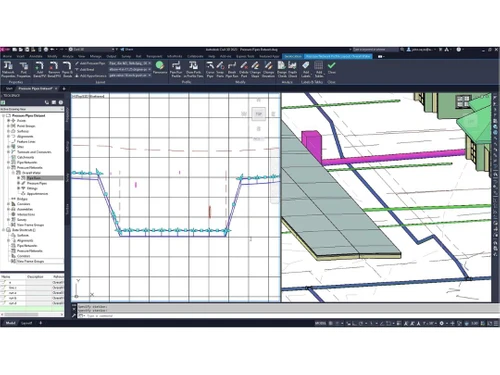
  • Pipe Networks: Design undrained utilities using intelligent catalogs of pipes and structures. Civil 3D automates network configuration, evaluates flows, and does pre-conflict detection. Custom rules guarantee compliance with engineering standards, while profile views show their depth and positioning concerning other structures.
  • Quantity Takeoff: Obtain comprehensive and detailed material estimates directly from the design models. The tool connects schedule data to the models for estimating costs by calculating earthwork volumes, pavement areas, and pipe lengths. This streamlines error management and bolsters budget supervision throughout the lifecycle of the project.
  • Geotechnical Modeling: Incorporate borehole information and soil strata into the 3D model for foundation designs. Civil 3D integrates surface models with geotechnical reports, allowing engineers to determine the risks of settlement, slope stability, and requisite excavations, all of which are vital to infrastructural resilience.

Why do Businesses Use Autodesk Civil 3D?

The major benefits of Autodesk Civil 3D are the following:

  • Faster Project Delivery: Autodesk Civil 3D comes with advanced features that enhance productivity by automating corridor modeling and quantity takeoffs, accelerating project completion timelines.
  • Reduced Errors and Rework: The software prevents construction errors and costly rework by automatically synchronizing the associated components in plans, profiles, and surfaces whenever a change is made, hence maintaining consistency through dynamic updates. All discrepancies are eliminated.
  • Cost Savings: Businesses are better able to manage their resources and cut down on waste due to Civil 3D’s precise calculations of earthwork and material quantities.
  • Improved Collaboration: With BIM, contractors, surveyors, and engineers can integrate seamlessly with Civil 3D. Everyone involved has real-time access to the same up-to-date model, which minimizes confusion and delays related to miscommunication or coordination.
  • Regulatory Compliance: Users can utilize out-of-the-box design standards and templates that adhere to AASHTO and other local industry code requirements. Built-in compliance tools strengthen validation checks against non-conforming designs so approvals can be obtained with non-complicated processes.
  • Enhanced Visualization: With Civil 3D, infrastructure projects can be modeled and simulated in 3D in a manner that is life-like with varying degrees of detail. They enable stakeholders and clients to visualize the design intent, reducing the number of revisions needed as more approvals are rapidly attained.

Autodesk Civil 3D Pricing

The starting price of Autodesk Civil 3D is ₹22,420 per month for 1 user at Techjockey.com.

Read more

Autodesk Company Details

Founded Year:  1982

Autodesk makes software for people who make things. If you’ve ever driven a high-performance car, admired a towering skyscraper, used a smartphone, or watched a great film, chances are you’ve experienced what millions of Autodesk customers are doing with our software.

Director/Founders John Walker / Dan Drake
Company Size 1000+ Employees

Autodesk Civil 3D Pricing & Plans

Looking for The Right Pricing?

Share your requirements and get a plan built around your business.

  • Define your business needs
  • Get customised pricing
  • Choose features that fit your workflow

Price Available on Request

Get personalised Autodesk Civil 3D pricing that fits your needs. Our team will connect with you.

Autodesk Civil 3D Features

  • icon_check Collaboration
    Real-time teamwork across disciplines with synchronized BIM models, reducing errors and accelerating project delivery.
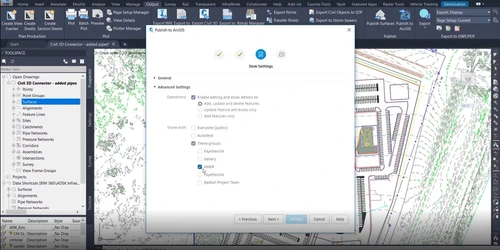
  • icon_check Connector for ArcGIS
    Seamless GIS integration enables data sharing between Civil 3D and ArcGIS for smarter infrastructure planning.
  • icon_check Bridge Design
    Specialized tools for modeling bridge geometry, decks, and abutments with automated documentation.
  • icon_check Pressure Network
    Design pressurized pipe systems (water/gas) with force analysis and clash detection capabilities.
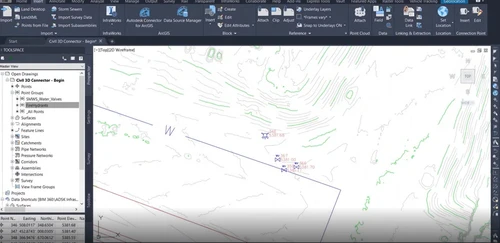
  • icon_check Surface Modelling
    Create accurate terrain models from survey data for grading, drainage, and visualization.
  • icon_check Site & Survey
    Process field data into design elements with automated point management and surface creation.
  • icon_check Corridor Modelling
    Parametric design of roads/highways with dynamic assemblies and automatic cross-sections.
  • icon_check Storm & Sanitary
    Analyze and design gravity-based drainage systems with hydraulic calculations.
  • icon_check Interoperability
    Open workflows with industry formats for smooth data exchange across platforms.
  • icon_check Pipe Networks
    Design complex gravity and pressure piping systems using specialized tools for layout, labeling, and interference checking.
  • icon_check Alignment Design
    Develop precise horizontal geometry for roads or rails with support for transition spirals and industry-standard design rules.
  • icon_check Volume Calculation
    Volume Calculation
  • icon_check Data Shortcuts
    Share project data like surfaces and alignments across multiple DWG files to ensure team-wide consistency and fast performance.
Autodesk Civil 3D Demo Video play icon

Get Autodesk Civil 3D Demo

Watch the demo video to explore key features, real workflows, and how the software fits your business needs.

Understand
Key Features
Personal
Demo Insights
Interactive
Demo Support

Autodesk Civil 3D Specifications

Supported Platforms
Windows Windows
Devices
Desktop Desktop
Deployment
Cloud-Based Cloud-Based
Suitable For
Architecture
Business Specific
All Businesses
Business Size
Small Business Medium Business Enterprises
Customer Support
Email
Language
English
Training Resources
Documentation Videos

Explore the Best Alternative Solutions Similar to Your Business Size and Needs

Autodesk Civil 3D Review

4.3

Out of 5

img

Overall Rating

Based on
5 Verified Ratings

Rating Breakdown

  • Features 4
  • Value for Money 4.6
  • Ease of Use 4.6
  • Customer Support 4.2

88% Recommend this Product

Add Review

Techjockey Trusted Reviews from Verified Users

No reviews are currently available for Autodesk Civil 3D. Discover similar Engineering Design Software reviews

  • CSiBridge

    4.7

    Whats great - I purchased this tool a half year back and can gladly say that this product is one of a kind for modeling and designing of br... read more

  • CSI SAP 2000

    4.0

    Whats great - From 2D static frame analysis to 3D nonlinear dynamic analysis, it has got practically everything covered. I felt so easy wor... read more

  • Power Translator Pro

    4.4

    Whats great - Exquisite on the grounds that its planners imagined the sorts of reports and situations that individuals need to decipher. read more

Compare Autodesk Civil 3D With other Engineering Design Software

Products
Ratings
Pricing
Device Supported
Deployment
Supported Platforms
  • img

    Autodesk Civil 3D

  • 4.3

  • Price On Request

  • Desktop

    Mobile

  • Web based

    On Premises

  • Windows

    Mac OS

  • img

    Staad Pro

  • 4.3

  • ₹ 92608

  • Desktop

    Mobile

  • Web based

    On Premises

  • Windows

    Mac OS

  • img

    ClearCalcs

  • 4.5

  • Price On Request

  • Desktop

    Mobile

  • Web based

    On Premises

  • Windows

    Mac OS

  • img

    Collimator AI

  • 4.5

  • Price On Request

  • Desktop

    Mobile

  • Web based

    On Premises

  • Windows

    Mac OS

  • img

    Catia

  • 4.5

  • Price On Request

  • Desktop

    Mobile

  • Web based

    On Premises

  • Windows

    Mac OS

  • img

    CSiBridge

  • 4.6

  • Price On Request

  • Desktop

    Mobile

  • Web based

    On Premises

  • Windows

    Mac OS

  • img

    OnScale Solve

  • 4.3

  • Price On Request

  • Desktop

    Mobile

  • Web based

    On Premises

  • Windows

    Mac OS

  • img

    nTop

  • 4.1

  • Price On Request

  • Desktop

    Mobile

  • Web based

    On Premises

  • Windows

    Mac OS

  • img

    Geomagic Design X

  • 4.2

  • Price On Request

  • Desktop

    Mobile

  • Web based

    On Premises

  • Windows

    Mac OS

(0) Product(s) selected

Autodesk Civil 3D Alternatives

See All Autodesk Civil 3D Alternatives

Available

Price on Request

Available

Price on Request

Available

Price on Request

Available

Price on Request

Available

Price on Request

Articles for Autodesk Civil 3D

See All Related Articles

How much does Autodesk Civil 3D cost?

Autodesk Civil 3D pricing starts from Rs 21,240 per month for 1 user at techjockey.com.

Is Autodesk Civil 3D free?

No, Autodesk Civil 3D is not available for free.

Is there a mobile app for Autodesk Civil 3D?

Yes, there is a mobile app available for Autodesk Civil 3D users.

Is a free demo available in Autodesk Civil 3D?

No, there is no free demo available in Autodesk Civil 3D.

Who can use Autodesk Civil 3D?

Civil engineers, surveyors, planners, and contractors are the key users of Autodesk Civil 3D.

How does Autodesk Civil 3D work?

Autodesk Civil 3D employs dynamic 3D modeling to plan civil infrastructure such as roads and utilities, keeping plans up-to-date automatically. Its integration of BIM optimizes collaboration and minimizes errors for contractors and engineers.

20,000+ Software Listed

Best Price Guranteed

Free Expert Consultation

2M+ Happy Customers

Terms and Condtions

close

Users with registered businesses can purchase goods from merchants on the platform to satisfy their business needs. Users are not permitted to utilize any products acquired through the platform for resale, advertising, business, or further distribution.

For each purchase made, users will receive a Tax Invoice (or 'GST invoice') that includes specific details such as:

  • the GSTIN of the user associated with their registered business, and

  • the specified Entity Name for their business.

It should be noted that not all products are eligible for GST Invoice. Only the products displayed by participating sellers with the 'GST-based Invoice Available' callout on the product description page would qualify.

Certain goods and services are not eligible to get a GST Invoice, including items with VAS, i.e., Value Added Services (e.g., Total Mobile Protection/Assured Buyback) and those involving an exchange offer at the time of purchase.

Users must ensure the accuracy of the GSTIN, and business entity name provided for the GST Invoice. Requests for corrections into GST Invoice would not be accommodated by Techjockey.com or any Seller, and any issues arising from user-provided information are the sole responsibility of users.

Techjockey.com is not liable for the GST Invoice or any associated input tax credit. To efficiently claim an input tax credit, users should select the registered place of business address as per the GST authority's data and follow the provisions of the GST Act and rules.

To claim an input tax credit, the delivery and billing addresses must match. Furthermore, input tax credits will not be granted if the delivery address and GSTIN on the invoice are from different states. In case of incorrect GST details provided during the order placement, the order will be canceled automatically.