linkedin
Geomagic Design X logo
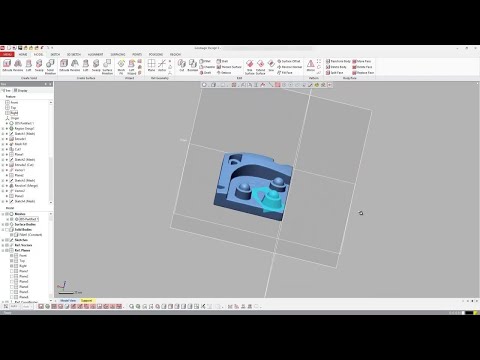
play Getting Started with Geomagic Design X | Interface
Geomagic Design X Reverse
Geomagic Design X Seamless

Geomagic Design X

Brand: Oqton

  • 4.2

  • 3 Ratings

Revolutionizing electrical design with comprehensive tools, Geomagic Design X empowers engineers to seamlessly create, analyze, and optimize precise electrical systems.

See More

Have you used Geomagic Design X before?

Share your insights for better experience

Add a Review

Price Available on Request

Questions about pricing or customization? We’re here to help, just a click away.

100% Genuine
Products
Best Price
Guaranteed
Safe & Secure
Payment
  • Description

  • Pricing

  • Features

  • Specification

  • Review

  • Compare

  • Alternatives

  • FAQ

Geomagic Design X Software Overview

What is Geomagic Design X Software?

Geomagic Design X is a reverse engineering software that seamlessly combines history-based CAD with 3D scan data processing. Users can effortlessly create feature-based, editable solid models fully compatible with existing CAD software. Geomagic Design X can convert 3D scan data into high-quality CAD models. It offers automatic and guided solid model extraction, precise surface fitting to organic scans, and advanced mesh editing capabilities.

Geomagic Design X helps users scan objects and generate manufacturing-ready designs quickly. This software saves users valuable time by quickly scanning prototypes, existing parts, and tooling and transforming them into fully functional CAD designs. The intuitive interface helps users to streamline the product development process by reducing time and effort from concept to finished design.

Geomagic Design X revolutionizes reverse engineering workflow. Users can achieve greater accuracy, efficiency, and productivity using cutting-edge capabilities. With Geomagic Design X, you can enhance your design productivity, accelerate time-to-market, and unleash your creativity, ultimately driving innovation and success for your projects.

Why Choose Geomagic Design X Software?

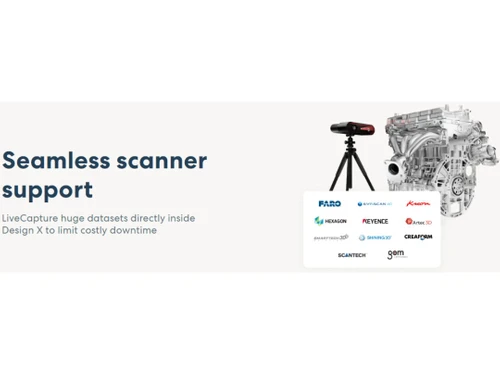
  • Wide Device Compatibility: You can effortlessly control various popular 3D scanning devices.
  • Versatile file format support: The software will allow importing of over 60 file formats like polygons, point clouds, and CAD data.
  • Efficient data handlingwill allow you to manage and process large-scale mesh and point cloud data.
  • Seamless mesh editing: Geomagic will enable the users to repair meshes with rapid hole filling, smoothing, optimizing, and polishing tools.
  • Automated solid and surface extraction: You can generate feature-based solids and surfaces directly from 3D scans.
  • Precise CAD modeling: With Geomagic you can create accurate solids and surfaces comparable to those made in CAD software.
  • Quality validation: It will help you validate surfaces, solids, and sketches against original scan data using automated accuracy analysis tools.
  • Seamless CAD integration: Using the Live Transfer feature, users can seamlessly transfer data to leading CAD systems.
  • Exact surface creation: The software helps in converting organic shapes to precise CAD models with industry-leading accuracy.
  • Comprehensive export options: Users can export neutral CAD or polygon files for seamless data sharing.
  • Real-time analysis: Automated accuracy analyzer will help validate surfaces, solids, and sketches against scan data, ensuring precision and reliability.

Benefits of Geomagic Design X Electrical Design Software

  • Using the software, you can easily analyze and extract feature information.
  • You can use the Mesh tools without any hassles.
  • Geomagic software will enable the users to sketch curves on meshes with an automated curve layout.
  • You can analyze real-time sketch data.
  • The software supports the import of 60+ 3D file formats.
  • It will help simplify your data design process.
  • Users can preview their finished design.

Pricing of Geomagic Design X Electrical Design Software

Geomagic Design X Electrical Design platform pricing is available on request at techjockey.com.

The overall pricing model is based on different factors such as personalization, extra features required, total users, and the deployment type. Please feel free to request a call from our product experts if you want to learn more about our subscription plans or premium package deals.

Read more

Oqton Company Details

Founded Year:  2017

Oqton is a software company that develops AI-driven software for the manufacturing industry.

Director/Founders Ben Schrauwen, Robert Yusin, Samir Hanna
Company Size 101-500 Employees

Geomagic Design X Pricing & Plans

Looking for The Right Pricing?

Share your requirements and get a plan built around your business.

  • Define your business needs
  • Get customised pricing
  • Choose features that fit your workflow

Price Available on Request

Get personalised Geomagic Design X pricing that fits your needs. Our team will connect with you.

Geomagic Design X Features

  • icon_check Electrical Engineering
    This software offers advanced tools for efficiently designing and analyzing electrical systems and components.
  • icon_check Collaboration
    This software offers a dashboard to seamlessly collaborate with every team member by sharing designs in real-time.
  • icon_check Reverse Engineering
    Reverse engineer physical parts into digital parametric CAD models with the most comprehensive reverse-engineering software
  • icon_check CAD Tools
    Users can access a comprehensive and advanced set of CAD tools with this software to create, edit, and refine 3D models with
  • icon_check Manufacturing Automation
    Streamline manufacturing processes and automate repetitive tasks for improved efficiency.
  • icon_check Production Management
    Project managers can effectively manage production workflows and track progress to optimize productivity efficiently.
  • icon_check Scheduling
    This software offers enhanced planning and scheduling for manufacturing operations.
  • icon_check Integrations
    Users can seamlessly integrate with other software and hardware systems to enhance design and manufacturing workflows.
Geomagic Design X Demo Video play icon

Get Geomagic Design X Demo

Watch the demo video to explore key features, real workflows, and how the software fits your business needs.

Understand
Key Features
Personal
Demo Insights
Interactive
Demo Support

Geomagic Design X Specifications

Supported Platforms
Windows Windows MacOS MacOS
Devices
Desktop Desktop Mobile Mobile
Deployment
Cloud-Based Cloud-Based
Suitable For
All Industries
Business Specific
All Businesses
Business Size
Small Business Startups Medium Business Enterprises SMBs SMEs MSMBs MSMEs
Customer Support
Phone Email Communities
Language
English
Training Resources
Documentation Videos

Explore the Best Alternative Solutions Similar to Your Business Size and Needs

Geomagic Design X Review

4.2

Out of 5

img

Overall Rating

Based on
3 Verified Ratings

Rating Breakdown

  • Features 4
  • Value for Money 3.6
  • Ease of Use 4.8
  • Customer Support 4.5

83% Recommend this Product

Add Review

Techjockey Trusted Reviews from Verified Users

No reviews are currently available for Geomagic Design X. Discover similar Engineering Design Software reviews

  • CSiBridge

    4.7

    Whats great - I purchased this tool a half year back and can gladly say that this product is one of a kind for modeling and designing of br... read more

  • CSI SAP 2000

    4.0

    Whats great - From 2D static frame analysis to 3D nonlinear dynamic analysis, it has got practically everything covered. I felt so easy wor... read more

  • Power Translator Pro

    4.4

    Whats great - Exquisite on the grounds that its planners imagined the sorts of reports and situations that individuals need to decipher. read more

Compare Geomagic Design X With other Engineering Design Software

Products
Ratings
Pricing
Device Supported
Deployment
Supported Platforms
  • img

    Geomagic Design X

  • 4.2

  • Price On Request

  • Desktop

    Mobile

  • Web based

    On Premises

  • Windows

    Mac OS

  • img

    Staad Pro

  • 4.3

  • ₹ 92608

  • Desktop

    Mobile

  • Web based

    On Premises

  • Windows

    Mac OS

  • img

    ClearCalcs

  • 4.5

  • Price On Request

  • Desktop

    Mobile

  • Web based

    On Premises

  • Windows

    Mac OS

  • img

    Collimator AI

  • 4.5

  • Price On Request

  • Desktop

    Mobile

  • Web based

    On Premises

  • Windows

    Mac OS

  • img

    Catia

  • 4.5

  • Price On Request

  • Desktop

    Mobile

  • Web based

    On Premises

  • Windows

    Mac OS

  • img

    CSiBridge

  • 4.6

  • Price On Request

  • Desktop

    Mobile

  • Web based

    On Premises

  • Windows

    Mac OS

  • img

    OnScale Solve

  • 4.3

  • Price On Request

  • Desktop

    Mobile

  • Web based

    On Premises

  • Windows

    Mac OS

  • img

    Autodesk Civil 3D

  • 4.3

  • Price On Request

  • Desktop

    Mobile

  • Web based

    On Premises

  • Windows

    Mac OS

  • img

    nTop

  • 4.1

  • Price On Request

  • Desktop

    Mobile

  • Web based

    On Premises

  • Windows

    Mac OS

(0) Product(s) selected

Geomagic Design X Alternatives

See All Geomagic Design X Alternatives

nTop

4.1

Available

Price on Request

Available

Price on Request

Available

Price on Request

Available

Price on Request

Available

Price on Request

Available

Price on Request

Articles for Geomagic Design X

See All Related Articles

Which operating system does the Geomagic Design X Engineering support?

Geomagic Design X Engineering is compatible with Windows and macOS operating systems.

Is there any Geomagic Design X Engineering app?

The Geomagic Design X Engineering app is unavailable on Android and iOS devices.

What is the deployment type of the Geomagic Design X Engineering?

Geomagic Design X Engineering supports on-premises deployment.

How much does the Geomagic Design X Engineering cost?

Geomagic Design X Engineering pricing is available on request at techjockey.com.

Who are the potential users of Geomagic Design X?

Geomagic Design X Engineering can be used by professionals in aerospace, automotive, manufacturing, and civil engineering who seek advanced tools to optimize designs, simulate complex systems, and enhance overall productivity.

Is there any free trial or demo for Geomagic Design X?

The Geomagic Design X Engineering demo is free with techjockey.com.

Is Geomagic Design X Engineering free?

Geomagic Design X Engineering does not offer a free trial.

How can you download the Geomagic Design X Engineering?

You can download Geomagic Design X software through their official website.

How does Geomagic Design X Engineering work?

Geomagic Design X is an Engineering Design software that aids in developing smart connected devices. It offers simulation-driven design tools for electronic system design, allowing specialized engineers to collaborate on various aspects of printed circuit board development.

20,000+ Software Listed

Best Price Guranteed

Free Expert Consultation

2M+ Happy Customers

Terms and Condtions

close

Users with registered businesses can purchase goods from merchants on the platform to satisfy their business needs. Users are not permitted to utilize any products acquired through the platform for resale, advertising, business, or further distribution.

For each purchase made, users will receive a Tax Invoice (or 'GST invoice') that includes specific details such as:

  • the GSTIN of the user associated with their registered business, and

  • the specified Entity Name for their business.

It should be noted that not all products are eligible for GST Invoice. Only the products displayed by participating sellers with the 'GST-based Invoice Available' callout on the product description page would qualify.

Certain goods and services are not eligible to get a GST Invoice, including items with VAS, i.e., Value Added Services (e.g., Total Mobile Protection/Assured Buyback) and those involving an exchange offer at the time of purchase.

Users must ensure the accuracy of the GSTIN, and business entity name provided for the GST Invoice. Requests for corrections into GST Invoice would not be accommodated by Techjockey.com or any Seller, and any issues arising from user-provided information are the sole responsibility of users.

Techjockey.com is not liable for the GST Invoice or any associated input tax credit. To efficiently claim an input tax credit, users should select the registered place of business address as per the GST authority's data and follow the provisions of the GST Act and rules.

To claim an input tax credit, the delivery and billing addresses must match. Furthermore, input tax credits will not be granted if the delivery address and GSTIN on the invoice are from different states. In case of incorrect GST details provided during the order placement, the order will be canceled automatically.