USA
USA UAE
UAESmall Business
Designed for startups and growing businesses


See More



Brand: Anduin Xue
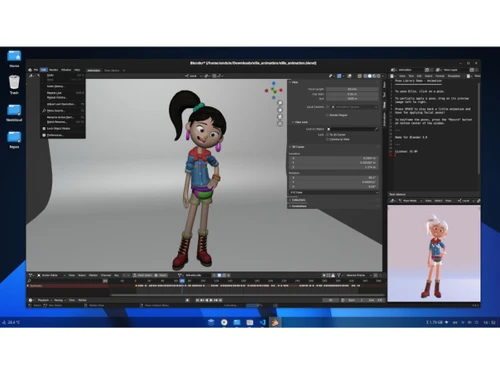
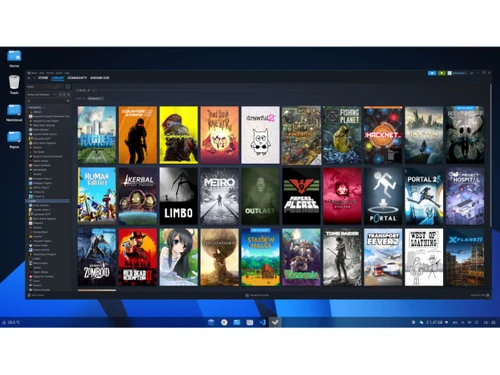
AnduinOS is a free, open-source Linux operating system software giving a Windows-like interface for a smooth user transition.
See MoreHave you used AnduinOS before?
Share your insights for better experience
This Product is Available Free Forever.
Start instantly with no fees, no subscriptions, and no commitments.
Free Forever Plan
Get started immediately at no cost. Upgrade anytime if your business demand more.
Free Forever Windows-Like Interface Flatpak App Support Optimized Kernel File Explorer Customization Multilingual Support Security Virtual Machine Privacy-Focused Design
  Ubuntu
  Linux
Linux  Desktop
  Perpetual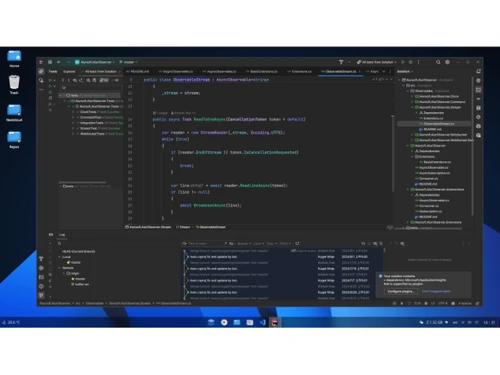
Small Business
Designed for startups and growing businesses
Medium Business
Built for business growth and flexibility
Enterprises
Designed for complex and large-scale business needs
4.0
Out of 5

Overall Rating
Based on
4 Verified Ratings
Rating Breakdown
80% Recommend this Product
Add ReviewThis product has no reviews yet. Be the first to leave your feedback.
Add Review
AnduinOS
FREE
Desktop
Mobile
Web based
On Premises
Windows
Mac OS
Microsoft Windows 11 Home
₹ 260
Desktop
Mobile
Web based
On Premises
Windows
Mac OS

Microsoft Windows 10 Enterprise
₹ 762
Desktop
Mobile
Web based
On Premises
Windows
Mac OS

Windows 10 Professional
₹ 260
Desktop
Mobile
Web based
On Premises
Windows
Mac OS
AlmaLinux OS
Price On Request
Desktop
Mobile
Web based
On Premises
Windows
Mac OS

Microsoft Windows 11 Pro
₹ 260
Desktop
Mobile
Web based
On Premises
Windows
Mac OS

BlackArch Linux
Price On Request
Desktop
Mobile
Web based
On Premises
Windows
Mac OS

Veritone aiWARE
Price On Request
Desktop
Mobile
Web based
On Premises
Windows
Mac OS

OpenDAN
Price On Request
Desktop
Mobile
Web based
On Premises
Windows
Mac OS

ELEMENT™ Software
Price On Request
Desktop
Mobile
Web based
On Premises
Windows
Mac OS

Kaba AI
Price On Request
Desktop
Mobile
Web based
On Premises
Windows
Mac OS
(0) Product(s) selected
Available
Price on Request
Available
Price on Request
Starting Price:
$72,000 /year
Available
Price on Request
Available
Price on Request

Available
Price on Request

Available
Price on Request

Available
Price on Request

Available
Price on Request

Available
Price on Request

Available
Price on Request
AnduinOS is free of cost at techjockey.com.
AnduinOS is used by developers, students, and enterprises for secure computing, testing, and transitioning from Windows to Linux.
AnduinOS works by combining Ubuntu's stable foundation with a Windows-like interface, delivering privacy-focused, lightweight, and user-friendly computing.
AnduinOS runs smoothly on Linux-based systems and supports installation alongside Windows and macOS through virtualization or dual booting.
Yes, AnduinOS offers a free ISO download, allowing users to test its features before permanent installation.
Yes, AnduinOS supports GUI customization with a Windows-like taskbar, start menu, and system tray for familiar navigation.
Yes, AnduinOS optimizes memory usage, ensuring stable multitasking and smooth performance even on older hardware systems.
Yes, AnduinOS allows dual booting with Windows, giving users the flexibility to switch between operating systems seamlessly.
Yes, AnduinOS supports virtualization platforms like VirtualBox and VMware, allowing users to run it smoothly in virtual machine setups.
20,000+ Software Listed
Best Price Guranteed
Free Expert Consultation
2M+ Happy Customers
Terms and Condtions

Users with registered businesses can purchase goods from merchants on the platform to satisfy their business needs. Users are not permitted to utilize any products acquired through the platform for resale, advertising, business, or further distribution.
For each purchase made, users will receive a Tax Invoice (or 'GST invoice') that includes specific details such as:
the GSTIN of the user associated with their registered business, and
the specified Entity Name for their business.
It should be noted that not all products are eligible for GST Invoice. Only the products displayed by participating sellers with the 'GST-based Invoice Available' callout on the product description page would qualify.
Certain goods and services are not eligible to get a GST Invoice, including items with VAS, i.e., Value Added Services (e.g., Total Mobile Protection/Assured Buyback) and those involving an exchange offer at the time of purchase.
Users must ensure the accuracy of the GSTIN, and business entity name provided for the GST Invoice. Requests for corrections into GST Invoice would not be accommodated by Techjockey.com or any Seller, and any issues arising from user-provided information are the sole responsibility of users.
Techjockey.com is not liable for the GST Invoice or any associated input tax credit. To efficiently claim an input tax credit, users should select the registered place of business address as per the GST authority's data and follow the provisions of the GST Act and rules.
To claim an input tax credit, the delivery and billing addresses must match. Furthermore, input tax credits will not be granted if the delivery address and GSTIN on the invoice are from different states. In case of incorrect GST details provided during the order placement, the order will be canceled automatically.