 USA
USA UAE
UAESmall Business
Designed for startups and growing businesses
See More





Brand: APIDOG
Apidog is an API testing tool enables developers to execute several test scenarios to thoroughly check APIs accuracy.
See MoreHave you used Apidog before?
Share your insights for better experience
Brand: APIDOG
Founded Year: 2022
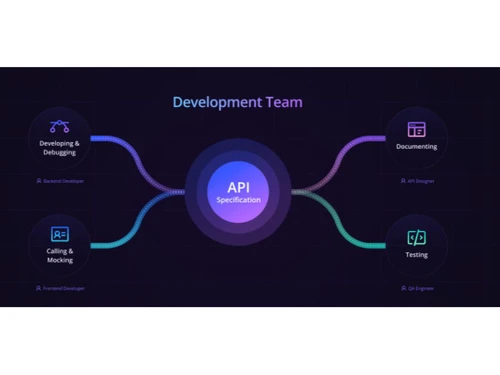
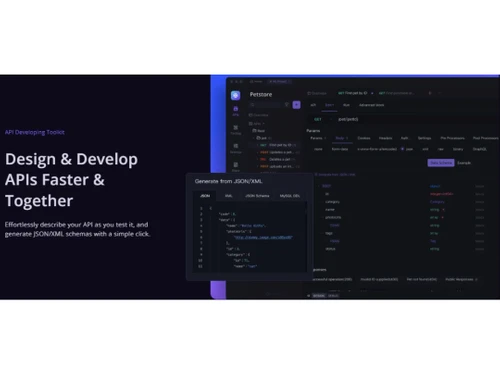
All-in-One workspace for API design, documentation, debugging, testing, and mocking
 API Test Automation API Debugging Collaboration CI/CD Multi-protocol support Integrations Streamlined Workflows End-to-End Encryption Custom Domains

Watch the demo video to explore key features, real workflows, and how the software fits your business needs.
 Windows
  MacOS
MacOS  Linux
Linux  Desktop
  Cloud-Based
Small Business
Designed for startups and growing businesses
Medium Business
Built for business growth and flexibility
Enterprises
Designed for complex and large-scale business needs
4.8
Out of 5

Overall Rating
Based on
2 Verified Reviews
Rating Breakdown
90% Recommend this Product
Add Review
Oct 14, 2024
Techjockey Verified
“Excellent API workflow and UI design”
Apidog emerges as a valuable tool for API development teams, particularly those engaged with APIs that are actively under development. It provides features that serve collaborative and dynamic environments, enabling teams to work more effectively and with greater agility.
Pros
Apidog has an excellent API design-debugging workflow. I can import Swagger and visualize and edit API specifications, then generate a beautiful API documentation that is even better than what other tools generate. Moreover, Apidog allows me to directly make API requests based on this documentation, which is fantastic. Apidog can also import collections from Postman, and it can even be compatible with Postman scripts. This feature has left a deep impression on me. Apidog also has an automated testing feature that I haven't tried yet, but I will definitely explore it in my next project.
Cons
I tried to add multiple authentication methods in the documentation but failed, it seems that this feature is not yet available.
Reason to switch
Postman is not ideally suited for APIs that are still under development. Frequent API changes necessitate constant rewriting of requests and scripts, adding additional overhead for developers when working with APIs that are evolving rapidly.
Misako Odawara 
Content Marketer
Sep 19, 2023
Techjockey Verified
“User-Friendly and Feature-Rich API Tool”
Pros
Apidog offers a visually intuitive interface, making it user-friendly, especially for beginners. It boasts a rich set of features, including API documentation, mock data generation, and robust testing capabilities. The testing functionality is impressive, and the seamless integration with Postman is a big plus. There are no runtime limitations, which is great.
Cons
Apidog is relatively new, having recently exited its beta phase. The existing subscription plans may not cater perfectly to enterprise needs. It would be more accommodating if custom plans based on actual user counts were available.
Reason to switch
Postman has updated its Collection Run limits across plans, with a price increase for the Basic plan recently.

Apidog
Price On Request
Desktop
Mobile
Web based
On Premises
Windows
Mac OS

RapidAPI
Price On Request
Desktop
Mobile
Web based
On Premises
Windows
Mac OS

Thunder Client
Price On Request
Desktop
Mobile
Web based
On Premises
Windows
Mac OS

Hoppscotch
Price On Request
Desktop
Mobile
Web based
On Premises
Windows
Mac OS

Swagger
Price On Request
Desktop
Mobile
Web based
On Premises
Windows
Mac OS

Kong Insomnia
Price On Request
Desktop
Mobile
Web based
On Premises
Windows
Mac OS

Testfully
Price On Request
Desktop
Mobile
Web based
On Premises
Windows
Mac OS

SoapUI
Price On Request
Desktop
Mobile
Web based
On Premises
Windows
Mac OS

Testsigma API Testing
Price On Request
Desktop
Mobile
Web based
On Premises
Windows
Mac OS

Karate DSL
Price On Request
Desktop
Mobile
Web based
On Premises
Windows
Mac OS

vREST NG
Price On Request
Desktop
Mobile
Web based
On Premises
Windows
Mac OS
(0) Product(s) selected
Starting Price:
$8 /Month
Starting Price:
$64 /month
Starting Price:
$15 /Month

Starting Price:
$200

Starting Price:
$25 /month

Starting Price:
$199 /Month

Starting Price:
$895 /license

Starting Price:
$19 /month
Apidog is compatible with the Windows, MacOS and Linux operating systems.
Apidog is unavailable for android and iOS app users.
Apidog supports web-based deployment.
Apidog price starts at $12 on techjockey.com.
Apidog is suitable for Small Business, Startups, Medium Business.
Apidog free demo is available at techjockey.com.
Apidog is not free. Price starts at $12 at techjockey.com.
Apidog software is a web-based platform. So, installation is not required. Just open the Setup Wizard to get started.
This tool helps users with API Test Automation, Multi-protocol support, Collaboration, Integrations, Collaboration, and much more.
20,000+ Software Listed
Best Price Guranteed
Free Expert Consultation
2M+ Happy Customers
Terms and Condtions

Users with registered businesses can purchase goods from merchants on the platform to satisfy their business needs. Users are not permitted to utilize any products acquired through the platform for resale, advertising, business, or further distribution.
For each purchase made, users will receive a Tax Invoice (or 'GST invoice') that includes specific details such as:
the GSTIN of the user associated with their registered business, and
the specified Entity Name for their business.
It should be noted that not all products are eligible for GST Invoice. Only the products displayed by participating sellers with the 'GST-based Invoice Available' callout on the product description page would qualify.
Certain goods and services are not eligible to get a GST Invoice, including items with VAS, i.e., Value Added Services (e.g., Total Mobile Protection/Assured Buyback) and those involving an exchange offer at the time of purchase.
Users must ensure the accuracy of the GSTIN, and business entity name provided for the GST Invoice. Requests for corrections into GST Invoice would not be accommodated by Techjockey.com or any Seller, and any issues arising from user-provided information are the sole responsibility of users.
Techjockey.com is not liable for the GST Invoice or any associated input tax credit. To efficiently claim an input tax credit, users should select the registered place of business address as per the GST authority's data and follow the provisions of the GST Act and rules.
To claim an input tax credit, the delivery and billing addresses must match. Furthermore, input tax credits will not be granted if the delivery address and GSTIN on the invoice are from different states. In case of incorrect GST details provided during the order placement, the order will be canceled automatically.



