linkedin
Sparrow logo
Sparrow-api
Sparrow collections
Sparrow-authentication

Sparrow

Brand: Sparrow

  • 4.0

  • 4 Ratings

An API testing tool that helps developers efficiently build, test, debug, and manage REST, GraphQL, and WebSocket APIs.

See More

Have you used Sparrow before?

Share your insights for better experience

Add a Review
Starting Price
$10

View plans

100% Genuine
Products
Best Price
Guaranteed
Safe & Secure
Payment
  • Description

  • Pricing

  • Features

  • Specification

  • Review

  • Compare

  • Alternatives

  • FAQ

Starting at $10

Sparrow Software Overview

What is Sparrow?

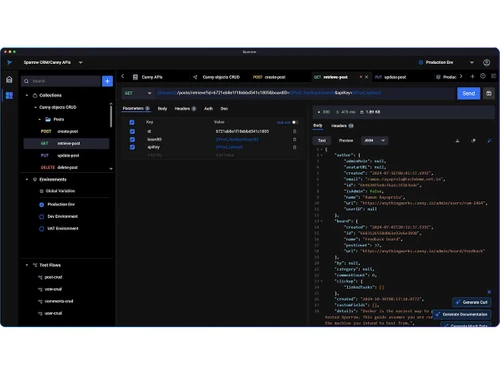
Sparrow is an API testing tool designed to make API testing, development, and management easier for individuals and teams. It offers a simple interface where you can quickly send API requests, manage collections, and organize your workspaces.

With Sparrow, multiple users can collaborate in real time, making it great for teamwork and sharing feedback. Key features include easy API testing, managing different environments, storing and sharing important documents, task management, and an activity dashboard.

Sparrow helps you automate repetitive tasks, monitor projects, and track feedback visually. The goal is to help developers work faster and more efficiently on software projects by streamlining these daily tasks.

Why Choose Sparrow Software?

  • Open-Source and Transparent: Fully open-source with community-driven development.
  • AI-Powered Debugging: Explains errors, suggests fixes, and auto-generates responses using AI.
  • Lightweight and Fast: Faster and more efficient than traditional API tools.
  • Cross-Platform Support: Runs on macOS, Windows, Linux, and Web.
  • Real-Time Collaboration: Enables live teamwork with synced workspaces.
  • Self-Hosting Option: Deploy on your own servers for full control.
  • Cloud Deployment Available: Offers cloud hosting for remote access.
  • GraphQL & WebSocket Support: Supports REST, GraphQL, WebSocket, and Socket.IO.
  • Mock API Responses: Create mock endpoints for backend-free testing.
  • Powerful Workspace Management: Organize projects with folders and team roles.

Benefits of Sparrow Software

  • User-Friendly Interface: Clean, intuitive UI for all skill levels.
  • One-Click Environment Switching: Easily toggle between multiple environments.
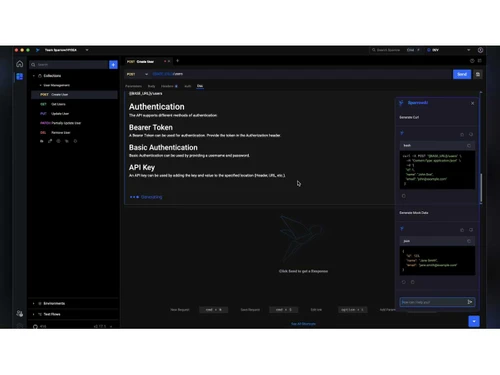
  • Integrated API Documentation: Auto-generate documentation from requests.
  • Offline Mode Support: Work offline without losing functionality.
  • Easy Import & Export: Import/export collections and configs easily.
  • Version Control Integration: Supports Git for version tracking.
  • Role-Based Access Control (RBAC): Set user roles and permissions.
  • Dark Mode & Theme Customization: Personalize UI with dark mode and themes.
  • Detailed Request History: Access past requests for easy debugging.
  • Active Community & Documentation: Backed by strong docs and community support.

Sparrow Pricing

Sparrow price starts at $10 per user per month at Techjockey.com. The pricing model is based on different parameters, including extra features, deployment type, and the total number of users. For further queries related to the product, you can contact our product team and learn more about the pricing and offers.

Read more

Sparrow Company Details

Founded Year:  2018

Sparrow is an application security and quality solution provider from Korea. It offers the application security ecosystem that includes Sparrow SAST/SAQT, intelligent static application security, and quality testing tool, Sparrow DAST, a powerful dynamic application security testing tool.

Director/Founders Sparrow
Company Size 101-500 Employees

Sparrow Pricing & Plans

Standard
Starting at $10
    • Users

      Users
      Users
    • Monthly

      Monthly
      Monthly

Key Features

  • Unlimited collaborators & 5 workspaces

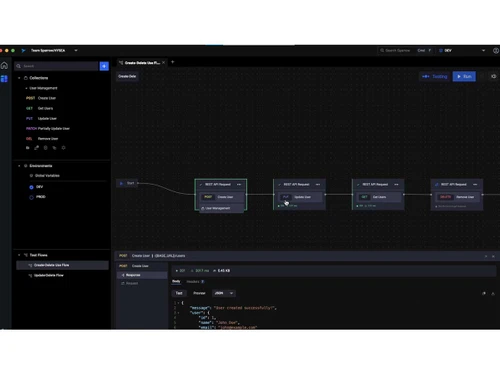
  • 10 test flows per workspace with up to 30 APIs per

  • Selective test runs for better debugging

  • 7-day test run history

Professional
Starting at $20
    • Users

      Users
      Users
    • Monthly

      Monthly
      Monthly

Key Features

  • Everything in Standard Plus

  • Private hubs for secure API collaboration (up to 1

  • Active sync for seamless workflow integration

  • 25 test flows per workspace

  • AI-powered mock server

Enterprise
Starting at $50
    • Users

      Users
      Users
    • Monthly

      Monthly
      Monthly

Key Features

  • Everything in Professional Plus

  • Unlimited private hubs

  • Unlimited test flows with extended test run histor

  • Hub-level access management

  • SCIM for automated user provisioning

Sparrow Features

  • icon_check Environment Management
    Easily switch between development, staging, and production setups.
  • icon_check Test Flows
    Automate and test multi-step API workflows seamlessly.
  • icon_check REST & WebSocket Testing
    Supports testing for REST APIs and live WebSocket connections.
  • icon_check Team Workspaces
    Collaborate using shared projects, teams, and collections.
  • icon_check Intuitive Interface
    Clean and lightweight UI, simple for beginners and efficient for pros.
  • icon_check AI-Powered Assistant
    Get instant help with code, requests, and documentation suggestions.
  • icon_check Fast & Lightweight
    Built without Electron; uses fewer resources for faster performance.

Sparrow Specifications

Supported Platforms
Windows Windows MacOS MacOS
Devices
Desktop Desktop
Deployment
Cloud-Based Cloud-Based
Suitable For
All Industries
Business Specific
All Businesses
Business Size
Small Business Startups Medium Business SMBs SMEs MSMBs MSMEs
Customer Support
Email
Language
English
Training Resources
Live Online

Explore the Best Alternative Solutions Similar to Your Business Size and Needs

Medium Business

Built for business growth and flexibility

Runscope

4.5

Apidog

4.8

SoapUI

4.3

See More

Sparrow Review

4.0

Out of 5

img

Overall Rating

Based on
4 Verified Ratings

Rating Breakdown

  • Features 4.3
  • Value for Money 3.8
  • Ease of Use 3.8
  • Customer Support 4

80% Recommend this Product

Add Review

Be the First to Review

This product has no reviews yet. Be the first to leave your feedback.

Add Review

Compare Sparrow With other API Testing Tools

Products
Ratings
Pricing
Device Supported
Deployment
Supported Platforms
  • img

    Sparrow

  • 4.0

  • Price On Request

  • Desktop

    Mobile

  • Web based

    On Premises

  • Windows

    Mac OS

  • img

    RapidAPI

  • 4.7

  • Price On Request

  • Desktop

    Mobile

  • Web based

    On Premises

  • Windows

    Mac OS

  • img

    Apidog

  • 4.8

  • Price On Request

  • Desktop

    Mobile

  • Web based

    On Premises

  • Windows

    Mac OS

  • img

    Thunder Client

  • 4.8

  • Price On Request

  • Desktop

    Mobile

  • Web based

    On Premises

  • Windows

    Mac OS

  • img

    Hoppscotch

  • 4.2

  • Price On Request

  • Desktop

    Mobile

  • Web based

    On Premises

  • Windows

    Mac OS

  • img

    Swagger

  • 4.3

  • Price On Request

  • Desktop

    Mobile

  • Web based

    On Premises

  • Windows

    Mac OS

  • img

    Kong Insomnia

  • 4.5

  • Price On Request

  • Desktop

    Mobile

  • Web based

    On Premises

  • Windows

    Mac OS

  • img

    Testfully

  • 4.5

  • Price On Request

  • Desktop

    Mobile

  • Web based

    On Premises

  • Windows

    Mac OS

  • img

    SoapUI

  • 4.3

  • Price On Request

  • Desktop

    Mobile

  • Web based

    On Premises

  • Windows

    Mac OS

  • img

    Karate DSL

  • 4.5

  • Price On Request

  • Desktop

    Mobile

  • Web based

    On Premises

  • Windows

    Mac OS

(0) Product(s) selected

Sparrow Alternatives

See All Sparrow Alternatives

Starting Price:

$64 /month

Starting Price:

$15 /Month

Starting Price:

$25 /month

Starting Price:

$199 /Month

Starting Price:

$895 /license

Starting Price:

$19 /month

How much does Sparrow cost?

Sparrow pricing starts at $10 per user per month, as listed on Techjockey.com.

Is there a mobile app available for Sparrow Software?

No, Sparrow does not offer a mobile app.

Which operating systems are compatible with Sparrow Software?

Sparrow is compatible with MacOS and Windows also offers a web version.

Is there a free trial available of Sparrow Software?

Yes, Sparrow free trial is available.

How does Sparrow Software function?

Sparrow enables developers to build, test, debug, document, mock, and collaborate on APIs using REST, GraphQL, WebSocket features, AI assistance, test flows, and workspaces.

Who uses Sparrow Software?

Sparrow is used by developers, DevOps engineers, and cross-functional API teams in startups and enterprises for API testing and collaboration.

Is a free demo available for Sparrow Software?

No, Sparrow offers a free demo.

Is Sparrow Software available for free?

Yes, Sparrow community edition is completely free, allowing up to 5 collaborators with core features at no cost.

20,000+ Software Listed

Best Price Guranteed

Free Expert Consultation

2M+ Happy Customers

Terms and Condtions

close

Users with registered businesses can purchase goods from merchants on the platform to satisfy their business needs. Users are not permitted to utilize any products acquired through the platform for resale, advertising, business, or further distribution.

For each purchase made, users will receive a Tax Invoice (or 'GST invoice') that includes specific details such as:

  • the GSTIN of the user associated with their registered business, and

  • the specified Entity Name for their business.

It should be noted that not all products are eligible for GST Invoice. Only the products displayed by participating sellers with the 'GST-based Invoice Available' callout on the product description page would qualify.

Certain goods and services are not eligible to get a GST Invoice, including items with VAS, i.e., Value Added Services (e.g., Total Mobile Protection/Assured Buyback) and those involving an exchange offer at the time of purchase.

Users must ensure the accuracy of the GSTIN, and business entity name provided for the GST Invoice. Requests for corrections into GST Invoice would not be accommodated by Techjockey.com or any Seller, and any issues arising from user-provided information are the sole responsibility of users.

Techjockey.com is not liable for the GST Invoice or any associated input tax credit. To efficiently claim an input tax credit, users should select the registered place of business address as per the GST authority's data and follow the provisions of the GST Act and rules.

To claim an input tax credit, the delivery and billing addresses must match. Furthermore, input tax credits will not be granted if the delivery address and GSTIN on the invoice are from different states. In case of incorrect GST details provided during the order placement, the order will be canceled automatically.