linkedin
Swagger logo
play API Exploration for Designers
swagger-dashboard
swagger software-application

Swagger

Brand: SmartBear

  • 4.3

  • 4 Ratings

Swagger API Testing Software simplifies and enhances the testing process for APIs, offering robust functionality for test creation and execution.

See More

Have you used Swagger before?

Share your insights for better experience

Add a Review
Starting Price
$30

View plans

100% Genuine
Products
Best Price
Guaranteed
Safe & Secure
Payment
  • Description

  • Pricing

  • Features

  • Specification

  • Review

  • Compare

  • Alternatives

  • FAQ

Starting at $30

Swagger Software Overview

What is Swagger Software?

Swagger is an indispensable API testing tool for developers to streamline and enhance API documentation and design processes. Trusted by industry giants like Google, Microsoft, and Netflix, Swagger simplifies the creation of REST APIs by ensuring adherence to the OpenAPI specification, saving developers time and effort.

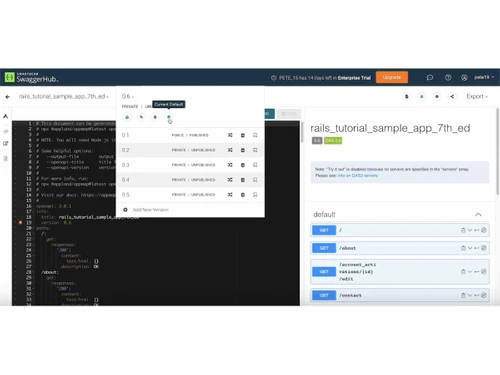
At its core, Swagger is an open-source toolkit designed to empower developers in developing, designing, documenting, and utilizing REST APIs effectively. The Swagger framework comprises of three integral components: Swagger Editor, UI, and Codegen. These elements work together seamlessly to facilitate API development.

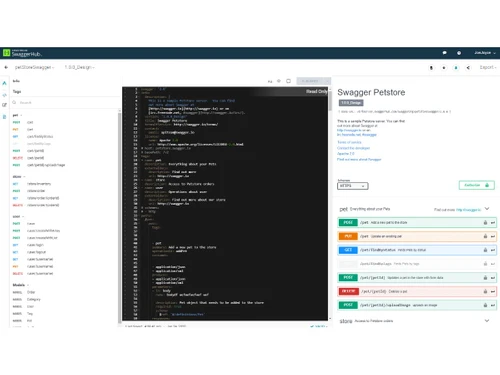
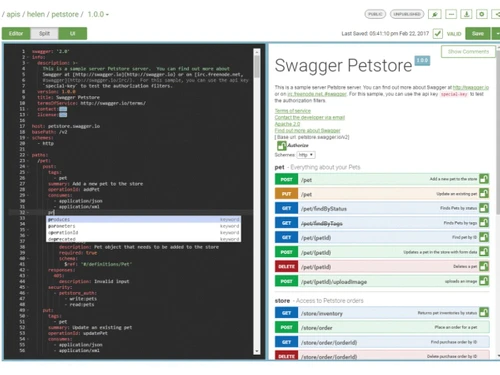
It provides a browser-based interface for crafting and editing API documentation and OpenAPI specifications. It supports YAML or JSON formats, offering convenient features like side-by-side views, live error reporting, and autocomplete options. Swagger UI, on the other hand, transforms your documentation into interactive, user-friendly documentation that enables users to test API calls directly within their browsers. Swagger Codegen generates server stubs, client SDKs, and client libraries from your OpenAPI specifications, simplifying server and client implementation.

Why Choose Swagger?

  • OpenAPI Specification Compliance: Ensure adherence to REST API best practices and standards with the OpenAPI specification.
  • Swagger Editor: Seamlessly craft and edit API documentation and OpenAPI specifications within a browser-based editor.
  • Swagger UI: Transform documentation into interactive API documentation for effortless user testing directly in the browser.
  • Swagger Codegen: Generate server stubs and client SDKs in various languages from your OpenAPI specifications.
  • Convenient Side-by-Side View: Easily plugin API requests and responses in YAML or JSON format with a user-friendly editor.
  • Live Error Reporting: Receive real-time error feedback, pinpointing areas of non-compliance for swift adjustments.
  • Autocomplete Option: Accelerate documentation creation by utilizing autocomplete for repeated elements.

Benefits of Swagger API Testing Software

  • Streamlined API documentation: Effortlessly create and maintain clear and organized API documentation.
  • Enhanced developer experience: Provide developers with a user-friendly and efficient environment for API development.
  • Time-saving API testing: Accelerate the testing process, saving valuable development time.
  • Interactive API exploration: Facilitate easy and dynamic exploration of APIs for developers.
  • Consistency in API design: Ensure uniformity and adherence to design principles across APIs.
  • Simplified server code generation: Generate server code easily, reducing development complexities.
  • Improved API adoption: Foster better acceptance and utilization of APIs within your ecosystem.

Swagger Pricing

Swagger API testing system pricing starts from USD 30 per month per user at techjockey.com.

The pricing model is based on different parameters, including extra features, deployment type, and total users. For further queries related to the product, you can contact our product team and learn more about the pricing and offers.

Read more

SmartBear Company Details

Founded Year:  2009

SmartBear provides a portfolio of trusted tools that give software development teams around the world visibility into end-to-end quality through test management and automation, API development lifecycle, and application stability.

Director/Founders Jason Cohen, Sallyann Freudenberg
Company Size 501-1000 Employees

Swagger Pricing & Plans

Individual
Starting at $30
    • Users

      Users
      Users
    • Monthly

      Monthly
      Monthly

Key Features

  • Codegen, editor, form-based editor, 5 domains

  • 1 public product with SmartBear branding

  • 10 contracts, 10 AI credits

  • 50 test executions, Test automation, CI/CD integra

Team
Starting at $42
    • Users

      Users
      Users
    • Monthly

      Monthly
      Monthly

Key Features

  • Codegen, editor, form-based editor, 10 domains

  • 2 public products with SmartBear branding

  • 20 contracts, 10 AI credits (per user), 1 System A

  • 50 test executions, Test automation, CI/CD integra

Enterprise
Starting at $71
    • Users

      Users
      Users
    • Monthly

      Monthly
      Monthly

Key Features

  • Standardization, unlimited domains

  • 5 public products with SmartBear branding

  • 50 contracts, 10 AI credits (per user), 1 System A

  • 100 test executions, Test automation, CI/CD integr

Swagger Features

  • icon_check Search and Filter
    Enable search and filtering across API catalog and documentation to locate endpoints and resources efficiently.
  • icon_check Contract Testing Automation
    Validate API contracts during development to detect breaking changes and ensure compatibility across services.
  • icon_check Multi Protocol API Testing
    Test APIs across multiple protocols such as HTTP and Kafka to ensure compatibility across different systems.
  • icon_check Functional Test Automation
    Automate functional and regression testing of APIs to validate behavior across deployments and versions.
  • icon_check Version Aware Testing
    Test APIs across multiple versions to ensure backward compatibility and detect issues in evolving APIs.
  • icon_check API Design Workspace
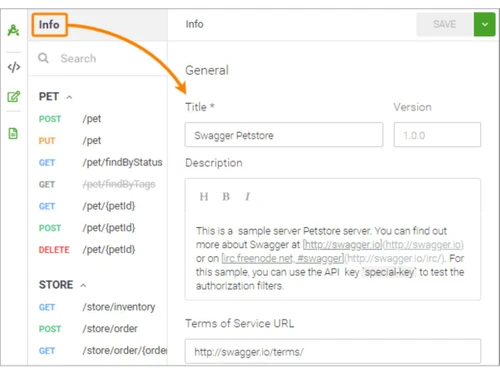
    Create and manage API definitions in a shared workspace with visual editing and structured specification support.
  • icon_check Centralized API Catalog
    Maintain a single catalog of API definitions to ensure consistency, reuse, and discoverability across teams and projects.
  • icon_check Templates
    Apply predefined templates and style guides to standardize API design and enforce consistent development practices.
  • icon_check Real-Time Collaboration
    Enable teams to collaboratively edit API definitions with inline comments and shared access in real time.
  • icon_check Automated Mock Servers
    Generate mock APIs automatically from specifications to simulate endpoints for testing without backend implementation.
  • icon_check Developer Portal Management
    Publish APIs in a centralized portal to provide structured access, documentation, and onboarding resources.
  • icon_check Role-Based Access Control (RBAC)
    Assign roles and permissions to control access, editing rights, and visibility across API design and documentation.
Swagger Demo Video play icon

Get Swagger Demo

Watch the demo video to explore key features, real workflows, and how the software fits your business needs.

Understand
Key Features
Personal
Demo Insights
Interactive
Demo Support

Swagger Specifications

Supported Platforms
Ubuntu Ubuntu Windows Windows MacOS MacOS Linux Linux
Devices
Desktop Desktop Mobile Mobile Tablet Tablet iPad iPad
Deployment
Cloud-Based Cloud-Based
Suitable For
All Industries
Business Specific
All Businesses
Business Size
Small Business Startups Medium Business Enterprises SMBs SMEs MSMBs MSMEs
Customer Support
Phone Email Communities
Language
English
Integration
API Integration
Training Resources
Documentation Videos

Explore the Best Alternative Solutions Similar to Your Business Size and Needs

Swagger Review

4.3

Out of 5

img

Overall Rating

Based on
4 Verified Ratings

Rating Breakdown

  • Features 4.2
  • Value for Money 4.2
  • Ease of Use 4.3
  • Customer Support 4.5

87% Recommend this Product

Add Review

Be the First to Review

This product has no reviews yet. Be the first to leave your feedback.

Add Review
Compare Swagger With other API Testing Tools

Products
Ratings
Pricing
Device Supported
Deployment
Supported Platforms
  • img

    Swagger

  • 4.3

  • Price On Request

  • Desktop

    Mobile

  • Web based

    On Premises

  • Windows

    Mac OS

  • img

    SoapUI

  • 4.3

  • Price On Request

  • Desktop

    Mobile

  • Web based

    On Premises

  • Windows

    Mac OS

  • img

    ReadyAPI

  • 4.5

  • Price On Request

  • Desktop

    Mobile

  • Web based

    On Premises

  • Windows

    Mac OS

  • img

    RapidAPI

  • 4.7

  • Price On Request

  • Desktop

    Mobile

  • Web based

    On Premises

  • Windows

    Mac OS

  • img

    Apidog

  • 4.8

  • Price On Request

  • Desktop

    Mobile

  • Web based

    On Premises

  • Windows

    Mac OS

  • img

    Hoppscotch

  • 4.2

  • Price On Request

  • Desktop

    Mobile

  • Web based

    On Premises

  • Windows

    Mac OS

  • img

    Thunder Client

  • 4.8

  • Price On Request

  • Desktop

    Mobile

  • Web based

    On Premises

  • Windows

    Mac OS

  • img

    Kong Insomnia

  • 4.5

  • Price On Request

  • Desktop

    Mobile

  • Web based

    On Premises

  • Windows

    Mac OS

  • img

    Testfully

  • 4.5

  • Price On Request

  • Desktop

    Mobile

  • Web based

    On Premises

  • Windows

    Mac OS

  • img

    Karate DSL

  • 4.5

  • Price On Request

  • Desktop

    Mobile

  • Web based

    On Premises

  • Windows

    Mac OS

(0) Product(s) selected

Swagger Alternatives

See All Swagger Alternatives

Starting Price:

$895 /license

Starting Price:

$64 /month

Starting Price:

$15 /Month

Starting Price:

$25 /month

Starting Price:

$199 /Month

Starting Price:

$19 /month

Which operating system does Swagger Software Support?

Swagger software is compatible with Windows and macOS operating systems.

Is there any Swagger App?

Swagger app is unavailable for Android and iOS devices.

What is the deployment type of Swagger Software?

Swagger supports web-based deployment.

How Much Does the Swagger Cost?

Swagger pricing pricing starts from USD 30 per month per user at techjockey.com.

Who are the potential users of Swagger Software?

Swagger software can be used by web owners, Web and App developers, automation testing developers and anyone who needs an API testing software.

Is there any free trial or demo for the Swagger Solution?

The Swagger demo is available for free with techjockey.com.

Is the Swagger Free?

Swagger does not offer a free trial.

How can you download the Swagger?

Swagger is a web-based platform. So, you need not download any software or app to use it.

How does Swagger work?

Swagger is an open-source toolset that simplifies API development for individuals, teams, and businesses. It provides a suite of tools for designing, documenting, and testing APIs, making the process more efficient and collaborative. Users can easily create and manage API documentation while ensuring consistency and accuracy, streamlining the development process.

20,000+ Software Listed

Best Price Guranteed

Free Expert Consultation

2M+ Happy Customers

Terms and Condtions

close

Users with registered businesses can purchase goods from merchants on the platform to satisfy their business needs. Users are not permitted to utilize any products acquired through the platform for resale, advertising, business, or further distribution.

For each purchase made, users will receive a Tax Invoice (or 'GST invoice') that includes specific details such as:

  • the GSTIN of the user associated with their registered business, and

  • the specified Entity Name for their business.

It should be noted that not all products are eligible for GST Invoice. Only the products displayed by participating sellers with the 'GST-based Invoice Available' callout on the product description page would qualify.

Certain goods and services are not eligible to get a GST Invoice, including items with VAS, i.e., Value Added Services (e.g., Total Mobile Protection/Assured Buyback) and those involving an exchange offer at the time of purchase.

Users must ensure the accuracy of the GSTIN, and business entity name provided for the GST Invoice. Requests for corrections into GST Invoice would not be accommodated by Techjockey.com or any Seller, and any issues arising from user-provided information are the sole responsibility of users.

Techjockey.com is not liable for the GST Invoice or any associated input tax credit. To efficiently claim an input tax credit, users should select the registered place of business address as per the GST authority's data and follow the provisions of the GST Act and rules.

To claim an input tax credit, the delivery and billing addresses must match. Furthermore, input tax credits will not be granted if the delivery address and GSTIN on the invoice are from different states. In case of incorrect GST details provided during the order placement, the order will be canceled automatically.