USA
USA UAE
UAESmall Business
Designed for startups and growing businesses
See More





Brand: POSTMAN
Powerful API platform that simplifies the entire API lifecycle, from design and testing to documentation and sharing.
See MoreHave you used Postman before?
Share your insights for better experience
Brand: POSTMAN
Founded Year: 2014
Postman is the collaboration platform for API development.
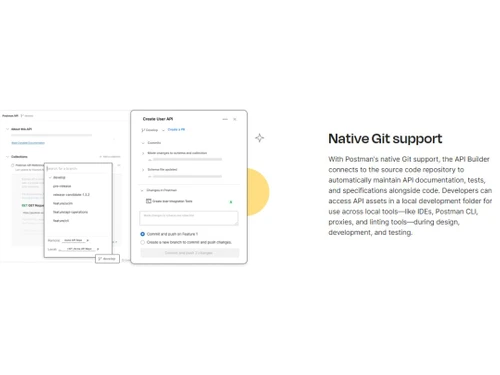
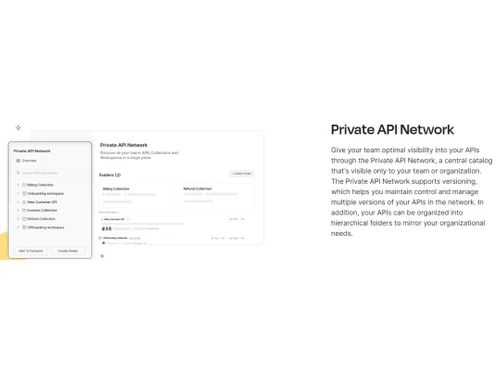
 API Integration Roles & Permissions Reporting & Analytics Collaboration Audit Logs Documentation Custom Domain

Watch the demo video to explore key features, real workflows, and how the software fits your business needs.
 Windows
  MacOS
MacOS  Desktop
  Mobile
  Cloud-Based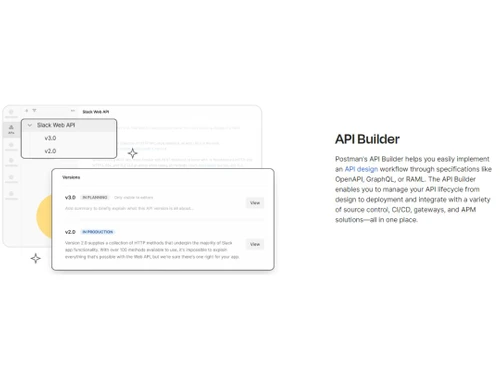
Small Business
Designed for startups and growing businesses
Medium Business
Built for business growth and flexibility
Enterprises
Designed for complex and large-scale business needs
4.5
Out of 5

Overall Rating
Based on
6 Verified Reviews
Rating Breakdown
88% Recommend this Product
Add ReviewOverall, users appreciate Postman for its user-friendly interface and efficient API testing capabilities, making it a valuable tool for both novice and experienced developers. The software enhances collaboration and streamlines development processes, often receiving high recommendations. However, some users have noted limitations such as performance issues with larger collections, a slight learning curve, and concerns regarding the recent shift to a paid model for certain features. Despite these drawbacks, the positive sentiment remains strong among users across various company sizes.


Apr 27, 2024
Techjockey Verified
“Improve Your API Testing and Team Collaboration with Postman”
Postman makes life easier for backend developers like me by simplifying API development and enhancing collaboration with frontend teams.
Pros
User-Friendly Interface: Postman's interface is super easy to use. It helps me quickly create, manage, and run API tests without needing a tech guru. This saves me a lot of time and gets me up and running fast.
Cons
Performance Hiccups: Sometimes, when dealing with really big collections or running lots of tests, Postman can slow down. It would be great to see some improvements here to handle larger workloads more smoothly.
Apr 21, 2024
Techjockey Verified
“Easy-to-Use Tool for API Requests: An Introduction to Postman”
Pros
Postman simplifies the execution of API requests, streamlining the process for developers. Its intuitive interface makes it easy to navigate, even for beginners. We find it particularly useful for testing and validating API responses, contributing to smoother development and work processes.
Cons
One drawback of Postman is its recent transition to a paid model, requiring licenses for saving requests within workspaces. This change may pose challenges for teams accustomed to its previous free offerings.
Reason to switch
Despite its drawbacks, Postman remains an invaluable tool for API testing and validation. Its seamless integration with automation tools like Selenium enhances the efficiency of backend testing, reducing reliance on frontend performance. By focusing on API endpoints, Postman helps streamline development processes, saving time and effort.
Apr 18, 2024
Techjockey Verified
“API Testing Made Simple and Efficient”
Pros
User-Friendly Interface: Postman's interface is thoughtfully designed, providing users with a seamless testing experience. Whether you're a seasoned developer or a novice, navigating Postman is a straightforward endeavor.
Cons
Learning Curve: Admittedly, there is a slight learning curve associated with Postman. Initially, users may find themselves consulting the documentation more frequently than anticipated. However, with a bit of patience and practice, navigating Postman becomes second nature.
Reason to switch
As a Python backend developer, I've experienced firsthand the transformative impact of Postman on my workflow. With Postman, sending requests, analyzing responses, and ensuring API functionality is a seamless process.

Postman
Price On Request
Desktop
Mobile
Web based
On Premises
Windows
Mac OS

RapidAPI
Price On Request
Desktop
Mobile
Web based
On Premises
Windows
Mac OS

Apidog
Price On Request
Desktop
Mobile
Web based
On Premises
Windows
Mac OS

Hoppscotch
Price On Request
Desktop
Mobile
Web based
On Premises
Windows
Mac OS

Thunder Client
Price On Request
Desktop
Mobile
Web based
On Premises
Windows
Mac OS

Swagger
Price On Request
Desktop
Mobile
Web based
On Premises
Windows
Mac OS

Kong Insomnia
Price On Request
Desktop
Mobile
Web based
On Premises
Windows
Mac OS

Testfully
Price On Request
Desktop
Mobile
Web based
On Premises
Windows
Mac OS

SoapUI
Price On Request
Desktop
Mobile
Web based
On Premises
Windows
Mac OS

Testsigma API Testing
Price On Request
Desktop
Mobile
Web based
On Premises
Windows
Mac OS

Karate DSL
Price On Request
Desktop
Mobile
Web based
On Premises
Windows
Mac OS
(0) Product(s) selected
Starting Price:
$8 /Month
Starting Price:
$30 /User/Month
Starting Price:
$64 /month

Starting Price:
$15 /Month

Starting Price:
$200

Starting Price:
$25 /month

Starting Price:
$199 /Month

Starting Price:
$895 /license
Postman is compatible with Windows and MacOS device systems.
Postman app is available for Android and iOS devices.
Postman testing tool supports web-based deployment.
The pricing of Postman starts from $ 19 on techjockey.com.
Potential users of Postman include software developers, QA engineers, and teams involved in API development, as well as IT professionals seeking a comprehensive platform to design, test, and manage APIs effectively and collaborate seamlessly throughout the development lifecycle.
Postman platform demo is available for free with techjockey.com.
Yes, it is free for individuals or a small team of 3 or less then that.
There is no need for software installation since Postman supports web-based deployment. Just open the setup wizard and get started.
Postman operates as a collaboration platform for API development, streamlining the process by providing tools for designing, testing, and managing APIs, enabling developers to simplify workflows and ensure efficient communication between different software components.
Postman testing tool pricing starts from $19 per month at techjockey.com.
20,000+ Software Listed
Best Price Guranteed
Free Expert Consultation
2M+ Happy Customers
Terms and Condtions

Users with registered businesses can purchase goods from merchants on the platform to satisfy their business needs. Users are not permitted to utilize any products acquired through the platform for resale, advertising, business, or further distribution.
For each purchase made, users will receive a Tax Invoice (or 'GST invoice') that includes specific details such as:
the GSTIN of the user associated with their registered business, and
the specified Entity Name for their business.
It should be noted that not all products are eligible for GST Invoice. Only the products displayed by participating sellers with the 'GST-based Invoice Available' callout on the product description page would qualify.
Certain goods and services are not eligible to get a GST Invoice, including items with VAS, i.e., Value Added Services (e.g., Total Mobile Protection/Assured Buyback) and those involving an exchange offer at the time of purchase.
Users must ensure the accuracy of the GSTIN, and business entity name provided for the GST Invoice. Requests for corrections into GST Invoice would not be accommodated by Techjockey.com or any Seller, and any issues arising from user-provided information are the sole responsibility of users.
Techjockey.com is not liable for the GST Invoice or any associated input tax credit. To efficiently claim an input tax credit, users should select the registered place of business address as per the GST authority's data and follow the provisions of the GST Act and rules.
To claim an input tax credit, the delivery and billing addresses must match. Furthermore, input tax credits will not be granted if the delivery address and GSTIN on the invoice are from different states. In case of incorrect GST details provided during the order placement, the order will be canceled automatically.