linkedin
Archibus logo
play New product features from Archibus by Eptura | Intelligent worktech
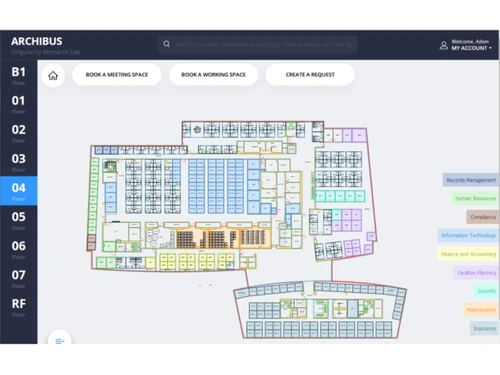
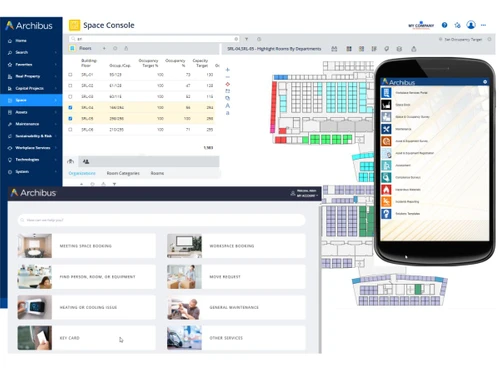
archibus-interface
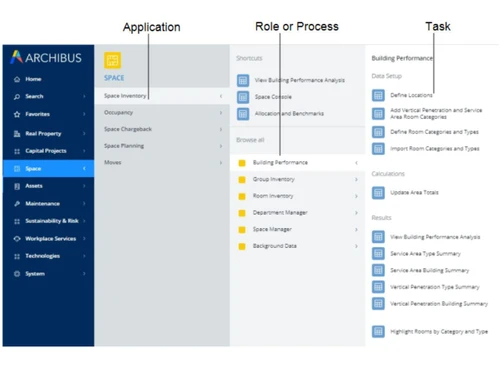
archibus-application

Archibus

Brand: Eptura

  • No Ratings & Reviews

A CAFM software is a facility management tool that helps organizations manage buildings, assets, space, and maintenance efficiently in one system.

See More

Have you used Archibus before?

Share your insights for better experience

Add a Review

Price Available on Request

Questions about pricing or customization? We’re here to help, just a click away.

100% Genuine
Products
Best Price
Guaranteed
Safe & Secure
Payment
  • Description

  • Pricing

  • Features

  • Specification

  • Review

  • Compare

  • Alternatives

  • FAQ

Archibus Software Overview

What is Archibus?

Archibus CAFM software is a powerful tool used to manage buildings, offices, and facilities in one place. It helps companies keep track of spaces, assets, maintenance work, and daily operations easily.

The software stores all facility-related data in a central system, so users can access everything quickly. It supports tasks like space planning, asset tracking, and maintenance scheduling. Archibus also helps in managing workplace activities, projects, and property information.

It provides real-time reports and dashboards for better decision-making. The software can connect to other systems, such as HR, finance, and ERP tools. It is web-based and can be used on mobile devices as well.

Archibus also supports modern technologies like IoT and BIM for smart building management. It improves efficiency, reduces costs, and saves time in facility operations.

Why Choose Archibus Software?

  • Centralized Facility Management: Manage all real estate and facility operations from a single unified platform.
  • Smart Space Utilization: Optimize and monitor workspace usage effectively.
  • Efficient Maintenance Management: Simplify work orders and maintenance scheduling.
  • Complete Asset Tracking: Manage the full lifecycle of assets with ease.
  • Real-Time Insights: Access accurate data and reports for better visibility.
  • Cost Optimization: Reduce operational and maintenance expenses.
  • Sustainability Support: Track and improve energy efficiency and environmental goals.
  • Easy System Integration: Seamlessly connect with existing business systems.
  • Scalable Solution: Adaptable for small businesses to large enterprises.
  • Flexible Deployment: Available in both cloud-based and on-premise options.

Benefits of Archibus Software

  • Boosted Productivity: Improve workplace efficiency and employee performance.
  • Advanced Lease Management: Handle property and lease data effectively.
  • User-Friendly Interface: Simple dashboards for easy navigation and use.
  • Compliance Management: Ensure adherence to industry standards and regulations.
  • Mobile Accessibility: Manage facilities anytime, anywhere via mobile devices.
  • Task Automation: Automate repetitive facility management processes.
  • Data-Driven Decisions: Make informed choices using analytics and forecasts.
  • Multi-Industry Use: Suitable for healthcare, education, corporate, and more.
  • Secure Data Handling: Protect information with strong security features.
  • Proven Reliability: Trusted solution used by organizations worldwide.

Archibus Pricing

Archibus price details are available on request at Techjockey. The pricing model is based on different parameters, including extra features, deployment type, and the total number of users. For further queries related to the product, you can contact our product team and learn more about the pricing and offers.

Read more

Eptura Company Details

Founded Year:  2022

Eptura is a global worktech company that digitally connects people, workplaces, and assets in a unified platform to enable our customers to thrive.

Director/Founders Don Traweek
Company Size 1000+ Employees

Archibus Pricing & Plans

Looking for The Right Pricing?

Share your requirements and get a plan built around your business.

  • Define your business needs
  • Get customised pricing
  • Choose features that fit your workflow

Price Available on Request

Get personalised Archibus pricing that fits your needs. Our team will connect with you.

Archibus Features

  • icon_check Space Management System
    Manages building space allocation, occupancy tracking, and space utilization to optimize workplace planning and facility usage
  • icon_check Asset Management
    Tracks asset lifecycle, location, condition, depreciation, and maintenance history to improve asset visibility and long-term
  • icon_check Maintenance Management
    Manages preventive and corrective maintenance work orders, schedules tasks, and tracks labor, materials, and maintenance costs.
  • icon_check Work Order Management
    Creates, assigns, and tracks facility service requests and work orders with status tracking, technician assignment, and
  • icon_check Real Estate Management
    Tracks property portfolio data, ownership details, costs, and performance metrics to support strategic real estate decisions.
  • icon_check Room Booking Management
    Allows scheduling and reservation of meeting rooms and shared spaces while tracking utilization and availability across locations.
  • icon_check Project Management
    Manages facility construction and renovation projects including budgets, timelines, approvals, and project documentation.
  • icon_check Compliance Management
    Tracks regulatory compliance tasks, inspections, certifications, and audit records for facilities, safety, and environmental
  • icon_check Document Management
    Stores and manages building drawings, contracts, manuals, and facility documents linked to assets, locations, and projects.
  • icon_check Energy Management
    Tracks energy consumption, utility usage, and sustainability metrics to monitor building performance and reduce operational costs.
  • icon_check Preventive Maintenance Scheduling
    Automates maintenance schedules based on time, usage, or asset condition to reduce downtime and extend equipment lifespan.
  • icon_check Reporting & Analytics
    Generates reports and dashboards for space usage, maintenance costs, assets, and real estate performance analysis.
  • icon_check Service Request Management
    Allows users to submit facility service requests and track progress, approvals, and completion through a centralized system.
Archibus Demo Video play icon

Get Archibus Demo

Watch the demo video to explore key features, real workflows, and how the software fits your business needs.

Understand
Key Features
Personal
Demo Insights
Interactive
Demo Support

Archibus Specifications

Supported Platforms
Ubuntu Ubuntu Windows Windows MacOS MacOS Linux Linux
Devices
Desktop Desktop
Deployment
Cloud-Based Cloud-Based
Suitable For
Manufacturing Education Healthcare Real Estate Corporations Governments Airport Property
Business Specific
All Businesses
Business Size
Small Business Medium Business Enterprises SMBs SMEs MSMBs MSMEs
Customer Support
Email Communities
Language
English
Integration
API Integration
Training Resources
Webinars Videos

Archibus Review

Be the First to Review

This product has no reviews yet. Be the first to leave your feedback.

Add Review
Compare Archibus With other CAFM Software

Products
Ratings
Pricing
Device Supported
Deployment
Supported Platforms
  • img

    Archibus

  • Price On Request

  • Desktop

    Mobile

  • Web based

    On Premises

  • Windows

    Mac OS

  • img

    Kaizen CAFM

  • 4.1

  • Price On Request

  • Desktop

    Mobile

  • Web based

    On Premises

  • Windows

    Mac OS

  • img

    eFACiLiTY

  • 4.3

  • Price On Request

  • Desktop

    Mobile

  • Web based

    On Premises

  • Windows

    Mac OS

  • img

    Planon

  • 4.2

  • Price On Request

  • Desktop

    Mobile

  • Web based

    On Premises

  • Windows

    Mac OS

  • img

    MRI Evolution

  • 4.2

  • Price On Request

  • Desktop

    Mobile

  • Web based

    On Premises

  • Windows

    Mac OS

  • img

    Smart FM

  • Price On Request

  • Desktop

    Mobile

  • Web based

    On Premises

  • Windows

    Mac OS

(2) Product(s) selected

Archibus Alternatives

See All Archibus Alternatives

Available

Price on Request

Available

Price on Request

Available

Price on Request

How much does Archibus cost?

Archibus pricing details are provided on request via techjockey.com.

Is there a mobile app available for Archibus Software?

No, Archibus does not offer mobile apps.

Which operating systems are compatible with Archibus Software?

Archibus is web-based and supports Ubuntu, Windows, macOS, and Linux.

Does Archibus Software offer a free trial?

No, Archibus does not offer a free trial.

How does Archibus Software function?

Archibus works by centralizing facility data to manage space, assets, maintenance, and real estate operations efficiently.

Who uses Archibus Software?

Archibus is used by enterprises, government organizations, healthcare institutions, and educational facilities.

Is a free demo available for Archibus Software?

Yes, a free demo is available upon request from the provider.

Is Archibus Software available for free?

No, Archibus is a paid enterprise solution and is not available for free.

20,000+ Software Listed

Best Price Guranteed

Free Expert Consultation

2M+ Happy Customers

Terms and Condtions

close

Users with registered businesses can purchase goods from merchants on the platform to satisfy their business needs. Users are not permitted to utilize any products acquired through the platform for resale, advertising, business, or further distribution.

For each purchase made, users will receive a Tax Invoice (or 'GST invoice') that includes specific details such as:

  • the GSTIN of the user associated with their registered business, and

  • the specified Entity Name for their business.

It should be noted that not all products are eligible for GST Invoice. Only the products displayed by participating sellers with the 'GST-based Invoice Available' callout on the product description page would qualify.

Certain goods and services are not eligible to get a GST Invoice, including items with VAS, i.e., Value Added Services (e.g., Total Mobile Protection/Assured Buyback) and those involving an exchange offer at the time of purchase.

Users must ensure the accuracy of the GSTIN, and business entity name provided for the GST Invoice. Requests for corrections into GST Invoice would not be accommodated by Techjockey.com or any Seller, and any issues arising from user-provided information are the sole responsibility of users.

Techjockey.com is not liable for the GST Invoice or any associated input tax credit. To efficiently claim an input tax credit, users should select the registered place of business address as per the GST authority's data and follow the provisions of the GST Act and rules.

To claim an input tax credit, the delivery and billing addresses must match. Furthermore, input tax credits will not be granted if the delivery address and GSTIN on the invoice are from different states. In case of incorrect GST details provided during the order placement, the order will be canceled automatically.