USA
USA UAE
UAESmall Business
Designed for startups and growing businesses

See More



Brand: Eptura
Eptura Engage optimizes workplaces with AI-powered scheduling and data-driven insights, helping modern offices manage meeting spaces efficiently.
See MoreHave you used Eptura Engage before?
Share your insights for better experience
Brand: Eptura
Founded Year: 2022
Eptura is a global worktech company that digitally connects people, workplaces, and assets in a unified platform to enable our customers to thrive.
Looking for The Right Pricing?
Share your requirements and get a plan built around your business.
Price Available on Request
Get personalised Eptura Engage pricing that fits your needs. Our team will connect with you.
 Reporting & Dashboard Desk Booking Meeting Room Booking Interactive Floor Plans Wayfinding Coworker Locator Visitor Management Automatic Check-In Workspace Management Calendar Synchronization Multi Location Management Role-Based Access Control (RBAC) QR Code Check-in
  Windows
  MacOS
MacOS  Desktop
  Cloud-Based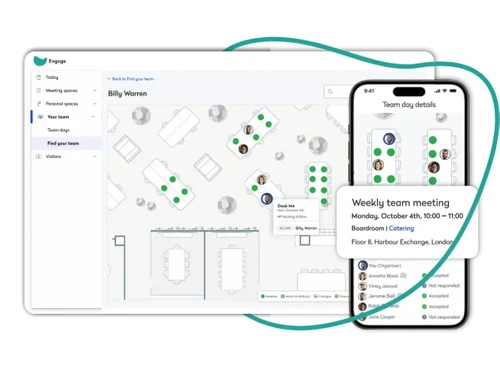
Small Business
Designed for startups and growing businesses
Medium Business
Built for business growth and flexibility
Enterprises
Designed for complex and large-scale business needs
Techjockey Trusted Reviews from Verified Users
No reviews are currently available for Eptura Engage. Discover similar Meeting Management Software reviews

Google Meet
Whats great - Google Meet is my top recommendation for meetings and project discussions. It offers user-friendly features like video record... read more

Confluence
Whats great - Techjockey did a better job in recommending appropriate software for our needs than our software re-seller. Would definitely ... read more
WorkInSync
Whats great - Fast guest invites, instant arrival alerts, reliable, easy to pick up between busy periods, searchable visitor history read more

Eptura Engage
Price On Request
Desktop
Mobile
Web based
On Premises
Windows
Mac OS

Vizitor Meeting
₹ 2000
Desktop
Mobile
Web based
On Premises
Windows
Mac OS

Zoho Meeting
₹ 60
Desktop
Mobile
Web based
On Premises
Windows
Mac OS
Zoapi
Price On Request
Desktop
Mobile
Web based
On Premises
Windows
Mac OS
Azeus Convene
Price On Request
Desktop
Mobile
Web based
On Premises
Windows
Mac OS
Newgen Board Meeting Software
Price On Request
Desktop
Mobile
Web based
On Premises
Windows
Mac OS

Airgram
Price On Request
Desktop
Mobile
Web based
On Premises
Windows
Mac OS

Cogram
Price On Request
Desktop
Mobile
Web based
On Premises
Windows
Mac OS

AskCody
Price On Request
Desktop
Mobile
Web based
On Premises
Windows
Mac OS

MeetingBooster
Price On Request
Desktop
Mobile
Web based
On Premises
Windows
Mac OS

Boardable
Price On Request
Desktop
Mobile
Web based
On Premises
Windows
Mac OS
(0) Product(s) selected
Starting Price:
$9
Available
Price on Request
Starting Price:
$4,999
Available
Price on Request
Starting Price:
$18

Available
Price on Request

Available
Price on Request

Starting Price:
€36

Available
Price on Request

Starting Price:
$10 /Month

Available
Price on Request
Eptura Engage (formerly Condeco) is a workplace management solution from Eptura that helps organizations manage office spaces, desks, meeting rooms, visitors, and workplace resources. It supports hybrid-work management by enabling employees to book and use workplace spaces while giving administrators visibility into workplace utilization.
Eptura Engage works by letting employees book desks, meeting rooms, and other workplace resources through a centralized platform. It helps workplace teams manage space usage, employee schedules, and utilization data.
Eptura Engage is ideal for employees, workplace and facilities teams, HR teams, and organizations managing hybrid work, office spaces, desks, meeting rooms, and workplace resources.
Eptura Engage pricing details are available on request on techjockey.com.
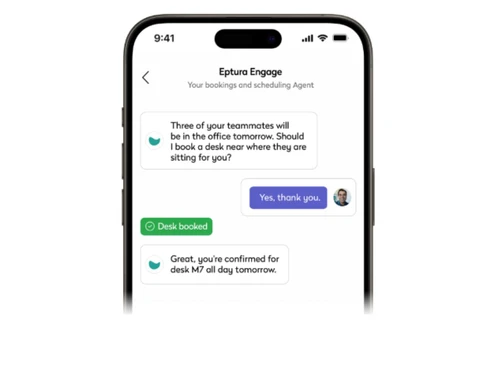
The AI-powered booking feature uses natural language commands with Copilot to help you quickly find available desks, meeting rooms, and even suggest the best days for in-office collaboration.
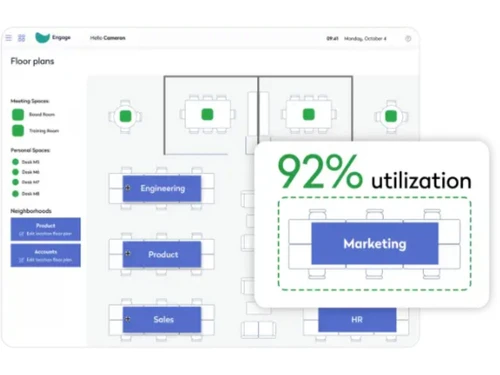
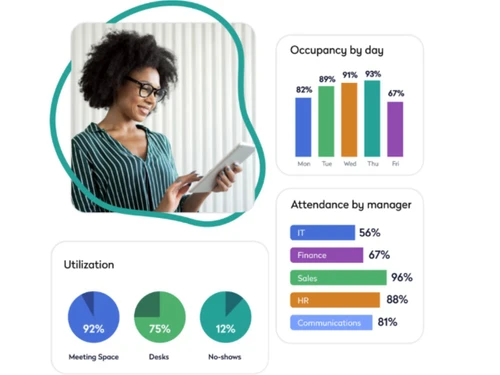
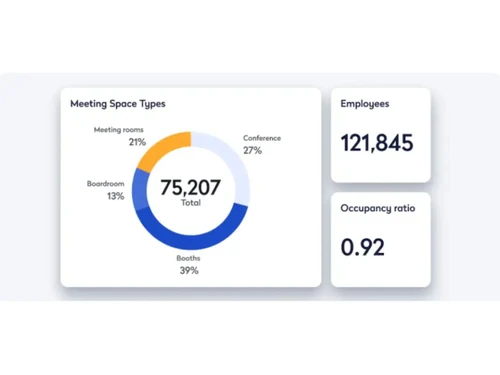
The workplace analytics module provides clear data on workspace utilization, peak usage days, no-shows, and employee work patterns to help you make smarter, data-driven decisions about your office strategy.
Yes, the software allows you to easily add visitors, catering, and AV services directly to any meeting booking to provide a seamless and welcoming experience from pre-registration to arrival.
20,000+ Software Listed
Best Price Guranteed
Free Expert Consultation
2M+ Happy Customers
Terms and Condtions

Users with registered businesses can purchase goods from merchants on the platform to satisfy their business needs. Users are not permitted to utilize any products acquired through the platform for resale, advertising, business, or further distribution.
For each purchase made, users will receive a Tax Invoice (or 'GST invoice') that includes specific details such as:
the GSTIN of the user associated with their registered business, and
the specified Entity Name for their business.
It should be noted that not all products are eligible for GST Invoice. Only the products displayed by participating sellers with the 'GST-based Invoice Available' callout on the product description page would qualify.
Certain goods and services are not eligible to get a GST Invoice, including items with VAS, i.e., Value Added Services (e.g., Total Mobile Protection/Assured Buyback) and those involving an exchange offer at the time of purchase.
Users must ensure the accuracy of the GSTIN, and business entity name provided for the GST Invoice. Requests for corrections into GST Invoice would not be accommodated by Techjockey.com or any Seller, and any issues arising from user-provided information are the sole responsibility of users.
Techjockey.com is not liable for the GST Invoice or any associated input tax credit. To efficiently claim an input tax credit, users should select the registered place of business address as per the GST authority's data and follow the provisions of the GST Act and rules.
To claim an input tax credit, the delivery and billing addresses must match. Furthermore, input tax credits will not be granted if the delivery address and GSTIN on the invoice are from different states. In case of incorrect GST details provided during the order placement, the order will be canceled automatically.