USA
USA UAE
UAESmall Business
Designed for startups and growing businesses
See More


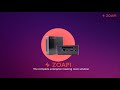


Brand: Zoapi Innovations Private Limited
Zoapi is an enterprise-level meeting room solution for co-working spaces, organizations, and educational centres. This video conferencing and wireless presentation solution is equipped with a host of features to simplify the video meeting room experience within a single window. Zoapi features include room scheduler, calendar integration, wireless presentation, digital signage and video conferenci...
See MoreHave you used Zoapi before?
Share your insights for better experience
Brand: Zoapi Innovations Private Limited
Founded Year: 2019
Zoapi is a collaboration and conferencing platform for future workspaces. Zoapi currently has two products in the meeting room solutions category.
Looking for The Right Pricing?
Share your requirements and get a plan built around your business.
Price Available on Request
Get personalised Zoapi pricing that fits your needs. Our team will connect with you.
 Screen Sharing HD Video Conferencing Digital Signage Calendar Integration Room Scheduler Dashboards Multiple Isolated Networks WiFi Access Point Annotation Proxy Support Single Click Join Password Protected. Security & Encryption Email Notifications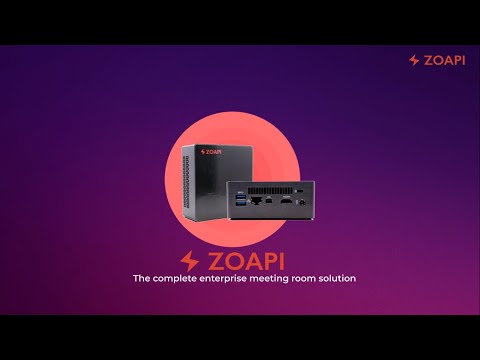

Watch the demo video to explore key features, real workflows, and how the software fits your business needs.
 Windows
  iOS
iOS  Android
  Linux
Linux  Desktop
  Mobile
  Tablet
  iPad
iPad  Cloud-Based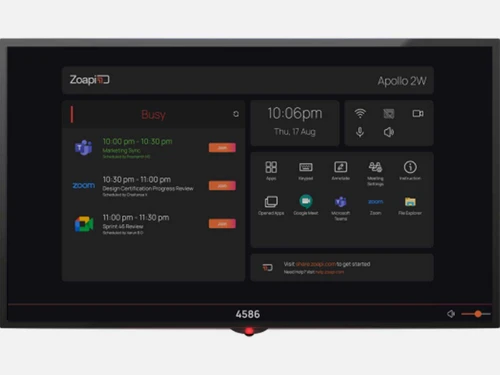


Small Business
Designed for startups and growing businesses
Medium Business
Built for business growth and flexibility
Enterprises
Designed for complex and large-scale business needs
4.4
Out of 5

Overall Rating
Based on
4 Verified Ratings
Rating Breakdown
90% Recommend this Product
Add ReviewTechjockey Trusted Reviews from Verified Users
No reviews are currently available for Zoapi. Discover similar Meeting Management Software reviews

Google Meet
Whats great - Google Meet is my top recommendation for meetings and project discussions. It offers user-friendly features like video record... read more

Confluence
Whats great - Techjockey did a better job in recommending appropriate software for our needs than our software re-seller. Would definitely ... read more
WorkInSync
Whats great - Fast guest invites, instant arrival alerts, reliable, easy to pick up between busy periods, searchable visitor history read more
Zoapi
Price On Request
Desktop
Mobile
Web based
On Premises
Windows
Mac OS

Vizitor Meeting
₹ 2000
Desktop
Mobile
Web based
On Premises
Windows
Mac OS

Zoho Meeting
₹ 60
Desktop
Mobile
Web based
On Premises
Windows
Mac OS
Azeus Convene
Price On Request
Desktop
Mobile
Web based
On Premises
Windows
Mac OS
Newgen Board Meeting Software
Price On Request
Desktop
Mobile
Web based
On Premises
Windows
Mac OS

Airgram
Price On Request
Desktop
Mobile
Web based
On Premises
Windows
Mac OS

Cogram
Price On Request
Desktop
Mobile
Web based
On Premises
Windows
Mac OS

AskCody
Price On Request
Desktop
Mobile
Web based
On Premises
Windows
Mac OS

MeetingBooster
Price On Request
Desktop
Mobile
Web based
On Premises
Windows
Mac OS

Boardable
Price On Request
Desktop
Mobile
Web based
On Premises
Windows
Mac OS

Board Management Software
Price On Request
Desktop
Mobile
Web based
On Premises
Windows
Mac OS
(0) Product(s) selected
Starting Price:
$9
Available
Price on Request
Starting Price:
$4,999
Available
Price on Request

Available
Price on Request

Available
Price on Request

Starting Price:
€36

Available
Price on Request

Available
Price on Request

Starting Price:
$10 /Month

Available
Price on Request
It is both a hardware as well as a software. The company sells Pre Installed Hardware ( Basic and Pro version) and Hub Software (Proware). Users can install the software on any Windows PC with 10 OS or select one out of their plug and play hardware.
Connect Zoapi Hub with any display using Mini-DisplayPort Cable or HDMI cable. Power up the Zoapi Hub and the system is ready to go
Yes, Zoapi demo online is available at Techjockey. You can send us a demo request mentioning a convenient time and date to get the demo online.
Zoapi facilitates seamless collaboration with external devices, besides a heap of facilities like pause sharing, HDMI wired presentation and multi-network compatibility
Yes, Zoapi app is available for both iOS and Android operating systems.
20,000+ Software Listed
Best Price Guranteed
Free Expert Consultation
2M+ Happy Customers
Terms and Condtions

Users with registered businesses can purchase goods from merchants on the platform to satisfy their business needs. Users are not permitted to utilize any products acquired through the platform for resale, advertising, business, or further distribution.
For each purchase made, users will receive a Tax Invoice (or 'GST invoice') that includes specific details such as:
the GSTIN of the user associated with their registered business, and
the specified Entity Name for their business.
It should be noted that not all products are eligible for GST Invoice. Only the products displayed by participating sellers with the 'GST-based Invoice Available' callout on the product description page would qualify.
Certain goods and services are not eligible to get a GST Invoice, including items with VAS, i.e., Value Added Services (e.g., Total Mobile Protection/Assured Buyback) and those involving an exchange offer at the time of purchase.
Users must ensure the accuracy of the GSTIN, and business entity name provided for the GST Invoice. Requests for corrections into GST Invoice would not be accommodated by Techjockey.com or any Seller, and any issues arising from user-provided information are the sole responsibility of users.
Techjockey.com is not liable for the GST Invoice or any associated input tax credit. To efficiently claim an input tax credit, users should select the registered place of business address as per the GST authority's data and follow the provisions of the GST Act and rules.
To claim an input tax credit, the delivery and billing addresses must match. Furthermore, input tax credits will not be granted if the delivery address and GSTIN on the invoice are from different states. In case of incorrect GST details provided during the order placement, the order will be canceled automatically.