linkedin
Airgram logo
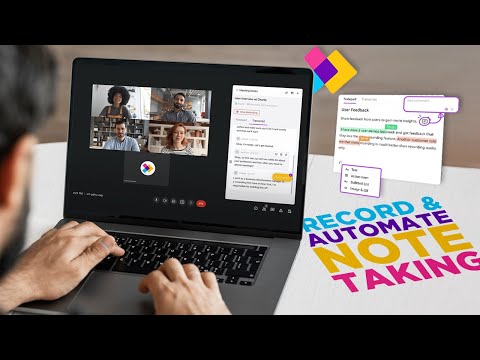
play Easily Record and Automate Note Taking in Zoom, Google Meet and Teams!
Airgram Insights Sharing
Airgram Live Transcription

Airgram

Brand: Airgram

  • 4.4

  • 4 Ratings

Airgram Meeting Management Software simplifies and enhances your meeting experience with intuitive scheduling, real-time collaboration, and automated task tracking.

See More

Have you used Airgram before?

Share your insights for better experience

Add a Review
Starting Price
$9

View plans

100% Genuine
Products
Best Price
Guaranteed
Safe & Secure
Payment
  • Description

  • Pricing

  • Features

  • Specification

  • Review

  • Compare

  • Alternatives

  • FAQ

Starting at $9

Airgram Software Overview

What is Airgram Software?

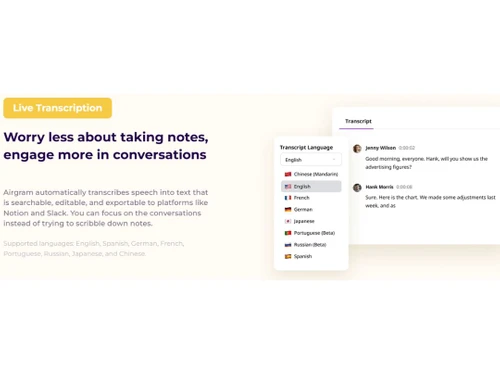
Airgram is an online artificial intelligence-based assistant for meeting conversations. It helps in recording, transcribing, summarizing, and sharing meeting conversations. The natural language processing abilities allow for transcribing speech into text and automatically generating meeting conversation notes. The text can be edited and exported to Slack or Notion platforms. Thus, rather than scribbling notes in a meeting, this assistant generates notes automatically and allows you to focus on the discussion.

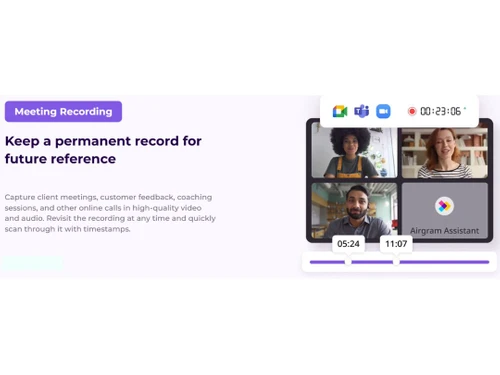
Airgram allows capturing high-quality video and audio of client meetings, customer feedback sessions, coaching sessions, and other online calls. The recordings can be revisited at any time with timestamps for easy navigation. The meeting text can generate video snippets that are easily shared with other members. It supports transcription in multiple languages.

Airgram allows advanced planning for meetings through well-structured meeting template agenda, audio recordings for automatic calls, and collaboration of agendas. This meeting assistant can be set to help you automatically join and record online calls at the scheduled start time, so you never miss anything. It can be integrated with meeting apps like Google Meet, Zoom etc. The meeting records are securely placed on Amazon Web Services, and proper security measures are followed to ensure security.

Why Choose Airgram?

  • Get meeting transcription: It allows the recording and transcription of meeting conversation, generate meeting transcripts, and organizes them properly. The files can be easily searched and shared.
  • Video/Audio Transcription: It generates text from audio and video files, making it easier to share and edit.
  • Automatic scheduling: It keeps track of the meeting schedule, prepares the meeting agenda from templates, and shares it before the meeting for productive discussion.
  • Sharing and collaboration: It summarizes meeting discussions, enables sharing of key highlights with others via video snippets, and assigns tasks in real-time, promoting effective cooperation.
  • Integration: It can be integrated with your favourite apps, making it easy to access scheduled meetings, share meeting notes, and collaborate with teammates.
  • Security: It is GDPR compliant, and it stores all data on Amazon Web Services (AWS), ensuring the safety and security of data.

Benefits of Airgram Meeting Management Software

  • Efficient management:It streamlines the entire meeting process, automates transcription and recording, and generates summaries of meetings, saving time and effort and resulting in productive discussions.
  • Improved communication:With features like searchable transcriptions, automatic text summaries, and video snippets, this meeting assistant enhances communication.
  • Good collaboration:It provides real-time meeting notes taking, summaries, commenting, and sharing of text and video snippets facilitating cooperation between meeting attendees.
  • Good preparation:With well-structured meeting agendas and the ability to share them in advance, participants are well-prepared, resulting in more focused and productive discussions.
  • User-Friendly interface:With its user-friendly interface, this meeting assistant is easy to navigate and use.

Pricing of Airgram Software

Airgram Meeting Management solution pricing starts at $9 at techjockey.com.

The overall pricing model is based on different factors such as personalization, extra features required, total users, and the deployment type. Please feel free to request a call from our product experts if you want to learn more about our subscription plans or premium package deals.

Read more

Airgram Company Details

Founded Year:  2020

An Airgram is a real-time transcription with speaker identification and high-definition video recording.

Director/Founders Ryan Zhang
Company Size 1-100 Employees

Airgram Pricing & Plans

Pro(10 recordings per month)
Key Features
  • 2-hour recording duration
  • Agenda timer
  • AI topic extraction
  • Tag meeting notes
  • Create clips
  • Search & replace
  • Download video recording
  • Export (Slack, Notion, Google Docs, Word)
Starting at $9
    • Licenses

      Licenses
      Licenses
    • Monthly

      Monthly
      Monthly

Key Features

  • 2-hour recording duration

  • Agenda timer

  • AI topic extraction

  • Tag meeting notes

  • Create clips

  • Search & replace

  • Download video recording

  • Export (Slack, Notion, Google Docs, Word)

Airgram Features

  • icon_check Meeting Recording
    Allows recording and capturing important meeting notes and discussions and transcribing them.
  • icon_check Live Transcription
    It provides a real-time transcription of meeting conversations through AI and NLP support.
  • icon_check Insights Sharing
    Summaries, key meeting insights and highlights can be shared with team members and the audience.
  • icon_check Collaboration
    Enables collaboration in real-time by sharing notes, comments, video snippets etc.
  • icon_check Seamlessly Integrate
    It can be integrated with popular meeting apps allowing smooth workflow integration.
  • icon_check Meeting Templates
    Provides meeting templates for making and structuring meeting agendas.
  • icon_check Auto-Join Meeting
    Automatically join scheduled meetings at the designated time without missing deadlines.
  • icon_check Search & Replace
    Instantly search and replace specific keywords or phrases within meeting transcripts and notes.
  • icon_check Tag Meeting Notes
    Allows tagging of meeting notes for easy categorization and retrieval.
  • icon_check Agenda Timer
    Set and monitor agenda timers to be on time and ensure good meeting time management.
Airgram Demo Video play icon

Get Airgram Demo

Watch the demo video to explore key features, real workflows, and how the software fits your business needs.

Understand
Key Features
Personal
Demo Insights
Interactive
Demo Support

Airgram Specifications

Supported Platforms
Ubuntu Ubuntu Windows Windows MacOS MacOS Linux Linux
Devices
Desktop Desktop Mobile Mobile Tablet Tablet iPad iPad
Deployment
Cloud-Based Cloud-Based
Suitable For
All Industries
Business Specific
All Businesses
Business Size
Small Business Startups Medium Business Enterprises
Customer Support
Email Communities
Language
English
Training Resources
Documentation Videos
AI Features
AI Integrated

Explore the Best Alternative Solutions Similar to Your Business Size and Needs

Airgram Review

4.4

Out of 5

img

Overall Rating

Based on
4 Verified Ratings

Rating Breakdown

  • Features 4.2
  • Value for Money 4.1
  • Ease of Use 4.6
  • Customer Support 4.7

92% Recommend this Product

Add Review

Techjockey Trusted Reviews from Verified Users

No reviews are currently available for Airgram. Discover similar Meeting Management Software reviews
  • Google Meet

    4.3

    Whats great - Google Meet is my top recommendation for meetings and project discussions. It offers user-friendly features like video record... read more

  • Confluence

    4.9

    Whats great - Techjockey did a better job in recommending appropriate software for our needs than our software re-seller. Would definitely ... read more
  • truMe Meeting Room

    5.0

    Whats great - Excellent product with effective booking process and utilisation of meeting rooms is very effective. read more

Compare Airgram With other Meeting Management Software

Products
Ratings
Pricing
Device Supported
Deployment
Supported Platforms
  • img

    Airgram

  • 4.4

  • Price On Request

  • Desktop

    Mobile

  • Web based

    On Premises

  • Windows

    Mac OS

  • img

    Vizitor Meeting

  • 4.1

  • ₹ 2000

  • Desktop

    Mobile

  • Web based

    On Premises

  • Windows

    Mac OS

  • img

    Zoho Meeting

  • 4.5

  • ₹ 60

  • Desktop

    Mobile

  • Web based

    On Premises

  • Windows

    Mac OS

  • img

    Zoapi

  • 4.4

  • Price On Request

  • Desktop

    Mobile

  • Web based

    On Premises

  • Windows

    Mac OS

  • img

    Azeus Convene

  • 4.3

  • Price On Request

  • Desktop

    Mobile

  • Web based

    On Premises

  • Windows

    Mac OS

  • img

    Cogram

  • 4.2

  • Price On Request

  • Desktop

    Mobile

  • Web based

    On Premises

  • Windows

    Mac OS

  • img

    AskCody

  • 4.4

  • Price On Request

  • Desktop

    Mobile

  • Web based

    On Premises

  • Windows

    Mac OS

  • img

    MeetingBooster

  • 4.3

  • Price On Request

  • Desktop

    Mobile

  • Web based

    On Premises

  • Windows

    Mac OS

  • img

    Boardable

  • 4.4

  • Price On Request

  • Desktop

    Mobile

  • Web based

    On Premises

  • Windows

    Mac OS

(0) Product(s) selected

Airgram Alternatives

See All Airgram Alternatives

Available

Price on Request

Starting Price:

$4,999

Available

Price on Request

Starting Price:

€36
Available

Price on Request
Articles for Airgram

See All Related Articles

Which operating system does the Airgram Software Support?

Airgram software is compatible with Windows and macOS operating systems.

Is there any Airgram App?

Airgram app is unavailable on Android, and iOS devices.

What is the deployment type of the Airgram Software?

Airgram system supports web-based deployment.

How much does the Airgram cost?

Airgram software pricing starts from $9 at techjockey.com.

Who are the potential users of the Airgram Software?

Airgram system can be used by Meeting management companies, Meeting managers, staff managers, and individuals who need a robust Meeting management software.

Is there any free trial or demo for Airgram?

Airgram demo is available for free with techjockey.com.

Is Airgram System free?

Airgram system does not offer a free trial.

How can you download the Airgram software?

Airgram is a web-based software. So, you need not download any software to use it.

How does Airgram Platform work?

Airgram is a versatile meeting management software that enables users to effectively capture, transcribe, condense, and distribute important discussions. It optimizes the outcomes of internal team meetings as well as client-facing interactions, ensuring valuable insights are shared and retained.

20,000+ Software Listed

Best Price Guranteed

Free Expert Consultation

2M+ Happy Customers

Terms and Condtions

close

Users with registered businesses can purchase goods from merchants on the platform to satisfy their business needs. Users are not permitted to utilize any products acquired through the platform for resale, advertising, business, or further distribution.

For each purchase made, users will receive a Tax Invoice (or 'GST invoice') that includes specific details such as:

  • the GSTIN of the user associated with their registered business, and

  • the specified Entity Name for their business.

It should be noted that not all products are eligible for GST Invoice. Only the products displayed by participating sellers with the 'GST-based Invoice Available' callout on the product description page would qualify.

Certain goods and services are not eligible to get a GST Invoice, including items with VAS, i.e., Value Added Services (e.g., Total Mobile Protection/Assured Buyback) and those involving an exchange offer at the time of purchase.

Users must ensure the accuracy of the GSTIN, and business entity name provided for the GST Invoice. Requests for corrections into GST Invoice would not be accommodated by Techjockey.com or any Seller, and any issues arising from user-provided information are the sole responsibility of users.

Techjockey.com is not liable for the GST Invoice or any associated input tax credit. To efficiently claim an input tax credit, users should select the registered place of business address as per the GST authority's data and follow the provisions of the GST Act and rules.

To claim an input tax credit, the delivery and billing addresses must match. Furthermore, input tax credits will not be granted if the delivery address and GSTIN on the invoice are from different states. In case of incorrect GST details provided during the order placement, the order will be canceled automatically.