linkedin
Zoho Meeting logo
play How to join an online meeting and use the live meeting window - Zoho Meeting Demo
Zoho Meeting Online
Zoho Meeting Webinar

Zoho Meeting

Brand: Zoho Corporation

  • 4.5

  • 4 Ratings

Zoho Meeting is a web-based conferencing software that allows users to host and join online meetings, webinars and audio conferences from any location across the globe. This best video conferencing software has given a whole new perspective to team meetings, allowing the members to collaborate and share information within the team. Zoho Meeting also enables them to transfer control to another tea...

See More

Have you used Zoho Meeting before?

Share your insights for better experience

Add a Review
Starting Price
₹60 excl.GST
₹ 71 incl. GST

View plans

offer Save upto 18%, Get GST Invoice on your business purchase T&C
offer Buy Now & Pay Later, Check offer on payment page.
Buy Now
100% Genuine
Products
Best Price
Guaranteed
Safe & Secure
Payment
  • Description

  • Pricing

  • Features

  • Specification

  • Review

  • Compare

  • Alternatives

  • FAQ

Starting at ₹60
Buy Now

Zoho Meeting Software Overview

What is Zoho Meeting?

Zoho Meeting is a web-based conferencing software that allows users to host and join online meetings, webinars and audio conferences from any location across the globe. This best video conferencing software has given a whole new perspective to team meetings, allowing the members to collaborate and share information within the team. Zoho Meeting also enables them to transfer control to another team member during product presentations. It enables the hosts to share their computer screen with the customers and demonstrate products and ideas in real-time. The automated email reminder of the software sends scheduled reminders to the potential attendees before conducting an online meeting or webinar.

How can users host successful webinars by using Zoho Meeting?

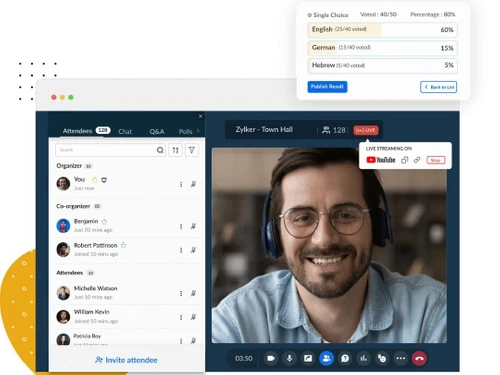
  1. Analytics: The software provides reports based on the attendees, poll results and Q&A. Users can download those reports as CSV and XLS files and analyze them.
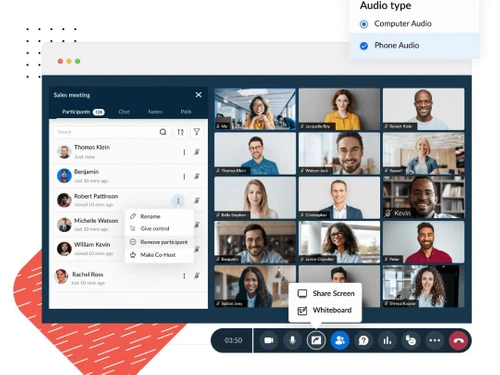
  2. Add Co-hosts: The software allows hosts to add co-hosts within a live webinar and enables them to present their thoughts and ideas in real-time.
  3. Polls, Q&A: By conducting live polls and Q&A sessions, hosts get better information about the attendees.
  4. Raise Hand: The attendees can use this feature for silent communication with the host of the webinar.

Pricing of Zoho Meeting

The software charges -

For Meetings:

  1. Rs. 350 per month for meetings. Allows 100 participants, and users can store up to 10 session recordings.

For Webinar:

  1. Rs. 450 per month, allows 25 attendees
  2. Rs. 850 per month, allows 50 attendees
  3. Rs.1050 per month, allows 100 attendees
  4. Rs.1200 per month, allows 250 attendees

Interested buyers can request a callback and our customer care team will provide support related to activation key, license renewal and many others.

The Latest Version of Zoho Meeting

The latest version of the software was launched in February 2020, and has the following features:

  1. Request Control: The software allows participants to send requests for remote access to the host for collaborations and troubleshooting.
  2. Q&A option: Hosts can view all the unanswered questions by using the checkbox in the Q&A tab.
  3. Integration: Webinars scheduled using the latest version of Zoho Meeting are automatically synced with Zoho CRM, only if the user has enabled its integration option.
  4. Audio Detection: The software sends pop-ups to users and informs them to enable audio, in case it is not detected automatically.
  5. Reduced Data Consumption: The makers of the software have made adjustments to reduce the amount of data being consumed during live screen sharing on mobile devices.

Compatible Platforms of Zoho Meeting

Zoho Meeting is a web-based software. The operating systems with which the software is compatible are:

  1. Windows 7 (version 6.1 and higher)
  2. Mac OS X 10.10 and higher
  3. Linux: All the operating systems supporting the latest versions of Chrome and Firefox browsers.

What are the benefits of using Zoho Meeting

  1. No Downloads: Users can host or join meetings right from their browser. They do not have to download preventive firewalls and other unnecessary add-ons.
  2. Recording: Zoho Meeting allows users to record complete webinars and online meeting sessions. They can further share those recordings with others in the form of downloadable links.
  3. Customization: By using Zoho Meetings, users can add customizable fields into their webinar registration forms. They can even add their company logo for brand promotion.
  4. Security: The software makes sure that webinars and online meetings take place through SSL/128-bit AES encryption protocols. It also complies with the EU-US Privacy Shield Framework.
Read more

Zoho Corporation Company Details

Founded Year:  1996

Zoho Corporation is an Indian multinational company that specialises in software development, cloud computing, and web-based business tools. It is best known for Zoho Office suite and its enterprise IT management division, ManageEngine

Director/Founders Sridhar Vembu / Tony Thomas
Company Size 1000+ Employees

Zoho Meeting Pricing & Plans

STANDARD (10 Participants)

Calculated Price

₹ 60 Exclusive of all taxes
    • Host

      Host
      Host
    • Monthly

      Monthly
      Monthly

Key Features

  • Cloud recording storage for 10 meetings/hostStores

  • Allow up to 2 co-hosts

  • Meetings for up to 24 hours

  • Personal Room

  • VoIP & Phone

  • Custom virtual background

PROFESSIONAL (10 Participants)

Calculated Price

₹ 150 Exclusive of all taxes
    • Host

      Host
      Host
    • Monthly

      Monthly
      Monthly

Key Features

  • Custom domain

  • Departments

  • Breakout rooms

  • Embed meeting widget

  • Multiple co-hosts

  • Advanced analytics

Zoho Meeting Features

  • icon_check RSVP Scheduling
    It enables the hosts to know how many attendees will be joining their meeting before they finally start. The RSVP section of the
  • icon_check Calendar
     The software enables users to auto-sync their meeting schedule with Zoho and Google calendars.
  • icon_check Screen/Application sharing
    By using Zoho Meeting, users can share their individual computer screen with their webinar attendees. This way, they can deliver
  • icon_check High Quality Voice Over IP (VoIP)
    The software enables users to join or host audio conferences by using their individual VoIP or international dial-in numbers.
  • icon_check Chat
    The software offers a live text chat feature to the host and the attendees, which is available both in private and public.
  • icon_check Webcam Sharing
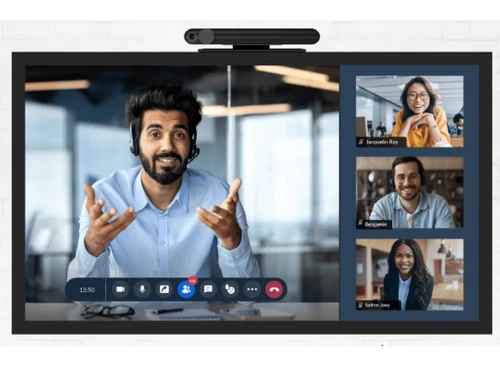
    The software allows users to transmit and share videos through their webcam while they are hosting a webinar or any other online
  • icon_check Meeting Recording
    By pressing the record button in the presenter’s toolbar, users can record complete webinar sessions. The software sends them
  • icon_check reminders via email
    Zoho Meeting allows users to send automated email reminders with all the conference details and joining links embedded within
  • icon_check Embed Meeting Widget
    The software allows users to embed registration forms and other meeting widgets within blogs and web pages to attract the
  • icon_check Attendee Join Notification
    Zoho Meeting sends notifications to the host of the webinar when an attendee tries to enter a secured meeting.
  • icon_check Lock Meeting
    You can lock the confidential meetings and keep them secure from any unexpected attendee.
  • icon_check Moderator Controls
    Users can mute and even remove the unwanted participants from their webinar in order to reduce disturbance and conduct meaningful
Zoho Meeting Demo Video play icon

Get Zoho Meeting Demo

Watch the demo video to explore key features, real workflows, and how the software fits your business needs.

Understand
Key Features
Personal
Demo Insights
Interactive
Demo Support

Zoho Meeting Specifications

Supported Platforms
Windows Windows iOS iOS Android Android
Devices
Desktop Desktop Mobile Mobile Tablet Tablet iPad iPad
Deployment
Cloud-Based Cloud-Based
Suitable For
All Industries
Business Specific
All Businesses
Customer Support
Phone Email
Language
English

Explore the Best Alternative Solutions Similar to Your Business Size and Needs

Zoho Meeting Review

4.5

Out of 5

img

Overall Rating

Based on
4 Verified Ratings

Rating Breakdown

  • Features 4.7
  • Value for Money 4.6
  • Ease of Use 4.5
  • Customer Support 4.5

90% Recommend this Product

Add Review

Techjockey Trusted Reviews from Verified Users

No reviews are currently available for Zoho Meeting. Discover similar Meeting Management Software reviews
  • Google Meet

    4.3

    Whats great - Google Meet is my top recommendation for meetings and project discussions. It offers user-friendly features like video record... read more

  • Confluence

    4.9

    Whats great - Techjockey did a better job in recommending appropriate software for our needs than our software re-seller. Would definitely ... read more

  • truMe Meeting Room

    5.0

    Whats great - Excellent product with effective booking process and utilisation of meeting rooms is very effective. read more

Compare Zoho Meeting With other Meeting Management Software

Products
Ratings
Pricing
Device Supported
Deployment
Supported Platforms
  • img

    Zoho Meeting

  • 4.5

  • ₹ 60.00 excl. GST

  • Desktop

    Mobile

  • Web based

    On Premises

  • Windows

    Mac OS

  • img

    Zoapi

  • 4.4

  • Price On Request

  • Desktop

    Mobile

  • Web based

    On Premises

  • Windows

    Mac OS

  • img

    Vizitor Meeting

  • 4.1

  • ₹ 2000

  • Desktop

    Mobile

  • Web based

    On Premises

  • Windows

    Mac OS

  • img

    Azeus Convene

  • 4.3

  • Price On Request

  • Desktop

    Mobile

  • Web based

    On Premises

  • Windows

    Mac OS

  • img

    Airgram

  • 4.4

  • Price On Request

  • Desktop

    Mobile

  • Web based

    On Premises

  • Windows

    Mac OS

  • img

    Cogram

  • 4.2

  • Price On Request

  • Desktop

    Mobile

  • Web based

    On Premises

  • Windows

    Mac OS

  • img

    MeetingBooster

  • 4.3

  • Price On Request

  • Desktop

    Mobile

  • Web based

    On Premises

  • Windows

    Mac OS

  • img

    AskCody

  • 4.4

  • Price On Request

  • Desktop

    Mobile

  • Web based

    On Premises

  • Windows

    Mac OS

  • img

    Boardable

  • 4.4

  • Price On Request

  • Desktop

    Mobile

  • Web based

    On Premises

  • Windows

    Mac OS

(0) Product(s) selected

Zoho Meeting Alternatives

See All Zoho Meeting Alternatives

Starting Price:

$9

Available

Price on Request

Starting Price:

$4,999

Available

Price on Request

Starting Price:

€36

Available

Price on Request

Starting Price:

$15

Articles for Zoho Meeting

See All Related Articles

Does Zoho Meeting allow in-session chats?

As a host, you can use the chat tab to send messages to the attendees who are a part of the current meeting or webinar.

Can users mute participants during live sessions with Zoho Meeting?

Users can mute participants or reduce their noise in order to make the session more informative and productive.

Can I get a demo of Zoho Meeting?

Yes, techjockey provides an online demo of Zoho Meeting. You simply need to send us a request mentioning your preferable time and date.

What are the system requirements for installing Zoho Meeting?

Zoho Meeting is a web-based software and has the following system requirements: Hardware: Desktop, laptop and compatible OS, built-in or wireless speakers, web camera. Internet speed: 4Mbps for presenters and 2Mbps for participants. Web Browsers: Chrome 55 and above, Firefox 54 and above, Opera, Microsoft Edge version 79 and Safari.

Does Zoho Meeting have a mobile app?

Yes! The software has a dedicated mobile app under the same name. Zoho Meeting is compatible with all Android and iOS devices.

20,000+ Software Listed

Best Price Guranteed

Free Expert Consultation

2M+ Happy Customers

Terms and Condtions

close

Users with registered businesses can purchase goods from merchants on the platform to satisfy their business needs. Users are not permitted to utilize any products acquired through the platform for resale, advertising, business, or further distribution.

For each purchase made, users will receive a Tax Invoice (or 'GST invoice') that includes specific details such as:

  • the GSTIN of the user associated with their registered business, and

  • the specified Entity Name for their business.

It should be noted that not all products are eligible for GST Invoice. Only the products displayed by participating sellers with the 'GST-based Invoice Available' callout on the product description page would qualify.

Certain goods and services are not eligible to get a GST Invoice, including items with VAS, i.e., Value Added Services (e.g., Total Mobile Protection/Assured Buyback) and those involving an exchange offer at the time of purchase.

Users must ensure the accuracy of the GSTIN, and business entity name provided for the GST Invoice. Requests for corrections into GST Invoice would not be accommodated by Techjockey.com or any Seller, and any issues arising from user-provided information are the sole responsibility of users.

Techjockey.com is not liable for the GST Invoice or any associated input tax credit. To efficiently claim an input tax credit, users should select the registered place of business address as per the GST authority's data and follow the provisions of the GST Act and rules.

To claim an input tax credit, the delivery and billing addresses must match. Furthermore, input tax credits will not be granted if the delivery address and GSTIN on the invoice are from different states. In case of incorrect GST details provided during the order placement, the order will be canceled automatically.