linkedin
Smart FM logo
smart-fm-email
smart-fm-workspaces
smart-fm-approval

Smart FM

Brand: Systsoft Technologies

  • No Ratings & Reviews

A cloud-based facility management software that helps organizations manage assets, maintenance, space, and workplace operations efficiently in one system.

See More

Have you used Smart FM before?

Share your insights for better experience

Add a Review

Price Available on Request

Questions about pricing or customization? We’re here to help, just a click away.

100% Genuine
Products
Best Price
Guaranteed
Safe & Secure
Payment
  • Description

  • Pricing

  • Features

  • Specification

  • Review

  • FAQ

Smart FM Software Overview

What is Smart FM?

Smart FM is a cloud-based facility management software designed to help companies manage offices, buildings, and assets efficiently. It brings all facility-related tasks like maintenance, space management, and asset tracking into one system.

The software helps manage employee requests, service tickets, and helpdesk operations easily. It allows businesses to track assets from purchase to disposal with full lifecycle details. Smart FM also supports vendor and contract management for better control.

Users can monitor office space, seating, and occupancy in real time. It provides dashboards and reports to improve decision-making.

The software automates routine tasks like maintenance schedules and approvals. It works on web and mobile devices for easy access anywhere. Smart FM helps reduce costs, improve efficiency, and streamline operations.

Why Choose Smart FM Software?

  • Cloud-Based Platform: Access data anytime with secure cloud hosting.
  • All-in-One Solution: Manage maintenance, assets, and space in one system.
  • Work Order Management: Create, assign, and track tasks easily.
  • Asset Lifecycle Tracking: Monitor assets from purchase to disposal.
  • Preventive Maintenance: Schedule regular maintenance to avoid breakdowns.
  • Real-Time Monitoring: Track operations and performance instantly.
  • AI-Powered Insights: Uses AI for smart decision-making and analytics.
  • IoT Integration: Connects with IoT devices for smart facility management.
  • Centralized Data System: Keeps all facility data in one place.
  • Mobile Access: Use on smartphones and tablets for field operations.
  • Helpdesk Management: Handle service requests and complaints efficiently.
  • Vendor Management: Manage vendors, contracts, and invoices easily.
  • Space Management: Optimize office space and seating arrangements.
  • Automated Workflows: Reduces manual work with smart automation.

Benefits of Smart FM Software

  • Customizable Dashboards: View data through interactive dashboards.
  • Detailed Reporting: Generate reports for better decision-making.
  • Improves Efficiency: Speeds up operations and reduces downtime.
  • Cost Control: Tracks expenses and helps reduce operational costs.
  • Multi-Location Management: Manage multiple sites from one platform.
  • QR Code Integration: Track assets and tasks using QR codes.
  • Geolocation Tracking: Monitor activities with location-based data.
  • Audit Compliance Tools: Conduct inspections and audits.
  • Secure Access Control: Role-based permissions for data safety.
  • Integration Capabilities: Connects with ERP, BMS, and third-party tools.
  • Self-Service Portals: Users can raise and track service requests.
  • Real-Time Alerts: Get notifications for faults and issues.
  • Data-Driven Decisions: Helps improve planning with analytics.

Smart FM Pricing

Smart FM price is available upon request at Techjockey. The pricing model is based on different parameters, including extra features, deployment type, and the total number of users. For further queries related to the product, you can contact our product team and learn more about the pricing and offers.

Read more

Smart FM Pricing & Plans

Looking for The Right Pricing?

Share your requirements and get a plan built around your business.

  • Define your business needs
  • Get customised pricing
  • Choose features that fit your workflow

Price Available on Request

Get personalised Smart FM pricing that fits your needs. Our team will connect with you.

Smart FM Features

  • icon_check Work Order Management
    Manages maintenance and service requests through routing, approvals, escalation tracking, and closure confirmation workflows.
  • icon_check Helpdesk Management
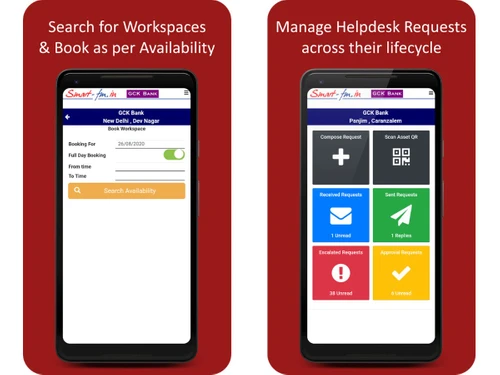
    Enables users to raise service requests that are routed to facility teams or vendors with tracking, approvals, and closure
  • icon_check Asset Lifecycle Management
    Tracks assets from purchase, installation, warranty, maintenance, transfers, repairs, and disposal across locations.
  • icon_check Preventive Maintenance Scheduling
    Schedules recurring preventive maintenance tasks for assets and vendor services to ensure timely servicing and compliance.
  • icon_check Vendor Contract Management
    Tracks vendor AMC contracts, invoices, service schedules, approvals, and performance across multiple facility locations.
  • icon_check Inventory Management
    Manages stock and consumables inventory with requisitions, reorder levels, vendor purchases, and stock dispatch tracking.
  • icon_check Lease Management
    Stores lease agreements, rental amounts, escalation schedules, deposits, and calculates rent payable with approval workflows.
  • icon_check Workspace Management
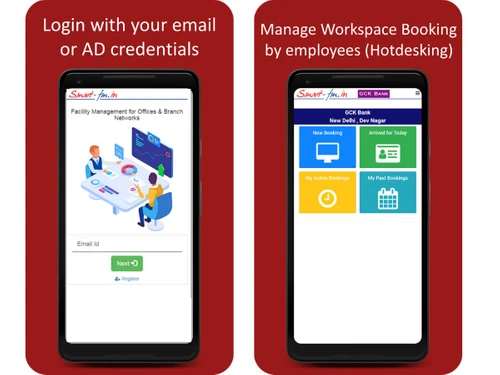
    Tracks office occupancy and allows employees to book workspaces or hotdesks directly on floor plans for hybrid workplaces.
  • icon_check Project Management
    Manages office setup or fit-out projects with task breakdowns, timelines, templates, responsibilities, and progress tracking.
  • icon_check Request Lifecycle Tracking
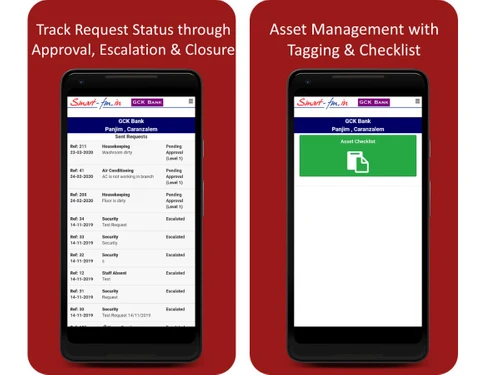
    Tracks service requests from submission to assignment, approval, execution, escalation, and final closure confirmation.
  • icon_check Maintenance Checklist Automation
    Automates periodic maintenance checklists and links checklist results with maintenance requests and service tracking.
  • icon_check Requisition Management
    Allows users to raise requisitions for inventory or purchases which are routed for approval and fulfilled by stock or vendors.
  • icon_check Vendor Invoice Approval
    Processes vendor invoices linked to contracts and services with approval workflows and cost tracking for services rendered.
  • icon_check Occupancy Tracking
    Provides real-time occupancy visibility and seating allocation information for office space utilization and planning.

Smart FM Specifications

Supported Platforms
Windows Windows iOS iOS Android Android MacOS MacOS
Devices
Desktop Desktop Mobile Mobile Tablet Tablet iPad iPad
Deployment
Cloud-Based Cloud-Based
Suitable For
All Industries
Business Specific
All Businesses
Business Size
Small Business Medium Business SMBs SMEs MSMBs MSMEs
Customer Support
Email Communities
Language
English
Training Resources
Videos

Smart FM Review

Techjockey Trusted Reviews from Verified Users

No reviews are currently available for Smart FM. Discover similar Facility Management Software reviews

  • Innomaint

    4.7

    Whats great - Innomaint has significantly streamlined asset management processes, making various tasks much easier to handle. The platform ... read more
  • eFacilito

    4.6

    Whats great - At first, I was reluctant in purchasing this software but after analyzing and using it quite a while I can say It is one of t... read more

  • Diyos FaME

    5.0

    Whats great - Their understanding of the industry is very good which made it easy to implement Payroll, Billing with site wise conditions &... read more

How much does Smart FM cost?

Smart FM price is available upon request, as listed on techjockey.com.

Is there a mobile app available for Smart FM Software?

Yes, the Smart FM mobile app is available on iOS and Android.

Which operating systems are compatible with Smart FM Software?

Smart FM is compatible with Windows and MacOS operating systems.

Does Smart FM Software offer a free trial?

No, Smart FM does not offer a free trial.

How does Smart FM Software function?

Smart FM works by centralizing facility data, automating work orders, maintenance tasks, and asset tracking through a cloud-based system with real-time dashboards.

Who uses Smart FM Software?

Smart FM is used by facility managers, property managers, real estate firms, hospitals, schools, and maintenance teams across industries.

Is a free demo available for Smart FM Software?

Yes, Smart FM offers a demo.

Is Smart FM Software available for free?

No, Smart FM is not available for free.

20,000+ Software Listed

Best Price Guranteed

Free Expert Consultation

2M+ Happy Customers

Terms and Condtions

close

Users with registered businesses can purchase goods from merchants on the platform to satisfy their business needs. Users are not permitted to utilize any products acquired through the platform for resale, advertising, business, or further distribution.

For each purchase made, users will receive a Tax Invoice (or 'GST invoice') that includes specific details such as:

  • the GSTIN of the user associated with their registered business, and

  • the specified Entity Name for their business.

It should be noted that not all products are eligible for GST Invoice. Only the products displayed by participating sellers with the 'GST-based Invoice Available' callout on the product description page would qualify.

Certain goods and services are not eligible to get a GST Invoice, including items with VAS, i.e., Value Added Services (e.g., Total Mobile Protection/Assured Buyback) and those involving an exchange offer at the time of purchase.

Users must ensure the accuracy of the GSTIN, and business entity name provided for the GST Invoice. Requests for corrections into GST Invoice would not be accommodated by Techjockey.com or any Seller, and any issues arising from user-provided information are the sole responsibility of users.

Techjockey.com is not liable for the GST Invoice or any associated input tax credit. To efficiently claim an input tax credit, users should select the registered place of business address as per the GST authority's data and follow the provisions of the GST Act and rules.

To claim an input tax credit, the delivery and billing addresses must match. Furthermore, input tax credits will not be granted if the delivery address and GSTIN on the invoice are from different states. In case of incorrect GST details provided during the order placement, the order will be canceled automatically.