linkedin
OfficeSpace logo
OfficeSpace-booking
OfficeSpace-hybrid
OfficeSpace-queue

OfficeSpace

Brand: OfficeSpace Software Inc

  • No Ratings & Reviews

OfficeSpace is an AI-powered workplace management platform that helps organizations streamline space planning, employee experiences, and asset management.

See More

Have you used OfficeSpace before?

Share your insights for better experience

Add a Review

Price Available on Request

Questions about pricing or customization? We’re here to help, just a click away.

100% Genuine
Products
Best Price
Guaranteed
Safe & Secure
Payment
  • Description

  • Pricing

  • Features

  • Specification

  • Review

  • Compare

  • Alternatives

  • FAQ

OfficeSpace Software Overview

What is OfficeSpace?

OfficeSpace is a leading, AI-powered workplace management platform designed for facilities, workplace experience, and commercial real estate teams. It serves as a unified operating system for the built world, consolidating numerous workplace functions into a single, connected solution. The platform is engineered to help organizations move away from managing multiple disconnected tools and manual processes, providing a centralized hub for space planning, employee experience, asset management, and data-driven insights.

By leveraging a team of AI agents, OfficeSpace automates complex tasks, delivers on-demand analytics, and enhances the overall workplace environment. It empowers leaders to make smarter, faster decisions backed by real-time data, ultimately helping to optimize real estate portfolios, improve operational efficiency, and create a more engaging and productive office experience for employees. The platform is trusted by over 2,000 teams globally to manage their facilities and workplace strategies effectively.

Why Choose OfficeSpace?

  • Rapid Implementation: The platform is rated #1 for its speed to value, with a standard implementation time of just 35 days. This allows organizations to get their systems, including complex integrations, up and running in weeks, not months.
  • 24/7 Live Support: Clients have access to live phone and email support during extended weekday hours, along with 24/7 case submission and critical-incident escalation. The AI agent, Ossie, provides additional intelligent support to help teams work smarter.
  • Constant Innovation: With a commitment to staying ahead of workplace trends, OfficeSpace releases new features every two weeks and consistently delivers over 90% of its product roadmap each year.
  • Dedicated Client Success: Every client receives comprehensive success services, including quarterly digital summits, office hours, and industry roundtables to ensure they maximize the platform's value.
  • Leading AI Capabilities: As an industry leader in AI innovation, OfficeSpace provides advanced tools for space planning, analytics, and workplace experience automation that are grounded in data, not assumptions.
  • Comprehensive Professional Services: To support evolving needs, the company offers unlimited floor plan changes, custom integration services, and tailored solutions to extend your existing technology stack.

Advanced Features of OfficeSpace

  • Workplace AI Agents: The platform features a team of specialized AI agents that work autonomously to enhance efficiency. These include the Space Planning Agent for automating restacks, the Workplace Experience (WEX) Agent for guiding employees, the Insights Agent for surfacing on-demand data, and the Facilities Agent for streamlining operations.
  • AI-Powered Scenario Planning: Move beyond manual spreadsheets with AI-driven scenario planning. The system analyzes collaboration data to generate optimal layouts, strengthen team adjacencies, and identify opportunities to right-size your real estate portfolio in minutes.
  • Workplace Intelligence and Reporting: Gain a clear, real-time view of your workplace with comprehensive portfolio reports and utilization data. This intelligence empowers leaders to justify decisions, forecast future needs, and confidently manage their entire footprint.
  • Seamless Integrations: OfficeSpace integrates with essential business tools including Microsoft 365, Google Workspace, Slack, and Zoom. It also connects with HR systems such as Workday and BambooHR for employee data syncing.
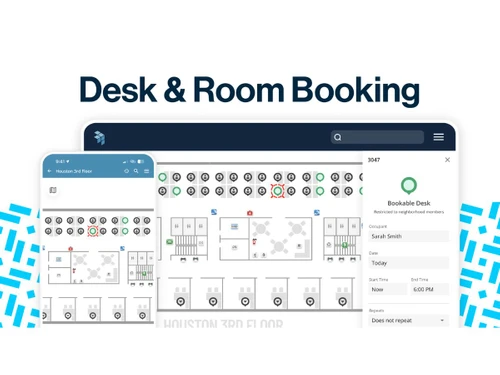
  • Smart Booking and Automated Check-ins: Enhance the employee experience by eliminating "ghost meetings" and double-bookings. The system provides smart nudges to book desks, automates check-ins to free up unused space, and shows real-time room availability.

Modules of OfficeSpace

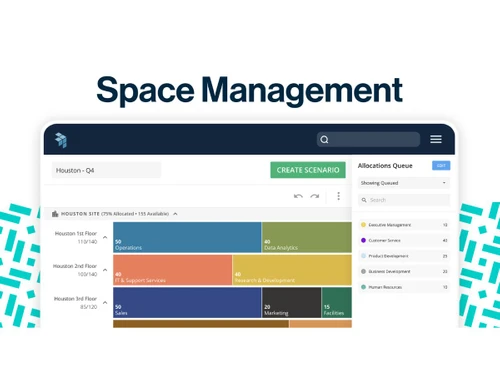
  • Space and Real Estate Management: This module provides the tools to build data-driven floor plans, manage moves, and execute complex reorganizations. With intuitive drag-and-drop stack planning, you can visualize space allocation, create unlimited "what-if" scenarios, and seamlessly move teams across floors or sites.
  • Facilities Management: Keep your buildings safe, compliant, and running efficiently. This capability centralizes work order management, preventative maintenance scheduling, visitor management, and delivery coordination into one powerful and easy-to-use system.
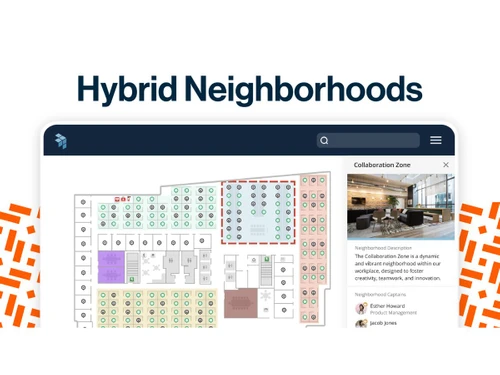
  • Workplace and Employee Experience: Make office days more purposeful and productive. This module focuses on creating a frictionless employee journey with features like smart desk booking, an employee dashboard for planning hybrid weeks, and seamless integrations with communication tools like Slack and Teams.
  • Asset Management: Gain total visibility and control over every company asset, from laptops to heavy equipment. You can visualize assets directly on your floor plan, scan and update them in the field via mobile, and use proactive maintenance schedules to prevent costly breakdowns before they occur.

How to Use OfficeSpace?

  1. Integrate and Configure: The process begins by connecting OfficeSpace to your core business systems. This includes setting up automated data syncs with your HRIS (e.g., WorkDay) and employee directories (e.g., Azure AD, Okta) to ensure all planning is based on accurate headcount and employee data.
  2. Visualize and Plan: Using the Block & Stack Planning tools, facility managers can visualize how teams are allocated across floors and buildings. They can then use the drag-and-drop interface to create and compare multiple scenarios for restacks, moves, or future growth.
  3. Engage and Operate: Once configured, employees can use the platform or its integrations to book desks, find colleagues, and reserve meeting rooms. Simultaneously, facility teams manage daily operations by tracking work orders, managing visitors, and overseeing asset maintenance schedules.
  4. Analyze and Optimize: Leverage the platform powerful reporting and AI-driven insights to monitor key metrics like space utilization and occupancy trends. This data allows leadership to make informed decisions, forecast future needs, and continuously optimize the workplace for cost-efficiency and employee satisfaction.

OfficeSpace Pricing

OfficeSpace pricing details are available on request on techjockey.com.

The pricing model is based on different parameters, including extra features, deployment type, and the total number of users. For further queries related to the product, you can contact our product team and learn more about the pricing and offers.

Read more

OfficeSpace Software Inc Company Details

Founded Year:  2006

OfficeSpace Software is the leading AI-powered workplace management platform that helps organizations plan, connect, and perform at scale.

Director/Founders Ashkon Sabet, Shamim Sahba
Company Size 101-500 Employees

OfficeSpace Pricing & Plans

Looking for The Right Pricing?

Share your requirements and get a plan built around your business.

  • Define your business needs
  • Get customised pricing
  • Choose features that fit your workflow

Price Available on Request

Get personalised OfficeSpace pricing that fits your needs. Our team will connect with you.

OfficeSpace Features

  • icon_check Space Management System
    Visualize, allocate, and optimize office spaces using interactive floor plans and occupancy insights.
  • icon_check Desk Booking
    Allow employees to reserve desks in advance, supporting hybrid work schedules and flexible seating.
  • icon_check Meeting Room Booking
    Enable quick reservation of conference rooms with real-time availability and calendar integration.
  • icon_check Visitor Management
    Streamline visitor check-ins, host notifications, badge printing, and visitor record management.
  • icon_check Asset Management
    Track workplace assets, equipment locations, ownership details, and lifecycle status efficiently.
  • icon_check Workplace Analytics
    Analyze utilization trends, occupancy patterns, and workplace performance through detailed reports.
  • icon_check Floor Plan
    Create and maintain interactive digital floor plans for accurate workplace space visualization.
  • icon_check Occupancy Tracking
    Monitor real-time workspace occupancy levels to improve resource allocation and planning decisions.
  • icon_check Move Management
    Simplify employee relocations and workspace changes with structured move planning workflows.
  • icon_check Resource Scheduling
    Schedule shared resources, workspaces, and facilities while preventing booking conflicts.
  • icon_check Maintenance Management
    Manage maintenance requests, service tasks, and facility issues through centralized workflows.
  • icon_check Calendar Integration
    Sync workplace reservations with popular calendar platforms for seamless scheduling management.
  • icon_check Real Estate Management
    Track property portfolios, space utilization, and real estate costs from a unified platform.
  • icon_check Workflow Automation
    Automate workplace processes, approvals, notifications, and recurring administrative tasks.
  • icon_check Access Control
    Integrate with access systems to improve workplace security and occupancy monitoring accuracy.

OfficeSpace Specifications

Supported Platforms
Windows Windows MacOS MacOS Linux Linux
Devices
Desktop Desktop
Deployment
Cloud-Based Cloud-Based
Suitable For
All Industries
Business Specific
All Businesses
Business Size
Small Business Startups Medium Business Enterprises SMBs SMEs MSMEs
Customer Support
Phone Email Live Chat
Language
English
Integration
API Integration
Training Resources
In Person Live Online Webinars Documentation Videos
AI Features
AI Integrated
Technology
Next Generation
Compliance Regulation
HIPAA CCPA CPRA

Explore the Best Alternative Solutions Similar to Your Business Size and Needs

OfficeSpace Review

Techjockey Trusted Reviews from Verified Users

No reviews are currently available for OfficeSpace. Discover similar Facility Management Software reviews

  • Innomaint

    4.7

    Whats great - Innomaint has significantly streamlined asset management processes, making various tasks much easier to handle. The platform ... read more

  • eFacilito

    4.6

    Whats great - At first, I was reluctant in purchasing this software but after analyzing and using it quite a while I can say It is one of t... read more

  • Diyos FaME

    5.0

    Whats great - Their understanding of the industry is very good which made it easy to implement Payroll, Billing with site wise conditions &... read more

Compare OfficeSpace With other Facility Management Software

Products
Ratings
Pricing
Device Supported
Deployment
Supported Platforms
  • img

    OfficeSpace

  • Price On Request

  • Desktop

    Mobile

  • Web based

    On Premises

  • Windows

    Mac OS

  • img

    eFacilito

  • 4.6

  • ₹ 3990

  • Desktop

    Mobile

  • Web based

    On Premises

  • Windows

    Mac OS

  • img

    Diyos FaME

  • 4.9

  • Price On Request

  • Desktop

    Mobile

  • Web based

    On Premises

  • Windows

    Mac OS

  • img

    MRI Evolution

  • 4.2

  • Price On Request

  • Desktop

    Mobile

  • Web based

    On Premises

  • Windows

    Mac OS

  • img

    Ecotrak

  • 4.3

  • Price On Request

  • Desktop

    Mobile

  • Web based

    On Premises

  • Windows

    Mac OS

  • img

    Innomaint

  • 4.6

  • Price On Request

  • Desktop

    Mobile

  • Web based

    On Premises

  • Windows

    Mac OS

  • img

    Planon

  • 4.2

  • Price On Request

  • Desktop

    Mobile

  • Web based

    On Premises

  • Windows

    Mac OS

  • img

    eFACiLiTY

  • 4.3

  • Price On Request

  • Desktop

    Mobile

  • Web based

    On Premises

  • Windows

    Mac OS

  • img

    Facility Suite

  • 4.5

  • Price On Request

  • Desktop

    Mobile

  • Web based

    On Premises

  • Windows

    Mac OS

  • img

    MyDesk

  • Price On Request

  • Desktop

    Mobile

  • Web based

    On Premises

  • Windows

    Mac OS

(2) Product(s) selected

OfficeSpace Alternatives

See All OfficeSpace Alternatives

Available

Price on Request

Available

Price on Request

Starting Price:

€3 /Month

Available

Price on Request

Available

Price on Request

Available

Price on Request

Available

Price on Request

What is OfficeSpace software?

OfficeSpace is the world's leading AI-powered workplace management platform and operating system, designed for facilities and workplace leaders to manage space, employee experience, assets, and insights.

What is OfficeSpace used for?

OfficeSpace is used to streamline workplace operations, including space planning, employee experience management, asset tracking, and facilities management, all powered by AI agents for data-driven decision-making.

How much does OfficeSpace cost?

OfficeSpace pricing details are available on request on techjockey.com.

What are the features of OfficeSpace software?

OfficeSpace software offers a comprehensive suite of features including AI agents for various tasks, space and real estate management, facilities management, workplace and employee experience tools, and asset management with proactive maintenance capabilities.

Who can use OfficeSpace?

OfficeSpace is primarily designed for facilities managers, workplace leaders, commercial real estate teams, and workplace experience professionals, while also providing tools for employees to manage their hybrid workdays.

How quickly can OfficeSpace be implemented?

OfficeSpace boasts rapid implementation, with systems typically up and running within 35 days, including necessary integrations, ensuring a quick speed to value for clients.

Does OfficeSpace integrate with other tools?

Yes, OfficeSpace offers out-of-the-box integrations with popular platforms like Microsoft, Google, Slack, and Zoom, and also connects with HRIS systems like WorkDay and employee directories such as Okta and Azure.

What kind of support does OfficeSpace offer?

OfficeSpace provides 24/7 live support via phone and email, along with dedicated client success services including quarterly digital summits, office hours, and industry roundtables.

How does OfficeSpace leverage AI?

OfficeSpace leverages AI through a team of dedicated agents that automate planning cycles, provide on-demand insights, guide employees through hybrid work, and maintain data currency across space planning, employee experience, and facilities management.

20,000+ Software Listed

Best Price Guranteed

Free Expert Consultation

2M+ Happy Customers

Terms and Condtions

close

Users with registered businesses can purchase goods from merchants on the platform to satisfy their business needs. Users are not permitted to utilize any products acquired through the platform for resale, advertising, business, or further distribution.

For each purchase made, users will receive a Tax Invoice (or 'GST invoice') that includes specific details such as:

  • the GSTIN of the user associated with their registered business, and

  • the specified Entity Name for their business.

It should be noted that not all products are eligible for GST Invoice. Only the products displayed by participating sellers with the 'GST-based Invoice Available' callout on the product description page would qualify.

Certain goods and services are not eligible to get a GST Invoice, including items with VAS, i.e., Value Added Services (e.g., Total Mobile Protection/Assured Buyback) and those involving an exchange offer at the time of purchase.

Users must ensure the accuracy of the GSTIN, and business entity name provided for the GST Invoice. Requests for corrections into GST Invoice would not be accommodated by Techjockey.com or any Seller, and any issues arising from user-provided information are the sole responsibility of users.

Techjockey.com is not liable for the GST Invoice or any associated input tax credit. To efficiently claim an input tax credit, users should select the registered place of business address as per the GST authority's data and follow the provisions of the GST Act and rules.

To claim an input tax credit, the delivery and billing addresses must match. Furthermore, input tax credits will not be granted if the delivery address and GSTIN on the invoice are from different states. In case of incorrect GST details provided during the order placement, the order will be canceled automatically.