linkedin
Assistplus for Offices logo
play Assistplus
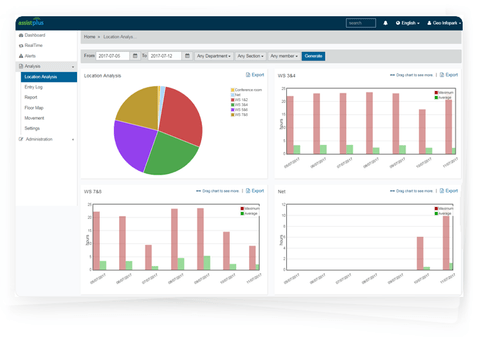
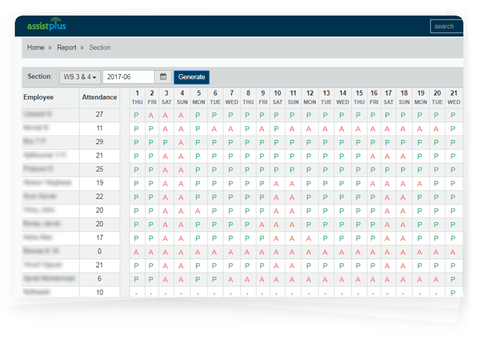
Assitplus for office dashboard
Assitplus for office devices

Assistplus for Offices

Brand: Pinmicro

  • 4.3

  • 4 Ratings

Assistplus for Offices is GPS-enabled employee management software to track the movement of your employees for higher security and productivity. The software helps with better office space utilization by providing authorized access to employees for using different resources within the premises. Assistplus for Offices further help with attendance management as check-ins and check-out can be tracke...

See More

Have you used Assistplus for Offices before?

Share your insights for better experience

Add a Review

Price Available on Request

Questions about pricing or customization? We’re here to help, just a click away.

100% Genuine
Products
Best Price
Guaranteed
Safe & Secure
Payment
  • Description

  • Pricing

  • Features

  • Specification

  • Review

  • Compare

  • Alternatives

  • FAQ

Assistplus for Offices Software Overview

What is Assistplus for Offices?

Assistplus for Offices is GPS-enabled employee management software to track the movement of your employees for higher security and productivity. The software helps with better office space utilization by providing authorized access to employees for using different resources within the premises.

Assistplus for Offices further help with attendance management as check-ins and check-out can be tracked automatically through GPS-enabled devices. The software allows businesses to manage all attendance tracking activities in the background without requiring any biometric scanner.

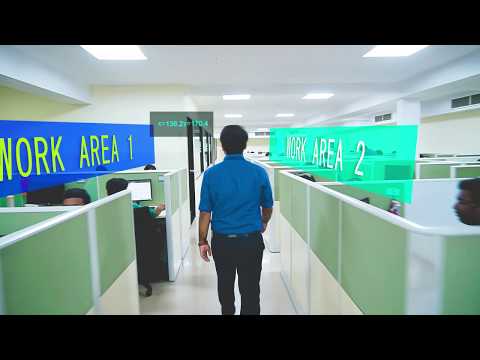
Another key functionality of using Assistplus for Offices is employee tracking. The software allows employers to keep track of the movement of their workers within the office premises to analyze the time spent by the employee working during office hours.

What are the benefits of using Assistplus for Offices employee tracking system?

Here are some of the core advantages of using this employee tracking software:

  1. Attendance Automation: The software helps in automating attendance management for an organization. It removes the necessity of using smart cards, biometric scanners, time loggers, etc. with beacon smart cards.
     
  2. Control Access Panel: Assistplus for Offices allows organizations to set limitations for employees who can access only certain areas within the building premises as per their role.
     
  3. Resource Allocation: Employee management software offers intelligent analysis tools. It allows users to examine their current resource utilization and plan better usage accordingly.
     
  4. Employee Optimization: This employee management software enables organizations to track the performance of their employees to optimize their productivity.
     

What are the different reports that Assistplus employee tracking system generates?

Here are some important reports that Assistplus for Offices generates:

  1. Location analysis
  2. Attendance reports
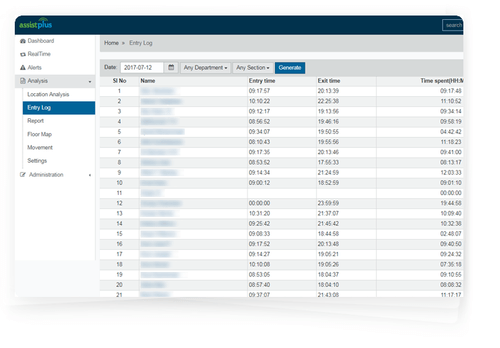
  3. Exit/entry log reports

What is the Assistplus employee tracking system price?

Assistplus for Offices price is available on request. Please request a callback and product experts will get back to you with personalized plans.

Read more

Pinmicro Company Details

Founded Year:  2015

Pinmicro provides the best RTLS platform with IoT. Get high-quality Bluetooth beacons, Gateways, and IoT sensors from Japan. Easy location intelligence.

Director/Founders Gijo Sivan, Kurvilla Tiby
Company Size 1-100 Employees

Assistplus for Offices Pricing & Plans

Looking for The Right Pricing?

Share your requirements and get a plan built around your business.

  • Define your business needs
  • Get customised pricing
  • Choose features that fit your workflow

Price Available on Request

Get personalised Assistplus for Offices pricing that fits your needs. Our team will connect with you.

Assistplus for Offices Features

  • icon_check Attendance
    The software offers automated attendance system which does not require smart cards or biometric devices.
  • icon_check Access Control
    This employee tracking software offers a restrictive access control for organizations to administer the access to different zones
  • icon_check Movement Paths
    Assistplus for Offices enables organizations to track the movement of employees inside the office premises.
  • icon_check Resource Planning & Scheduling
    Organizations can use this employee tracking solution to effectively monitor and evaluate the usage and allocation of resources
  • icon_check Employee Optimization
    Business owners can use employee optimization tools offered by Assistplus to optimize the productivity of your workforce.
  • icon_check Reports
    The software generates important reports for better analysis of the workforce and resource usage.
  • icon_check Employee Safety
    This employee management software allows organizations to comply with all the safety standards and practices to ensure the safety
  • icon_check Workflows
    Assistplus for Offices offers features to efficiently label and supervise the work of your employees in real-time.
  • icon_check Space Optimization
    This employee tracking software helps organizations optimize their workspace as a part of their resource planning and
  • icon_check Location Analysis
    Monitoring teams/managers can analyze the location of their employees during the working hours.
  • icon_check Entry/Exit log Report
    This employee tracking software keeps an accurate track of an employee’s incoming and outgoing hours.
Assistplus for Offices Demo Video play icon

Get Assistplus for Offices Demo

Watch the demo video to explore key features, real workflows, and how the software fits your business needs.

Understand
Key Features
Personal
Demo Insights
Interactive
Demo Support

Assistplus for Offices Specifications

Supported Platforms
Windows Windows
Devices
Desktop Desktop
Deployment
Cloud-Based Cloud-Based
Suitable For
All Industries
Business Specific
All Businesses
Language
English

Explore the Best Alternative Solutions Similar to Your Business Size and Needs

Small Business

Designed for startups and growing businesses

Digidesk

4.5

Knot-HR

4.3

Claimz

4.5

See More

Assistplus for Offices Review

4.3

Out of 5

img

Overall Rating

Based on
4 Verified Ratings

Rating Breakdown

  • Features 4.1
  • Value for Money 4.3
  • Ease of Use 4.3
  • Customer Support 4.5

82% Recommend this Product

Add Review

Techjockey Trusted Reviews from Verified Users

No reviews are currently available for Assistplus for Offices. Discover similar Employee Management Software reviews

  • Teamlease

    4.6

    Whats great - They placed me in a company quickly. read more

  • Groupe.io

    4.4

    Whats great - One of the best workforce management tool read more

  • Mewurk

    4.6

    Whats great - Leave and shift management made easy, Easy tracking of on field employees and Android and mobile application for on the go us... read more

Compare Assistplus for Offices With other Employee Management Software

Products
Ratings
Pricing
Device Supported
Deployment
Supported Platforms
  • img

    Assistplus for Offices

  • 4.3

  • Price On Request

  • Desktop

    Mobile

  • Web based

    On Premises

  • Windows

    Mac OS

  • img

    Teamlease

  • 4.5

  • Price On Request

  • Desktop

    Mobile

  • Web based

    On Premises

  • Windows

    Mac OS

  • img

    Digidesk

  • 4.5

  • Price On Request

  • Desktop

    Mobile

  • Web based

    On Premises

  • Windows

    Mac OS

  • img

    Apploye

  • 4.3

  • Price On Request

  • Desktop

    Mobile

  • Web based

    On Premises

  • Windows

    Mac OS

  • img

    WorkHub Scheduling

  • 4.3

  • Price On Request

  • Desktop

    Mobile

  • Web based

    On Premises

  • Windows

    Mac OS

  • img

    Office Intranet

  • 4.5

  • ₹ 1999

  • Desktop

    Mobile

  • Web based

    On Premises

  • Windows

    Mac OS

  • img

    Timetrex

  • 4.5

  • Price On Request

  • Desktop

    Mobile

  • Web based

    On Premises

  • Windows

    Mac OS

  • img

    Groupe.io

  • 4.3

  • Price On Request

  • Desktop

    Mobile

  • Web based

    On Premises

  • Windows

    Mac OS

  • img

    Knot-HR

  • 4.3

  • ₹ 803

  • Desktop

    Mobile

  • Web based

    On Premises

  • Windows

    Mac OS

  • img

    ekincare

  • 4.0

  • Price On Request

  • Desktop

    Mobile

  • Web based

    On Premises

  • Windows

    Mac OS

  • img

    Claimz

  • 4.5

  • Price On Request

  • Desktop

    Mobile

  • Web based

    On Premises

  • Windows

    Mac OS

(0) Product(s) selected

Assistplus for Offices Alternatives

See All Assistplus for Offices Alternatives

Available

Price on Request

Starting Price:

$7 /User/Month

Starting Price:

$30

Available

Price on Request

Starting Price:

$10 /Month

Available

Price on Request

Articles for Assistplus for Offices

See All Related Articles

Where does Assistplus for Offices save all the information?

Assistplus for Offices uses Cloud-based storage system to save all the workflow data.

What type of filters can I setup on attendance reports in Assistplus for Offices?

The attendance report in Assistplus for Offices offers detailed information on every employee and can be filtered based on day, week, month, or year.

How does Assistplus help in enhancement of workflows?

Assistplus for Offices uses AI-powered analytics to produce highly scalable workflows for employees to drive the highest return on investment.

How to use Assistplus for space optimizations?

The employee tracking software allows users to efficiently design floor plans in the RTLS module.

How to get a demo for Assistplus for Offices?

Interested buyers can request a call back and product experts will get back to them at their preferred data and time.

20,000+ Software Listed

Best Price Guranteed

Free Expert Consultation

2M+ Happy Customers

Terms and Condtions

close

Users with registered businesses can purchase goods from merchants on the platform to satisfy their business needs. Users are not permitted to utilize any products acquired through the platform for resale, advertising, business, or further distribution.

For each purchase made, users will receive a Tax Invoice (or 'GST invoice') that includes specific details such as:

  • the GSTIN of the user associated with their registered business, and

  • the specified Entity Name for their business.

It should be noted that not all products are eligible for GST Invoice. Only the products displayed by participating sellers with the 'GST-based Invoice Available' callout on the product description page would qualify.

Certain goods and services are not eligible to get a GST Invoice, including items with VAS, i.e., Value Added Services (e.g., Total Mobile Protection/Assured Buyback) and those involving an exchange offer at the time of purchase.

Users must ensure the accuracy of the GSTIN, and business entity name provided for the GST Invoice. Requests for corrections into GST Invoice would not be accommodated by Techjockey.com or any Seller, and any issues arising from user-provided information are the sole responsibility of users.

Techjockey.com is not liable for the GST Invoice or any associated input tax credit. To efficiently claim an input tax credit, users should select the registered place of business address as per the GST authority's data and follow the provisions of the GST Act and rules.

To claim an input tax credit, the delivery and billing addresses must match. Furthermore, input tax credits will not be granted if the delivery address and GSTIN on the invoice are from different states. In case of incorrect GST details provided during the order placement, the order will be canceled automatically.